How to copy local Group Policy?

theslowminded

New member
Local time
11:15 AM
Messages
5
I have a large network of about 500 machines on a domain. I have set up a local account for exams, with a special local Group Policy that is for non-administrators. The group policy restricts almost everything apart from a few applications.

I need to copy this GP over to another 20-30 machines. Is there any way i can do this.

Copying %systemroot%\system32\grouppolicy didn't work.
 

My Computer My Computer

At a glance

Windows 7 x86
OS
Windows 7 x86
Welcome to Sevenforums theslowminded!

After you copied the policy over, did you force the update?

Code:
gpupdate /force
 

My Computer My Computer

At a glance

Windows 7 Ultimate 64-Bit SP1Intel Core i7-2600k OC'd @ 5.0Ghz16 GB Corsair Vengeance PC3-12800 (4x4GB)XFX 695X DD (x2) in Crossfire
Computer Manufacturer/Model Number
Custom Rig
OS
Windows 7 Ultimate 64-Bit SP1
CPU
Intel Core i7-2600k OC'd @ 5.0Ghz
Motherboard
ASUS Maximus IV Extreme-Z
Memory
16 GB Corsair Vengeance PC3-12800 (4x4GB)
Graphics Card(s)
XFX 695X DD (x2) in Crossfire
Sound Card
Realtek ALC889 (Integrated)
Monitor(s) Displays
XFX Triple Monitor Display w/ 3 ASUS 23.6" LCD
Screen Resolution
5760x1080 (AMD Eyefinity)
Hard Drives
OCZ Vertex 3 SATA III (120GB)
WD Caviar Black 1.5 TB x2
PSU
XFX ProSeries Black Edition 1000w 80+ Platinum Certified
Case
Cooler Master HAF X Blue Edition
Cooling
Corsair H100 w/ Noctua NF-S12B FLX (x4) Push/Pull
Keyboard
Razer Lycosa
Mouse
Razer Naga & Razer Nostromo
Other Info
ASUS ROG G74SX
-240GB OCZ Vertex II x2 (Raid 0)
Hi V43L1N,

Yes I have tried to force the policy in CMD, but to no avail.

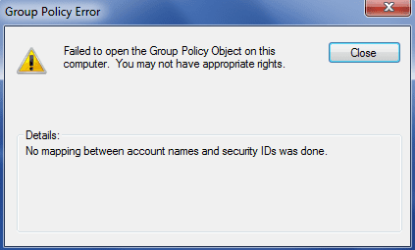
I have even tried using "save as" in the MMC, copying it to a USB, but when I try to load it on another machine I get the error "Failed to open the Group Policy Object on this computer. You may not have appropriate rights." "Details: No mapping between account names and security IDs was done."

I am logged in as local admin so I should have the rights, even if I right click and select "Run as Administrator" I get the same error.
 

My Computer My Computer

At a glance

Windows 7 x86
OS
Windows 7 x86
Received the same error last week when I moved a GPO to a separate domain. Had to adjust the security properties in order to use it. Check the security properties and make sure your domain admin has full control.

I'm sure you've done a lot of searching trying to solve this, but just in case you may have missed it, here is a KB from MS that lists your error and the causes for it:

"Failed to Open the Group Policy Object" Error Message Occurs When You Try to Open a Policy As a Domain Administrator
Group Policy Error Message When Appropriate Sysvol Contents Are Missing

Couple of other questions:
Can you access the local GPO on the system, before you replace it?
-If you can, can you edit the policy without receiving errors?
Have these systems already been joined to the domain?
If any, what error is showing in the event logs?
 

My Computer My Computer

At a glance

Windows 7 Ultimate 64-Bit SP1Intel Core i7-2600k OC'd @ 5.0Ghz16 GB Corsair Vengeance PC3-12800 (4x4GB)XFX 695X DD (x2) in Crossfire
Computer Manufacturer/Model Number
Custom Rig
OS
Windows 7 Ultimate 64-Bit SP1
CPU
Intel Core i7-2600k OC'd @ 5.0Ghz
Motherboard
ASUS Maximus IV Extreme-Z
Memory
16 GB Corsair Vengeance PC3-12800 (4x4GB)
Graphics Card(s)
XFX 695X DD (x2) in Crossfire
Sound Card
Realtek ALC889 (Integrated)
Monitor(s) Displays
XFX Triple Monitor Display w/ 3 ASUS 23.6" LCD
Screen Resolution
5760x1080 (AMD Eyefinity)
Hard Drives
OCZ Vertex 3 SATA III (120GB)
WD Caviar Black 1.5 TB x2
PSU
XFX ProSeries Black Edition 1000w 80+ Platinum Certified
Case
Cooler Master HAF X Blue Edition
Cooling
Corsair H100 w/ Noctua NF-S12B FLX (x4) Push/Pull
Keyboard
Razer Lycosa
Mouse
Razer Naga & Razer Nostromo
Other Info
ASUS ROG G74SX
-240GB OCZ Vertex II x2 (Raid 0)
I have been trying to use Microsoft Security Compliance Manager (MSCM) to export a backup of the GP and then import it on the other machines, however it wont install.

Is there any way I can create a logon script that would cause the same effects as group policy. All it needs to do is remove everything from the start menu, including the all programs button, just leaving My Docs and My computer (but not show the C drive), Remove all pinned aps from the taskbar, Deny right click, and only show specified shortcuts on the desktop.

One thing that I have just noticed is that when I copy the GPO to another machine, it just copys the name of it and who it applies to, none of the GP that have been set to "Enabled" come across, they all revert to "Not Configured"

As for your questions

Can you access the local GPO on the system, before you replace it?
-If you can, can you edit the policy without receiving errors?

Yes, this is what I have been doing because I can't copy the GPO, I've been manually changing the 65 polices.

Have these systems already been joined to the domain?
If any, what error is showing in the event logs?

The laptops automatically connect to the domain from the MDT imaging, so when I try to set them up for the Exam account I take it off the domain before I start. No errors show in event logs.

 
Last edited:

My Computer My Computer

At a glance

Windows 7 x86
OS
Windows 7 x86
I have the same issue. Did you get to resolve it? Thanks!
Capture.PNG
 

My Computer My Computer

At a glance

windows 7 Professional
Computer type
PC/Desktop
Computer Manufacturer/Model Number
Dell
OS
windows 7 Professional
Back
Top