Solved How to disable this Windows 7 feature :(

fisko

New member
Local time
11:04 AM
Messages
10
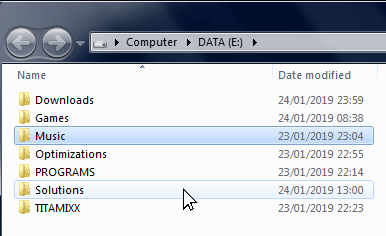
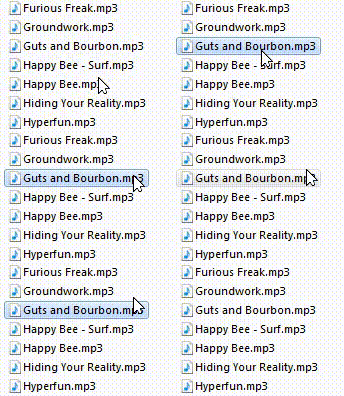
Help me disable this Windows 7 feature :(

Hello,

I've been searching for a solution to the problem for days. I want to disable the selection highlight when hovering over a file (without clicking), from what I've learned, I need to install some kind of "custom theme", patch system files and make back-ups, edit hex, etc..

Is there a possibility to simply edit the registry and disable that feature?
I'll be very thankful if anyone helps me resolve this.

DQshHXF.png
 
Last edited:

My Computer

Computer type
PC/Desktop
OS
Win 74
I could not get my computer to do that what you have in the screenshot. I suspect that this then is a performance issue of aero glass. To adjust the performance / quality of presentation, you go into Performance Options > Visual Effects.

The long path to this location is at: control panel > all control panel items > system > advanced system settings > system properties > advanced tab > performance settings > visual effects.

You might find experimenting with the custom settings disables the visual effect that causes your issue.
 

My Computer

Computer type
PC/Desktop
OS
Windows 7 x64, Vista x64, 8.1 smartphone
CPU
Intel E8400 65W 64-bit
Motherboard
Gigabyte EP45-UD3LR
Memory
DDR2 2 x 2GB, 1GB x 2
Graphics Card(s)
XFX Radeon HD5750
Sound Card
AMD High Definition Audio; Realtek High Definition Audio
Monitor(s) Displays
iiyama prolite X2377HDS
Screen Resolution
1920 x 1080
Hard Drives
500GB 7200 rpm Seagate ST3500413AS 16MB, 500GB 5400 rpm Toshiba MQ02ABF050H 32MB, 200GB 7200 rpm Seagate ST3200820AS 8MB, 2TB 7200 rpm Western Digital WD20EZRX 64MB
PSU
Enermax Liberty Modular
Case
Antec P193 Midi Tower
Keyboard
Mionix ZIBAL 60
Mouse
Razer USB 2.0 Diamondback Mouse or Huion Graphics Tablet
Browser
Internet Explorer, Lunascape, Firefox, Opera, Avast Safezone
I could not get my computer to do that what you have in the screenshot. I suspect that this then is a performance issue of aero glass. To adjust the performance / quality of presentation, you go into Performance Options > Visual Effects.

The long path to this location is at: control panel > all control panel items > system > advanced system settings > system properties > advanced tab > performance settings > visual effects.

You might find experimenting with the custom settings disables the visual effect that causes your issue.

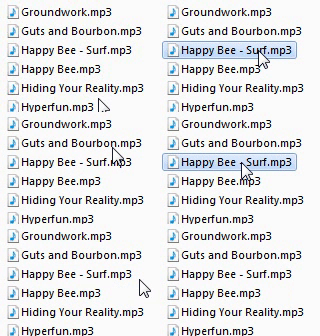
I'm talking about a stock feature on Windows 7 (as well as Vista, 8, 8.1, 10). When you hover over a file without selecting it, it highglights the file. This was added to aero theme and was not available on Windows XP or classic.
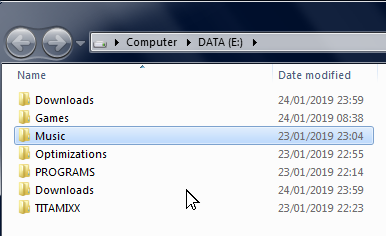
I post another screenshot to better explain:

This is what it is:
1LqTYjX.png


This is what I want:
c9G9iu0.png
 
Last edited:

My Computer

Computer type
PC/Desktop
OS
Win 74
Well you can disable Aero theme if you are happy with a more classic look.

How to disable Aero theme and enable other classic features can be found in the following tutorial:
convert windows 7 to xp style
 

My Computer

Computer type
PC/Desktop
OS
Windows 7 x64, Vista x64, 8.1 smartphone
CPU
Intel E8400 65W 64-bit
Motherboard
Gigabyte EP45-UD3LR
Memory
DDR2 2 x 2GB, 1GB x 2
Graphics Card(s)
XFX Radeon HD5750
Sound Card
AMD High Definition Audio; Realtek High Definition Audio
Monitor(s) Displays
iiyama prolite X2377HDS
Screen Resolution
1920 x 1080
Hard Drives
500GB 7200 rpm Seagate ST3500413AS 16MB, 500GB 5400 rpm Toshiba MQ02ABF050H 32MB, 200GB 7200 rpm Seagate ST3200820AS 8MB, 2TB 7200 rpm Western Digital WD20EZRX 64MB
PSU
Enermax Liberty Modular
Case
Antec P193 Midi Tower
Keyboard
Mionix ZIBAL 60
Mouse
Razer USB 2.0 Diamondback Mouse or Huion Graphics Tablet
Browser
Internet Explorer, Lunascape, Firefox, Opera, Avast Safezone
I would change the theme to Windows Classic, but then Windows automatically disables the
Desktop Composition, which makes the videos jitter, as the screen is handled by the CPU, not by the my graphic card. Desktop composition cannot be enabled on Basic or Classic theme....
 

My Computer

Computer type
PC/Desktop
OS
Win 74

My Computer

Computer type
Laptop
Computer Manufacturer/Model Number
Sager NP9170
OS
Win 7 Pro x64 / Win 10 Pro
CPU
Intel(R) Core(TM) i7-3630QM CPU @ 2.40GHz
Motherboard
CLEVO P170EM
Memory
12 GB
Graphics Card(s)
(1) Intel(R) HD Graphics 4000 (2) NVIDIA GeForce GTX 675M
Sound Card
(1) Realtek High Definition Audio (2) Intel(R) Display Aud
Monitor(s) Displays
17.3
Screen Resolution
1920x1080
Hard Drives
(1) Samsung 860 EVO 500GB(OS) (1) Samsung 860 EVO 500GB(Data)
Keyboard
Backlite
Antivirus
MSE, Malwarebytes Pro
Browser
Firefox
Other Info
DESKTOP: Custom-built.
OS: Win 10 Pro x64.
CASE: Rosewill R5.
CPU: Intel I5 4670K CPU @ 3.40GHz.
CPU COOLER: Cool Master Hyper 212 EVO.
MOTHERBOARD: Asus Z87-A.
MEMORY: Kingston HyperX 2x4 GB.
GPU: Nvidia Geforce 650 TI.
PSU: Corsair TX750.
DRIVES: (1) Samsung 840 120 GB SSD (2) Western Digital blue 500 GB 7200 RPM.

My Computer

Computer type
PC/Desktop
OS
Win 74
Here you go Download and extract the zip folder below put Both the NoHover folder and the NoHover.theme file in C:\Windows\Resources\Themes


Make sure you did one of the two ways of enabling custom themes.

Will show up in Personalization as NoHover


Let me know.
Jerry
 

Attachments

My Computer

Computer type
Laptop
Computer Manufacturer/Model Number
Sager NP9170
OS
Win 7 Pro x64 / Win 10 Pro
CPU
Intel(R) Core(TM) i7-3630QM CPU @ 2.40GHz
Motherboard
CLEVO P170EM
Memory
12 GB
Graphics Card(s)
(1) Intel(R) HD Graphics 4000 (2) NVIDIA GeForce GTX 675M
Sound Card
(1) Realtek High Definition Audio (2) Intel(R) Display Aud
Monitor(s) Displays
17.3
Screen Resolution
1920x1080
Hard Drives
(1) Samsung 860 EVO 500GB(OS) (1) Samsung 860 EVO 500GB(Data)
Keyboard
Backlite
Antivirus
MSE, Malwarebytes Pro
Browser
Firefox
Other Info
DESKTOP: Custom-built.
OS: Win 10 Pro x64.
CASE: Rosewill R5.
CPU: Intel I5 4670K CPU @ 3.40GHz.
CPU COOLER: Cool Master Hyper 212 EVO.
MOTHERBOARD: Asus Z87-A.
MEMORY: Kingston HyperX 2x4 GB.
GPU: Nvidia Geforce 650 TI.
PSU: Corsair TX750.
DRIVES: (1) Samsung 840 120 GB SSD (2) Western Digital blue 500 GB 7200 RPM.
Thank you so much, it works perfectly. There is one last thing, is there any way to remove this selection after clicking a file and then clicking away?

kMcAj0W.png
 

My Computer

Computer type
PC/Desktop
OS
Win 74
Switch to different theme, logoff/logon then replace NoHover.msstyles in C:\Windows\Resources\Themes\NoHover with the 1 in zip folder below.


Jerry
 

Attachments

My Computer

Computer type
Laptop
Computer Manufacturer/Model Number
Sager NP9170
OS
Win 7 Pro x64 / Win 10 Pro
CPU
Intel(R) Core(TM) i7-3630QM CPU @ 2.40GHz
Motherboard
CLEVO P170EM
Memory
12 GB
Graphics Card(s)
(1) Intel(R) HD Graphics 4000 (2) NVIDIA GeForce GTX 675M
Sound Card
(1) Realtek High Definition Audio (2) Intel(R) Display Aud
Monitor(s) Displays
17.3
Screen Resolution
1920x1080
Hard Drives
(1) Samsung 860 EVO 500GB(OS) (1) Samsung 860 EVO 500GB(Data)
Keyboard
Backlite
Antivirus
MSE, Malwarebytes Pro
Browser
Firefox
Other Info
DESKTOP: Custom-built.
OS: Win 10 Pro x64.
CASE: Rosewill R5.
CPU: Intel I5 4670K CPU @ 3.40GHz.
CPU COOLER: Cool Master Hyper 212 EVO.
MOTHERBOARD: Asus Z87-A.
MEMORY: Kingston HyperX 2x4 GB.
GPU: Nvidia Geforce 650 TI.
PSU: Corsair TX750.
DRIVES: (1) Samsung 840 120 GB SSD (2) Western Digital blue 500 GB 7200 RPM.
Switch to different theme, logoff/logon then replace NoHover.msstyles in C:\Windows\Resources\Themes\NoHover with the 1 in zip folder below.


Jerry

Thank you for investing your time, I appreciate that. I'm working on projects that require navigating through Windows all the day and now it's much better thanks to you! I even feel that the windows is more responsive than before :)
 
Last edited:

My Computer

Computer type
PC/Desktop
OS
Win 74
Bongo, while using the last custom theme you send me, I noticed some weird "bug".


In the software you use to modify the theme, is there any way to remove that selection box that appears after clicking away and hovering over the file again:

Mp7jOdU.gif


_____


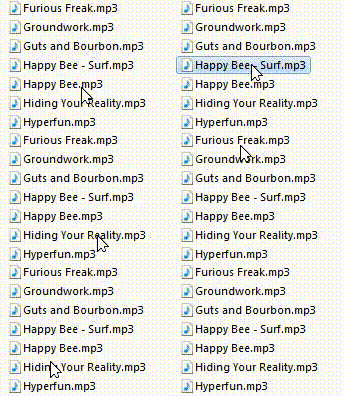
And also the that contrasted highlight that appears after clicking the file and launching it:

bVQMoBk.gif


Hopefully there is a way to change that and I hope you'll be so kind to invest a little more time to help me through this :huh:
 
Last edited:

My Computer

Computer type
PC/Desktop
OS
Win 74
Try this 1, I think I got it.


Jerry
 

Attachments

My Computer

Computer type
Laptop
Computer Manufacturer/Model Number
Sager NP9170
OS
Win 7 Pro x64 / Win 10 Pro
CPU
Intel(R) Core(TM) i7-3630QM CPU @ 2.40GHz
Motherboard
CLEVO P170EM
Memory
12 GB
Graphics Card(s)
(1) Intel(R) HD Graphics 4000 (2) NVIDIA GeForce GTX 675M
Sound Card
(1) Realtek High Definition Audio (2) Intel(R) Display Aud
Monitor(s) Displays
17.3
Screen Resolution
1920x1080
Hard Drives
(1) Samsung 860 EVO 500GB(OS) (1) Samsung 860 EVO 500GB(Data)
Keyboard
Backlite
Antivirus
MSE, Malwarebytes Pro
Browser
Firefox
Other Info
DESKTOP: Custom-built.
OS: Win 10 Pro x64.
CASE: Rosewill R5.
CPU: Intel I5 4670K CPU @ 3.40GHz.
CPU COOLER: Cool Master Hyper 212 EVO.
MOTHERBOARD: Asus Z87-A.
MEMORY: Kingston HyperX 2x4 GB.
GPU: Nvidia Geforce 650 TI.
PSU: Corsair TX750.
DRIVES: (1) Samsung 840 120 GB SSD (2) Western Digital blue 500 GB 7200 RPM.
Jerry, this is almost perfect, but I wonder if its a Windows bug or it just needs a little touch:

This happens when after opening the file:

EBZLVKc.gif


I just want it to remain highlighted after opening the file (without changing color when I hover). Everything else works fine.

I'm thinking about donating you money for all the tries you made in order to correct that no highlight feature. :sick:
 

My Computer

Computer type
PC/Desktop
OS
Win 74
OK try this.


I don't take pay for helping out I do it for fun.


Jerry
 

Attachments

My Computer

Computer type
Laptop
Computer Manufacturer/Model Number
Sager NP9170
OS
Win 7 Pro x64 / Win 10 Pro
CPU
Intel(R) Core(TM) i7-3630QM CPU @ 2.40GHz
Motherboard
CLEVO P170EM
Memory
12 GB
Graphics Card(s)
(1) Intel(R) HD Graphics 4000 (2) NVIDIA GeForce GTX 675M
Sound Card
(1) Realtek High Definition Audio (2) Intel(R) Display Aud
Monitor(s) Displays
17.3
Screen Resolution
1920x1080
Hard Drives
(1) Samsung 860 EVO 500GB(OS) (1) Samsung 860 EVO 500GB(Data)
Keyboard
Backlite
Antivirus
MSE, Malwarebytes Pro
Browser
Firefox
Other Info
DESKTOP: Custom-built.
OS: Win 10 Pro x64.
CASE: Rosewill R5.
CPU: Intel I5 4670K CPU @ 3.40GHz.
CPU COOLER: Cool Master Hyper 212 EVO.
MOTHERBOARD: Asus Z87-A.
MEMORY: Kingston HyperX 2x4 GB.
GPU: Nvidia Geforce 650 TI.
PSU: Corsair TX750.
DRIVES: (1) Samsung 840 120 GB SSD (2) Western Digital blue 500 GB 7200 RPM.
Finally, that's perfect! Thank you for your patience and for your help! If there is any favor I can do for you, just let me know :)
 
Last edited:

My Computer

Computer type
PC/Desktop
OS
Win 74
Back
Top