How to eject an external eSata drive?

daz1761

New member
Local time
2:47 PM
Messages
22
I am fairly new to W7 and I was wondering how you safely remove an external eSATA hard drive that is connected to a Sumvision 3.5" HDD docking station? Iv'e looked everywhere and cannot find anything that says eject. I did look in the Sumvision manual and it says supports plug and play?

Thanks!
 

My Computer

OS
Windows 7 Home 64bit

My Computer

Computer Manufacturer/Model Number
Custom built
OS
Windows 7 Ultimate 64 bit
CPU
AMD Phenom II X4 965 Black Edition
Motherboard
Gigabyte GA-MA790X-DS4
Memory
GSkill 4 X 2 GB PC 8500
Graphics Card(s)
XFX Radeon HD 6790 D
Sound Card
On board RealTek HD
Monitor(s) Displays
Dual monitors:Samsung SyncMaster S20B300
Screen Resolution
1600 X 900
Hard Drives
Seagate Barracuda 1TB (primary)
Seagate Barracuda 2 X 320 GB
PSU
Ultra X4 750 watt fully modular
Case
Thermaltake Overseer RX 1 full tower
Cooling
Core-Contact 92 mm CPU Cooler
Keyboard
Logitech G510
Mouse
Razor DeathAdder
Internet Speed
50/5 Mbps UL/DL
Other Info
Optical: Super Muliti DVD burner w/lightscribe, Hauppauge WinTV HVR-1800
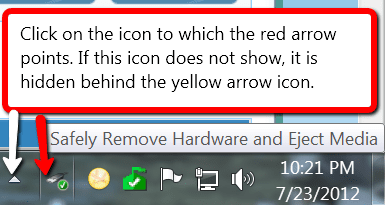
See picture:
 

Attachments

  • 2012-07-23_1233.png
    2012-07-23_1233.png
    14 KB · Views: 26

My Computer

Computer Manufacturer/Model Number
HP, Dell, Gateway, Toshiba - 4 laptops and 2 desktops
OS
Vista, Windows7, Mint Mate, Zorin, Windows 8
CPU
from 1.6GHz Duo to i7
Monitor(s) Displays
2x HP w2207
Hard Drives
5x HDD, 7x SSD, 12x Externals
Keyboard
with trackball - no mices
Mouse
Trackball mice
Internet Speed
DSL 6000
Cheers

I followed the instructions and when I got to the policies tab within the hard drive properties, he says tick the "quick removal option" All's I have is "turn off Windows write-cache buffer flushing on the device". Will this be the same thing? I am used to using a Mac and all's you do is right click on the drive and select "eject". All though I have ticked the latter, I am still reluctant to pull it out as it seems to still be spinning to me.
 

My Computer

OS
Windows 7 Home 64bit
Cheers

I followed the instructions and when I got to the policies tab within the hard drive properties, he says tick the "quick removal option" All's I have is "turn off Windows write-cache buffer flushing on the device". Will this be the same thing? I am used to using a Mac and all's you do is right click on the drive and select "eject". All though I have ticked the latter, I am still reluctant to pull it out as it seems to still be spinning to me.

Well, the first question would be...is the AHCI mode selected in your BIOS?
Without it selected, the Quick removal options probably won't appear.
Not all motherboards support AHCI, so you need to do some checking to see what is supported and selected on your board.
 

My Computer

Computer type
PC/Desktop
Computer Manufacturer/Model Number
Custom Build
OS
Windows 7 Home Premium 64 bit
CPU
Intel Core i7-4790
Motherboard
GA-Z87X-D3H
Memory
G.SKILL 8GB (2 x 4GB) DDR3 F3-10666CL9D-8GBNT
Graphics Card(s)
AMD Radeon R7 250
Sound Card
Realtek ALC892
Monitor(s) Displays
Samsung UN32EH5000, Dell 1703FPT
Screen Resolution
1920 x 1080, 1280 x 1024
Hard Drives
WD5003AZEX
WD10EZEX
Samsung HD103SJ
Samsung 128 GB 840 PRO
PSU
SeaSonic M12II SS-500GM
Case
Fractal Design Define R4
Cooling
Zalman CNPS9900ALED
Keyboard
Logitech K800
Mouse
Logitech M705
Internet Speed
16 Mbps
Antivirus
Avast
Browser
Firefox
Other Info
Bose Companion 2 Multimedia Speakers
Well that could be problem, as I am running Windows 7 via Mac OS X's BootCamp so I cannot access the BIOS.

Thanks
 

My Computer

OS
Windows 7 Home 64bit
Back
Top