How to enable 2 monitors without mirroring them

rinku

New member
Local time
7:25 PM
Messages
4
I have been trying to use both my monitors to work well with windows 7.
I have the following configuration :
Intel orignal DH87RL
Intel core I7-4770 , 3.4Ghz
1st Dell monitor with HDMI => connected to HDMI port
2nd Dell Monitor with HDMI => connected to DVI port using dvi to HDMI connector

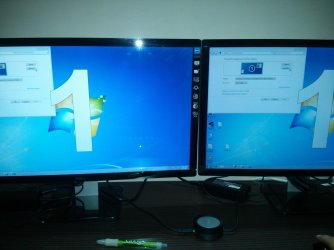
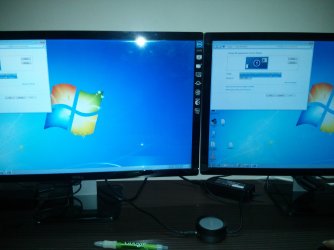
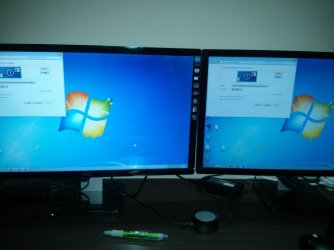
I can see both the monitor connected as mirror but I want them to be used as increased desktop space.
In settings I am unable to see that 2 monitors are connected. Images attached below:

Any pointers will be helpful
 

Attachments
  • IMG_20130720_013345.jpg
    IMG_20130720_013345.jpg
    468.8 KB · Views: 6
  • IMG_20130720_013404.jpg
    IMG_20130720_013404.jpg
    504.9 KB · Views: 3
  • IMG_20130720_013414.jpg
    IMG_20130720_013414.jpg
    497.7 KB · Views: 6

My Computer My Computer

Computer type
PC/Desktop
OS
Singapore
Hi there, usually there should be an option to "Extend this Display" from the drop down box when 2 monitors are connected. Do you not have this option?

If not, it could be the cable/adapter type, can you test it with one connected via VGA cable?
 

My Computer My Computer

OS
Windows 7 Professional 64 bit
Hi there, usually there should be an option to "Extend this Display" from the drop down box when 2 monitors are connected. Do you not have this option?

If not, it could be the cable/adapter type, can you test it with one connected via VGA cable?

I am unable to see that option, I can see both the monitors as mirrored.
Also, I see the display as standard VGA adapter, but there is no VGA port in mother board, I have one DVI and 1 HDMI port
 

My Computer My Computer

Computer type
PC/Desktop
OS
Singapore
Why not try one with each type? 1 HDMI and 1 DVI.
 

My Computers My Computers

System One System Two

  • Computer type
    PC/Desktop
    Computer Manufacturer/Model Number
    ALWAYS UNDER CONSTRUCTION
    OS
    Windows 11 Pro
    CPU
    Ryzen 9 5900X
    Motherboard
    Asus X570 Crosshair Viii Hero
    Memory
    32GB G Skill DDR4-3600
    Graphics Card(s)
    EVGA RTX 3080 FTW 3 Ultra
    Sound Card
    On Board/Sennheiser PC37X Headset
    Monitor(s) Displays
    3 X Asus 27"
    Screen Resolution
    2560x1440
    Hard Drives
    2 X 1 TB NVME drives
    PSU
    EVGA 850
    Case
    Phanteks Eclipse P400A
    Cooling
    EVGA 280 AIO
    Keyboard
    Logitech G510s/ Logitech G13
    Mouse
    Logitech G502
    Internet Speed
    24/1
    Antivirus
    ESET/MBAM Pro/SAS Pro
    Browser
    Chrome/ Firefox/ Edge
  • Computer type
    Laptop
    System Manufacturer/Model Number
    Dell 16 Plus
    OS
    Windows 11 Pro
    CPU
    Intel Ultra 9 288V
    Memory
    32 GB LPDDR5X 8533
    Monitor(s) Displays
    16" Mini-LED HDR600 Touch 90 Hz
    Screen Resolution
    2560X1600
    Hard Drives
    1 TB NVME
I have been trying to use both my monitors to work well with windows 7.
I have the following configuration :
Intel orignal DH87RL
Intel core I7-4770 , 3.4Ghz
1st Dell monitor with HDMI => connected to HDMI port
2nd Dell Monitor with HDMI => connected to DVI port using dvi to HDMI connector

I can see both the monitor connected as mirror but I want them to be used as increased desktop space.
In settings I am unable to see that 2 monitors are connected. Images attached below:

Any pointers will be helpful

Right mouse button click on your desktop screen, go down to Screen Resolutions. Your window should look like this;

Capture_zps8a42ff6c.jpg


As paulpicks21 said, select "Extend these Displays".
 

My Computer My Computer

Computer type
PC/Desktop
Computer Manufacturer/Model Number
Custom built 2011
OS
Windows 7 64-bit
CPU
Intel Core i5-2500K 3300 Mhz
Motherboard
Gigabyte P67A-UD3-B3
Memory
16Gb Patriot PC3-12800 1600 Mhz
Graphics Card(s)
EVGA GeForce GTX 560 Ti (Fermi)
Sound Card
On Motherboard
Monitor(s) Displays
Dell U2412M & NEC EA232WMi
Screen Resolution
DELL 1920x1200 - NEC 1920x1080
Hard Drives
Crucial 128 Gb SSD
Hitachi Deskstar 2Tb 7200 RPM 32MB Cache
Seagate Barracuda 500Gb 7200 RPM
Hitachi GST Deskstar 1.5TB 7200 RPM 64MB Cache
PSU
Seasonic M1211-620 Bronze
Case
Antec Solo
Cooling
Tuniq Tower 120 Extreme Rev 1
Keyboard
Apple
Mouse
Microsoft
Internet Speed
5mbs
Other Info
Sunbeam PL-RS-3 Rheosmart 3 Fan Controller 3.5" Bay 3 Channel 30W Fan Controller Panel
Hi there, usually there should be an option to "Extend this Display" from the drop down box when 2 monitors are connected. Do you not have this option?

If not, it could be the cable/adapter type, can you test it with one connected via VGA cable?

I am unable to see that option, I can see both the monitors as mirrored.
Also, I see the display as standard VGA adapter, but there is no VGA port in mother board, I have one DVI and 1 HDMI port

Sorry, I did see this post.

1st, we need you to fill in your system specs. This is very important as I have no idea what you graphic card is. With that info we can determine if it supports dual monitors, which it may not & thus no "Extend these Displays" function. You have HDMI & DVI but that doesn't necessarily mean dual monitor capable. It could be options for configuring to your monitor's connector as some monitors, mine included, do not accept HDMI.
 

My Computer My Computer

Computer type
PC/Desktop
Computer Manufacturer/Model Number
Custom built 2011
OS
Windows 7 64-bit
CPU
Intel Core i5-2500K 3300 Mhz
Motherboard
Gigabyte P67A-UD3-B3
Memory
16Gb Patriot PC3-12800 1600 Mhz
Graphics Card(s)
EVGA GeForce GTX 560 Ti (Fermi)
Sound Card
On Motherboard
Monitor(s) Displays
Dell U2412M & NEC EA232WMi
Screen Resolution
DELL 1920x1200 - NEC 1920x1080
Hard Drives
Crucial 128 Gb SSD
Hitachi Deskstar 2Tb 7200 RPM 32MB Cache
Seagate Barracuda 500Gb 7200 RPM
Hitachi GST Deskstar 1.5TB 7200 RPM 64MB Cache
PSU
Seasonic M1211-620 Bronze
Case
Antec Solo
Cooling
Tuniq Tower 120 Extreme Rev 1
Keyboard
Apple
Mouse
Microsoft
Internet Speed
5mbs
Other Info
Sunbeam PL-RS-3 Rheosmart 3 Fan Controller 3.5" Bay 3 Channel 30W Fan Controller Panel
Back
Top