
How to enable thumbnails in only 1 folder

Zoandar

New member
Local time
1:43 AM
Messages
33
Is it possible to enable thumbnail view in only a single folder, and display only icon view in all the other folders, in Explorer? If I enable thumbnail view, it brings Explorer file tree navigation to a standstill. But I have 1 folder I would like to see thumbnails in. Can I do this somehow?

Please excuse if this is covered already, I looked at dozens of posts about thumbnails and couldn't find the answer I seek.
 

My Computer

Computer type
PC/Desktop
Computer Manufacturer/Model Number
Self Built
OS
Windows 7 x64 bit Home Premium
CPU
AND FX8150
Motherboard
Asus Crosshair V Formula/Thunderbolt
Memory
16GB DDR3
Graphics Card(s)
GeForce GTX 1070
Monitor(s) Displays
Asus VK228 , LG34UM66, Asus VS228
Screen Resolution
6000 x 2560
Hard Drives
A great many. 3 are SSD, including the Win7 OS Drive, and one for FSX. All SATA
PSU
Cooler Master Silent Pro M 1000W
Case
Cooler Master Cosmos II Ultra Tower
Cooling
Corsair Hydro H100 Extreme Performance Liquid Cooling
Keyboard
Logitech G510s
Mouse
Logitech Trackball M571
Internet Speed
Spectrum Broadband
Antivirus
ME Security Essentials, Malwarebytes AntiMalware
Browser
Chrome
Other Info
Ableconn 10 port SATA PSI Card. Of these 10 and the 6 SATA Ports on the mobo, 14 of them are in use.
Folder Template

You could try to use the Folder Templates to do this.

Tutorial
Folder View - Apply to Folders

For example, you could set all of your folders to "General Items" Folder Template.
Then choose the folder you want to have the Thumbnail View (make sure it is set to a different Folder Template) and apply it.


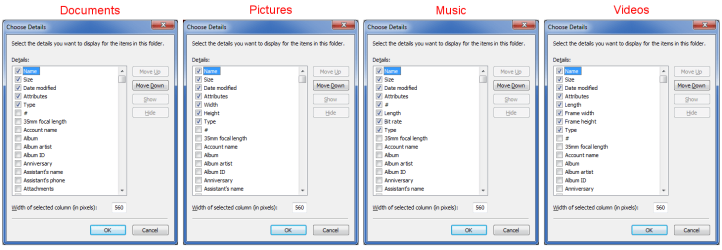
I have my folders all set to "Details View", except for my Picture folders.

I used the "Details View" to set up what details (column headings) I want.
I have 5 columns that are common to all my Folder Template (including Pictures).
After I have set up my default columns, I apply them to all of my folders.

Then I pick a picture folder:

  • Set the Folder Template to Pictures
  • Set the the view to Thumbnails (it still remembers the Details I chose, so that I can use "Sort by" & "Group by")
  • Apply it to all of my picture folders
Folder Templates 2016 02.png

WE - Folder Templates & Views.png
 

My Computer

Computer type
PC/Desktop
Computer Manufacturer/Model Number
n/a
OS
W7 Ultimate SP1, LM19.2 MATE, W10 Home 1703, W10 Pro 1703 VM, #All 64 bit
CPU
AMD Phenom II x6 1100T, 3.3 GHz
Motherboard
ASUS M4A88T-M/USB3 (AM3)
Memory
12GB DDR3 1333 G-Skill (4GB x 2), G-Skill (2GB x 2)
Graphics Card(s)
NVIDIA GeForce GTX 660
Sound Card
Realtek?
Monitor(s) Displays
Samsung S23B350
Screen Resolution
1920x1080
Hard Drives
WD Green 2TB (SATA), WD Green 3TB (SATA), WD Blue 4TB (SATA), WD Blue 6TB (SATA)
PSU
Cooler Master
Case
Antec GX300 Tower
Cooling
3x Antec TRICOOL 120mm Fans
Mouse
Wired Optical
Internet Speed
DSL
Antivirus
Avast
Browser
Pale Moon (64 bit)
Other Info
2018-12-27 Upgraded HDDs
2015-12-10 Upgraded case, graphics card, storage
2015-08-15 Upgraded motherboard & RAM
2015-07-15 Upgraded LM17.1 to LM17.2
Thank you very much! I will try your technique and see if it solves my problem. ☺
 

My Computer

Computer type
PC/Desktop
Computer Manufacturer/Model Number
Self Built
OS
Windows 7 x64 bit Home Premium
CPU
AND FX8150
Motherboard
Asus Crosshair V Formula/Thunderbolt
Memory
16GB DDR3
Graphics Card(s)
GeForce GTX 1070
Monitor(s) Displays
Asus VK228 , LG34UM66, Asus VS228
Screen Resolution
6000 x 2560
Hard Drives
A great many. 3 are SSD, including the Win7 OS Drive, and one for FSX. All SATA
PSU
Cooler Master Silent Pro M 1000W
Case
Cooler Master Cosmos II Ultra Tower
Cooling
Corsair Hydro H100 Extreme Performance Liquid Cooling
Keyboard
Logitech G510s
Mouse
Logitech Trackball M571
Internet Speed
Spectrum Broadband
Antivirus
ME Security Essentials, Malwarebytes AntiMalware
Browser
Chrome
Other Info
Ableconn 10 port SATA PSI Card. Of these 10 and the 6 SATA Ports on the mobo, 14 of them are in use.
Your suggestion doesn't seem to help my problem. It seems my issue may be a little different.

What I am trying to do is prevent Windows Explorer from very seriously lagging while copying files from specific sub-folders on, for example, a blu-ray disc I made. It has 19GB on it, in 18 folders. Each of the 18 folders has a "scenery" sub-folder. (This is photo-realistic satellite image scenery I made for MS Flight Simulator X).

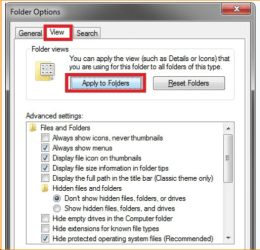
So as a test, I navigate the file tree on the disc repeatedly opening each of the 18 main folders in turn, then their scenery sub-folder, copy a couple .BGL files they hold over to a hard drive, navigate back out to the list of 18 main folders, select the next one of those, rinse and repeat. The only way I have found to prevent very serious lag (the cursor turns into a spinning circle, the Explorer window is blank, and the internal SATA blu-ray drive LED flashes continuously) is to do this - as seen in the attached image, I have to check that very first checkbox (it is unchecked in the image) for "always show icons, never thumbnails". Unless I do that, things grind to a halt. AND....stay that way, until I either log off and back on or reboot. Even if I go back and re-check that checkbox, once the lag has started it continues.

I think what's happening is Win7 is looking through the entire 19GB disc for photos to make thumbnails.

This setting seems to be universal. it is visible both when looking at your entire collection of drives, or when looking at a single folder. But if you un-check it for a single folder, it gets un-checked for the whole computer's file system. If I leave that box checked, I can fly through the file tree on the disc as fast as I can move the mouse around. It is instantaneous. But, it prevents me from seeing thumbnails even in the one folder I told to be set for pictures. The only way I can see thumbnails in it is to un-check that checkbox, grinding disc access to a halt.
 

Attachments

  • Monday, May 21, 2018.png
    Monday, May 21, 2018.png
    78 KB · Views: 32

My Computer

Computer type
PC/Desktop
Computer Manufacturer/Model Number
Self Built
OS
Windows 7 x64 bit Home Premium
CPU
AND FX8150
Motherboard
Asus Crosshair V Formula/Thunderbolt
Memory
16GB DDR3
Graphics Card(s)
GeForce GTX 1070
Monitor(s) Displays
Asus VK228 , LG34UM66, Asus VS228
Screen Resolution
6000 x 2560
Hard Drives
A great many. 3 are SSD, including the Win7 OS Drive, and one for FSX. All SATA
PSU
Cooler Master Silent Pro M 1000W
Case
Cooler Master Cosmos II Ultra Tower
Cooling
Corsair Hydro H100 Extreme Performance Liquid Cooling
Keyboard
Logitech G510s
Mouse
Logitech Trackball M571
Internet Speed
Spectrum Broadband
Antivirus
ME Security Essentials, Malwarebytes AntiMalware
Browser
Chrome
Other Info
Ableconn 10 port SATA PSI Card. Of these 10 and the 6 SATA Ports on the mobo, 14 of them are in use.
Perhaps "Auto-Folder Discovery" is responsible.
I had to change that to prevent WE from changing my Folder Templates when it discovered an image in a folder.

Create a Registry Backup (or better yet a Backup OS Image using something like Macrium Reflect).

I prefer to use Macrium Reflect Free Edition.
After you install it, create a recovery CD/USB
Then create your Backup Image.
Make sure you use the Verify option or verify the image after you have made it.

Tutorial
Imaging with free Macrium

If anything goes wrong, you can restore your PC using the Backup Image

Once you have created your backup, try disabling "Auto-Folder Discovery" in the Registry.

Code:
Windows Registry Editor Version 5.00

[HKEY_CURRENT_USER\Software\Classes\Local Settings\Software\Microsoft\Windows\Shell\Bags\AllFolders\Shell]
"FolderType"="NotSpecified"
 

My Computer

Computer type
PC/Desktop
Computer Manufacturer/Model Number
n/a
OS
W7 Ultimate SP1, LM19.2 MATE, W10 Home 1703, W10 Pro 1703 VM, #All 64 bit
CPU
AMD Phenom II x6 1100T, 3.3 GHz
Motherboard
ASUS M4A88T-M/USB3 (AM3)
Memory
12GB DDR3 1333 G-Skill (4GB x 2), G-Skill (2GB x 2)
Graphics Card(s)
NVIDIA GeForce GTX 660
Sound Card
Realtek?
Monitor(s) Displays
Samsung S23B350
Screen Resolution
1920x1080
Hard Drives
WD Green 2TB (SATA), WD Green 3TB (SATA), WD Blue 4TB (SATA), WD Blue 6TB (SATA)
PSU
Cooler Master
Case
Antec GX300 Tower
Cooling
3x Antec TRICOOL 120mm Fans
Mouse
Wired Optical
Internet Speed
DSL
Antivirus
Avast
Browser
Pale Moon (64 bit)
Other Info
2018-12-27 Upgraded HDDs
2015-12-10 Upgraded case, graphics card, storage
2015-08-15 Upgraded motherboard & RAM
2015-07-15 Upgraded LM17.1 to LM17.2
I just finished making a System Image backup, so I hope to try your suggestion later today.

Thanks! ☺
 

My Computer

Computer type
PC/Desktop
Computer Manufacturer/Model Number
Self Built
OS
Windows 7 x64 bit Home Premium
CPU
AND FX8150
Motherboard
Asus Crosshair V Formula/Thunderbolt
Memory
16GB DDR3
Graphics Card(s)
GeForce GTX 1070
Monitor(s) Displays
Asus VK228 , LG34UM66, Asus VS228
Screen Resolution
6000 x 2560
Hard Drives
A great many. 3 are SSD, including the Win7 OS Drive, and one for FSX. All SATA
PSU
Cooler Master Silent Pro M 1000W
Case
Cooler Master Cosmos II Ultra Tower
Cooling
Corsair Hydro H100 Extreme Performance Liquid Cooling
Keyboard
Logitech G510s
Mouse
Logitech Trackball M571
Internet Speed
Spectrum Broadband
Antivirus
ME Security Essentials, Malwarebytes AntiMalware
Browser
Chrome
Other Info
Ableconn 10 port SATA PSI Card. Of these 10 and the 6 SATA Ports on the mobo, 14 of them are in use.
Although I have edited Windows registry many times without incident, I usually had very specific instructions to follow. Could you please elaborate on exactly what you want me to add here (there is no existing "FolderType"="NotSpecified" listing) ? I have various choices and no idea which one to use? Did you mean to enter a new String Value?

I found this article telling a similar, but much more detailed, procedure, so I tried that. Hopefully it is what you meant. :)

Disable Automatic Folder Type Discovery for Templates in Windows 10 / 8 / 7 / Vista - Tech Journey

Well, thanks for the attempt. But it did not make any difference. I still must un-check the "always show icons-never thumbnails" option in Explorer/Folder Options/View in order to see the thumbnails in my chosen individual folder, and once I do that, even with this registry change, it enables thumbnails in ALL folders, and begins the extreme lag trying to read the blu-ray disc. But as long as I leave that checkbox checked (after logging off and back on again) blu-ray disc access flies right along. There has to be some way to enable thumbnails in a single folder without dragging the entire PC into the mud. Or if nothing else, enable thumbnails on hard drives, but exclude them on optical media. That would probably be acceptable in my case.

Thanks!
 
Last edited:

My Computer

Computer type
PC/Desktop
Computer Manufacturer/Model Number
Self Built
OS
Windows 7 x64 bit Home Premium
CPU
AND FX8150
Motherboard
Asus Crosshair V Formula/Thunderbolt
Memory
16GB DDR3
Graphics Card(s)
GeForce GTX 1070
Monitor(s) Displays
Asus VK228 , LG34UM66, Asus VS228
Screen Resolution
6000 x 2560
Hard Drives
A great many. 3 are SSD, including the Win7 OS Drive, and one for FSX. All SATA
PSU
Cooler Master Silent Pro M 1000W
Case
Cooler Master Cosmos II Ultra Tower
Cooling
Corsair Hydro H100 Extreme Performance Liquid Cooling
Keyboard
Logitech G510s
Mouse
Logitech Trackball M571
Internet Speed
Spectrum Broadband
Antivirus
ME Security Essentials, Malwarebytes AntiMalware
Browser
Chrome
Other Info
Ableconn 10 port SATA PSI Card. Of these 10 and the 6 SATA Ports on the mobo, 14 of them are in use.
Although I have edited Windows registry many times without incident, I usually had very specific instructions to follow. Could you please elaborate on exactly what you want me to add here (there is no existing "FolderType"="NotSpecified" listing) ? I have various choices and no idea which one to use? Did you mean to enter a new String Value?

I found this article telling a similar, but much more detailed, procedure, so I tried that. Hopefully it is what you meant. :)

Disable Automatic Folder Type Discovery for Templates in Windows 10 / 8 / 7 / Vista - Tech Journey
My bad.
I got the info years ago from a different article.
I created a ".reg" file and stored it away for use on new installs.

The code I posted could be copied into Notepad and then saved as a ".reg" file.
When you run that file it will:

  • Add the key if it doesn't exist
  • Change the existing value if it does exist

Well, thanks for the attempt. But it did not make any difference. I still must un-check the "always show icons-never thumbnails" option in Explorer/Folder Options/View in order to see the thumbnails in my chosen individual folder, and once I do that, even with this registry change, it enables thumbnails in ALL folders, and begins the extreme lag trying to read the blu-ray disc. But as long as I leave that checkbox checked (after logging off and back on again) blu-ray disc access flies right along. There has to be some way to enable thumbnails in a single folder without dragging the entire PC into the mud. Or if nothing else, enable thumbnails on hard drives, but exclude them on optical media. That would probably be acceptable in my case.
Sorry that wasn't helpful. :(

I wondered if it was an optical drive issue.
Windows Explorer is slower when it has to read optical drives.

A Blu-Ray disc could have an enormous number of files/images, combined with a lower read speed than HDDs/SSDs, would cause significant delays in WE.


Another possibility, do you have software that automatically generates thumbnails?

For example, I use K-Lite Codec pack and it includes a thumbnail generation tool (Icaros?).
I always deselect it during installation, because I assumed it automatically runs once installed and I don't use video thumbnails because of the delay they cause when viewing folders.

I just tried viewing a CD and images are showing as icons by default.
WE - CD Image Icons.png
Another possibility, perhaps something has corrupted some code in your Windows install, or it didn't install correctly in the first place. :(

The way the Fonts folder worked on my first W7 install was different to members PCs here.
In my subsequent new installs, the Fonts folder worked the same as people here reported. :confused:
 

My Computer

Computer type
PC/Desktop
Computer Manufacturer/Model Number
n/a
OS
W7 Ultimate SP1, LM19.2 MATE, W10 Home 1703, W10 Pro 1703 VM, #All 64 bit
CPU
AMD Phenom II x6 1100T, 3.3 GHz
Motherboard
ASUS M4A88T-M/USB3 (AM3)
Memory
12GB DDR3 1333 G-Skill (4GB x 2), G-Skill (2GB x 2)
Graphics Card(s)
NVIDIA GeForce GTX 660
Sound Card
Realtek?
Monitor(s) Displays
Samsung S23B350
Screen Resolution
1920x1080
Hard Drives
WD Green 2TB (SATA), WD Green 3TB (SATA), WD Blue 4TB (SATA), WD Blue 6TB (SATA)
PSU
Cooler Master
Case
Antec GX300 Tower
Cooling
3x Antec TRICOOL 120mm Fans
Mouse
Wired Optical
Internet Speed
DSL
Antivirus
Avast
Browser
Pale Moon (64 bit)
Other Info
2018-12-27 Upgraded HDDs
2015-12-10 Upgraded case, graphics card, storage
2015-08-15 Upgraded motherboard & RAM
2015-07-15 Upgraded LM17.1 to LM17.2
I Found out something interesting tonight. This is definitely a Windows Explorer issue, because out of curiosity I installed Free Commander XE, and even when I turn on thumbnail views on the blu-ray disc, although it slows down some, it accesses the files far more quickly than Windows Explorer can with thumbnails enabled.

I learned about Free Commander while working with the MS Flight Simulator X SDK files. Amazingly, Windows Explorer cannot read them from the disc! But I found through research online that Free Commander can. So I use it whenever I get into something sticky with Windows Explorer. In Free Commander the option to view thumbnails is also specific to the window being viewed (it has dual window panes like the older Windows OS version file utility had) and I can actually have thumbnails from one hard drive showing on one side of the window, with detailed view and very fast file access to the blu-ray disc files on the other side of the window. I wish Explorer worked that way.

Thanks for the suggestions! :)

For now I think I'll just live with things the way they are. If I decide I want the thumbnails to show on that folder, I can turn them on in Explorer, and then just use Free Commander when working with files on large drives or media. My desire for those thumbnails is actually not displayed in Explorer itself, but in Paperport, which uses an Explorer derived window to show me the thumbnails of small BMP images which are tied to its "Stamp" tool (like stamping PAID on a PDF of an invoice, for example). It's easier to quickly find the stamp I want if I can see the thumbnails of them, rather than having to look for one by its file name.
 

My Computer

Computer type
PC/Desktop
Computer Manufacturer/Model Number
Self Built
OS
Windows 7 x64 bit Home Premium
CPU
AND FX8150
Motherboard
Asus Crosshair V Formula/Thunderbolt
Memory
16GB DDR3
Graphics Card(s)
GeForce GTX 1070
Monitor(s) Displays
Asus VK228 , LG34UM66, Asus VS228
Screen Resolution
6000 x 2560
Hard Drives
A great many. 3 are SSD, including the Win7 OS Drive, and one for FSX. All SATA
PSU
Cooler Master Silent Pro M 1000W
Case
Cooler Master Cosmos II Ultra Tower
Cooling
Corsair Hydro H100 Extreme Performance Liquid Cooling
Keyboard
Logitech G510s
Mouse
Logitech Trackball M571
Internet Speed
Spectrum Broadband
Antivirus
ME Security Essentials, Malwarebytes AntiMalware
Browser
Chrome
Other Info
Ableconn 10 port SATA PSI Card. Of these 10 and the 6 SATA Ports on the mobo, 14 of them are in use.
I have FreeCommander installed.

The twin panes, tabs and mass rename tool are really handy. :-)
 

My Computer

Computer type
PC/Desktop
Computer Manufacturer/Model Number
n/a
OS
W7 Ultimate SP1, LM19.2 MATE, W10 Home 1703, W10 Pro 1703 VM, #All 64 bit
CPU
AMD Phenom II x6 1100T, 3.3 GHz
Motherboard
ASUS M4A88T-M/USB3 (AM3)
Memory
12GB DDR3 1333 G-Skill (4GB x 2), G-Skill (2GB x 2)
Graphics Card(s)
NVIDIA GeForce GTX 660
Sound Card
Realtek?
Monitor(s) Displays
Samsung S23B350
Screen Resolution
1920x1080
Hard Drives
WD Green 2TB (SATA), WD Green 3TB (SATA), WD Blue 4TB (SATA), WD Blue 6TB (SATA)
PSU
Cooler Master
Case
Antec GX300 Tower
Cooling
3x Antec TRICOOL 120mm Fans
Mouse
Wired Optical
Internet Speed
DSL
Antivirus
Avast
Browser
Pale Moon (64 bit)
Other Info
2018-12-27 Upgraded HDDs
2015-12-10 Upgraded case, graphics card, storage
2015-08-15 Upgraded motherboard & RAM
2015-07-15 Upgraded LM17.1 to LM17.2
Back
Top