
Hi. I have a WD 500gb external HDD. I can't access it anymore and I really don't know how to fix it. It won't show in My Computer but I can still see it Disk Management. The files are not important since I have a copy of it, I just really need to fix my external. Any help would be much appreciated. I have Minitool Partition Wizard Home Edition and Easeus Partition Master Free Edition. Actually, the other day, the only problem was that I can't access it but I can still see it in My Computer as F:. It said it needs to be formatted so that's what I did but it won't finish. error something. So, I tried "googling" how to fix it and saw other saying to use Easeus and delete partition. So that's what I did. I did something I don't really remember. But it was like I deleted partition and created another partition. And then I realized that it is no longer visible in My Computer and in disk management, I can't see it in Volume. Oh dear, I just made the condition of my external worse.  Please help me. I just want to fix my external.Here are some pics which will elaborate it's status now.
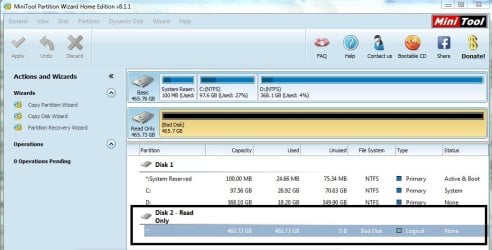
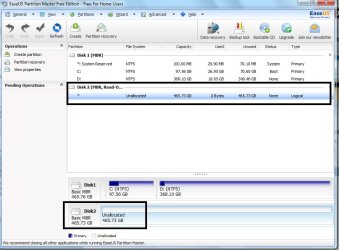
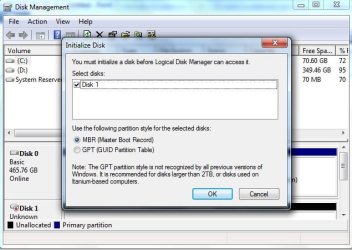
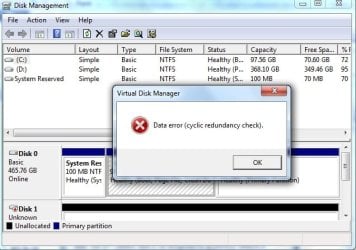
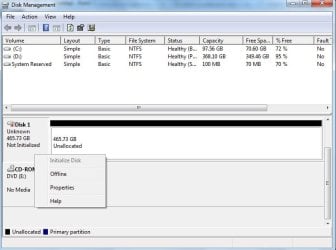
Thanks!
Please help me. I just want to fix my external.Here are some pics which will elaborate it's status now.Thanks!
My Computer
- Computer type
- Laptop
- Computer Manufacturer/Model Number
- HP Compaq
- OS
- Windows 7 Professional 32bit


