Solved how to fix lagging clock

windows7ke

New member
Local time
12:29 AM
Messages
9
After a little research on this forum i found a post from BRINK an admin with instructions to run a program and post a copy of some of my computers information. The problem i'm having relates to the clock not keeping up with the current time. Only when i boot it up is it correct, after that it lags behind as much as every hour that goes by approximately 10 mins is shown to have past on the computer clock. I have had this computer for a couple of years in storage and just recently set it up again after moving and all windows updates are current. Another potential problem is the cursor when i type into a search engine seems to hesitate instead of blinking steadily. I do not know if this is cause for concern or if these two issues i'm having are related at all but if anyone has any advice on what i can do to fix the problem i would greatly appreciate it! below is my report, Thank you in advance!

Code:
Diagnostic Report (1.9.0027.0):
-----------------------------------------
Windows Validation Data-->

Validation Code: 0
Cached Online Validation Code: N/A, hr = 0xc004f012
Windows Product Key: *****-*****-27CCH-G93RD-QYX2Y
Windows Product Key Hash: dyTz1IYRzIwl3fkFjo3KXoQKmgk=
Windows Product ID: 00426-437-7582616-85738
Windows Product ID Type: 5
Windows License Type: Retail
Windows OS version: 6.1.7601.2.00010100.1.0.001
ID: {03E20847-F72B-4D8B-93EF-ECCC00D3D77A}(3)
Is Admin: Yes
TestCab: 0x0
LegitcheckControl ActiveX: N/A, hr = 0x80070002
Signed By: N/A, hr = 0x80070002
Product Name: Windows 7 Ultimate
Architecture: 0x00000009
Build lab: 7601.win7sp1_gdr.150316-1654
TTS Error: 
Validation Diagnostic: 
Resolution Status: N/A

Vista WgaER Data-->
ThreatID(s): N/A, hr = 0x80070002
Version: N/A, hr = 0x80070002

Windows XP Notifications Data-->
Cached Result: N/A, hr = 0x80070002
File Exists: No
Version: N/A, hr = 0x80070002
WgaTray.exe Signed By: N/A, hr = 0x80070002
WgaLogon.dll Signed By: N/A, hr = 0x80070002

OGA Notifications Data-->
Cached Result: N/A, hr = 0x80070002
Version: N/A, hr = 0x80070002
OGAExec.exe Signed By: N/A, hr = 0x80070002
OGAAddin.dll Signed By: N/A, hr = 0x80070002

OGA Data-->
Office Status: 109 N/A
OGA Version: N/A, 0x80070002
Signed By: N/A, hr = 0x80070002
Office Diagnostics: 025D1FF3-364-80041010_025D1FF3-229-80041010_025D1FF3-230-1_025D1FF3-517-80040154_025D1FF3-237-80040154_025D1FF3-238-2_025D1FF3-244-80070002_025D1FF3-258-3

Browser Data-->
Proxy settings: N/A
User Agent: Mozilla/4.0 (compatible; MSIE 8.0; Win32)
Default Browser: C:\Program Files (x86)\Google\Chrome\Application\chrome.exe
Download signed ActiveX controls: Prompt
Download unsigned ActiveX controls: Disabled
Run ActiveX controls and plug-ins: Allowed
Initialize and script ActiveX controls not marked as safe: Disabled
Allow scripting of Internet Explorer Webbrowser control: Disabled
Active scripting: Allowed
Script ActiveX controls marked as safe for scripting: Allowed

File Scan Data-->

Other data-->
Office Details: <GenuineResults><MachineData><UGUID>{03E20847-F72B-4D8B-93EF-ECCC00D3D77A}</UGUID><Version>1.9.0027.0</Version><OS>6.1.7601.2.00010100.1.0.001</OS><Architecture>x64</Architecture><PKey>*****-*****-*****-*****-QYX2Y</PKey><PID>00426-437-7582616-85738</PID><PIDType>5</PIDType><SID>S-1-5-21-563311206-1459254088-2755514761</SID><SYSTEM><Manufacturer>Dell Inc.</Manufacturer><Model>OptiPlex 960                 </Model></SYSTEM><BIOS><Manufacturer>Dell Inc.</Manufacturer><Version>A02</Version><SMBIOSVersion major="2" minor="5"/><Date>20081229000000.000000+000</Date></BIOS><HWID>E0B13507018400F8</HWID><UserLCID>0409</UserLCID><SystemLCID>0409</SystemLCID><TimeZone>Eastern Standard Time(GMT-05:00)</TimeZone><iJoin>0</iJoin><SBID><stat>3</stat><msppid></msppid><name></name><model></model></SBID><OEM><OEMID>DELL  </OEMID><OEMTableID>B10K   </OEMTableID></OEM><GANotification/></MachineData><Software><Office><Result>109</Result><Products/><Applications/></Office></Software></GenuineResults>  

Spsys.log Content: 0x80070002

Licensing Data-->
Software licensing service version: 6.1.7601.17514

Name: Windows(R) 7, Ultimate edition
Description: Windows Operating System - Windows(R) 7, RETAIL channel
Activation ID: ac96e1a8-6cc4-4310-a4ff-332ce77fb5b8
Application ID: 55c92734-d682-4d71-983e-d6ec3f16059f
Extended PID: 00426-00170-437-758261-01-1033-7600.0000-3562013
Installation ID: 018186822525083844236482711200753780903272752192121652
Processor Certificate URL: http://go.microsoft.com/fwlink/?LinkID=88338
Machine Certificate URL: http://go.microsoft.com/fwlink/?LinkID=88339
Use License URL: http://go.microsoft.com/fwlink/?LinkID=88341
Product Key Certificate URL: http://go.microsoft.com/fwlink/?LinkID=88340
Partial Product Key: QYX2Y
License Status: Licensed
Remaining Windows rearm count: 4
Trusted time: 4/20/2015 4:01:16 PM

Windows Activation Technologies-->
HrOffline: 0x00000000
HrOnline: N/A
HealthStatus: 0x0000000000000000
Event Time Stamp: N/A
ActiveX: Registered, Version: 7.1.7600.16395
Admin Service: Registered, Version: 7.1.7600.16395
HealthStatus Bitmask Output:


HWID Data-->
HWID Hash Current: OAAAAAEABgABAAIAAAABAAAAAgABAAEAeqgC65ZoKkVUDa4TmCnYe8jrrD8w684vnHVe+QVDRso=

OEM Activation 1.0 Data-->
N/A

OEM Activation 2.0 Data-->
BIOS valid for OA 2.0: yes
Windows marker version: 0x0
OEMID and OEMTableID Consistent: yes
BIOS Information: 
  ACPI Table Name	OEMID Value	OEMTableID Value
  APIC			DELL  		B10K   
  FACP			DELL  		B10K   
  HPET			DELL  		B10K   
  BOOT			DELL  		B10K   
  MCFG			DELL  		B10K   
  SSDT			DELL		st_ex
  ASF!			DELL  		B10K   
  ____			DELL  		B10K   
  SLIC			DELL  		B10K   
  SSDT			DELL		st_ex
  SSDT			DELL		st_ex
  SSDT			DELL		st_ex
 

My Computer

Computer type
PC/Desktop
Computer Manufacturer/Model Number
Dell
OS
windows 7 ultimate
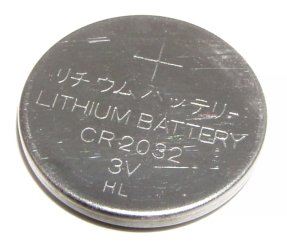
The standard idea about bad time on the clock is to replace the CMOS battery on the motherboard.

Cheap and may work.
 

Attachments

  • Battery-lithium-cr2032.jpg
    Battery-lithium-cr2032.jpg
    46 KB · Views: 27

My Computer

Computer type
PC/Desktop
Computer Manufacturer/Model Number
Ignatz Special; 4 speed manual gearbox; factory air conditioning; one of one
OS
Windows 7 Home Premium SP1, 64-bit
CPU
Intel Skylake i5-6600K, not overclocked
Motherboard
AsRock Z170M Extreme 4, micro ATX
Memory
8 GB HyperX DDR4-2666 (2 x 4 GB)
Graphics Card(s)
none; graphics are integrated on CPU
Sound Card
onboard: Realtek ALC1150; external: USB Behringer UF0-202
Monitor(s) Displays
Dell S2340M 23 inch IPS
Screen Resolution
1600 x 900
Hard Drives
System: Crucial MX100 series SSD, 128 GB;
Data: Samsung Spinpoint 103SJ, 1 TB;
Backup: WD Caviar Green WD30EZRX-00D8PB0, 3 TB
PSU
Rosewill SilentNight 500 watt fanless, semi-modular
Case
Antec Solo II
Cooling
Noctua NH-U12S; Noctua F12 intake, Noctua S12A exhaust
Keyboard
Microsoft 200 6JH-00001 USB
Mouse
Dell or Microsoft optical wired; USB
Antivirus
Microsoft Security Essentials and Malwarebytes Premium
Browser
Pale Moon
Other Info
All fans PWM; speeds at idle: CPU circa 500 rpm; intake circa 600 rpm; exhaust circa 600 rpm; CPU temps 27 idle and 47 C load in a warm room (27 C/81 F) when running Intel Extreme Tuning Utility stress test.
You probably need to change the CMOS battery, which is a small button battery, usually a 3 volt 2032 cell & this is located on the motherboard. This battery maintains necessary info & keeps the clock going when there is no external power.

Also check that you have your correct location set. To do that click on the clock on the Task Bar & select Change Date & Time Settings & follow through to set Time Zone.

When you are using a search engine on the web does it find your selected site normally, if so I would not worry about the cursor action. Browsers seem to vary on how the cursor behaves & some only show a circling icon up on the search bar & the mouse cursor just remains an arrow.
 

My Computer

Computer type
PC/Desktop
Computer Manufacturer/Model Number
Self built using existing case
OS
Windows 7 Home Premium 64 bit sp1
CPU
Intel i5 3570 3.4Ghz Ivy Bridge SKT 1155 quad core
Motherboard
Gigabyte Z77-HD3 SKT 1155 2xSata 3, 4x USB 3.0
Memory
G-Skill Rip Jaws 16Gb (8x2) DDR3 -1600 PC3 12800 CL 10 red
Graphics Card(s)
Gigabyte NVIDIA GT610 1Gb DDR3 810/1200 PCI-E 2.0 Silent
Sound Card
NVIDIA High Definition & Realtech High Definition Audio
Monitor(s) Displays
2 x Philips 226V4L 16:9 aspect ratio
Screen Resolution
1920 x 1080 HD
Hard Drives
Samsung 840 Pro 256gb SSD, SATA 3.
Hitachi Touro Portable 1tb, USB 3.0 HDD used for image b/ups.
PSU
Corsair VS450
Case
Codeng
Cooling
PSU fan & CPU fan
Keyboard
Logitech
Mouse
Logitech Wireless trackball M570
Internet Speed
Wireless 3G. 3mg down & 550kb up.
Antivirus
Bitdefender Internet Security 2020
Browser
Opera (Current Version) & Firefox
Other Info
MS Office 2013 Pro. Davis weather station software. MGE Nova 600 avr UPS.
Well after I replaced the CMOS battery something went wrong. I tried to boot up and a popup says 'your computer was unable to restart'. I selected for it to repair the problem and it says it will do so automatically but after a while another popup says it can't be restarted...I don't know what I did wrong but everything looks like its in the right place and I'm pretty sure I didn't break anything while replacing the battery. Any clue as to what may be going on?
 

My Computer

Computer type
PC/Desktop
Computer Manufacturer/Model Number
Dell
OS
windows 7 ultimate
Hi you did unplug the computer from wall correct? try it again power off computer unplug from wall hold power button for a few seconds. take the battery out for say 5 minutes now put battery back in writing on battery is face up. plug computer back in and start it. what happens?
 

My Computer

Computer type
PC/Desktop
Computer Manufacturer/Model Number
dell xps 9000
OS
win 10
Hi you did unplug the computer from wall correct? try it again power off computer unplug from wall hold power button for a few seconds. take the battery out for say 5 minutes now put battery back in writing on battery is face up. plug computer back in and start it. what happens?

Actually I unplugged from the back of the computer. I had everything powered down though before I pulled the plug. I followed the instructions in the quote above exactly and I still get the same message that windows cannot start or repair the issues automatically. Hope I didn't ruin my computer because I pulled the plug from the back of the comp instead of the wall...
 

My Computer

Computer type
PC/Desktop
Computer Manufacturer/Model Number
Dell
OS
windows 7 ultimate
no it should not of mattered. i would open the case again and make sure everything is seated. might of bumped a connection when changing battery.
 

My Computer

Computer type
PC/Desktop
Computer Manufacturer/Model Number
dell xps 9000
OS
win 10
Yeah I thought that was the problem at first but there are no loose ends every connection has a home and are all secure. I don't know what to do next I can't even restore back to my restore point because windows isn't loading.
 

My Computer

Computer type
PC/Desktop
Computer Manufacturer/Model Number
Dell
OS
windows 7 ultimate
have you tried all the options in the F8 menu like last known good configuration or the safe modes?
 

My Computer

Computer type
PC/Desktop
Computer Manufacturer/Model Number
dell xps 9000
OS
win 10
have you tried all the options in the F8 menu like last known good configuration or the safe modes?

Yes I get the same result each time windows fails to start.
 

My Computer

Computer type
PC/Desktop
Computer Manufacturer/Model Number
Dell
OS
windows 7 ultimate
ok unplug the connections to the hard drive and put back in and see what happens.
 

My Computer

Computer type
PC/Desktop
Computer Manufacturer/Model Number
dell xps 9000
OS
win 10
Same thing...
 

My Computer

Computer type
PC/Desktop
Computer Manufacturer/Model Number
Dell
OS
windows 7 ultimate
Changing out the CMOS battery usually changes some settings in the BIOS. Most frequently the integrated hard drive controller setting changes from from RAID/AHCI (the factory default where generically AHCI = SATA mode) to RAID/ATA. See if you can tell if any other BIOS settings were changed.
 

My Computer

Computer type
Laptop
Computer Manufacturer/Model Number
Sony Vaio VPCEB47GM Laptop
OS
Win 7 Pro 64-bit
CPU
Intel i5 2.4 Ghz
Memory
8GB DDR3
Graphics Card(s)
Intel HD 3000
Sound Card
IDT High Definition
Monitor(s) Displays
15.6 WGXA Anti-Glare LED
Screen Resolution
1280x800
Hard Drives
640Gb 7200rpm
Antivirus
MSE
Browser
Opera (primary) with IE9 backup
Changing out the CMOS battery usually changes some settings in the BIOS. Most frequently the integrated hard drive controller setting changes from from RAID/AHCI (the factory default where generically AHCI = SATA mode) to RAID/ATA. See if you can tell if any other BIOS settings were changed.

I dont know how to look for the integrated hard drive controller settings, is that something i can find out even if windows doesnt load?
 

My Computer

Computer type
PC/Desktop
Computer Manufacturer/Model Number
Dell
OS
windows 7 ultimate
Yes you go to bios. Start computer and start tapping the del key or F2 or F1 to get to bios could say on screen what key to press to enter setup
 

My Computer

Computer type
PC/Desktop
Computer Manufacturer/Model Number
dell xps 9000
OS
win 10
Ok found the settings. Raid on was the operation that was selected so the following are the four listed options:
RAID autodetect/AHCI
RAID autodetect/ATA
RAID on
Legacy

When I highlight one to change it I get a warning that it may require a reinstall or prevent operating system from booting. Just wanna choose the right one instead of guessing...
 

My Computer

Computer type
PC/Desktop
Computer Manufacturer/Model Number
Dell
OS
windows 7 ultimate
I am not an expert on what to select here, but there are others on this Forum who are.

Just so they are on the right track your first post shows this as a Dell desktop & the BIOS date is 28 Dec 2008.
 
Last edited:

My Computer

Computer type
PC/Desktop
Computer Manufacturer/Model Number
Self built using existing case
OS
Windows 7 Home Premium 64 bit sp1
CPU
Intel i5 3570 3.4Ghz Ivy Bridge SKT 1155 quad core
Motherboard
Gigabyte Z77-HD3 SKT 1155 2xSata 3, 4x USB 3.0
Memory
G-Skill Rip Jaws 16Gb (8x2) DDR3 -1600 PC3 12800 CL 10 red
Graphics Card(s)
Gigabyte NVIDIA GT610 1Gb DDR3 810/1200 PCI-E 2.0 Silent
Sound Card
NVIDIA High Definition & Realtech High Definition Audio
Monitor(s) Displays
2 x Philips 226V4L 16:9 aspect ratio
Screen Resolution
1920 x 1080 HD
Hard Drives
Samsung 840 Pro 256gb SSD, SATA 3.
Hitachi Touro Portable 1tb, USB 3.0 HDD used for image b/ups.
PSU
Corsair VS450
Case
Codeng
Cooling
PSU fan & CPU fan
Keyboard
Logitech
Mouse
Logitech Wireless trackball M570
Internet Speed
Wireless 3G. 3mg down & 550kb up.
Antivirus
Bitdefender Internet Security 2020
Browser
Opera (Current Version) & Firefox
Other Info
MS Office 2013 Pro. Davis weather station software. MGE Nova 600 avr UPS.
Problem solved! The settings in the BIOS was the key. RAID/ATA was the setting that finally booted windows up. Thank you oscer1 for helping me troubleshoot the problem and finding that post that ultimately was the key. Also thanks marsmimar for the post. All that for a battery replacement so that my clock would work right!
 

My Computer

Computer type
PC/Desktop
Computer Manufacturer/Model Number
Dell
OS
windows 7 ultimate
Glad to hear you got it sorted out. Thanks for posting back. :thumbsup:
 

My Computer

Computer type
Laptop
Computer Manufacturer/Model Number
Sony Vaio VPCEB47GM Laptop
OS
Win 7 Pro 64-bit
CPU
Intel i5 2.4 Ghz
Memory
8GB DDR3
Graphics Card(s)
Intel HD 3000
Sound Card
IDT High Definition
Monitor(s) Displays
15.6 WGXA Anti-Glare LED
Screen Resolution
1280x800
Hard Drives
640Gb 7200rpm
Antivirus
MSE
Browser
Opera (primary) with IE9 backup
Good to hear well done
 

My Computer

Computer type
PC/Desktop
Computer Manufacturer/Model Number
dell xps 9000
OS
win 10
Back
Top