How to fix start orb

WillThGreatX

New member
Local time
12:08 PM
Messages
3
I was playing around with the Start Orb Changer v2.6. I changed the start orb and when I logged on to the administrator account and the screen was black except for several error messages that said something about a bitmap. (Sorry can't remember!) After clicking 'OK' multiple times, it took me to my desktop. Everything was fine and the start orb even changed. I didn't want this error message anymore so I open the Start Orb Changer again and clicked 'Restore Original Explorer Backup.' My start orb was restored. I restarted my computer and logged back on only to find the old start orb again. I tried many thing and they all failed. I even took a fresh explorer.exe from my Windows 7 installation DVD and replaced it (giving myself ownership and all). It didn't work either. I must mention that prior to this I play messing with Custopack Tools to skin my Windows. Ended up not liking it so I restored the them and uninstalled Custopack. A little while ago, while trying to fix it, I stumbled upon a fellow user who seemed to be having the same problem. The solutions that worked for him didn't work for me, which were deleting the W7SOC folder in C:/Windows and running the Elevated Command Prompt with SFC SCANNOW. Didn't work. Another person said that using Start Orb Changer v3.1a to change it to the default orb would work, but alas, it did not. Now I must point out that while on the administrator account, opening the task manager and terminating the explorer.exe process and rerunning it does give me the default orb back, but every time I log out or restart it gives me the old start orb I don't want. ALSO, my user account is fine. I have the default orb on the user account even when I restart.
 

My Computer My Computer

At a glance

Windows 7 Home Premium 64bitIntel Core i5-2400Mushkin 8GBGTX 460
OS
Windows 7 Home Premium 64bit
CPU
Intel Core i5-2400
Motherboard
MSI P67A-G45 (B3)
Memory
Mushkin 8GB
Graphics Card(s)
GTX 460
Sound Card
On-board
Monitor(s) Displays
Asus 23" 238H
Hard Drives
Samsung Spinpoint 1TB (x2)
PSU
Corsair 650W
Case
NZXT Gamma
Cooling
Stock
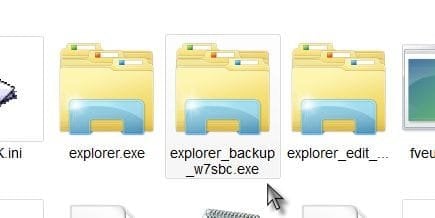
Welcome to Seven Forums WillThGreatX. You say you ran the System File Checker (SFC). Did it find no errors? Or did it find errors it could not correct? W7SOC does save and rename the original explorer.exe. Do you show multiple explorer exe's?

Explorer.jpg

SFC should restore the original system files, even if you have added custom themes. A Guy
 

My Computer My Computer

At a glance

Windows 10 Home x64INTEL Core i5-750 Quad-Core 3.37GHzHyperX Fury Black Series 8GB (2 x 4GB) 1866MhzEVGA GeForce GTX 750 Superclocked 1GB 128-Bit...
Computer type
PC/Desktop
OS
Windows 10 Home x64
CPU
INTEL Core i5-750 Quad-Core 3.37GHz
Motherboard
ASUS P7P55D
Memory
HyperX Fury Black Series 8GB (2 x 4GB) 1866Mhz
Graphics Card(s)
EVGA GeForce GTX 750 Superclocked 1GB 128-Bit GDDR5
Monitor(s) Displays
LG 32MA68HY 32" IPS
Screen Resolution
1920 x 1080
Hard Drives
Samsung 840 Evo 120GB, SEAGATE 500GB Barracuda® 7200.12, SATA 3 Gb/s, 7200 RPM, 16MB cache
PSU
ANTEC TruePower New TP-550, 80 PLUS, 550W
Case
ANTEC Three Hundred Illusion
Cooling
COOLER MASTER Hyper 212 Plus, 4 x 120mm 1 x 140mm Noctua's
Internet Speed
85 + Mbps
Antivirus
Avast
Browser
Vivaldi
you could try using the orb changer to change the orb to the original, by that i dont mean have it restore but add the original bitmap orb as if it was a custom one.
here it is here
ive zipped it as you cant upload bitmaps to the forum

View attachment 1 - Copy.zip
 

My Computer My Computer

At a glance

Microsoft Windows 7 Home Premium 64-bit 7600IIx4 amd athelon 635 processor2x2gbati radeon HD 5450
Computer Manufacturer/Model Number
Hewlett packard/p6512uk
OS
Microsoft Windows 7 Home Premium 64-bit 7600
CPU
IIx4 amd athelon 635 processor
Motherboard
FOXCONN 2AA9
Memory
2x2gb
Graphics Card(s)
ati radeon HD 5450
Sound Card
(1) Realtek High Definition Audio (2) AMD High Definition
Monitor(s) Displays
samsung lcd tv 32"
Screen Resolution
1360x 768
Hard Drives
(1) WDC WD10 01FAES-60Z2A0 SATA Disk Device (2) Maxtor OneTouch USB Device (3) ST310003 33AS USB Device (4) WD My Book 1111 USB Device
PSU
?
Cooling
air!
Keyboard
wireless hp
Mouse
wireless Hp,optical
Internet Speed
1.10mb/s
Antivirus
MSE
Browser
Firefox
Welcome to Seven Forums WillThGreatX. You say you ran the System File Checker (SFC). Did it find no errors? Or did it find errors it could not correct? W7SOC does save and rename the original explorer.exe. Do you show multiple explorer exe's?

View attachment 217719

SFC should restore the original system files, even if you have added custom themes. A Guy
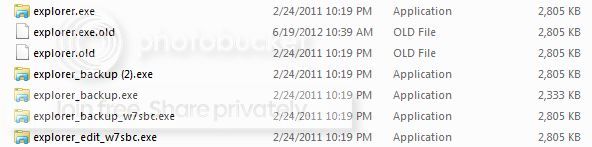
The SFC found errors and it restored them, but I know some error were cause by a program called the Universal Theme Patcher. After the scan the start orb was still the apple orb (the orb that won't change). So I just used it to patch again so mt custom themes were working.
The C:/Windows looks like this:
explorer.jpg

Some of the other files named .old or _old were from me following tutorials trying t fix it and the others were from the program itself, I believe.
 

My Computer My Computer

At a glance

Windows 7 Home Premium 64bitIntel Core i5-2400Mushkin 8GBGTX 460
OS
Windows 7 Home Premium 64bit
CPU
Intel Core i5-2400
Motherboard
MSI P67A-G45 (B3)
Memory
Mushkin 8GB
Graphics Card(s)
GTX 460
Sound Card
On-board
Monitor(s) Displays
Asus 23" 238H
Hard Drives
Samsung Spinpoint 1TB (x2)
PSU
Corsair 650W
Case
NZXT Gamma
Cooling
Stock
It looks like all the backups were made on the same date. I would say that deleting all but the explorer.old, then renaming the explorer.old back to explorer.exe would be the way to go. I would make a system backup before attempting anything. You can also save the backups to a folder rather then deleting them, just in case. If restoring the backup has no effect, even if you have to run SFC again after, then I'd think a Repair install would be a valid fix.

http://www.sevenforums.com/tutorials/3413-repair-install.html

A Guy
 

My Computer My Computer

At a glance

Windows 10 Home x64INTEL Core i5-750 Quad-Core 3.37GHzHyperX Fury Black Series 8GB (2 x 4GB) 1866MhzEVGA GeForce GTX 750 Superclocked 1GB 128-Bit...
Computer type
PC/Desktop
OS
Windows 10 Home x64
CPU
INTEL Core i5-750 Quad-Core 3.37GHz
Motherboard
ASUS P7P55D
Memory
HyperX Fury Black Series 8GB (2 x 4GB) 1866Mhz
Graphics Card(s)
EVGA GeForce GTX 750 Superclocked 1GB 128-Bit GDDR5
Monitor(s) Displays
LG 32MA68HY 32" IPS
Screen Resolution
1920 x 1080
Hard Drives
Samsung 840 Evo 120GB, SEAGATE 500GB Barracuda® 7200.12, SATA 3 Gb/s, 7200 RPM, 16MB cache
PSU
ANTEC TruePower New TP-550, 80 PLUS, 550W
Case
ANTEC Three Hundred Illusion
Cooling
COOLER MASTER Hyper 212 Plus, 4 x 120mm 1 x 140mm Noctua's
Internet Speed
85 + Mbps
Antivirus
Avast
Browser
Vivaldi
Back
Top