how to forcefully use 802.11g

johnnie

New member
Local time
1:39 PM
Messages
5
2 Laptops A & B running on Windows7 ultimate.
A supports 802.11b/g
B supports 802.11b/g/n
When A and B are connected, 802.11b is always used.
Do you know how to forcefully use 802.11g always?
 

My Computer

Computer Manufacturer/Model Number
HP
OS
windows 7
Memory
4GB
2 Laptops A & B running on Windows7 ultimate.
A supports 802.11b/g
B supports 802.11b/g/n
When A and B are connected, 802.11b is always used.
Do you know how to forcefully use 802.11g always?

Once I was able to use 802.11g, But I did not notice when it was changed to 802.11b automatically.
 

My Computer

Computer Manufacturer/Model Number
HP
OS
windows 7
Memory
4GB
Hi there
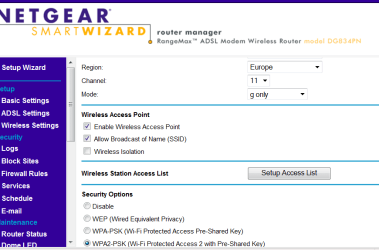
try some settings on the Router -- usually in the wireless setup there is a parameter as to what wireless protocol the router uses.

Once you've done that NIC's on the computers should work at the highest rate - note if reception is poor then they might drop down to a lower protocol.

The first place is to look at the router wireless settings.

pic enc


Cheers
jimbo
 

Attachments

  • router.png
    router.png
    21.8 KB · Views: 126

My Computer

Computer type
PC/Desktop
Computer Manufacturer/Model Number
Custom built, several laptops HP/ASUS
OS
Linux CENTOS 7 / various Windows OS'es and servers
CPU
Intel i7 Intel i5
Memory
8GB, 16GB
Graphics Card(s)
On Motherboard
Sound Card
Realtek HD audio
Monitor(s) Displays
Apple Cinema display, Samsung LCD
Screen Resolution
1920 X 1080
Hard Drives
4 X 1TB SATA
Mouse
Toshiba wireless laser
Internet Speed
> 20MB up
Hi Jimbo,
Thanks for the reply.
But my problem does not involve any wireless router.
It is an ad-hoc connection between two laptops, hence no router is involved.
I was hoping that there might be some registry hack to force windows to always use 802.11g instead of 802.11b.
 

My Computer

Computer Manufacturer/Model Number
HP
OS
windows 7
Memory
4GB
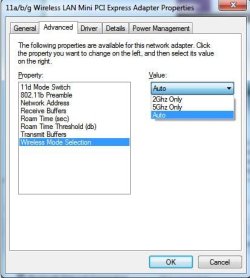
Is there a wireless mode selection in the Advance tab, in config..option of your wireless adatper? Mine has 2Ghz, and 5Ghz. I'm not sure if that can help.
Noname.jpg
 

My Computer

Computer Manufacturer/Model Number
Lenovo ThinkPad T60
OS
Windows 7 Ultimate 64Bit
CPU
GenuineIntel Intel(R) Core(TM) DuoCore T2400 @ 1.83GHz
Motherboard
Intel(R) 82801G (ICH7 Family)
Memory
2.00 GB
Graphics Card(s)
Mobile Intel(R) 945 Express Chipset
Sound Card
SoundMAX Integrated Digital HD Audio
Monitor(s) Displays
ThinkPad Display
Screen Resolution
1400x1050
Hard Drives
100Gb SATA
Keyboard
Standard Keyboard
Mouse
HID-compliant Mouse
Internet Speed
Cable Broadband - 54Mbps
Other Info
Intel(R) PRO/1000 PL Network Connection
11a/b/g Wireless LAN Mini PCI Express Adapter
@AEM,
You are wonderful.. Thanks.. The option was not exactly same, but I could figure out what to do by going to advance tab of the wireless adapter..
:D
I am now able to connect using 802.11g.. cheers..
 

My Computer

Computer Manufacturer/Model Number
HP
OS
windows 7
Memory
4GB
But, to my dissapointment, the speed is still not that fast. Only ~1.25MBps(used to be some 600KBps if 802.11b was used)..

Any one has any idea how to increase the speed.?
 

My Computer

Computer Manufacturer/Model Number
HP
OS
windows 7
Memory
4GB
Yeh not every adapter has the same features and configurable properties. I would think becos the adhoc runs off your wireless card, whatever the card is capable of is what you go to work with. If you toggle between the different modes, and it actually shows the difference, that's when u know it's working to the adapter's capability.
 

My Computer

Computer Manufacturer/Model Number
Lenovo ThinkPad T60
OS
Windows 7 Ultimate 64Bit
CPU
GenuineIntel Intel(R) Core(TM) DuoCore T2400 @ 1.83GHz
Motherboard
Intel(R) 82801G (ICH7 Family)
Memory
2.00 GB
Graphics Card(s)
Mobile Intel(R) 945 Express Chipset
Sound Card
SoundMAX Integrated Digital HD Audio
Monitor(s) Displays
ThinkPad Display
Screen Resolution
1400x1050
Hard Drives
100Gb SATA
Keyboard
Standard Keyboard
Mouse
HID-compliant Mouse
Internet Speed
Cable Broadband - 54Mbps
Other Info
Intel(R) PRO/1000 PL Network Connection
11a/b/g Wireless LAN Mini PCI Express Adapter
Back
Top