how to get rid of this extremely aggravating popup?

alientrader1

New member
Local time
4:49 PM
Messages
13
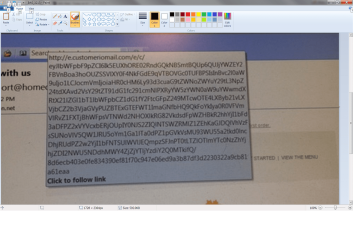
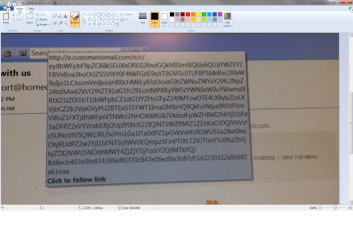
I can't seem to find out who is responsible for this EXTREMELY annoying popup. Every time I go to click on a hyperlink, this box pops up with the website, and 4-5 more lines of gibberish, that doesn't help me at all.
It says "click to follow link", and at least half of the time, it blocks almost all of the hyperlink, so that I have to move the cursor to find a place to click. I am using Windows 7 Home Premium with IE 11 and Outlook 2007. I don't know if it is Google, Outlook, Win 7, or IE 11.

Thanks for any help,

Barry

P.S. Microsoft help, et al, give tips on how to work with CTRL+click, but this is not my problem.
 

My Computer My Computer

At a glance

Windows 7 UltimateIntel Duo core 2.66Mz4 GBNvidia GeForce
Computer Manufacturer/Model Number
Alienware
OS
Windows 7 Ultimate
CPU
Intel Duo core 2.66Mz
Motherboard
EVGA
Memory
4 GB
Graphics Card(s)
Nvidia GeForce
Sound Card
SoundBlaster
Monitor(s) Displays
Sony E540 21" CRT
Hard Drives
Seagate 500GB SATA
PSU
Alienware 750 Watt
Case
Alienware
Cooling
4 Fans, Heatsink
Hi and welcome to SevenForums,
Tool tips or live previews of items,
Hit the Office logo on the top left,
Word Options on the bottom
Popular and all of the preview stuff is on the top section Uncheck all.

Oops,
Nope Display show tool tips :o
 

My Computer My Computer

At a glance

Win-7-Pro64bit 7-H-Prem-64biti7-5930K 2nd i9-9940x both water blocked VRM'...Trident-z 3200C14 2nd Trident-z 3600C16EVGA 1080ti ftw3 2nd Titan Xp both water blocked
Computer type
PC/Desktop
Computer Manufacturer/Model Number
Custom assembled by me :}
OS
Win-7-Pro64bit 7-H-Prem-64bit
CPU
i7-5930K 2nd i9-9940x both water blocked VRM's too
Motherboard
ASUS SABERTOOTH X99 2nd ASUS x299 Apex
Memory
Trident-z 3200C14 2nd Trident-z 3600C16
Graphics Card(s)
EVGA 1080ti ftw3 2nd Titan Xp both water blocked
Sound Card
Built-in Realtek
Monitor(s) Displays
1-AOC G2460PG 24"G-Sync 144Hz/ 2nd 1-ASUS VG248QE 24" 144Hz
Screen Resolution
1920 x 1080 144Hz
Hard Drives
2-Samsung M.2 Evo & Evo Plus
2-Samsung 850 EVO 500GB SSD's/ 3-2.5 W.D. Black 1tb-&3-1tb/3-3.5 WD Black 1tb hdd's
PSU
EVGA SuperNOVA 1000-P2 2nd 1200-P2
Case
2-Corsair Obsidian Series 450D Black ATX Mid Tower
Cooling
Custom water loops
Keyboard
Logitech G710+/ 2nd Logitech G910
Mouse
2-RedDragon M901 Perdition 16400 dpi Gaming mouse = wired
Internet Speed
Comcast Ping 19ms 89.31mbps download speed 6.12mbps upload
Antivirus
Malwarebytes Pro/ Superantispyware Pro
Browser
FireFox & Pale moon
Other Info
2nd ASUS X299 Apex/Intel i9-9940x with Custom water loop/7H-Prem-x64/Corsair 450D case/Ram Trident-z 3600C16 4x8gb / Samsung970Evo plus 500gb SSD/Dual ssd EZ swap evo/PSU EVGA SuperNova 1200w-P2 80+Platinum/GPU Titan Xp /8-ML-140 on push-pull on 2-280GTX rads
Thanks for the input ThrashZone, but alas, that doesn't work. I tried to take a screenshot of it, but you can't. As soon as you hit the ALT key it disappears. I can't believe that I am the only person that has ever had this problem.

Thanks again,

Barry
 

My Computer My Computer

At a glance

Windows 7 UltimateIntel Duo core 2.66Mz4 GBNvidia GeForce
Computer Manufacturer/Model Number
Alienware
OS
Windows 7 Ultimate
CPU
Intel Duo core 2.66Mz
Motherboard
EVGA
Memory
4 GB
Graphics Card(s)
Nvidia GeForce
Sound Card
SoundBlaster
Monitor(s) Displays
Sony E540 21" CRT
Hard Drives
Seagate 500GB SATA
PSU
Alienware 750 Watt
Case
Alienware
Cooling
4 Fans, Heatsink

My Computer My Computer

At a glance

Win 10 Pro x64Intel I5-2500K @3.3GHz16GB G.Skill Ripjaws X (4x4GB)EVGA GeForce 750 Ti SC 2GB
Computer type
PC/Desktop
Computer Manufacturer/Model Number
Self Built
OS
Win 10 Pro x64
CPU
Intel I5-2500K @3.3GHz
Motherboard
Asrock P67 Extreme4
Memory
16GB G.Skill Ripjaws X (4x4GB)
Graphics Card(s)
EVGA GeForce 750 Ti SC 2GB
Sound Card
ASUS Xonar DG 5.1 Channels 24-bit 96KHz PCI Interface Sound
Monitor(s) Displays
auria eq2367
Screen Resolution
1920 x 1080
Hard Drives
250GB Samsung 850 EVO SSD
1TB WD Blue
1TB Hitachi
PSU
SeaSonic X 650W 80 Plus Gold
Case
Corsair Obsidian 750D
Cooling
Corsair H60, Three 140mm case fans
Keyboard
Logitech Wireless Keyboard K520
Mouse
Logitech Wireless Mouse M310
Internet Speed
Wave Broadband ~ 100 dn 5 up
Antivirus
Windows Defender, Malwarebytes Premium
Browser
Edge, IE11, Chrome
Other Info
Laptop specs: HP g7-1365dx /
CPU: AMD A6-3420M APU with Radeon(tm) HD Graphics /
RAM: Crucial 8Gb (2x4Gb) /
SSD: Crucial M4-CT128M4SSD2 ATA Device/ FW 000F /
GFX: AMD Radeon HD 6520G /
OS: Windows 10 Pro x64
Can anyone please tell me how to get rid of this extremely aggravating popup?

I wrote to you a year and a half ago, and the following was the reply.
.
Hi and welcome to SevenForums,
Tool tips or live previews of items,
Hit the Office logo on the top left,
Word Options on the bottom
Popular and all of the preview stuff is on the top section Uncheck all.

Oops,
Nope Display show tool tips


This did not work, as well as all the internet "Gurus" replies didn't either

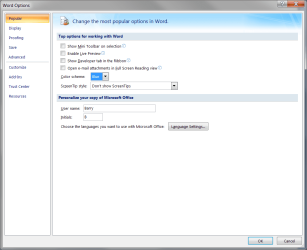
I have no "show tool tips" option in my Word Options as you can see with the second picture.

Please help.

Thanks,

Barry
 

Attachments

  • Click to Follow Link.png
    Click to Follow Link.png
    313.8 KB · Views: 2
  • Popular Options.png
    Popular Options.png
    28.5 KB · Views: 1

My Computer My Computer

At a glance

Windows 7 UltimateIntel Duo core 2.66Mz4 GBNvidia GeForce
Computer Manufacturer/Model Number
Alienware
OS
Windows 7 Ultimate
CPU
Intel Duo core 2.66Mz
Motherboard
EVGA
Memory
4 GB
Graphics Card(s)
Nvidia GeForce
Sound Card
SoundBlaster
Monitor(s) Displays
Sony E540 21" CRT
Hard Drives
Seagate 500GB SATA
PSU
Alienware 750 Watt
Case
Alienware
Cooling
4 Fans, Heatsink
Barry, for us that didn't see the year and a half ago post, could you please explain what is the problem you facing?
I understood that is a link to follow.
Where does the link appear? On a Word document? What is the version of the MS Office you have?
 

My Computers My Computers

  • At a glance

    Windows 7 HP 64i5 6600K - 800MHz to 4200MHz4+4G GSkill DDR4 3000IG - Intel 530
    Computer type
    PC/Desktop
    Computer Manufacturer/Model Number
    custom build
    OS
    Windows 7 HP 64
    CPU
    i5 6600K - 800MHz to 4200MHz
    Motherboard
    GA-Z170-HD3P
    Memory
    4+4G GSkill DDR4 3000
    Graphics Card(s)
    IG - Intel 530
    Monitor(s) Displays
    Samsung 226BW
    Screen Resolution
    1680x1050
    Hard Drives
    (1) -1 SM951 – 128GB M.2 AHCI PCIe SSD drive for Windows 7 and Lubuntu
    (2) -1 WD SATA 3 - 1T for Data
    (3) -1 WD SATA 3 - 1T for backup
    PSU
    Thermaltake 450W TR2 gold
    Keyboard
    Old and good Chicony mechanical keyboard
    Mouse
    Logitech mX performance - 9 buttons (had to disable some)
    Internet Speed
    500Mb/s
    Browser
    Firefox 64
    Other Info
    TinyWall firewall
  • At a glance

    Windows 7 Proi7-4500U 800MHz to 3.0GHz(4+4)G DDR3 1600IG intel 4400 + NVIDIA GeForce GT 745M
    Computer type
    Laptop
    System Manufacturer/Model Number
    Asus Q550LF
    OS
    Windows 7 Pro
    CPU
    i7-4500U 800MHz to 3.0GHz
    Motherboard
    Asus Q550LF
    Memory
    (4+4)G DDR3 1600
    Graphics Card(s)
    IG intel 4400 + NVIDIA GeForce GT 745M
    Sound Card
    Realtek
    Monitor(s) Displays
    LG Display LP156WF4-SPH1
    Screen Resolution
    1920 x 1080
    Hard Drives
    BX500 120G SSD for Windows and programs +
    1T HDD for data
    Internet Speed
    500 Mb/s
    Browser
    Firefox
    Other Info
    TinyWall firewall
Hi Megahertz07,

Thanks for the quick reply. I am running Windows 7 Home Premium, and Office 2007, and this only happens in Outlook 2007
e-mail. In the first picture I sent, you can see the popup that appears when I hover over any hyperlink to click on. Sometimes the popup covers the top line of the link, so I have to move the cursor down, and sometimes this popup makes the cursor highlight a letter in blue, like I'm trying to copy it, so I have to move the cursor somewhere else. This is extremely aggravating. I believe it is some setting in Outlook that is turned on, but I have yet to find it.

Thanks for any suggestions,

Barry
 

My Computer My Computer

At a glance

Windows 7 UltimateIntel Duo core 2.66Mz4 GBNvidia GeForce
Computer Manufacturer/Model Number
Alienware
OS
Windows 7 Ultimate
CPU
Intel Duo core 2.66Mz
Motherboard
EVGA
Memory
4 GB
Graphics Card(s)
Nvidia GeForce
Sound Card
SoundBlaster
Monitor(s) Displays
Sony E540 21" CRT
Hard Drives
Seagate 500GB SATA
PSU
Alienware 750 Watt
Case
Alienware
Cooling
4 Fans, Heatsink
Some emails has hyperlinks on the middle of the text.
Those links can be to open a page on the browser but they can be a link to malicious software.
For security reasons, Outlook shows the full address of the link when you pass the mouse over it.
As it is a MS Office program I will ask the administrator to move this thread to Office where you going to find people more qualified to solve your problem.
 

My Computers My Computers

  • At a glance

    Windows 7 HP 64i5 6600K - 800MHz to 4200MHz4+4G GSkill DDR4 3000IG - Intel 530
    Computer type
    PC/Desktop
    Computer Manufacturer/Model Number
    custom build
    OS
    Windows 7 HP 64
    CPU
    i5 6600K - 800MHz to 4200MHz
    Motherboard
    GA-Z170-HD3P
    Memory
    4+4G GSkill DDR4 3000
    Graphics Card(s)
    IG - Intel 530
    Monitor(s) Displays
    Samsung 226BW
    Screen Resolution
    1680x1050
    Hard Drives
    (1) -1 SM951 – 128GB M.2 AHCI PCIe SSD drive for Windows 7 and Lubuntu
    (2) -1 WD SATA 3 - 1T for Data
    (3) -1 WD SATA 3 - 1T for backup
    PSU
    Thermaltake 450W TR2 gold
    Keyboard
    Old and good Chicony mechanical keyboard
    Mouse
    Logitech mX performance - 9 buttons (had to disable some)
    Internet Speed
    500Mb/s
    Browser
    Firefox 64
    Other Info
    TinyWall firewall
  • At a glance

    Windows 7 Proi7-4500U 800MHz to 3.0GHz(4+4)G DDR3 1600IG intel 4400 + NVIDIA GeForce GT 745M
    Computer type
    Laptop
    System Manufacturer/Model Number
    Asus Q550LF
    OS
    Windows 7 Pro
    CPU
    i7-4500U 800MHz to 3.0GHz
    Motherboard
    Asus Q550LF
    Memory
    (4+4)G DDR3 1600
    Graphics Card(s)
    IG intel 4400 + NVIDIA GeForce GT 745M
    Sound Card
    Realtek
    Monitor(s) Displays
    LG Display LP156WF4-SPH1
    Screen Resolution
    1920 x 1080
    Hard Drives
    BX500 120G SSD for Windows and programs +
    1T HDD for data
    Internet Speed
    500 Mb/s
    Browser
    Firefox
    Other Info
    TinyWall firewall

My Computer My Computer

At a glance

Windows 7 Home Premium 64 bit sp1Intel i5 3570 3.4Ghz Ivy Bridge SKT 1155 quad...G-Skill Rip Jaws 16Gb (8x2) DDR3 -1600 PC3 12...Gigabyte NVIDIA GT610 1Gb DDR3 810/1200 PCI-E...
Computer type
PC/Desktop
Computer Manufacturer/Model Number
Self built using existing case
OS
Windows 7 Home Premium 64 bit sp1
CPU
Intel i5 3570 3.4Ghz Ivy Bridge SKT 1155 quad core
Motherboard
Gigabyte Z77-HD3 SKT 1155 2xSata 3, 4x USB 3.0
Memory
G-Skill Rip Jaws 16Gb (8x2) DDR3 -1600 PC3 12800 CL 10 red
Graphics Card(s)
Gigabyte NVIDIA GT610 1Gb DDR3 810/1200 PCI-E 2.0 Silent
Sound Card
NVIDIA High Definition & Realtech High Definition Audio
Monitor(s) Displays
2 x Philips 226V4L 16:9 aspect ratio
Screen Resolution
1920 x 1080 HD
Hard Drives
Samsung 840 Pro 256gb SSD, SATA 3.
Hitachi Touro Portable 1tb, USB 3.0 HDD used for image b/ups.
PSU
Corsair VS450
Case
Codeng
Cooling
PSU fan & CPU fan
Keyboard
Logitech
Mouse
Logitech Wireless trackball M570
Internet Speed
Wireless 3G. 3mg down & 550kb up.
Antivirus
Bitdefender Internet Security 2020
Browser
Opera (Current Version) & Firefox
Other Info
MS Office 2013 Pro. Davis weather station software. MGE Nova 600 avr UPS.
I believe the 3rd link could be the one I need. "disable hyperlinks warning", but
I have Office 2007, and none of the programs has the "File" option at the top.
I can't find the "disable warning" anywhere.This must be a feature of Office 2013/2016.

Thanks sincerely,

Barry
 
Last edited:

My Computer My Computer

At a glance

Windows 7 UltimateIntel Duo core 2.66Mz4 GBNvidia GeForce
Computer Manufacturer/Model Number
Alienware
OS
Windows 7 Ultimate
CPU
Intel Duo core 2.66Mz
Motherboard
EVGA
Memory
4 GB
Graphics Card(s)
Nvidia GeForce
Sound Card
SoundBlaster
Monitor(s) Displays
Sony E540 21" CRT
Hard Drives
Seagate 500GB SATA
PSU
Alienware 750 Watt
Case
Alienware
Cooling
4 Fans, Heatsink

My Computer My Computer

At a glance

Windows 7 Home Premium 64 bit sp1Intel i5 3570 3.4Ghz Ivy Bridge SKT 1155 quad...G-Skill Rip Jaws 16Gb (8x2) DDR3 -1600 PC3 12...Gigabyte NVIDIA GT610 1Gb DDR3 810/1200 PCI-E...
Computer type
PC/Desktop
Computer Manufacturer/Model Number
Self built using existing case
OS
Windows 7 Home Premium 64 bit sp1
CPU
Intel i5 3570 3.4Ghz Ivy Bridge SKT 1155 quad core
Motherboard
Gigabyte Z77-HD3 SKT 1155 2xSata 3, 4x USB 3.0
Memory
G-Skill Rip Jaws 16Gb (8x2) DDR3 -1600 PC3 12800 CL 10 red
Graphics Card(s)
Gigabyte NVIDIA GT610 1Gb DDR3 810/1200 PCI-E 2.0 Silent
Sound Card
NVIDIA High Definition & Realtech High Definition Audio
Monitor(s) Displays
2 x Philips 226V4L 16:9 aspect ratio
Screen Resolution
1920 x 1080 HD
Hard Drives
Samsung 840 Pro 256gb SSD, SATA 3.
Hitachi Touro Portable 1tb, USB 3.0 HDD used for image b/ups.
PSU
Corsair VS450
Case
Codeng
Cooling
PSU fan & CPU fan
Keyboard
Logitech
Mouse
Logitech Wireless trackball M570
Internet Speed
Wireless 3G. 3mg down & 550kb up.
Antivirus
Bitdefender Internet Security 2020
Browser
Opera (Current Version) & Firefox
Other Info
MS Office 2013 Pro. Davis weather station software. MGE Nova 600 avr UPS.
"Click to follow link" only in Outlook 2007

Thanks Ranger4, but this didn't do it either. Maybe "disable auto hyperlink: in Word 2007

is not what I'm looking for. I just know that this popup is driving me crazy. I think that

I read somewhere that you cannot disable this in Word 2007/2010. Who knows?
 

Attachments

  • Click to Follow Link.png
    Click to Follow Link.png
    313.8 KB · Views: 1

My Computer My Computer

At a glance

Windows 7 UltimateIntel Duo core 2.66Mz4 GBNvidia GeForce
Computer Manufacturer/Model Number
Alienware
OS
Windows 7 Ultimate
CPU
Intel Duo core 2.66Mz
Motherboard
EVGA
Memory
4 GB
Graphics Card(s)
Nvidia GeForce
Sound Card
SoundBlaster
Monitor(s) Displays
Sony E540 21" CRT
Hard Drives
Seagate 500GB SATA
PSU
Alienware 750 Watt
Case
Alienware
Cooling
4 Fans, Heatsink
In the Oct 1 post you stated "...and this only happens in Outlook 2007 e-mail." So this popup happens with one or more emails in Outlook, correct? As stated in other replies, Outlook shows this as a security concern.

Now, what is this? I followed some leads from your screen shot, specificly customer.io which is used to track real-time customer behavior, send targeted marketing, etc. It looks like your hyperlink is embedded in an email to send your data somewhere and Outlook is blocking it (probably a good thing).

Ways to get rid of the pop up include using a different mail client that allows the silent embedded behavior or blocks it without a warning, or you could copy the email as plain text and create a text document, then send it to yourself and delete the original.

Regards,
GEWB
 
Last edited:

My Computer My Computer

At a glance

Linux Mint / XP / Win7 Home, Pro, Ultimate / ...
Computer type
PC/Desktop
Computer Manufacturer/Model Number
(7 different computers booting up to 10 systems)
OS
Linux Mint / XP / Win7 Home, Pro, Ultimate / Win8.1 / Win10
Other Info
Four desktops, two laptops, one notebook and one tablet
Back
Top