Solved How to get rid of with stripes on the screen

Hikeman

New member
Power User
Local time
11:41 PM
Messages
134
How to get rid of with stripes on the screen Hey guys! nice to be here
smile.gif
Hope I am going to find a solution for my problem here !!
smile.gif

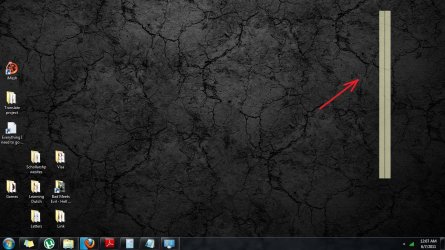
So my problem is: Every time I change a theme on my Windows 7 Ultimate x64, on the right side of my screen are appearing with strips, two of them, next to each other! And I can not get rid of them, while being logged in, the only solution is to loge off and log in again or to restart. I didn't had this problem before on my previous installations of Windows 7 OS, also on this current one this problem appeared some time ago.
I'll attache a screenshot to this message!
Hope you guys can help me somehow
wink.gif
 

Attachments

  • Untitled.jpg
    Untitled.jpg
    163.1 KB · Views: 78

My Computer My Computer

At a glance

Windows 7 SP1 Ultimate x64Intel Core i5 M430 2.27 GHz 2.27 GHz3952 MB (DDR3-1066 DDR3 SDRAM)ATI Mobility Radeon HD 5650 (1024 MB)
Computer Manufacturer/Model Number
SONY VAIO VPCEB1S1E
OS
Windows 7 SP1 Ultimate x64
CPU
Intel Core i5 M430 2.27 GHz 2.27 GHz
Motherboard
Intel Ibex Peak-M HM55, Intel Arrandale
Memory
3952 MB (DDR3-1066 DDR3 SDRAM)
Graphics Card(s)
ATI Mobility Radeon HD 5650 (1024 MB)
Sound Card
Realtek ALC269 @ Intel Ibex Peak PCH - High Definition Audio
Monitor(s) Displays
Generic PnP Monitor [NoDB]
Screen Resolution
1366x768
Hard Drives
Toshiba MK-5055GSX 500 Gb
Almost looks like a broken gadget. Are you running sidebar?
 

My Computer My Computer

At a glance

Win 8 Release candidate 8400[email protected]4 gigsNvidia 9600M
Computer Manufacturer/Model Number
HP Pavillion dv-7 1005 Tx
OS
Win 8 Release candidate 8400
CPU
[email protected]
Memory
4 gigs
Graphics Card(s)
Nvidia 9600M
Sound Card
HD built-in
Monitor(s) Displays
17" Wxga
Screen Resolution
1440x900
Cooling
none
Internet Speed
45Mb down 5Mb up

My Computer My Computer

At a glance

win 7 ultimate32bit, Win8.1pro wmc 32bitamd phenom x4 9600corsair twinxs 2x2gb2x nvidia 1gb 8500gt
Computer type
PC/Desktop
Computer Manufacturer/Model Number
self build
OS
win 7 ultimate32bit, Win8.1pro wmc 32bit
CPU
amd phenom x4 9600
Motherboard
asus m2n32-sli deluxe
Memory
corsair twinxs 2x2gb
Graphics Card(s)
2x nvidia 1gb 8500gt
Sound Card
onboard
Monitor(s) Displays
23" PB Viseo 233d
Screen Resolution
1920x1080
Hard Drives
maxtor sata 500gb
maxtor sata 320gb
fujitsu sata200gb
PSU
oryxx tornado 750w
Case
thermaltake xaser lll
Cooling
artic freezer64 pro + 7 case fans
Next time you see them, left click and drag a box around them. Right click and see if there is an option to delete.

Box.jpg

A Guy
 
Last edited:

My Computer My Computer

At a glance

Windows 10 Home x64INTEL Core i5-750 Quad-Core 3.37GHzHyperX Fury Black Series 8GB (2 x 4GB) 1866MhzEVGA GeForce GTX 750 Superclocked 1GB 128-Bit...
Computer type
PC/Desktop
OS
Windows 10 Home x64
CPU
INTEL Core i5-750 Quad-Core 3.37GHz
Motherboard
ASUS P7P55D
Memory
HyperX Fury Black Series 8GB (2 x 4GB) 1866Mhz
Graphics Card(s)
EVGA GeForce GTX 750 Superclocked 1GB 128-Bit GDDR5
Monitor(s) Displays
LG 32MA68HY 32" IPS
Screen Resolution
1920 x 1080
Hard Drives
Samsung 840 Evo 120GB, SEAGATE 500GB Barracuda® 7200.12, SATA 3 Gb/s, 7200 RPM, 16MB cache
PSU
ANTEC TruePower New TP-550, 80 PLUS, 550W
Case
ANTEC Three Hundred Illusion
Cooling
COOLER MASTER Hyper 212 Plus, 4 x 120mm 1 x 140mm Noctua's
Internet Speed
85 + Mbps
Antivirus
Avast
Browser
Vivaldi

My Computer My Computer

At a glance

Windows 7 SP1 Ultimate x64Intel Core i5 M430 2.27 GHz 2.27 GHz3952 MB (DDR3-1066 DDR3 SDRAM)ATI Mobility Radeon HD 5650 (1024 MB)
Computer Manufacturer/Model Number
SONY VAIO VPCEB1S1E
OS
Windows 7 SP1 Ultimate x64
CPU
Intel Core i5 M430 2.27 GHz 2.27 GHz
Motherboard
Intel Ibex Peak-M HM55, Intel Arrandale
Memory
3952 MB (DDR3-1066 DDR3 SDRAM)
Graphics Card(s)
ATI Mobility Radeon HD 5650 (1024 MB)
Sound Card
Realtek ALC269 @ Intel Ibex Peak PCH - High Definition Audio
Monitor(s) Displays
Generic PnP Monitor [NoDB]
Screen Resolution
1366x768
Hard Drives
Toshiba MK-5055GSX 500 Gb
Hi Hikeman ,Have a look at this tutorial http://www.sevenforums.com/tutorials/140358-gadgets-not-displaying-correctly-windows-7-fix.html this may help with the problem you are having :)


Tank you guys for your replies !!!

So the thing is that I had my gadgets are working fine now. I had exact same problem you sent me tutorial for, then I fixed it, as I remember I did it with your tutorial!! Not I am realizing, that I guess this "with strips" started to appear after that incident.
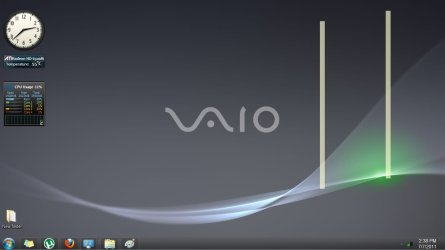
So check out my printscreen, this time, cuz that "with stripes" are appearing in different shapes and tehy doesn't look like an object, they are just stripes, like the part of my wallpaper...!
also my gadgets are working fine!
I am confused, help me pleas
 

Attachments

  • Untitled1.jpg
    Untitled1.jpg
    36.9 KB · Views: 5

My Computer My Computer

At a glance

Windows 7 SP1 Ultimate x64Intel Core i5 M430 2.27 GHz 2.27 GHz3952 MB (DDR3-1066 DDR3 SDRAM)ATI Mobility Radeon HD 5650 (1024 MB)
Computer Manufacturer/Model Number
SONY VAIO VPCEB1S1E
OS
Windows 7 SP1 Ultimate x64
CPU
Intel Core i5 M430 2.27 GHz 2.27 GHz
Motherboard
Intel Ibex Peak-M HM55, Intel Arrandale
Memory
3952 MB (DDR3-1066 DDR3 SDRAM)
Graphics Card(s)
ATI Mobility Radeon HD 5650 (1024 MB)
Sound Card
Realtek ALC269 @ Intel Ibex Peak PCH - High Definition Audio
Monitor(s) Displays
Generic PnP Monitor [NoDB]
Screen Resolution
1366x768
Hard Drives
Toshiba MK-5055GSX 500 Gb
Next time you see them, left click and drag a box around them. Right click and see if there is an option to delete.

View attachment 163669

A Guy


I tried to do what you suggested, but nothing. This strips are not seam to be an object (gadget), they are not anyhow active, can not do anything with them. But as I mentioned before, if I log of and log in again or just restart, they are going away...so it's just annoying and i ma curious why are they appearing??
Thnx
 

My Computer My Computer

At a glance

Windows 7 SP1 Ultimate x64Intel Core i5 M430 2.27 GHz 2.27 GHz3952 MB (DDR3-1066 DDR3 SDRAM)ATI Mobility Radeon HD 5650 (1024 MB)
Computer Manufacturer/Model Number
SONY VAIO VPCEB1S1E
OS
Windows 7 SP1 Ultimate x64
CPU
Intel Core i5 M430 2.27 GHz 2.27 GHz
Motherboard
Intel Ibex Peak-M HM55, Intel Arrandale
Memory
3952 MB (DDR3-1066 DDR3 SDRAM)
Graphics Card(s)
ATI Mobility Radeon HD 5650 (1024 MB)
Sound Card
Realtek ALC269 @ Intel Ibex Peak PCH - High Definition Audio
Monitor(s) Displays
Generic PnP Monitor [NoDB]
Screen Resolution
1366x768
Hard Drives
Toshiba MK-5055GSX 500 Gb
Perhaps turn the gadget platform off, and see if it is indeed the cause.

http://www.sevenforums.com/tutorials/5023-windows-features-turn-off.html

Scroll down to Windows Gadget Platform, and untick it. If your problem goes away, try turning it back on and see if it returns. If so, suggest run the System File Checker

http://www.sevenforums.com/tutorials/1538-sfc-scannow-command-system-file-checker.html

If no help, you can try a clean boot to see if a program is causing it

How to Troubleshoot a Problem by Performing a Clean Startup in Windows 7 or Vista

A Guy
 
Last edited by a moderator:

My Computer My Computer

At a glance

Windows 10 Home x64INTEL Core i5-750 Quad-Core 3.37GHzHyperX Fury Black Series 8GB (2 x 4GB) 1866MhzEVGA GeForce GTX 750 Superclocked 1GB 128-Bit...
Computer type
PC/Desktop
OS
Windows 10 Home x64
CPU
INTEL Core i5-750 Quad-Core 3.37GHz
Motherboard
ASUS P7P55D
Memory
HyperX Fury Black Series 8GB (2 x 4GB) 1866Mhz
Graphics Card(s)
EVGA GeForce GTX 750 Superclocked 1GB 128-Bit GDDR5
Monitor(s) Displays
LG 32MA68HY 32" IPS
Screen Resolution
1920 x 1080
Hard Drives
Samsung 840 Evo 120GB, SEAGATE 500GB Barracuda® 7200.12, SATA 3 Gb/s, 7200 RPM, 16MB cache
PSU
ANTEC TruePower New TP-550, 80 PLUS, 550W
Case
ANTEC Three Hundred Illusion
Cooling
COOLER MASTER Hyper 212 Plus, 4 x 120mm 1 x 140mm Noctua's
Internet Speed
85 + Mbps
Antivirus
Avast
Browser
Vivaldi
Hey man !!! You will never believe what was causing that white stripes ?!
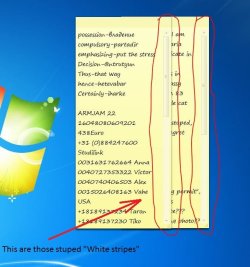
THE "Sticky Notes" more persistently the vertical "scrolling bars" of my two sticky notes! like when I was changing a theme while "Sticky Notes" were minimized, you could see that white stripes, I just needed to maximize them and minimize again in order to get rid of them. But it was only happening with new installed themes! so if I change between themes, which were installed some time ago the stripes were not appearing. plus it's happening only when my sticky notes are in the right side of my screen. Maaaaaaaaaaaaaaan! this is so stupid :)
and BTW I never liked Sticky Notes! they are so incomplete. they could have been more flexible!!!
But another thing is that I had Sticky Notes before also, but I never had this white stripes...
so what do you think is the reason???

check the screen-shot out!!!
 

Attachments

  • Capture.JPG
    Capture.JPG
    63.7 KB · Views: 7

My Computer My Computer

At a glance

Windows 7 SP1 Ultimate x64Intel Core i5 M430 2.27 GHz 2.27 GHz3952 MB (DDR3-1066 DDR3 SDRAM)ATI Mobility Radeon HD 5650 (1024 MB)
Computer Manufacturer/Model Number
SONY VAIO VPCEB1S1E
OS
Windows 7 SP1 Ultimate x64
CPU
Intel Core i5 M430 2.27 GHz 2.27 GHz
Motherboard
Intel Ibex Peak-M HM55, Intel Arrandale
Memory
3952 MB (DDR3-1066 DDR3 SDRAM)
Graphics Card(s)
ATI Mobility Radeon HD 5650 (1024 MB)
Sound Card
Realtek ALC269 @ Intel Ibex Peak PCH - High Definition Audio
Monitor(s) Displays
Generic PnP Monitor [NoDB]
Screen Resolution
1366x768
Hard Drives
Toshiba MK-5055GSX 500 Gb

My Computer My Computer

At a glance

Windows 10 Home x64INTEL Core i5-750 Quad-Core 3.37GHzHyperX Fury Black Series 8GB (2 x 4GB) 1866MhzEVGA GeForce GTX 750 Superclocked 1GB 128-Bit...
Computer type
PC/Desktop
OS
Windows 10 Home x64
CPU
INTEL Core i5-750 Quad-Core 3.37GHz
Motherboard
ASUS P7P55D
Memory
HyperX Fury Black Series 8GB (2 x 4GB) 1866Mhz
Graphics Card(s)
EVGA GeForce GTX 750 Superclocked 1GB 128-Bit GDDR5
Monitor(s) Displays
LG 32MA68HY 32" IPS
Screen Resolution
1920 x 1080
Hard Drives
Samsung 840 Evo 120GB, SEAGATE 500GB Barracuda® 7200.12, SATA 3 Gb/s, 7200 RPM, 16MB cache
PSU
ANTEC TruePower New TP-550, 80 PLUS, 550W
Case
ANTEC Three Hundred Illusion
Cooling
COOLER MASTER Hyper 212 Plus, 4 x 120mm 1 x 140mm Noctua's
Internet Speed
85 + Mbps
Antivirus
Avast
Browser
Vivaldi
Back
Top