
You are using an out of date browser. It may not display this or other websites correctly.
You should upgrade or use an alternative browser.
You should upgrade or use an alternative browser.
How to hide folders from other user accounts?
- Thread starter simorio69
- Start date

Welcom to the forum
Hope this helps
http://www.sevenforums.com/tutorials/56005-file-folder-hide-unhide.html
Hope this helps
http://www.sevenforums.com/tutorials/56005-file-folder-hide-unhide.html
My Computer
At a glance
Windows 10, Home Clean InstallIntel Core2 processsor Q8200(2.33Ghz 1333FSB)...6 gbATI Radeon 256MB HD3650
- Computer type
- PC/Desktop
- Computer Manufacturer/Model Number
- Dell XPS 420
- OS
- Windows 10, Home Clean Install
- CPU
- Intel Core2 processsor Q8200(2.33Ghz 1333FSB) Quad Core Tech
- Motherboard
- Dell
- Memory
- 6 gb
- Graphics Card(s)
- ATI Radeon 256MB HD3650
- Sound Card
- Intergrated 7.1 Channel Audio
- Monitor(s) Displays
- Dell SP2009W 20"
- Hard Drives
- 640 GB Serial ATA Hard drive
- Cooling
- Fan
- Keyboard
- Dell USB Keyboard
- Mouse
- Dell Premium Optical USB
- Internet Speed
- DSL 2.85
If i tap hide folders, i will not see it, i wanna hide just from one user.,Sry my english badright click the folder you want to hide, choose properties under General tab, checkmark Hidden
My Computer
At a glance
windows 7
- OS
- windows 7
I do not know how to make it invisible, unless you give the other user his own account, and you have a password on yours.
My Computer
At a glance
Windows 10, Home Clean InstallIntel Core2 processsor Q8200(2.33Ghz 1333FSB)...6 gbATI Radeon 256MB HD3650
- Computer type
- PC/Desktop
- Computer Manufacturer/Model Number
- Dell XPS 420
- OS
- Windows 10, Home Clean Install
- CPU
- Intel Core2 processsor Q8200(2.33Ghz 1333FSB) Quad Core Tech
- Motherboard
- Dell
- Memory
- 6 gb
- Graphics Card(s)
- ATI Radeon 256MB HD3650
- Sound Card
- Intergrated 7.1 Channel Audio
- Monitor(s) Displays
- Dell SP2009W 20"
- Hard Drives
- 640 GB Serial ATA Hard drive
- Cooling
- Fan
- Keyboard
- Dell USB Keyboard
- Mouse
- Dell Premium Optical USB
- Internet Speed
- DSL 2.85
You can share the folder, give permission and password protect for your user only.
My Computer
At a glance
8 Pro x64i7 3770K 4.6GHz16GB G.Skill Trident X 2666mhzx2 EVGA 780 Ti Superclocked SLI
- Computer type
- PC/Desktop
- Computer Manufacturer/Model Number
- Systems by SmartEyeball
- OS
- 8 Pro x64
- CPU
- i7 3770K 4.6GHz
- Motherboard
- ASUS P8Z77 WS
- Memory
- 16GB G.Skill Trident X 2666mhz
- Graphics Card(s)
- x2 EVGA 780 Ti Superclocked SLI
- Sound Card
- SB X-FI Surround 5.1 PRO USB / ATH-AD900 Headphones
- Monitor(s) Displays
- x3 Dell U2410 / 58" Samsung
- Screen Resolution
- 5760*1200/ 1920*1200
- Hard Drives
- 2x Intel 520 240GB (RAID 0) * 2x WD Caviar Blacks 2TB (RAID 0) * 2TB WD Caviar Black * Sony Optirac DVD
- PSU
- Silverstone Strider Evolution 1200W
- Case
- Thermaltake Level 10 GT Snow Edition
- Cooling
- Noctua NH-D14
- Keyboard
- Topre Realforce // Ducky Shine MX Black // Filco Ninja TKL
- Mouse
- Thermaltake Theron (Highly Recommended) + Razer Imperator
- Antivirus
- MSE
- Browser
- IE, FF, WaterFox
- Other Info
- GT Extreme V2 Sim Racing Cockpit + 40" LCD and K/B Mouse stand ▼
Fanatec CSR Elite Wheel + Clubsport V1 Pedals + CSR shifter/7G-H ▼Saitek X52 Pro ▼ TrackIR 5 Pro
Buttkicker v2 Seat Rumbler with Dedicated 5.1 and Sub Woofer attached to frame ▼
=
Bloody Big Grin

This can be achieved by the use of permissions but will take a little work - I would also add that the default permissions of an administrator level account (even in win7 with UAC on), does not adapt well to this.
I would recommend that you set this up in standard user accounts and keep at least one admin account to control things.
create your Standard level accounts
log in as admin account and in the properties - security tab on the folders you wish to be private remove all users except the user who needs access and the administrators, (also leave any other system related users for safety).
You will need to remove catch-all groups such as everyone and Homeusers$ and specifically add the allowed user.
Rights may be assigned as required such as read, write, modify, etc. but I would advise you leave the ownership as is or manually set to administrators group.
once set-up any user that does not have specific rights assigned will not be able to access a folder.
This is the way that access is controlled on major network systems so it is a proven system, although with major systems it is normal to assign users to groups and then assign the rights to a group
As I said it will take a little work and thought but it can provide total control of a shared system
I would recommend that you set this up in standard user accounts and keep at least one admin account to control things.
create your Standard level accounts
log in as admin account and in the properties - security tab on the folders you wish to be private remove all users except the user who needs access and the administrators, (also leave any other system related users for safety).
You will need to remove catch-all groups such as everyone and Homeusers$ and specifically add the allowed user.
Rights may be assigned as required such as read, write, modify, etc. but I would advise you leave the ownership as is or manually set to administrators group.
once set-up any user that does not have specific rights assigned will not be able to access a folder.
This is the way that access is controlled on major network systems so it is a proven system, although with major systems it is normal to assign users to groups and then assign the rights to a group
As I said it will take a little work and thought but it can provide total control of a shared system
My Computers
-
At a glance
Windows 11 Pro x64 [Latest Release and Releas...Ryzen 9 5950X, 3.8 - 5.2 MHz64GB [2 x 32GB] DDR4 3200MHz4GB NVIDIA GEFORCE GTX 1650 Ti- Computer type
- PC/Desktop
- Computer Manufacturer/Model Number
- ChillBlast - Custom to my design
- OS
- Windows 11 Pro x64 [Latest Release and Release Preview]
- CPU
- Ryzen 9 5950X, 3.8 - 5.2 MHz
- Motherboard
- Asus Prime X570-Pro
- Memory
- 64GB [2 x 32GB] DDR4 3200MHz
- Graphics Card(s)
- 4GB NVIDIA GEFORCE GTX 1650 Ti
- Sound Card
- On-board SPDIF to 5.1 System + HDMI [5.1 system]
- Monitor(s) Displays
- 32" UHD 32 Bit HDR Monitor + 43" UHD 4K 32Bit HDR TV
- Screen Resolution
- 2 x 3840 x 2160 @60Hz
- Hard Drives
- 1TB M2 SSD OS, 500GB Fast Access SSD, 2 x 8TB Data + Various Externals from 1TB to 4TB, 10TB NAS
- PSU
- NZXT C750 80 PLUS Gold 750W Modular PSU
- Case
- Workstation Case [Matt Black]
- Cooling
- NZXT Kraken X63 280mm CPU Cooler +2x Quiet Case fans
- Keyboard
- Logitech Wireless MX Keys & K400 + others
- Mouse
- Logitech Wireless MX Master 3S
- Internet Speed
- 920 MB Down 50 MB Up
- Antivirus
- BitDefender Total Security Pro
- Browser
- Chrome (always run latest Non-Beta)
- Other Info
- Also run ...
Laptop - Quad 8GB - Windows 10 Pro x64
Nexus 7 Android tablet x2
Samsung 10.2" tablet
Blackview TAB 8 4G Android Tablet c/w Keyboard
Wacom Intuos Pro Medium Pen Pad
Wacom Intuos Pro Small Pen Pad
Wacom Expresskeys Remote
Loopdeck+ Graphics Controller
Shuttle Pro v2 Control
-
At a glance
Windows 11 Pro x64 Latest RPIntel I7 10750H 5.0GHz32GB [2x16GB] DDR4 2933 MHznVidia GTX1650Ti 4 GB GDDR6- Computer type
- Laptop
- System Manufacturer/Model Number
- Dell XPS 17 10750H
- OS
- Windows 11 Pro x64 Latest RP
- CPU
- Intel I7 10750H 5.0GHz
- Motherboard
- Dell XPS
- Memory
- 32GB [2x16GB] DDR4 2933 MHz
- Graphics Card(s)
- nVidia GTX1650Ti 4 GB GDDR6
- Sound Card
- Stock [Realtek] 4 Speaker
- Monitor(s) Displays
- 17" IPS UHD+ Infinity Edge Touchscreen
- Screen Resolution
- 3840 x 2400
- Hard Drives
- 2TB M2 NVMe, 4TB External + various 500GB & 1TB External NVMe (also have access to spinner HDD from
- PSU
- Stock
- Case
- Stock XPS Aluminium & Carbon Fibre
- Cooling
- Stock - Active Fan Control
- Keyboard
- Backlit + Various Logitech
- Mouse
- Stock Track Pad + Logitech MX Trackball
- Internet Speed
- 72 MB Down 18MB Up
- Browser
- Chrome
- Other Info
- Also run ...
Laptop - Quad 8GB - Windows 10 Pro x64
Nexus 7 Android tablet x2
10.2" tablet
Sony Z3 Android Smartphone
Wacom Intuos Pro Medium Pen Pad
Wacom Intuos Pro Small Pen Pad
Wacom Expresskeys Remote
Loopdeck+ Graphics Controller
Shuttle Pro v2 Control Pad
10TB NAS
I tried somethung with security, its quite complicated.. tnx i will tryThis can be achieved by the use of permissions but will take a little work - I would also add that the default permissions of an administrator level account (even in win7 with UAC on), does not adapt well to this.
I would recommend that you set this up in standard user accounts and keep at least one admin account to control things.
create your Standard level accounts
log in as admin account and in the properties - security tab on the folders you wish to be private remove all users except the user who needs access and the administrators, (also leave any other system related users for safety).
You will need to remove catch-all groups such as everyone and Homeusers$ and specifically add the allowed user.
Rights may be assigned as required such as read, write, modify, etc. but I would advise you leave the ownership as is or manually set to administrators group.
once set-up any user that does not have specific rights assigned will not be able to access a folder.
This is the way that access is controlled on major network systems so it is a proven system, although with major systems it is normal to assign users to groups and then assign the rights to a group
As I said it will take a little work and thought but it can provide total control of a shared system
My Computer
At a glance
windows 7
- OS
- windows 7
If you just want to protect a particular folder or folder tree from prying eyes  the best solution is encryption using something like bitlocker or the free truecrypt
TrueCrypt - Free Open-Source On-The-Fly Disk Encryption Software for Windows 7/Vista/XP, Mac OS X and Linux
the best solution is encryption using something like bitlocker or the free truecryptTrueCrypt - Free Open-Source On-The-Fly Disk Encryption Software for Windows 7/Vista/XP, Mac OS X and Linux
My Computers
-
At a glance
Windows 11 Pro x64 [Latest Release and Releas...Ryzen 9 5950X, 3.8 - 5.2 MHz64GB [2 x 32GB] DDR4 3200MHz4GB NVIDIA GEFORCE GTX 1650 Ti- Computer type
- PC/Desktop
- Computer Manufacturer/Model Number
- ChillBlast - Custom to my design
- OS
- Windows 11 Pro x64 [Latest Release and Release Preview]
- CPU
- Ryzen 9 5950X, 3.8 - 5.2 MHz
- Motherboard
- Asus Prime X570-Pro
- Memory
- 64GB [2 x 32GB] DDR4 3200MHz
- Graphics Card(s)
- 4GB NVIDIA GEFORCE GTX 1650 Ti
- Sound Card
- On-board SPDIF to 5.1 System + HDMI [5.1 system]
- Monitor(s) Displays
- 32" UHD 32 Bit HDR Monitor + 43" UHD 4K 32Bit HDR TV
- Screen Resolution
- 2 x 3840 x 2160 @60Hz
- Hard Drives
- 1TB M2 SSD OS, 500GB Fast Access SSD, 2 x 8TB Data + Various Externals from 1TB to 4TB, 10TB NAS
- PSU
- NZXT C750 80 PLUS Gold 750W Modular PSU
- Case
- Workstation Case [Matt Black]
- Cooling
- NZXT Kraken X63 280mm CPU Cooler +2x Quiet Case fans
- Keyboard
- Logitech Wireless MX Keys & K400 + others
- Mouse
- Logitech Wireless MX Master 3S
- Internet Speed
- 920 MB Down 50 MB Up
- Antivirus
- BitDefender Total Security Pro
- Browser
- Chrome (always run latest Non-Beta)
- Other Info
- Also run ...
Laptop - Quad 8GB - Windows 10 Pro x64
Nexus 7 Android tablet x2
Samsung 10.2" tablet
Blackview TAB 8 4G Android Tablet c/w Keyboard
Wacom Intuos Pro Medium Pen Pad
Wacom Intuos Pro Small Pen Pad
Wacom Expresskeys Remote
Loopdeck+ Graphics Controller
Shuttle Pro v2 Control
-
At a glance
Windows 11 Pro x64 Latest RPIntel I7 10750H 5.0GHz32GB [2x16GB] DDR4 2933 MHznVidia GTX1650Ti 4 GB GDDR6- Computer type
- Laptop
- System Manufacturer/Model Number
- Dell XPS 17 10750H
- OS
- Windows 11 Pro x64 Latest RP
- CPU
- Intel I7 10750H 5.0GHz
- Motherboard
- Dell XPS
- Memory
- 32GB [2x16GB] DDR4 2933 MHz
- Graphics Card(s)
- nVidia GTX1650Ti 4 GB GDDR6
- Sound Card
- Stock [Realtek] 4 Speaker
- Monitor(s) Displays
- 17" IPS UHD+ Infinity Edge Touchscreen
- Screen Resolution
- 3840 x 2400
- Hard Drives
- 2TB M2 NVMe, 4TB External + various 500GB & 1TB External NVMe (also have access to spinner HDD from
- PSU
- Stock
- Case
- Stock XPS Aluminium & Carbon Fibre
- Cooling
- Stock - Active Fan Control
- Keyboard
- Backlit + Various Logitech
- Mouse
- Stock Track Pad + Logitech MX Trackball
- Internet Speed
- 72 MB Down 18MB Up
- Browser
- Chrome
- Other Info
- Also run ...
Laptop - Quad 8GB - Windows 10 Pro x64
Nexus 7 Android tablet x2
10.2" tablet
Sony Z3 Android Smartphone
Wacom Intuos Pro Medium Pen Pad
Wacom Intuos Pro Small Pen Pad
Wacom Expresskeys Remote
Loopdeck+ Graphics Controller
Shuttle Pro v2 Control Pad
10TB NAS
Hide the folder then do a search for files contained in the folder to see if your efforts were effective.
Example:
If the folder contains .jpg files do a search for all .jpgs in your computer and see of the ones in your hidden folder appear.
This free software works great for me.
www.winmend.com
Example:
If the folder contains .jpg files do a search for all .jpgs in your computer and see of the ones in your hidden folder appear.
This free software works great for me.
www.winmend.com
My Computer
At a glance
win 7HP
- Computer Manufacturer/Model Number
- G71-34OUS
- OS
- win 7
- CPU
- HP
I was trying to investigate all this few hours.I dont understand what the differences between system, administrator, users, authenticated users ? can I delete all except system?I tried somethung with security, its quite complicated.. tnx i will tryThis can be achieved by the use of permissions but will take a little work - I would also add that the default permissions of an administrator level account (even in win7 with UAC on), does not adapt well to this.
I would recommend that you set this up in standard user accounts and keep at least one admin account to control things.
create your Standard level accounts
log in as admin account and in the properties - security tab on the folders you wish to be private remove all users except the user who needs access and the administrators, (also leave any other system related users for safety).
You will need to remove catch-all groups such as everyone and Homeusers$ and specifically add the allowed user.
Rights may be assigned as required such as read, write, modify, etc. but I would advise you leave the ownership as is or manually set to administrators group.
once set-up any user that does not have specific rights assigned will not be able to access a folder.
This is the way that access is controlled on major network systems so it is a proven system, although with major systems it is normal to assign users to groups and then assign the rights to a group
As I said it will take a little work and thought but it can provide total control of a shared system
My Computer
At a glance
windows 7
- OS
- windows 7
Any folder with system or administrators in the permissions will need to retain these the "authenticated users" is a catch all for remote access users and "users" are local users you will need to remove the "users" and "Authenticated users" as these will contain all user id's that exist on the system by default.
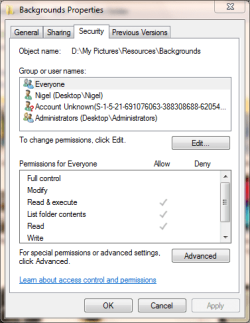
for example the everyone group on the screenshot attached would include all users and all authenticated users so to control the access this group would need to be removed. once this is done only the users you see with specific access would be able to see the file or folder
you have to be careful only to make these changes in data folders as if there is system content, (program files or DLLs (especially system files), then the results are likely to be unpredictable at best
for example the everyone group on the screenshot attached would include all users and all authenticated users so to control the access this group would need to be removed. once this is done only the users you see with specific access would be able to see the file or folder
you have to be careful only to make these changes in data folders as if there is system content, (program files or DLLs (especially system files), then the results are likely to be unpredictable at best
My Computers
-
At a glance
Windows 11 Pro x64 [Latest Release and Releas...Ryzen 9 5950X, 3.8 - 5.2 MHz64GB [2 x 32GB] DDR4 3200MHz4GB NVIDIA GEFORCE GTX 1650 Ti- Computer type
- PC/Desktop
- Computer Manufacturer/Model Number
- ChillBlast - Custom to my design
- OS
- Windows 11 Pro x64 [Latest Release and Release Preview]
- CPU
- Ryzen 9 5950X, 3.8 - 5.2 MHz
- Motherboard
- Asus Prime X570-Pro
- Memory
- 64GB [2 x 32GB] DDR4 3200MHz
- Graphics Card(s)
- 4GB NVIDIA GEFORCE GTX 1650 Ti
- Sound Card
- On-board SPDIF to 5.1 System + HDMI [5.1 system]
- Monitor(s) Displays
- 32" UHD 32 Bit HDR Monitor + 43" UHD 4K 32Bit HDR TV
- Screen Resolution
- 2 x 3840 x 2160 @60Hz
- Hard Drives
- 1TB M2 SSD OS, 500GB Fast Access SSD, 2 x 8TB Data + Various Externals from 1TB to 4TB, 10TB NAS
- PSU
- NZXT C750 80 PLUS Gold 750W Modular PSU
- Case
- Workstation Case [Matt Black]
- Cooling
- NZXT Kraken X63 280mm CPU Cooler +2x Quiet Case fans
- Keyboard
- Logitech Wireless MX Keys & K400 + others
- Mouse
- Logitech Wireless MX Master 3S
- Internet Speed
- 920 MB Down 50 MB Up
- Antivirus
- BitDefender Total Security Pro
- Browser
- Chrome (always run latest Non-Beta)
- Other Info
- Also run ...
Laptop - Quad 8GB - Windows 10 Pro x64
Nexus 7 Android tablet x2
Samsung 10.2" tablet
Blackview TAB 8 4G Android Tablet c/w Keyboard
Wacom Intuos Pro Medium Pen Pad
Wacom Intuos Pro Small Pen Pad
Wacom Expresskeys Remote
Loopdeck+ Graphics Controller
Shuttle Pro v2 Control
-
At a glance
Windows 11 Pro x64 Latest RPIntel I7 10750H 5.0GHz32GB [2x16GB] DDR4 2933 MHznVidia GTX1650Ti 4 GB GDDR6- Computer type
- Laptop
- System Manufacturer/Model Number
- Dell XPS 17 10750H
- OS
- Windows 11 Pro x64 Latest RP
- CPU
- Intel I7 10750H 5.0GHz
- Motherboard
- Dell XPS
- Memory
- 32GB [2x16GB] DDR4 2933 MHz
- Graphics Card(s)
- nVidia GTX1650Ti 4 GB GDDR6
- Sound Card
- Stock [Realtek] 4 Speaker
- Monitor(s) Displays
- 17" IPS UHD+ Infinity Edge Touchscreen
- Screen Resolution
- 3840 x 2400
- Hard Drives
- 2TB M2 NVMe, 4TB External + various 500GB & 1TB External NVMe (also have access to spinner HDD from
- PSU
- Stock
- Case
- Stock XPS Aluminium & Carbon Fibre
- Cooling
- Stock - Active Fan Control
- Keyboard
- Backlit + Various Logitech
- Mouse
- Stock Track Pad + Logitech MX Trackball
- Internet Speed
- 72 MB Down 18MB Up
- Browser
- Chrome
- Other Info
- Also run ...
Laptop - Quad 8GB - Windows 10 Pro x64
Nexus 7 Android tablet x2
10.2" tablet
Sony Z3 Android Smartphone
Wacom Intuos Pro Medium Pen Pad
Wacom Intuos Pro Small Pen Pad
Wacom Expresskeys Remote
Loopdeck+ Graphics Controller
Shuttle Pro v2 Control Pad
10TB NAS
Thanks for helpAny folder with system or administrators in the permissions will need to retain these the "authenticated users" is a catch all for remote access users and "users" are local users you will need to remove the "users" and "Authenticated users" as these will contain all user id's that exist on the system by default.
View attachment 53547
for example the everyone group on the screenshot attached would include all users and all authenticated users so to control the access this group would need to be removed. once this is done only the users you see with specific access would be able to see the file or folder
you have to be careful only to make these changes in data folders as if there is system content, (program files or DLLs (especially system files), then the results are likely to be unpredictable at best

My Computer
At a glance
windows 7
- OS
- windows 7
This can be achieved by the use of permissions but will take a little work - I would also add that the default permissions of an administrator level account (even in win7 with UAC on), does not adapt well to this.
I would recommend that you set this up in standard user accounts and keep at least one admin account to control things.
create your Standard level accounts
log in as admin account and in the properties - security tab on the folders you wish to be private remove all users except the user who needs access and the administrators, (also leave any other system related users for safety).
You will need to remove catch-all groups such as everyone and Homeusers$ and specifically add the allowed user.
Rights may be assigned as required such as read, write, modify, etc. but I would advise you leave the ownership as is or manually set to administrators group.
once set-up any user that does not have specific rights assigned will not be able to access a folder.
This is the way that access is controlled on major network systems so it is a proven system, although with major systems it is normal to assign users to groups and then assign the rights to a group
As I said it will take a little work and thought but it can provide total control of a shared system
There's no Thanks button on this forum, (May I suggest you to arrange one?)
I was looking after this high and low. your post really helped, Thanks!
Its very complicated, but works after practice.
My Computer
At a glance
Windows 7 Ultimate 64-bitAMD manchester 3800 x24 GB9800GT (Overclocked)
- Computer Manufacturer/Model Number
- Self Assembled and fully modded
- OS
- Windows 7 Ultimate 64-bit
- CPU
- AMD manchester 3800 x2
- Motherboard
- MSI K8nGM2-FID
- Memory
- 4 GB
- Graphics Card(s)
- 9800GT (Overclocked)
- Sound Card
- Realtek Onboard 7.1
- Monitor(s) Displays
- LG widescreen
- Hard Drives
- 1 TB x 2 RAID 0, Gives easily 240 MB/s.
Seagate 7200.12
- Case
- Self Modded,Acrylic side pannel with etching, DVD window,LED
- Cooling
- Slef Casted aluminium heatsinks, P4 CPU Heatsink on OC'd GFX
- Internet Speed
- HSDPA 3G
There's no Thanks button on this forum, (May I suggest you to arrange one?)
There is a rep button - the silver scales, top right of a post.
My Computer
At a glance
8 Pro x64i7 3770K 4.6GHz16GB G.Skill Trident X 2666mhzx2 EVGA 780 Ti Superclocked SLI
- Computer type
- PC/Desktop
- Computer Manufacturer/Model Number
- Systems by SmartEyeball
- OS
- 8 Pro x64
- CPU
- i7 3770K 4.6GHz
- Motherboard
- ASUS P8Z77 WS
- Memory
- 16GB G.Skill Trident X 2666mhz
- Graphics Card(s)
- x2 EVGA 780 Ti Superclocked SLI
- Sound Card
- SB X-FI Surround 5.1 PRO USB / ATH-AD900 Headphones
- Monitor(s) Displays
- x3 Dell U2410 / 58" Samsung
- Screen Resolution
- 5760*1200/ 1920*1200
- Hard Drives
- 2x Intel 520 240GB (RAID 0) * 2x WD Caviar Blacks 2TB (RAID 0) * 2TB WD Caviar Black * Sony Optirac DVD
- PSU
- Silverstone Strider Evolution 1200W
- Case
- Thermaltake Level 10 GT Snow Edition
- Cooling
- Noctua NH-D14
- Keyboard
- Topre Realforce // Ducky Shine MX Black // Filco Ninja TKL
- Mouse
- Thermaltake Theron (Highly Recommended) + Razer Imperator
- Antivirus
- MSE
- Browser
- IE, FF, WaterFox
- Other Info
- GT Extreme V2 Sim Racing Cockpit + 40" LCD and K/B Mouse stand ▼
Fanatec CSR Elite Wheel + Clubsport V1 Pedals + CSR shifter/7G-H ▼Saitek X52 Pro ▼ TrackIR 5 Pro
Buttkicker v2 Seat Rumbler with Dedicated 5.1 and Sub Woofer attached to frame ▼
=
Bloody Big Grin
Similar threads

- Replies
- 2
- Views
- 6K
- Replies
- 28
- Views
- 8K
- Replies
- 4
- Views
- 7K

- Replies
- 9
- Views
- 7K

- Replies
- 1
- Views
- 14K