Well, I may have found a way. My system is a throw away and I can mess with it all I want, so this is a disclaimer about being careful with yours.
But I was able to restore the Win 8 GUI in your situation,
by booting to the Windows 8 install media, select troubleshoot, advanced options, command prompt. By opening an administrative command prompt in Windows 8 and typing the
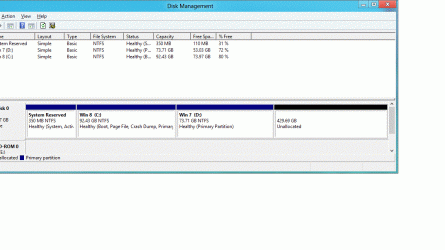
bcdboot c:\Windows command, which replaced the BCD store. Of course, c: is the Windows 8 install partition since Win 8 is in the first partition, and Win 7 in the second on the drive.
I now know, thanks to gregrocker, the command will not allow using the F8 "Repair your Computer" options in Windows 7. But in this case, it appears the option is still available in Windows 7 but not Windows 8, if it ever was.
I will be re-running the test to see if I can duplicate, I will edit this post as to whether the second test worked also.
Edit: Now confirmed with second test command does restore the Windows 8 boot GUI, but it does look like the Windows 7 F8 options are gone. This may be normal for a Windows 7/Windows 8 install, not sure. Exporting your BCD store before doing the operation might be a good idea, so you can import it back later if needed.
HTML:
Windows Boot Manager
--------------------
identifier              {bootmgr}
device                  partition=C:
description             Windows Boot Manager
locale                  en-us
inherit                 {globalsettings}
default                 {current}
resumeobject            {624f2e1a-ee99-11e1-a36b-8df5e69c0a13}
displayorder            {current}
                        {19b54205-ee91-11e1-a697-ff2d5db0e5dc}
toolsdisplayorder       {memdiag}
timeout                 30
Windows Boot Loader
-------------------
identifier              {current}
device                  partition=C:
path                    \Windows\system32\winload.exe
description             Windows 8
locale                  en-us
inherit                 {bootloadersettings}
allowedinmemorysettings 0x15000075
osdevice                partition=C:
systemroot              \Windows
resumeobject            {624f2e1a-ee99-11e1-a36b-8df5e69c0a13}
nx                      OptIn
bootmenupolicy          Standard
detecthal               Yes
Windows Boot Loader
-------------------
identifier              {19b54205-ee91-11e1-a697-ff2d5db0e5dc}
device                  partition=D:
path                    \Windows\system32\winload.exe
description             Windows 7
locale                  en-US
inherit                 {bootloadersettings}
recoverysequence        {19b54206-ee91-11e1-a697-ff2d5db0e5dc}
recoveryenabled         Yes
osdevice                partition=D:
systemroot              \Windows
resumeobject            {19b54204-ee91-11e1-a697-ff2d5db0e5dc}
nx                      OptIn