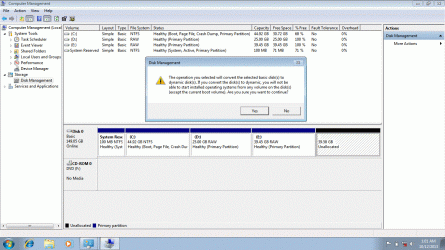
How to make unallocated space to basic type disk

mmudassir6

New member
Local time
5:50 PM
Messages
6
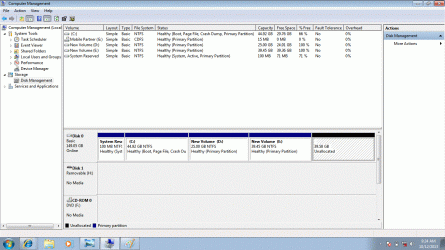
any body can help how to solve this? iwant to make unallocated space to basic disk. but a problem is occuring
New Bitmap Image (2).gif
New B.gif
 

My Computer

Computer type
Laptop
Computer Manufacturer/Model Number
HP Elitebook 8440p
OS
Windows 7 professional x64

My Computer

Computer type
PC/Desktop
Computer Manufacturer/Model Number
Custom assembled by me :}
OS
Win-7-Pro64bit 7-H-Prem-64bit
CPU
i7-5930K 2nd i9-9940x both water blocked VRM's too
Motherboard
ASUS SABERTOOTH X99 2nd ASUS x299 Apex
Memory
Trident-z 3200C14 2nd Trident-z 3600C16
Graphics Card(s)
EVGA 1080ti ftw3 2nd Titan Xp both water blocked
Sound Card
Built-in Realtek
Monitor(s) Displays
1-AOC G2460PG 24"G-Sync 144Hz/ 2nd 1-ASUS VG248QE 24" 144Hz
Screen Resolution
1920 x 1080 144Hz
Hard Drives
2-Samsung M.2 Evo & Evo Plus
2-Samsung 850 EVO 500GB SSD's/ 3-2.5 W.D. Black 1tb-&3-1tb/3-3.5 WD Black 1tb hdd's
PSU
EVGA SuperNOVA 1000-P2 2nd 1200-P2
Case
2-Corsair Obsidian Series 450D Black ATX Mid Tower
Cooling
Custom water loops
Keyboard
Logitech G710+/ 2nd Logitech G910
Mouse
2-RedDragon M901 Perdition 16400 dpi Gaming mouse = wired
Internet Speed
Comcast Ping 19ms 89.31mbps download speed 6.12mbps upload
Antivirus
Malwarebytes Pro/ Superantispyware Pro
Browser
FireFox & Pale moon
Other Info
2nd ASUS X299 Apex/Intel i9-9940x with Custom water loop/7H-Prem-x64/Corsair 450D case/Ram Trident-z 3600C16 4x8gb / Samsung970Evo plus 500gb SSD/Dual ssd EZ swap evo/PSU EVGA SuperNova 1200w-P2 80+Platinum/GPU Titan Xp /8-ML-140 on push-pull on 2-280GTX rads
will you please explain your answer. i can't understand
 

My Computer

Computer type
Laptop
Computer Manufacturer/Model Number
HP Elitebook 8440p
OS
Windows 7 professional x64
Do not convert the HD to Dynamic which is only meant to span a partition across multiple HD's!

It looks like between the time you took the first and second screenshots D and E became RAW. Are these still marked RAW which means ruined? Check now. If so install CrystalDiskInfo - Software to check the HD status. If in doubt run the HD maker's HD Diagnostic extended CD scan.

If the HD checks out and the partitions are still RAW then delete them in Disk Mgmt to re-create. I would just create one new partition for data instead of so many small ones.

As explained in the link Thrash posted to have more than four partitions you must convert or create a Logical partition which can then have as many adjacent Logical partitions as you want.

Keeping the four you have now you could convert the last one to Logical using Partition Wizard to set partition as Logical. Then the Unallocated Space to it's right can be created Logical using Partition Wizard Create Partition - Video Help .
 
Back
Top