
How to merge partitions

Jorj

New member
Local time
10:17 PM
Messages
2
Hello,

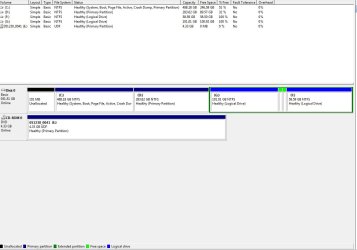
I have attempted to install ubuntu but it kept failing and I was left out with too many partitions.

I have googled this issue but I couldn't find a clear answer. Attached is a screenshot of my disk manager. My question is, how can I merge 2 partitions together?
 

Attachments
  • disk-manager.jpg
    disk-manager.jpg
    66.8 KB · Views: 166

My Computer My Computer

OS
Windows 7
CPU
Intel Core i7

My Computer My Computer

Computer Manufacturer/Model Number
Dell and Custom
OS
Systems 1 and 2: Windows 7 Enterprise x64, Win 8 Developer
CPU
System 1: i7 [email protected], System 2: AMD FX-4100 Zambezi 3.6G
Motherboard
System 1:Dell 06NWYK System 2: ASUS M5A97 AM3+
Memory
System 1: 8GB System 2: 8GB
Graphics Card(s)
System 1: ATI FirePro V4800 System 2: Radeon HD 6850
Sound Card
System 1: onboard System 2: onboard
Monitor(s) Displays
System1: Viewsonic HDMI 24"
Screen Resolution
System 1: 1920x1080 System 2: 1920x1080
Hard Drives
System 1: Mirrored .5B drives System 2: Seagate Barracuda ST1000DM003 1TB 7200 RPM 64MB Cache SATA 6.0Gb/s
Case
System 1: Dell System 2: Cooler Master
Internet Speed
10 MBPS
Easeus can fail in Resizing operations so back up files and a Win7 system image.

Disk Management cannot fail so is recommended for those functions such as these which it can do.

For other operations, we recommend free Partition Wizard bootable CD which has been used to help with hundreds of partitioning operations here without a single failure. Partition Wizard.URL
 
Do the G: / F: partitions contain data you wish to keep?

If not, then the simplest way is to simply delete G: and F: and then create a new partition in the now unallocated space.

If you do have data you wish to keep, then the Partition Wizzard mentioned above will do the trick.
 

My Computer My Computer

Computer type
PC/Desktop
Computer Manufacturer/Model Number
Systems by SmartEyeball
OS
8 Pro x64
CPU
i7 3770K 4.6GHz
Motherboard
ASUS P8Z77 WS
Memory
16GB G.Skill Trident X 2666mhz
Graphics Card(s)
x2 EVGA 780 Ti Superclocked SLI
Sound Card
SB X-FI Surround 5.1 PRO USB / ATH-AD900 Headphones
Monitor(s) Displays
x3 Dell U2410 / 58" Samsung
Screen Resolution
5760*1200/ 1920*1200
Hard Drives
2x Intel 520 240GB (RAID 0) * 2x WD Caviar Blacks 2TB (RAID 0) * 2TB WD Caviar Black * Sony Optirac DVD
PSU
Silverstone Strider Evolution 1200W
Case
Thermaltake Level 10 GT Snow Edition
Cooling
Noctua NH-D14
Keyboard
Topre Realforce // Ducky Shine MX Black // Filco Ninja TKL
Mouse
Thermaltake Theron (Highly Recommended) + Razer Imperator
Antivirus
MSE
Browser
IE, FF, WaterFox
Other Info
GT Extreme V2 Sim Racing Cockpit + 40" LCD and K/B Mouse stand ▼
Fanatec CSR Elite Wheel + Clubsport V1 Pedals + CSR shifter/7G-H ▼Saitek X52 Pro ▼ TrackIR 5 Pro
Buttkicker v2 Seat Rumbler with Dedicated 5.1 and Sub Woofer attached to frame ▼
=
Bloody Big Grin
Easeus can fail in Resizing operations so back up files and a Win7 system image.

Thanks for the warning! :cool:

I just needed to allocate some unallocated space, so it wasn't anything major. I tried the command line procedure, but it was a no-go.

I installed Easeus, the program clearly displayed my "unallocated" space and all I had to do was left click and drag what I wanted "allocated", 60 seconds and I'm done...

Jorj, your job sounds a little more difficult, and I sure don't want you messing up your computer. If gregrocker says the program is unstable, better steer clear. :geek:
 

My Computer My Computer

OS
XP pro
Back
Top