How to Network 2 Windows 7 Ultimate x64 PCs with Patch Cable?

JustNow

New member
Local time
7:06 AM
Messages
6
I only need file sharing between 2 PCs with Windows 7 Ultimate x64.

1st PC has internet. 2nd PC has no internet.
Each PC has a working networking device, and there is a correct patch cable between them.
There is no router. Hardware is not the problem.

I need help configuring settings in Windows 7 for each PC, setting up folders in each PC, or whatever it takes so I can share files between these 2 PCs.

I am not willing to look elsewhere for instructions for how to do this because I've already looked at various sites including YouTube. And this has resulted in wasting many hours over several days - just to establish a simple file sharing connection.

If YOU are an expert at this and have the patience to help me in this thread until I get this done AND you require compensation, then please name your price. I can pay by PayPal.

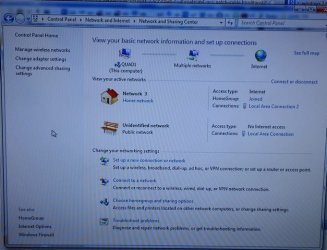
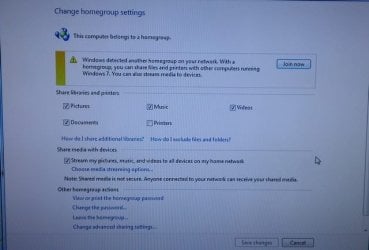
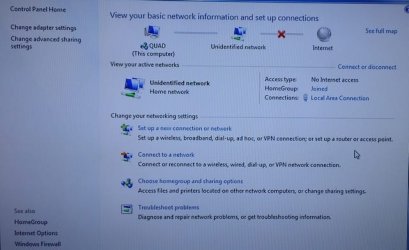
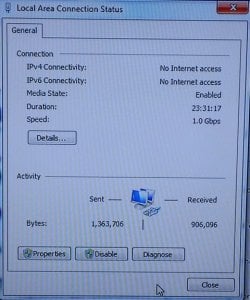
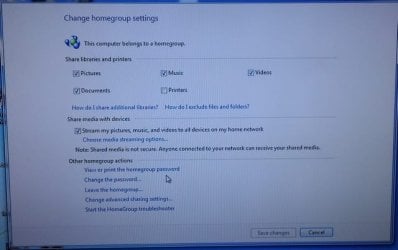
I will be posting pics to show the problem. Let me know if additional pics are required. Thank you.
 

My Computer My Computer

Computer type
PC/Desktop
Computer Manufacturer/Model Number
Two Custom PCs
OS
Windows 7 Ultimate x64
CPU
Two Quads
Memory
8 Gigs Each
Graphics Card(s)
1 Gig Memory
Welcome to sevenforums!

You should be able to share file between two PCs only if the two are connected to internet with the home network settings.

Otherwise it could be a solution at cost, to buy a network Ethernet Pci-e Card or switch/hub and plug the two pcs with a Ethernet Cat5 or Cat6 cross-over cable.

You might have to assign IP manually
How to connect two PC's using Ethernet cable
 

My Computer My Computer

Computer type
PC/Desktop
Computer Manufacturer/Model Number
Custom Build
OS
Windows 7 Professional SP1 - x64 [Non-UEFI Boot]
CPU
Ivy Bridge Core i5 3570K (Delidded)
Motherboard
Asus P8Z77-V LE PLUS
Memory
G.Skill "Ares" DDR3 PC3-12800 - 1600MHz (16Gb)
Graphics Card(s)
Asus Dual-RX480-O4G
Sound Card
Creative Sound Blaster Z w/5.1 sound system
Monitor(s) Displays
Asus IPS 23"
Screen Resolution
16/9
Hard Drives
Internal:
500Go Sata 6Gb/s (x2)
500Go Sata 3Gb/s (x2)
SSD 60Go Sata 6Gb/s
PSU
In Win C 900W Series 80+ Platinum
Case
Thermaltake Chaser A71
Cooling
Custom Water Cooling Loop
Keyboard
Cooler Master QuickFire XTi
Mouse
Razer Imperator 2012 (4G)
Antivirus
MSE
Browser
IE 11.0.xxx Rtm
Other Info
"Raid0" with Intel Smart Response Technology (HDD/SSD)
Welcome JustNow :)

How is the one computer connected to the internet ?
Is the patch cable a cross-over cable as NoN says ?
 

My Computer My Computer

Computer type
PC/Desktop
Computer Manufacturer/Model Number
Built them myself, Science Experiments !
OS
Win7 Enterprise, Win7 x86 (Ult 7600), Win7 x64 Ult 7600, TechNet RTM on AMD x64 (2.8Ghz)
CPU
AMD fx8350 4ghz, AMD-32 2400mhz, AMD-64 3200mhz, AMDx64 2.8G
Motherboard
SIS 755, ECS-K8M890M-M (Ult 7600), GigaByte & others
Memory
2gb, 4gb on the Ult 7600, 4gb on Technet RTM, 32gb on FX8350
Graphics Card(s)
Draw my own Graphics, several nVidia cards
Sound Card
on motherboard
Monitor(s) Displays
19" flat scr, 28" I-Inc widescr,22" Emprex Widescr, 23" Acer
Screen Resolution
1280 x 1024, 1440 x 900, 1920 x 1080
Hard Drives
6 pata Ide HD's & 2 Sata HD's
added 80gb external on Ult 7600 computer,
numerous extra 1tb, 2TB, 3Tb SATA HD's
A collection of ext HD Docks w/ HDs
PSU
430w, 550w, 600w, 700, 800, etc
Case
All Generic Full Towers
Cooling
Open Air & a few fans, some w/ colored LEDs
Keyboard
Compaq & Dell recycled from GoodWill
Mouse
Made in China Optical Wired Mouse
Internet Speed
Fast Cable InterNet
Antivirus
AVG Free on 24 different Desktops, NO Problems!
Browser
IE 8 is preferred, but use FireFox sometimes
Other Info
Linksys Routers, switches, & Hubs
Too Many USB Flash Drives to count, Biggest is 64GB !
Eight computers in my home network.
Sixteen computers at my business network.
Linked via TeamViewer !
Lots of old used spare computer parts everywhere!
Welcome to sevenforums!

You should be able to share file between two PCs only if the two are connected to internet with the home network settings.

Otherwise it could be a solution at cost, to buy a network Ethernet Pci-e Card or switch/hub and plug the two pcs with a Ethernet Cat5 or Cat6 cross-over cable.

You might have to assign IP manually
How to connect two PC's using Ethernet cable

PC#1 is connected to the internet. This is separate from the networking connection that I want.
I have network devices in each PC, and these are connected with the correct Cat5 Patch cable.
And these devices are working. I even have back up PCI and PCIe network cards if needed.
Again, hardware is not the problem.

I'm not asking for a solution that involves assigning IPs.
There is another way through Windows, and that's what I'm after in this thread.
 

My Computer My Computer

Computer type
PC/Desktop
Computer Manufacturer/Model Number
Two Custom PCs
OS
Windows 7 Ultimate x64
CPU
Two Quads
Memory
8 Gigs Each
Graphics Card(s)
1 Gig Memory

Attachments

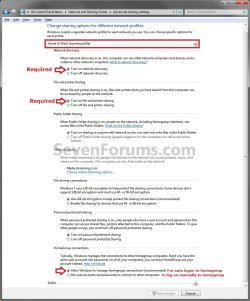
  • Advanced_Sharing_Settings.jpg
    Advanced_Sharing_Settings.jpg
    122.1 KB · Views: 2

My Computer My Computer

Computer type
PC/Desktop
Computer Manufacturer/Model Number
Custom Build
OS
Windows 7 Professional SP1 - x64 [Non-UEFI Boot]
CPU
Ivy Bridge Core i5 3570K (Delidded)
Motherboard
Asus P8Z77-V LE PLUS
Memory
G.Skill "Ares" DDR3 PC3-12800 - 1600MHz (16Gb)
Graphics Card(s)
Asus Dual-RX480-O4G
Sound Card
Creative Sound Blaster Z w/5.1 sound system
Monitor(s) Displays
Asus IPS 23"
Screen Resolution
16/9
Hard Drives
Internal:
500Go Sata 6Gb/s (x2)
500Go Sata 3Gb/s (x2)
SSD 60Go Sata 6Gb/s
PSU
In Win C 900W Series 80+ Platinum
Case
Thermaltake Chaser A71
Cooling
Custom Water Cooling Loop
Keyboard
Cooler Master QuickFire XTi
Mouse
Razer Imperator 2012 (4G)
Antivirus
MSE
Browser
IE 11.0.xxx Rtm
Other Info
"Raid0" with Intel Smart Response Technology (HDD/SSD)
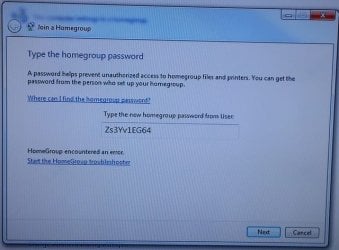
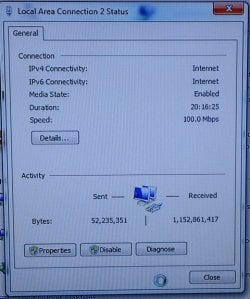
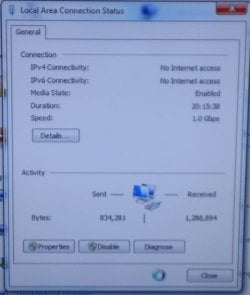
Some Pics

Take a look.
 

Attachments

  • PC#1.5.JPG
    PC#1.5.JPG
    66.5 KB · Views: 25
  • PC#1.4.JPG
    PC#1.4.JPG
    60.4 KB · Views: 24
  • PC#1.3.JPG
    PC#1.3.JPG
    59.5 KB · Views: 24
  • PC#1.2.JPG
    PC#1.2.JPG
    40.3 KB · Views: 23
  • PC#1.1.JPG
    PC#1.1.JPG
    67.1 KB · Views: 26
  • PC#1.6.JPG
    PC#1.6.JPG
    52.6 KB · Views: 25
  • PC#2.1.JPG
    PC#2.1.JPG
    50.6 KB · Views: 24
  • PC#2.2.JPG
    PC#2.2.JPG
    63 KB · Views: 24
  • PC#2.3.JPG
    PC#2.3.JPG
    47.9 KB · Views: 23

My Computer My Computer

Computer type
PC/Desktop
Computer Manufacturer/Model Number
Two Custom PCs
OS
Windows 7 Ultimate x64
CPU
Two Quads
Memory
8 Gigs Each
Graphics Card(s)
1 Gig Memory
I can already see this isn't getting me anywhere.

Can anyone reading this suggest someone or a website that I could pay to help me get this done?

Thanks.
 

My Computer My Computer

Computer type
PC/Desktop
Computer Manufacturer/Model Number
Two Custom PCs
OS
Windows 7 Ultimate x64
CPU
Two Quads
Memory
8 Gigs Each
Graphics Card(s)
1 Gig Memory
You won't be able to join because you don't have appropriate IP addressing. You need to manually assign static IP addresses to each computer on the point to point connection that is from a DIFFERENT subnet than the internet connection. Best bet would be to use a different class of IP addressing to be sure of this.

On PC1:

IP address: 172.16.1.10

Subnet Mask: 255.255.255.128

On PC2:

IP address 172.16.1.11

Subnet Mask: 255.255.255.128

This should allow you to set the network as a home network and then be able to set up the homegroup and/or share files.

Hope This Helps,
Josh
 

My Computer My Computer

Computer type
PC/Desktop
Computer Manufacturer/Model Number
Custom Built
OS
Windows 7 Professional x64 SP1 ; Windows Server 2012 R2 Standard
CPU
Intel Core i5 2400 @ 3.10GHz
Motherboard
Foxconn H67MP-S/-V/H67MP
Memory
8.0GB DDR3 @ 665MHz (2GBx4)
Graphics Card(s)
AMD Radeon HD 6870
Sound Card
Realtek High Definition Audio
Monitor(s) Displays
AOC 2243W & SMB1930NW
Screen Resolution
1440x900 & 1920x1080
Hard Drives
977GB Seagate ST31000524AS ATA Drive (SATA)
250GB WD iSCSI attached Drive
PSU
750W Gaming PSU
Case
Novatech Night
Cooling
Fan
Keyboard
Dell Standard PS/2 Keyboard
Mouse
R.A.T 07 Gaming Mouse
Internet Speed
Download: 10 Mbps Ping: 30ms Upload: 0.81 Mbps
Browser
Google Chrome
Other Info
Optiarc DVD RW AD-5260S ATA Device
I just had to transfer data from a Win 7 laptop to a new Win 10 laptop (both gigabit Ethernet). Plugged in an ethernet patch cable between them directly and after enabling file sharing on public networks on both I could see each other on the network. Didn't have to set IP addresses/subnet masks/homegroup etc. I could access the shared folders after entering the login for the destination laptop. I disabled the wifi on both to ensure the Ethernet connection was used.

Now transferring data at 2GB/min using Laplink PCMover (free).

Thought I'd post as I've seen a lot of websites saying you can't do it without a crossover cable and some configuration of the adapter settings - which is obviously wrong (at least in my case).
 

My Computer My Computer

Computer type
PC/Desktop
OS
Win 7 pro 32
Sg, gigabit Ethernet cards can sense a patch cable connected between 2 PCs and adjust the signals accordingly to simulate cross-over connection so you don't need one (I learned about this here relatively recently). In the absence of a DHCP both NICs got IPs from link-local addresses or APIPA as MS name it (169.254.x.x/16).
 

My Computer My Computer

Computer type
PC/Desktop
Computer Manufacturer/Model Number
Custom Build
OS
Windows 7 Ultimate x64 SP1
CPU
AMD Phenom 2 1090T
Motherboard
Gigabyte GA-890FXA-UD5
Memory
2x8GB Kingston HyperX Fury Black 1600Mhz Unganged
Graphics Card(s)
MSI GTX 970 Gaming 4G
Sound Card
Realtek On-Board HD 7.1 Audio / Logitech G35
Monitor(s) Displays
3xAcer GD245HQ
Screen Resolution
1920x1080
Hard Drives
Samsung 850 Pro 512GB SSD - OS /
WD Caviar Black SATA 3 - 1 TBx2 - Dynamic RAID 0 /
WD Caviar Green SATA 2 - 640GBx2 - Dynamic RAID 0 /
WD Caviar Green SATA 2 - 640GB - Internal Backup /
Seagate Barracude SATA 3 - 3TB - External Backup/ Sync
PSU
HighPower 1000W
Case
Cooler Master HAF 932
Cooling
Noctua NH-D14
Keyboard
Logitech G19
Mouse
Logitech G500
Internet Speed
100/4 Mbit Cable (100GB quota)
Antivirus
ZoneAlarm Extreme Security / MBAM Pro / MBAE Free / SAS Free
Browser
IE 11 - Firefox - Chrome
Other Info
Logitech F710/ G27/ G940/ Z5500 // TrackIR 5 // Nvidia 3D Surround Vision
Back
Top