how to play mkv file in windowa media player

Dharmendra apii

New member
Local time
5:36 PM
Messages
1
how to play mkv file in windows media player?When i try to play it show file not supported, please give me a solution for that.
 

My Computer My Computer

At a glance

Windows 7 32 bit3 gb512 MB ATI radon
Computer type
Laptop
Computer Manufacturer/Model Number
HP
OS
Windows 7 32 bit
Memory
3 gb
Graphics Card(s)
512 MB ATI radon
Hey Dharmendra, Welcome to Sevenforums.

What version of media player are you using? Normally Media player latest version supports MKV file support.

You can install codecs for media player from here. Or, you can use VLC media player. It comes with lots of codecs already installed.
 

My Computer My Computer

At a glance

Windows 11 x64i5 2500K @ 3.3 GHz16 GB DDR 3 @ 1600MhzMSI 1050TI 4GB OC version
Computer type
PC/Desktop
Computer Manufacturer/Model Number
Custom Bulid/Self made
OS
Windows 11 x64
CPU
i5 2500K @ 3.3 GHz
Motherboard
ASUS P8 Z77 V pro
Memory
16 GB DDR 3 @ 1600Mhz
Graphics Card(s)
MSI 1050TI 4GB OC version
Sound Card
On Board (Realtek HD audio)
Monitor(s) Displays
Samsung 22" LCD
Screen Resolution
1920*1080
Hard Drives
Seagate 1 TB, WD 1TB, Seagate 2 TB ( I use a lot of space)
PSU
coolermaster 750 W
Case
Coolermaster HAF912
Cooling
Coolermaster hyper 212 EVO
Keyboard
Samsung
Mouse
Dell Wireless
Internet Speed
Wireless 50 Mbps
Antivirus
AVG 2016 Internet Security
Browser
Google Chrome

My Computer My Computer

At a glance

Microsoft Windows 7 Home Premium 64-bit 7600IIx4 amd athelon 635 processor2x2gbati radeon HD 5450
Computer Manufacturer/Model Number
Hewlett packard/p6512uk
OS
Microsoft Windows 7 Home Premium 64-bit 7600
CPU
IIx4 amd athelon 635 processor
Motherboard
FOXCONN 2AA9
Memory
2x2gb
Graphics Card(s)
ati radeon HD 5450
Sound Card
(1) Realtek High Definition Audio (2) AMD High Definition
Monitor(s) Displays
samsung lcd tv 32"
Screen Resolution
1360x 768
Hard Drives
(1) WDC WD10 01FAES-60Z2A0 SATA Disk Device (2) Maxtor OneTouch USB Device (3) ST310003 33AS USB Device (4) WD My Book 1111 USB Device
PSU
?
Cooling
air!
Keyboard
wireless hp
Mouse
wireless Hp,optical
Internet Speed
1.10mb/s
Antivirus
MSE
Browser
Firefox
Personally I wouldn't install any extraneous codec packs. The simplest way to play mkvs on WMP12 is to install FFDshow and Haali Media splitter. I think that is the way I went though I fail to remember things now. Google search and you can find the minimalist way to play mkv files. Avoid indiscriminately installing codec packs. These can bring in multitude of problems.
 

My Computer My Computer

At a glance

Windows 7 Home Premium 32 bit
OS
Windows 7 Home Premium 32 bit
i agree about being careful with codec packs that is why i suggested the sharks pack, shark 007 was a member here for a while and his codecs were/are well used and recommended. i never had any issues with windows when using them. or they didnt cause any issues.
 

My Computer My Computer

At a glance

Microsoft Windows 7 Home Premium 64-bit 7600IIx4 amd athelon 635 processor2x2gbati radeon HD 5450
Computer Manufacturer/Model Number
Hewlett packard/p6512uk
OS
Microsoft Windows 7 Home Premium 64-bit 7600
CPU
IIx4 amd athelon 635 processor
Motherboard
FOXCONN 2AA9
Memory
2x2gb
Graphics Card(s)
ati radeon HD 5450
Sound Card
(1) Realtek High Definition Audio (2) AMD High Definition
Monitor(s) Displays
samsung lcd tv 32"
Screen Resolution
1360x 768
Hard Drives
(1) WDC WD10 01FAES-60Z2A0 SATA Disk Device (2) Maxtor OneTouch USB Device (3) ST310003 33AS USB Device (4) WD My Book 1111 USB Device
PSU
?
Cooling
air!
Keyboard
wireless hp
Mouse
wireless Hp,optical
Internet Speed
1.10mb/s
Antivirus
MSE
Browser
Firefox
OK @Dharmendra, I was able to google search and bring out one of my old posts :) here http://www.sevenforums.com/music-pi...an-i-play-mkv-files-wmp-12-a.html#post1546012

I too had Shark's codecs for a long time but later decided to do away with that. I no longer have it on my PC now.

Currently I am out of touch with all these and that is why I recommend that you do a thorough google search on the subject.

Before experimenting with different ways/codecs please do increase the space available for system restore points manyfold, always create a system restore point before, so that you can revert to the old point should you experience any problem. Nothing like trying out the many ways and finding the one that suits you.

EDIT: Here is another reference http://www.hack7mc.com/2009/01/playing-mkvs-in-media-center.html
 

My Computer My Computer

At a glance

Windows 7 Home Premium 32 bit
OS
Windows 7 Home Premium 32 bit

My Computer My Computer

At a glance

Vista, Windows7, Mint Mate, Zorin, Windows 8from 1.6GHz Duo to i7
Computer Manufacturer/Model Number
HP, Dell, Gateway, Toshiba - 4 laptops and 2 desktops
OS
Vista, Windows7, Mint Mate, Zorin, Windows 8
CPU
from 1.6GHz Duo to i7
Monitor(s) Displays
2x HP w2207
Hard Drives
5x HDD, 7x SSD, 12x Externals
Keyboard
with trackball - no mices
Mouse
Trackball mice
Internet Speed
DSL 6000
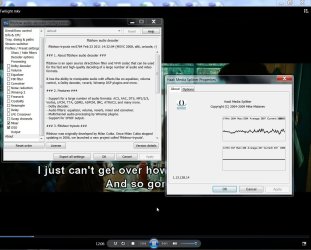
After a long time I just played an MKV movie on my Desktop just to confirm my WMP12 is set up the minimal way to play it using FFDShow and Haali Media Splitter.Hmmm...... these haven't been updated since 2011. And that was the time when I gave up on Shark007's codecs and completely uninstalled it.

11-12-2013 01-19-32.jpg

I also hold the puritan view that any video should be played in its original format and any conversion will result in less than "original". :) If you have an mkv play it as an mkv. If you have a bluray play it as a bluray. Conversion should be resorted to only when it is inevitable.
 

My Computer My Computer

At a glance

Windows 7 Home Premium 32 bit
OS
Windows 7 Home Premium 32 bit
You make a valid point. But I really never noticed any quality deterioration after a conversion. But then there is always VLC. Exposing your system to one of those codec packs is not the solution. Sharks codecs seem to be OK. But only pick the one you need.

Besides, with Format Factory you can do nifty things like crop your video or boost the audio output.
 

My Computer My Computer

At a glance

Vista, Windows7, Mint Mate, Zorin, Windows 8from 1.6GHz Duo to i7
Computer Manufacturer/Model Number
HP, Dell, Gateway, Toshiba - 4 laptops and 2 desktops
OS
Vista, Windows7, Mint Mate, Zorin, Windows 8
CPU
from 1.6GHz Duo to i7
Monitor(s) Displays
2x HP w2207
Hard Drives
5x HDD, 7x SSD, 12x Externals
Keyboard
with trackball - no mices
Mouse
Trackball mice
Internet Speed
DSL 6000
In order to play all kinds of MKV files in Windows Media Player successfully even without installing any codec, an ideal method is to convert MKV to Windows Media Player more supported format.


iDealshare VideoGo is just the ideal MKV to WMP Converter which supports converting all kinds of MKV, HD MKV to Windows Media Player supported video format like WMV, AVI, MPG, ASF. Besides converting MKV to WMP video format, it also helps to convert MKV to WMP supported audio format like WMA, MP3, WAV and etc.
 

My Computer My Computer

At a glance

Windows
Computer type
PC/Desktop
OS
Windows
@ intellectualfre $30 is a bit steep for a video converter - Handbrake is free.
 

My Computer My Computer

At a glance

Windows 7 Pro x64 sp1i7 4770K8GB Corsair Vengeance 1600MHzonboard
Computer type
PC/Desktop
Computer Manufacturer/Model Number
self build
OS
Windows 7 Pro x64 sp1
CPU
i7 4770K
Motherboard
MSI B85M-E45
Memory
8GB Corsair Vengeance 1600MHz
Graphics Card(s)
onboard
Monitor(s) Displays
LG 27MP35
Screen Resolution
1920-1080
Hard Drives
Seagate 2TB
PSU
Cooler Master GX 750
Case
Antec 300
Cooling
Seidon 120V
Internet Speed
60/18
Antivirus
MSE
Browser
Firefox
Back
Top