How to program "stop slouching !" message

pacman10

New member
Member
Local time
1:31 PM
Messages
36
I want my computer to throw up a custom message in the middle of whatever I am doing (reading mail, writing a document, Skype-ing, etc.) which reminds me to do something. The example I have in mind is a message that pops up every 5-10 minutes saying "Sit up straight in front of the computer" or "Stop slouching !"

In fact, it would be neat if the tool would pick lines at random from a .txt file and it would be even neater if the time between displays of the message could be set, e.g. every 5 minutes or every 10 minutes.

Does anyone here know whether such a utility exists or whether it could be easily set up using existing Windows 7 tools ?
 
Last edited:

My Computer

OS
Windows 7 64-bit
Does anyone here know whether such a utility exists
Its called a wife!;)
 

My Computer

Computer Manufacturer/Model Number
Hewlett packard/p6512uk
OS
Microsoft Windows 7 Home Premium 64-bit 7600
CPU
IIx4 amd athelon 635 processor
Motherboard
FOXCONN 2AA9
Memory
2x2gb
Graphics Card(s)
ati radeon HD 5450
Sound Card
(1) Realtek High Definition Audio (2) AMD High Definition
Monitor(s) Displays
samsung lcd tv 32"
Screen Resolution
1360x 768
Hard Drives
(1) WDC WD10 01FAES-60Z2A0 SATA Disk Device (2) Maxtor OneTouch USB Device (3) ST310003 33AS USB Device (4) WD My Book 1111 USB Device
PSU
?
Cooling
air!
Keyboard
wireless hp
Mouse
wireless Hp,optical
Internet Speed
1.10mb/s
Antivirus
MSE
Browser
Firefox
:roflmao: I completely agree. But for the purpose of this thread, there might be something a bit... cheaper? You know, without the wedding and reception and the honey moon... Well, okay, honey moon is something else xD
 

My Computer

Computer type
Laptop
Computer Manufacturer/Model Number
Custom
OS
Windows 7 Home Premium x64
CPU
Intel Core i5 2500K
Motherboard
MSI MS-7750
Memory
8GB DDR3
Graphics Card(s)
nVidia GeForce GTX650 Ti BOOST
Sound Card
Realtek
Monitor(s) Displays
21' Philips
Screen Resolution
Full HD
Hard Drives
1TB
PSU
500W
i dont know of any! however an alarm of some sort could be set to display a message and repeat every hour or so,
several alarms could display different messages
 

My Computer

Computer Manufacturer/Model Number
Hewlett packard/p6512uk
OS
Microsoft Windows 7 Home Premium 64-bit 7600
CPU
IIx4 amd athelon 635 processor
Motherboard
FOXCONN 2AA9
Memory
2x2gb
Graphics Card(s)
ati radeon HD 5450
Sound Card
(1) Realtek High Definition Audio (2) AMD High Definition
Monitor(s) Displays
samsung lcd tv 32"
Screen Resolution
1360x 768
Hard Drives
(1) WDC WD10 01FAES-60Z2A0 SATA Disk Device (2) Maxtor OneTouch USB Device (3) ST310003 33AS USB Device (4) WD My Book 1111 USB Device
PSU
?
Cooling
air!
Keyboard
wireless hp
Mouse
wireless Hp,optical
Internet Speed
1.10mb/s
Antivirus
MSE
Browser
Firefox
I always use this. [link]
 

My Computer

Computer type
PC/Desktop
Computer Manufacturer/Model Number
Custom built
OS
Windows 8 Pro 64-bit
CPU
Intel Core i7 950 @4.4GHz
Motherboard
EVGA 131-GT-E767
Memory
12GB DDR3 1333MHz @1400 (9-9-9-24)
Graphics Card(s)
2x AMD Radeon HD 6770
Sound Card
Sound Blaster Audigy
Monitor(s) Displays
Acer S231HL + Acer E19T5W
Screen Resolution
1920x1080 + 1440x900
Hard Drives
128GB Samsung 840 Pro
1TB Seagate Barracuda 7200RPM 64mb
500GB Seagate Barracuda 7200RPM 16mb
PSU
Corsair GS800
Case
Custom-made
Cooling
CM Hyper212+, lots of fans
Keyboard
NMB RT8255C+
Mouse
Func MS-3
Internet Speed
30/1.5
Antivirus
Microsoft Security Essentials/Spybot SD/Malwarebytes
Browser
Google Chrome
Other Info
Onkyo TX-27 receiver & two Realistic Optimus T100s.
Thanks for this but I already have an alarm. I'm rather looking for a utility which throws up messages at random times. I'm sure something like this must already exist because it would be useful for other purposes, e.g. for throwing up aphorisms and philosophical sayings.
 

My Computer

OS
Windows 7 64-bit
If you really need it i could programm something in vbs for you.
But i'd need the right motivation :P
 

My Computer

OS
Windows 7 Ultimate 64 bit
Thanks very much Ascor but it's not so important that I'd want to invest anything in it. I just thought it might be possible with some existing Windows 7 utility or some utility out there in the WWW that I haven't yet discovered.
 

My Computer

OS
Windows 7 64-bit
Try it with the tool Win-Fehler.It creates fakeerrors in a random time and you can use custom alerts with your texts. Maybe it isuseful!
 

My Computer

OS
Windows 7 Home Premium 32bit
Thanks very much. An interesting oblique approach to fulfilling this need. I haven't yet worked out whether I can dispense with the database that comes with the program and make my own messages but I'm going through the FAQs to check this out.
 

My Computer

OS
Windows 7 64-bit
Hi pacman10

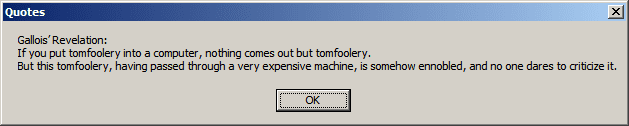
I couldn't find any program that did what you wanted, so I wrote a simple script to read a simple text file and display a random line from that file.

Code:
<job id="vbs">
    <script language="VBScript">
        Set objFSO=CreateObject("Scripting.FileSystemObject")
        Set objReadFile=objFSO.OpenTextFile("Quotes.txt", 1)
        I=1
        Do Until objReadFile.AtEndOfStream
           Redim Preserve arrData(I)
           arrData(I)=Replace(objReadFile.ReadLine, "vbCrLf", (CHR(13) & CHR(10)))
           I=I+1
        Loop
        objReadFile.Close

        Randomize
        MyNumber=Int(Rnd()*UBound(arrData))+1
        'WScript.Echo MyNumber

        strContents=arrData(MyNumber)
        'WScript.Echo strContents
        MsgBox strContents, 0, "Quotes"
    </script>
</job>
You can save this to a file with the extension .wsf and create a shortcut with WScript "Path to the wsf file" anywhere. The data file 'Quotes.txt' must be in the same folder as the .wsf file.
If you check the data file I've attached you'll find a few lines with vbCrLf. Wherever you add vbCrLf to a line, a line feed [ENTER] will be added.

You can then use Task Scheduler to run the shortcut repetitively.
http://www.sevenforums.com/tutorials/12444-task-scheduler-create-new-task.html

Quote.png

I've attached the files also with this post.
 

Attachments

My Computer

Computer type
Laptop
Computer Manufacturer/Model Number
HP EliteBook 8530w Mobile Workstation
OS
Windows 7 Ultimate x64 (XP, 98SE, 95, 3.11, DOS 7.10 on VM) + Ubuntu 10.04 LTS Lucid Lynx
CPU
Intel Core 2 Duo Processor P8600 (2.40 GHz, 3 MB L2 cache)
Motherboard
Mobile Intel PM45 Express Chipset ICH9M-Enhanced
Memory
4GB 800 MHz DDR2 SDRAM
Graphics Card(s)
ATI Mobility FireGL V5700 with 256 MB
Sound Card
SoundMAX Integrated Digital HD Audio
Monitor(s) Displays
15.4-inch WXGA anti-glare (1280 x 800 resolution)
Screen Resolution
1280 x 800
Hard Drives
500GB + 1TB
Mouse
Synaptics PS/2 Port Touchpad, USB Mouse
Internet Speed
4 Mbps
Antivirus
MSE
Browser
Firefox, Chrome, IE
Other Info
Authentec AES2810 Fingerprint Reader
Hi Gladson1976,

Thanks very much indeed for taking the trouble to write this script. Very neat !

I'm still trying to work out how to fire it up with Task Scheduler at, say, 6 hourly intervals. Task Scheduler only offers Daily, Weekly, etc. as options.

You really ought to publish this script under a snappy name. I'm sure lots of people would use it. It could also be used to throw up aphorisms and jokes. Attached is a list of sayings that some people might like if it's their kind of style. Unfortunately I can't remember where this list came from. I don't like stealing things and would like to have been able to attribute it to its author or compiler.

Anyway, back to finding out how Task Scheduler works !

Thanks again.
 

Attachments

My Computer

OS
Windows 7 64-bit
well done gladson, some thing that occured to me when reading another thread about vocal messages on startup was that you could possibly have a recorded message and set it as a system sound , perhaps when closing a programme to say your message . not sure exactly how you would go about it but its a thought and if anyone knows how perhaps it could work, you could find a text to speach site where you can type your message then have sound effects and different voices (from anna)
anyone?
 

My Computer

Computer Manufacturer/Model Number
Hewlett packard/p6512uk
OS
Microsoft Windows 7 Home Premium 64-bit 7600
CPU
IIx4 amd athelon 635 processor
Motherboard
FOXCONN 2AA9
Memory
2x2gb
Graphics Card(s)
ati radeon HD 5450
Sound Card
(1) Realtek High Definition Audio (2) AMD High Definition
Monitor(s) Displays
samsung lcd tv 32"
Screen Resolution
1360x 768
Hard Drives
(1) WDC WD10 01FAES-60Z2A0 SATA Disk Device (2) Maxtor OneTouch USB Device (3) ST310003 33AS USB Device (4) WD My Book 1111 USB Device
PSU
?
Cooling
air!
Keyboard
wireless hp
Mouse
wireless Hp,optical
Internet Speed
1.10mb/s
Antivirus
MSE
Browser
Firefox
Back
Top