Solved How to read FAT32 formatted external drive on Windows 7?

bitmug

New member
Local time
1:03 AM
Messages
3
Location
Milan, Italy
I had a DVD recorder with internal HDD (Nortek, ndvx hd 160 p).
It was repaired once, but the second time it stopped working, the repairer said the vendor didn't longer provide spare parts.
I asked him to give me the HDD back as I had downloaded tons of home made movie of
my kids from a videocamera.
I bought a logilink bridge (USB2.0 to IDE & SATA) and I expected to see it as an external drive once collected to the PC.
Actually the tool seems to work fine but I do not see any drive.
I found on the web few information about how files are stored on that recorder, they used FAT32 file system.

On a previous thread "Windows 7 unable to read external drive formatted FAT32"
there is a nice procedure from user "balak46", last point is:
"4. Start ->Mycomputer->Rightclick-> Manage ->System->diskmanage.
See if your drive shows up without a letter. Assign a letter and it will work."
Actually my external drive shows up without a letter, but how can I assign one to it?

Thanks
 

Attachments
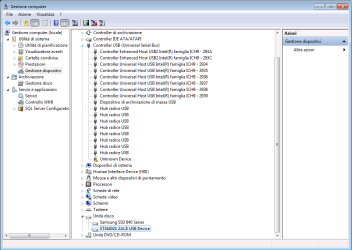
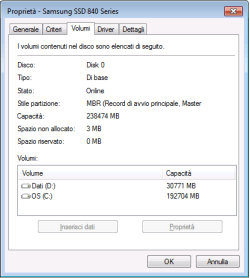
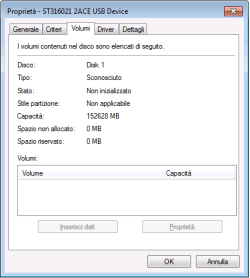
  • disco n1.png
    disco n1.png
    23.8 KB · Views: 1
  • disco n2.png
    disco n2.png
    7.4 KB · Views: 35
  • disco n3.png
    disco n3.png
    6.7 KB · Views: 35

My Computer My Computer

At a glance

64
Computer type
PC/Desktop
OS
64
Right click the drive in Disk Management to assign it a letter.
 

My Computer My Computer

At a glance

Windows 10 Pro x64Intel Core i7 6700KGSkill TridentZ RGB 16GB 3600 16-16-16-36EVGA GTX 980 Ti SC x2
Computer type
PC/Desktop
Computer Manufacturer/Model Number
Skylake Special #666
OS
Windows 10 Pro x64
CPU
Intel Core i7 6700K
Motherboard
Asus Sabertooth Z170 Mark 1
Memory
GSkill TridentZ RGB 16GB 3600 16-16-16-36
Graphics Card(s)
EVGA GTX 980 Ti SC x2
Sound Card
Realtek High Definition
Monitor(s) Displays
AOC G2460PG
Screen Resolution
1920 x 1080 144Hz
Hard Drives
Samsung 860 Pro 256GB, Seagate Barracuda 4TB x2
PSU
EVGA 1000 P2, EVGA White Custom Braided Cables
Case
Corsair Vengeance C70 Gunmetal Black
Cooling
Corsair H100i v2, Corsair ML120 x2, Thermal Grizzly Kryonaut
Keyboard
Logitech G910 Orion Spectrum
Mouse
Logitech G700s
Internet Speed
Verizon Fios Quantum Gateway 75/75
Antivirus
Windows Defender, Malwarebytes Free 3.8.3
Browser
Chrome
Other Info
Corsair SP120 x4, LG Blu-ray Drive, Durabrand HT-395 100 Watt Dolby Digital Amp, Corsair H2100 Wireless 7.1 Headset
In Start right-click Computer and choose Manage. In the Disk Management section locate the drive in question, right-click it and make a choice. If it has a partition on it and has been formatted you should be able to assign a drive letter. It won't allow using a letter already in use. I find no problem using FAT32 drives with Windows, a number of USB Thumb/Flash drives will be FAT32 or sometimes FAT/FAT16 if 2GB or smaller size.

Sorry AddRAM, got interrupted in my typing by arrival of computer to clean up and hadn't hit the submit.
 

My Computer My Computer

At a glance

Windows 7 Ultimate 64-bit, Windows 8.1 64-bit...
Computer type
PC/Desktop
Computer Manufacturer/Model Number
Customs, Dell, Gateway, HP, Toshiba, Acer, ASUS
OS
Windows 7 Ultimate 64-bit, Windows 8.1 64-bit, Mac OS X 10.10, Linux Mint 17, Windows 10 Pro TP
Keyboard
Microsoft
Mouse
Microsoft
Thanks for the suggestion. I am cautions as I don't want to damage the HD content.

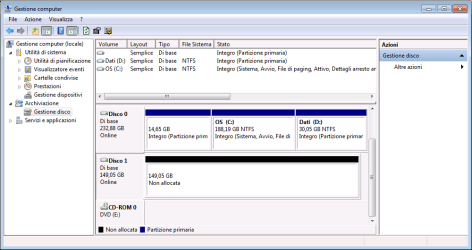
The annexed picture shows what I get using disk manager.

The possible option rightclicking on the "Disco1" icon are:
- convert to dynamic disk
- convert to GPT disk.

Which one should I opt for? Thanks
 

Attachments

  • disco n5.png
    disco n5.png
    18.4 KB · Views: 1

My Computer My Computer

At a glance

64
Computer type
PC/Desktop
OS
64
I am cautions as I don't want to damage the HD content.
I've always found that situation means the content is lost.

However, there are firms such as Kroll's Ontrack that usually can recover data as long nothing was done to the drive, not cheap. I've used them a couple of small businesses to retrieve the company books when a backup wasn't available.
 

My Computer My Computer

At a glance

Windows 7 Ultimate 64-bit, Windows 8.1 64-bit...
Computer type
PC/Desktop
Computer Manufacturer/Model Number
Customs, Dell, Gateway, HP, Toshiba, Acer, ASUS
OS
Windows 7 Ultimate 64-bit, Windows 8.1 64-bit, Mac OS X 10.10, Linux Mint 17, Windows 10 Pro TP
Keyboard
Microsoft
Mouse
Microsoft
Hi bitmug,

Are you sure that that HDD uses FAT32 file system? It could be some misinformation unless you can point me to the exact references. (Windows 7 can read FAT32 format. Most USB pen drives are FAT32 formatted.)

What I have read is "The file system used on the hard drives of these recorders is a variation of UFS that is deliberately designed to be unreadable by anything but the recorder itself. Standard UFS recovery tools don't work because they can't fix whatever proprietary file glitch is preventing the recorder from reading the drive." Those HDDs are usually not the consumer drives but specially manufactured for use in DVD recorders.

That would mean that it is as good as gone with the wind.

If the manufacturer is still alive and kicking, you can contact them to ascertain the true state of affairs.

EDIT: The only solution I can think of: If you can find another willing owner with the same machine, you can substitute your HDD and if it reads well, play and copy the contents to some other media with conventional file format.
 

My Computer My Computer

At a glance

Windows 7 Home Premium 32 bit
OS
Windows 7 Home Premium 32 bit

My Computer My Computer

At a glance

Vista, Windows7, Mint Mate, Zorin, Windows 8from 1.6GHz Duo to i7
Computer Manufacturer/Model Number
HP, Dell, Gateway, Toshiba - 4 laptops and 2 desktops
OS
Vista, Windows7, Mint Mate, Zorin, Windows 8
CPU
from 1.6GHz Duo to i7
Monitor(s) Displays
2x HP w2207
Hard Drives
5x HDD, 7x SSD, 12x Externals
Keyboard
with trackball - no mices
Mouse
Trackball mice
Internet Speed
DSL 6000
Thanks everyone, based on your answers I realise that the problem is probably due to how files are stored on the HDD by the DVD recorder. I took for good the indication I found on a chat and tried to act accordingly (FAT32). Unfortunately it is a discontinued product and it's not easy to find information about it.
 

My Computer My Computer

At a glance

64
Computer type
PC/Desktop
OS
64
Back
Top