
How to remove access denied

bobsscgirl

New member
Member
Local time
3:58 PM
Messages
78
Location
the land of Dorothy and Toto, where?
I think when I recently installed RegCurePro I started something with regard to my external hard drive. I had to have my external hard drive detached when I boot up. So in a sense I have been used to dealing with the external hard drive.Upon the installation of the RegCurePro I started getting the access denied msg. when I tried to open anything on my hard drive. I have uninstalled RegCurePro but am still getting the msg. My husband has copied all the files on my external hard drive to his pc and I will be reformating the external hard drive and transferring my files to it. Question what if I still get the access denied msg.? Any thoughts or suggestions would be appreciated!
 

My Computer

Computer Manufacturer/Model Number
Compaq
OS
Win7Home Premium x64
CPU
AMD Athlon(tm) Dual Core Processor 4450e
Memory
3.00 GB
Sound Card
Realtek
Monitor(s) Displays
View Sonic
Hard Drives
ST325031 OAS SCSI
Standard S-ATA Hard Drive USB

My Computer

Computer type
PC/Desktop
Computer Manufacturer/Model Number
Lenovo IdeaCenter 450
OS
Windows 10 Pro X64
CPU
Intel Quad Core i7-4770 @ 3.4Ghz
Memory
16.0GB PC3-12800 DDR3 SDRAM 1600 MHz
Graphics Card(s)
Intel Integrated HD Graphics
Sound Card
Realtek HD Audio
Monitor(s) Displays
HP 22" LCD
Screen Resolution
1680 x 1050
Hard Drives
250GB Samsung EVO SATA-3 SSD
2TB Seagate ST2000DM001 SATA-2
1.5TB Seagate ST3150041AS SATA
Keyboard
Dell USB
Mouse
Lenovo USB
Internet Speed
Cable via Road Runner 3MB Upload, 30MB Download
Antivirus
Windows Defender, MBAM Pro, MBAE
Browser
Seamonkey
Other Info
UEFI/GPT
PLDS DVD-RW DH16AERSH
How to remove access denied part 2

Future help needed. Suggestion did not work????
 

My Computer

Computer Manufacturer/Model Number
Compaq
OS
Win7Home Premium x64
CPU
AMD Athlon(tm) Dual Core Processor 4450e
Memory
3.00 GB
Sound Card
Realtek
Monitor(s) Displays
View Sonic
Hard Drives
ST325031 OAS SCSI
Standard S-ATA Hard Drive USB
Were you able to take ownership of the external drive?
 

My Computer

Computer type
PC/Desktop
Computer Manufacturer/Model Number
Lenovo IdeaCenter 450
OS
Windows 10 Pro X64
CPU
Intel Quad Core i7-4770 @ 3.4Ghz
Memory
16.0GB PC3-12800 DDR3 SDRAM 1600 MHz
Graphics Card(s)
Intel Integrated HD Graphics
Sound Card
Realtek HD Audio
Monitor(s) Displays
HP 22" LCD
Screen Resolution
1680 x 1050
Hard Drives
250GB Samsung EVO SATA-3 SSD
2TB Seagate ST2000DM001 SATA-2
1.5TB Seagate ST3150041AS SATA
Keyboard
Dell USB
Mouse
Lenovo USB
Internet Speed
Cable via Road Runner 3MB Upload, 30MB Download
Antivirus
Windows Defender, MBAM Pro, MBAE
Browser
Seamonkey
Other Info
UEFI/GPT
PLDS DVD-RW DH16AERSH
I got the option to take ownership to appear in the drop menu. Unfortunately the problem still exists. I have verified that I am the administrator on my computer. I appreciate your assistance.
 

My Computer

Computer Manufacturer/Model Number
Compaq
OS
Win7Home Premium x64
CPU
AMD Athlon(tm) Dual Core Processor 4450e
Memory
3.00 GB
Sound Card
Realtek
Monitor(s) Displays
View Sonic
Hard Drives
ST325031 OAS SCSI
Standard S-ATA Hard Drive USB
Once the option is available, you to use it to take ownership of the external drive by right clicking on it in Windows Explorer and selecting Take Ownership.
 

My Computer

Computer type
PC/Desktop
Computer Manufacturer/Model Number
Lenovo IdeaCenter 450
OS
Windows 10 Pro X64
CPU
Intel Quad Core i7-4770 @ 3.4Ghz
Memory
16.0GB PC3-12800 DDR3 SDRAM 1600 MHz
Graphics Card(s)
Intel Integrated HD Graphics
Sound Card
Realtek HD Audio
Monitor(s) Displays
HP 22" LCD
Screen Resolution
1680 x 1050
Hard Drives
250GB Samsung EVO SATA-3 SSD
2TB Seagate ST2000DM001 SATA-2
1.5TB Seagate ST3150041AS SATA
Keyboard
Dell USB
Mouse
Lenovo USB
Internet Speed
Cable via Road Runner 3MB Upload, 30MB Download
Antivirus
Windows Defender, MBAM Pro, MBAE
Browser
Seamonkey
Other Info
UEFI/GPT
PLDS DVD-RW DH16AERSH
I am sorry I was not specific in my last message. I did use it to attempt gain ownership. I still get the error msg.
 

My Computer

Computer Manufacturer/Model Number
Compaq
OS
Win7Home Premium x64
CPU
AMD Athlon(tm) Dual Core Processor 4450e
Memory
3.00 GB
Sound Card
Realtek
Monitor(s) Displays
View Sonic
Hard Drives
ST325031 OAS SCSI
Standard S-ATA Hard Drive USB
Formatting the drive (use quick format, that's all that's needed) should definitely fix the problem.

You might also think about doing a System Restore to before you installed RegCurePro.
 

My Computer

Computer type
PC/Desktop
Computer Manufacturer/Model Number
Lenovo IdeaCenter 450
OS
Windows 10 Pro X64
CPU
Intel Quad Core i7-4770 @ 3.4Ghz
Memory
16.0GB PC3-12800 DDR3 SDRAM 1600 MHz
Graphics Card(s)
Intel Integrated HD Graphics
Sound Card
Realtek HD Audio
Monitor(s) Displays
HP 22" LCD
Screen Resolution
1680 x 1050
Hard Drives
250GB Samsung EVO SATA-3 SSD
2TB Seagate ST2000DM001 SATA-2
1.5TB Seagate ST3150041AS SATA
Keyboard
Dell USB
Mouse
Lenovo USB
Internet Speed
Cable via Road Runner 3MB Upload, 30MB Download
Antivirus
Windows Defender, MBAM Pro, MBAE
Browser
Seamonkey
Other Info
UEFI/GPT
PLDS DVD-RW DH16AERSH
Thank you for getting back to me. I was wondering if my registry might have been corrupted when I installed RegCurePro? By the way I agree backup would have been a good step, but we all know about hindsight! Would the quick format be effective if my registry is affected?
 

My Computer

Computer Manufacturer/Model Number
Compaq
OS
Win7Home Premium x64
CPU
AMD Athlon(tm) Dual Core Processor 4450e
Memory
3.00 GB
Sound Card
Realtek
Monitor(s) Displays
View Sonic
Hard Drives
ST325031 OAS SCSI
Standard S-ATA Hard Drive USB
Registry should not have anything to do with the problem as far as I can see.

Try it, see what happens.
 

My Computer

Computer type
PC/Desktop
Computer Manufacturer/Model Number
Lenovo IdeaCenter 450
OS
Windows 10 Pro X64
CPU
Intel Quad Core i7-4770 @ 3.4Ghz
Memory
16.0GB PC3-12800 DDR3 SDRAM 1600 MHz
Graphics Card(s)
Intel Integrated HD Graphics
Sound Card
Realtek HD Audio
Monitor(s) Displays
HP 22" LCD
Screen Resolution
1680 x 1050
Hard Drives
250GB Samsung EVO SATA-3 SSD
2TB Seagate ST2000DM001 SATA-2
1.5TB Seagate ST3150041AS SATA
Keyboard
Dell USB
Mouse
Lenovo USB
Internet Speed
Cable via Road Runner 3MB Upload, 30MB Download
Antivirus
Windows Defender, MBAM Pro, MBAE
Browser
Seamonkey
Other Info
UEFI/GPT
PLDS DVD-RW DH16AERSH
My husband(linux user) talked to someone where he has had some work done on his computer. The tech thought it was something in the registry that could only be fixed by someone who is experienced. I will check out your solution later on tonight, right now on to supper! Again that you for you assistance.
 

My Computer

Computer Manufacturer/Model Number
Compaq
OS
Win7Home Premium x64
CPU
AMD Athlon(tm) Dual Core Processor 4450e
Memory
3.00 GB
Sound Card
Realtek
Monitor(s) Displays
View Sonic
Hard Drives
ST325031 OAS SCSI
Standard S-ATA Hard Drive USB
I did try it and there was no change. I still get access denied error msg.
 

My Computer

Computer Manufacturer/Model Number
Compaq
OS
Win7Home Premium x64
CPU
AMD Athlon(tm) Dual Core Processor 4450e
Memory
3.00 GB
Sound Card
Realtek
Monitor(s) Displays
View Sonic
Hard Drives
ST325031 OAS SCSI
Standard S-ATA Hard Drive USB
You did a quick format of the drive and you still can't access it??????
 

My Computer

Computer type
PC/Desktop
Computer Manufacturer/Model Number
Lenovo IdeaCenter 450
OS
Windows 10 Pro X64
CPU
Intel Quad Core i7-4770 @ 3.4Ghz
Memory
16.0GB PC3-12800 DDR3 SDRAM 1600 MHz
Graphics Card(s)
Intel Integrated HD Graphics
Sound Card
Realtek HD Audio
Monitor(s) Displays
HP 22" LCD
Screen Resolution
1680 x 1050
Hard Drives
250GB Samsung EVO SATA-3 SSD
2TB Seagate ST2000DM001 SATA-2
1.5TB Seagate ST3150041AS SATA
Keyboard
Dell USB
Mouse
Lenovo USB
Internet Speed
Cable via Road Runner 3MB Upload, 30MB Download
Antivirus
Windows Defender, MBAM Pro, MBAE
Browser
Seamonkey
Other Info
UEFI/GPT
PLDS DVD-RW DH16AERSH
Yes
 

My Computer

Computer Manufacturer/Model Number
Compaq
OS
Win7Home Premium x64
CPU
AMD Athlon(tm) Dual Core Processor 4450e
Memory
3.00 GB
Sound Card
Realtek
Monitor(s) Displays
View Sonic
Hard Drives
ST325031 OAS SCSI
Standard S-ATA Hard Drive USB
That is amazing. I can't fathom how that is possible.

Can you boot to the Advanced Boot Options Menu by pressing F8 during boot. If you get there select Safe Mode. Login and see if you can access the external drive.

If not, enable the hidden Administrator account then login as Administrator and try it.

First, open a Elevated Command Prompt:
Click on the Start button and type cmd.
DO NOT press Enter or click Go.
Look at the upper part of the window and you will see cmd.exe.
Right click on it and select Run as Administrator.
Enable hidden administrator:
Type net user administrator /active:yes and press Enter.
Logoff your account and logon as Administrator:
Click Start, click the arrow to the right of Shutdown and select Logoff.
Select Administrator to login as.
Try the external drive again.

Post results please.

Note: To disable Administrator, use /active:no.
 

My Computer

Computer type
PC/Desktop
Computer Manufacturer/Model Number
Lenovo IdeaCenter 450
OS
Windows 10 Pro X64
CPU
Intel Quad Core i7-4770 @ 3.4Ghz
Memory
16.0GB PC3-12800 DDR3 SDRAM 1600 MHz
Graphics Card(s)
Intel Integrated HD Graphics
Sound Card
Realtek HD Audio
Monitor(s) Displays
HP 22" LCD
Screen Resolution
1680 x 1050
Hard Drives
250GB Samsung EVO SATA-3 SSD
2TB Seagate ST2000DM001 SATA-2
1.5TB Seagate ST3150041AS SATA
Keyboard
Dell USB
Mouse
Lenovo USB
Internet Speed
Cable via Road Runner 3MB Upload, 30MB Download
Antivirus
Windows Defender, MBAM Pro, MBAE
Browser
Seamonkey
Other Info
UEFI/GPT
PLDS DVD-RW DH16AERSH
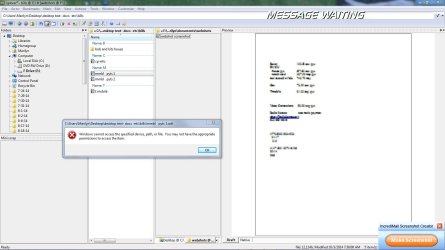
In reading the advice you gave me in your last post I realized since my pc will not boot with the external hard drive attached it would present a problem in following the steps you listed. If the external hard drive is attached the boot up process, I guess you could day, hangs up or is in neutral. Subsequent to boot up I can attach external hard drive and it is recognized, with no problem thereafter. In realizing I was getting access denied when I tried to open an Open Office document I wondered if the RegCurePro had affected that program resulting in the access denied msg. My husband had heard of a similar program, LibreOffice. I installed it and attempted to open a document. Left click results in attachment one and right click allows me to use the option of open with, resulting in a document in LibreOffice format. I have uninstalled Open Office. Any further advice or insight would be appreciated.
 

Attachments

  • IncrediMail_Screenshot_0007.jpg
    IncrediMail_Screenshot_0007.jpg
    103.2 KB · Views: 1

My Computer

Computer Manufacturer/Model Number
Compaq
OS
Win7Home Premium x64
CPU
AMD Athlon(tm) Dual Core Processor 4450e
Memory
3.00 GB
Sound Card
Realtek
Monitor(s) Displays
View Sonic
Hard Drives
ST325031 OAS SCSI
Standard S-ATA Hard Drive USB
I'm lost again, not really sure where you are.

You said you formatted the external drive (quick format). That means you were able to access it.
Was it after you restored the files to the drive that you can no longer access the files on it?
Specific files or all files and folders?

What program are you using to access the drive? Doesn't look like Windows Explorer, something called exp[lorer2? Try plain old windows Explorer, what happens?

As for my previous post. Remove the drive, boot as described. Connect drive and test.
 

My Computer

Computer type
PC/Desktop
Computer Manufacturer/Model Number
Lenovo IdeaCenter 450
OS
Windows 10 Pro X64
CPU
Intel Quad Core i7-4770 @ 3.4Ghz
Memory
16.0GB PC3-12800 DDR3 SDRAM 1600 MHz
Graphics Card(s)
Intel Integrated HD Graphics
Sound Card
Realtek HD Audio
Monitor(s) Displays
HP 22" LCD
Screen Resolution
1680 x 1050
Hard Drives
250GB Samsung EVO SATA-3 SSD
2TB Seagate ST2000DM001 SATA-2
1.5TB Seagate ST3150041AS SATA
Keyboard
Dell USB
Mouse
Lenovo USB
Internet Speed
Cable via Road Runner 3MB Upload, 30MB Download
Antivirus
Windows Defender, MBAM Pro, MBAE
Browser
Seamonkey
Other Info
UEFI/GPT
PLDS DVD-RW DH16AERSH
Both before and after the quick format I got the access denied response when I attempted to assess the hard drive. I tried to open a sampling of files with the access denied response. As mentioned in my last post:
In realizing I was getting access denied when I tried to open an Open Office document I wondered if the RegCurePro had affected that program resulting in the access denied msg. My husband had heard of a similar program, LibreOffice. I installed it and attempted to open a document. Left click results in attachment one and right click allows me to use the option of open with, resulting in a document in LibreOffice format. I have uninstalled Open Office. Any further advice or insight would be appreciated.
It seems to be the case that subsequent to my use of LibreOffice and my using the open with option that I am accessing the files. I am listed as the administrator. What purpose would the test have? I am using xplorer2.
 

My Computer

Computer Manufacturer/Model Number
Compaq
OS
Win7Home Premium x64
CPU
AMD Athlon(tm) Dual Core Processor 4450e
Memory
3.00 GB
Sound Card
Realtek
Monitor(s) Displays
View Sonic
Hard Drives
ST325031 OAS SCSI
Standard S-ATA Hard Drive USB
I hate to keep beating on the same question and I'm sure you are getting sick of it, but I still don't understand.

You said:

Both before and after the quick format I got the access denied response when I attempted to assess the hard drive. I tried to open a sampling of files with the access denied response.
If you formatted the drive, there would be no files on it, so I'm concerned that you didn't actually format the drive as you thought you did.

As I asked before, was it after you restored the files to the drive that you can no longer access the files on it?

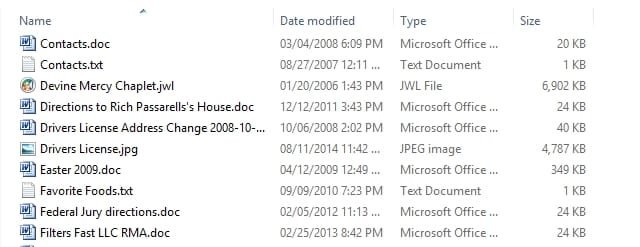
What is the file type ( the part after the . in a file name) that is causing the access denied or is it all files on the drive? You may have to go into Control Panel, Folder Options, View tab and uncheck Hide extensions for known filetypes before you will see the file extensions. The following is in Details view showing file extensions:

FileExts.jpg

Left click results in attachment one and right click allows me to use the option of open with, resulting in a document in LibreOffice format.
So right click and Open with works?

What is the default (highlighted) action shown when you right click on the file? Is it Open or something else?
 

My Computer

Computer type
PC/Desktop
Computer Manufacturer/Model Number
Lenovo IdeaCenter 450
OS
Windows 10 Pro X64
CPU
Intel Quad Core i7-4770 @ 3.4Ghz
Memory
16.0GB PC3-12800 DDR3 SDRAM 1600 MHz
Graphics Card(s)
Intel Integrated HD Graphics
Sound Card
Realtek HD Audio
Monitor(s) Displays
HP 22" LCD
Screen Resolution
1680 x 1050
Hard Drives
250GB Samsung EVO SATA-3 SSD
2TB Seagate ST2000DM001 SATA-2
1.5TB Seagate ST3150041AS SATA
Keyboard
Dell USB
Mouse
Lenovo USB
Internet Speed
Cable via Road Runner 3MB Upload, 30MB Download
Antivirus
Windows Defender, MBAM Pro, MBAE
Browser
Seamonkey
Other Info
UEFI/GPT
PLDS DVD-RW DH16AERSH
I am not tired of it, more so I appreciate your patience and persistence with the issue. I thought I had stated that my husband had copied all the files on my external hard drive to his pc. I did the quick format and checked the drive. It was blank after the quick format. My husband then transferred the files back to my external drive.

Both before and after the quick format I got the access denied response when I attempted to assess the hard drive. I tried to open a sampling of files with the access denied response.

The files in question were under the Open Office program.

In realizing I was getting access denied when I tried to open an Open Office document I wondered if the RegCurePro had affected that program resulting in the access denied msg. My husband had heard of a similar program, LibreOffice. I installed it and attempted to open a document. Left click results in attachment one and right click allows me to use the option of open with, resulting in a document in LibreOffice format. I have uninstalled Open Office.

You asked:

*So right click and Open with works?

right click results in previously noted attachment 1 but using open with it opens


*What is the default (highlighted) action shown when you right click on the file? Is it Open or something else? .....

open
 

My Computer

Computer Manufacturer/Model Number
Compaq
OS
Win7Home Premium x64
CPU
AMD Athlon(tm) Dual Core Processor 4450e
Memory
3.00 GB
Sound Card
Realtek
Monitor(s) Displays
View Sonic
Hard Drives
ST325031 OAS SCSI
Standard S-ATA Hard Drive USB
Back
Top