Solved How to Restore .exe icon

  • Thread starter Thread starter KIUJOL
  • Start date Start date
K

KIUJOL

Guest
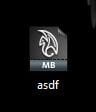
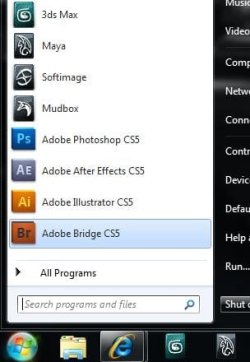
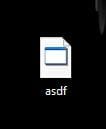
I just got 3ds Max installed and when I saved a file for the first time I got an icon like this (bottom-left icon). I noticed that it is just putting the icon from the .exe file (left list image) inside a blank sheet. I also have Maya and that is working fine, the .exe icon (right list image) and the save file (bottom-right icon). The program is working just fine and the icons in my taskbar and start menu (far right) are normal. How can I get the 3ds Max .exe icon restored and will that fix the save files?
 

Attachments

  • Bad Icon.JPG
    Bad Icon.JPG
    8.2 KB · Views: 2,644
  • Bad Application.JPG
    Bad Application.JPG
    12.9 KB · Views: 44
  • Good Application.JPG
    Good Application.JPG
    13.3 KB · Views: 44
  • Good Icon.JPG
    Good Icon.JPG
    8.4 KB · Views: 2,649
  • Start Menu and Taskbar.JPG
    Start Menu and Taskbar.JPG
    26.2 KB · Views: 43
Have you tried going into the game's primary folder and using the right click context menu to send a shortcut to the desktop?
 

My Computer My Computer

Computer Manufacturer/Model Number
DIY
OS
W7x64 Pro, SuSe 12.1/** W7 x64 Pro, XP MCE
CPU
Phenom II 1090T w/Noctua NH-D14 /**4400+ X2 w/CM Hyper TX 3
Motherboard
ASRock 890FX Deluxe 4/**A8N-SLI
Memory
2 x 2GB Patriot PGS34g1600LLKA/**4x1GB Corsair VS
Graphics Card(s)
EVGA GTX460 SC/**EVGA 8800GTS
Sound Card
Asus Xonar D2X/**Xonar D1
Monitor(s) Displays
Acer X233H, Dell E152FPc /**LG M237-WD
Screen Resolution
1920x1080 & 1024x768/**1980x1080
Hard Drives
WDC 2TB, 1.5TB, 1TB, 500GB,Seagate 500GB , Maxtor 80GB /**500GB Seagate & WDC 1TB Black
PSU
CM RS600 w/ APC BX1000G/**Antec 500 TP w/ APC BX1000
Case
HAF922/**Antec 1040IIB
Cooling
3x200mm, 1x140 and 1x120mm/**5x80mm fans
Keyboard
Logitech Media USB/**Saitek Eclipse
Mouse
Cordless Trackman Wheel/**Ditto
Internet Speed
3.3Mbps
Other Info
SB 560 5.1 w/ Sennheiser RS140/**Creative T20 speakers, Dvico FusionHDTV7 Gold RT, Cisco E3000, HP 5510V AIO, Linksys E3000, Belkin F5U237 hub and **F5D8055 adapter
(** = 2nd rig)
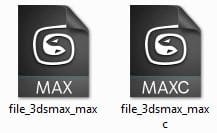
I think you misunderstood. 3ds Max is a 3d modeling program and the problem I'm having is with the scene files I save. They have no icon and I think that may be because in the program's primary folder, the .exe file has no icon as well. But I don't know how to fix that. I have other products from the same software company and they have icons for both .exe and save files. 3ds Max also has the icons saved (below), they're just not being used.
 

Attachments

  • Capture.JPG
    Capture.JPG
    12.2 KB · Views: 2,640
  • Capture 2.JPG
    Capture 2.JPG
    9.4 KB · Views: 2,650
When you double click on that file who don't have icon,is it opening with 3D Max?
 

My Computer My Computer

Computer type
PC/Desktop
Computer Manufacturer/Model Number
Custom Build
OS
Windows 10 Pro x64
CPU
Intel Core i5 4440 @Stock
Motherboard
Gigabyte Z97 D3H
Memory
4 x 4GB HyperX Fury DDR3
Graphics Card(s)
Gigabyte GTX 1050Ti O4G
Sound Card
Integrated
Monitor(s) Displays
Dell P2417H
Screen Resolution
1920 x 1080
Hard Drives
Samsung EVO 850 120GB / Toshiba DT01ACA050 1TB 7200prm 32MB
PSU
Riotoro Onyx 750W
Case
NZXT H500 Black-Red
Cooling
Stock CPU + NZXT 120mm + 2x120mm red fans
Keyboard
Modecom Volcano Lanparty
Mouse
Asus ROG Gladius / DeepCool E-Pad Plus
Internet Speed
DOCSIS 50/3 Mbit
Browser
Google Chrome
Other Info
Asus K55VJ(i5 3210M, GT635M / 2GB, 8GB DDR3, 500GB HDD)
I think you misunderstood. 3ds Max is a 3d modeling program and the problem I'm having is with the scene files I save. They have no icon and I think that may be because in the program's primary folder, the .exe file has no icon as well. But I don't know how to fix that. I have other products from the same software company and they have icons for both .exe and save files. 3ds Max also has the icons saved (below), they're just not being used.

I know nothing about the program, but if you right click the desktop icon and go to the Shortcut tab of Properties, doesn't it have a button to change the icon image? If so, try navigating back to the program folder and look for a satisfactory icon. Sometimes, selecting the .exe itself will offer additional icons also.

EDIT: If all else fails, you could Google for an image to use, or make one yourself.
 

My Computer My Computer

Computer Manufacturer/Model Number
DIY
OS
W7x64 Pro, SuSe 12.1/** W7 x64 Pro, XP MCE
CPU
Phenom II 1090T w/Noctua NH-D14 /**4400+ X2 w/CM Hyper TX 3
Motherboard
ASRock 890FX Deluxe 4/**A8N-SLI
Memory
2 x 2GB Patriot PGS34g1600LLKA/**4x1GB Corsair VS
Graphics Card(s)
EVGA GTX460 SC/**EVGA 8800GTS
Sound Card
Asus Xonar D2X/**Xonar D1
Monitor(s) Displays
Acer X233H, Dell E152FPc /**LG M237-WD
Screen Resolution
1920x1080 & 1024x768/**1980x1080
Hard Drives
WDC 2TB, 1.5TB, 1TB, 500GB,Seagate 500GB , Maxtor 80GB /**500GB Seagate & WDC 1TB Black
PSU
CM RS600 w/ APC BX1000G/**Antec 500 TP w/ APC BX1000
Case
HAF922/**Antec 1040IIB
Cooling
3x200mm, 1x140 and 1x120mm/**5x80mm fans
Keyboard
Logitech Media USB/**Saitek Eclipse
Mouse
Cordless Trackman Wheel/**Ditto
Internet Speed
3.3Mbps
Other Info
SB 560 5.1 w/ Sennheiser RS140/**Creative T20 speakers, Dvico FusionHDTV7 Gold RT, Cisco E3000, HP 5510V AIO, Linksys E3000, Belkin F5U237 hub and **F5D8055 adapter
(** = 2nd rig)
I have even looked at tutorials to change the icon through the registry but couldn't manage. There is no change icon button and I already have the original icons.

Yes it opens. Everything works fine, just no icons
 

My Computer My Computer

Computer type
PC/Desktop
Computer Manufacturer/Model Number
Custom Build
OS
Windows 10 Pro x64
CPU
Intel Core i5 4440 @Stock
Motherboard
Gigabyte Z97 D3H
Memory
4 x 4GB HyperX Fury DDR3
Graphics Card(s)
Gigabyte GTX 1050Ti O4G
Sound Card
Integrated
Monitor(s) Displays
Dell P2417H
Screen Resolution
1920 x 1080
Hard Drives
Samsung EVO 850 120GB / Toshiba DT01ACA050 1TB 7200prm 32MB
PSU
Riotoro Onyx 750W
Case
NZXT H500 Black-Red
Cooling
Stock CPU + NZXT 120mm + 2x120mm red fans
Keyboard
Modecom Volcano Lanparty
Mouse
Asus ROG Gladius / DeepCool E-Pad Plus
Internet Speed
DOCSIS 50/3 Mbit
Browser
Google Chrome
Other Info
Asus K55VJ(i5 3210M, GT635M / 2GB, 8GB DDR3, 500GB HDD)
No, it's just the save file icon. Not the clickable button in the program but the file itself. Thanks for taking the time to look for it tough.
 

My Computer My Computer

Computer type
PC/Desktop
Computer Manufacturer/Model Number
Gateway DX4831-01e (Mid-Tower Desktop)
OS
Originally Win 7 Hm Prem x64 Ver 6.1.7600 Build 7601-SP1 | Upgraded to Windows 10 December 14, 2019
CPU
Intel i3 530 2.93GHz, 2933MHz 2 Cores 4 Logical Processors
Motherboard
Gateway H57M01 133 megahertz
Memory
6GB of 1,333MHz DDR3 SDRAM
Graphics Card(s)
32MB Intel Graphics Media Accelerator HD IGChip
Sound Card
Realtek High Definition Audio
Monitor(s) Displays
Gateway HX2000 20inch TFT active matrix TN
Screen Resolution
1600 x 900 x 59 hertz
Hard Drives
WDC WD10EADS-00M2B0 [HDD] (1000.20 GB) -- drive 0,
HL-DT-ST DVDRAM GH41N [CD-ROM dr]
Four card readers, and Four USB 2.0
PSU
300watts.
Case
Mid-Tower Desktop
Cooling
Stock from Gateway
Keyboard
Natural Ergonomic Keyboard 4000, see Other Info
Mouse
Orig. Gateway wore out now using Insignia USB wired optical
Internet Speed
Vz FIOS 10ms png 57.64Mbps down 65.53Mbps up Speedtest.org
Antivirus
Zamana Anti-logger with Anti-malware, MSE, Windows Firewall,
Browser
IE11.0.9600.19399-Upd ver11.0.135, Firefox 68.0.1 x64
Other Info
System Specs by Belarc.

BIOS: American Megatrends Inc. P01-A0 11/17/2009

Replaced the MS 'Natural' Standard PS/2 Enhanced 101-102 Keyboard with a new Natural Ergonomic Keyboard 4000 on August 1st 2014.

Canon Pixma MG3222 Printer.

Updated to IE11 on 12102015 | Fios Quantum Router g1100

Additional AV: SpywareBlaster, manual Mbam, SAS
I just uninstalled and reinstalled right away but the problem remained. I've noticed from other programs I have uninstalled before that some folders and files stay in the computer. Would it have helped if before reinstalling I deleted everything single thing related to that program?

EDIT: I have it's latest version.
 
Do you use any third party program to clean up junks/registry ? I mean something like tuneup?

For such a case, it deletes items from C:\Windows\Installer , the obvious result is vanishing the .exe icons .

you may fix it by manually putting the icon in the location using Resource Hacker , but that is a tough deal to search it . Better you reinstall 3Ds Max over the existing installation .

From the next time use only Ccleaner for cleaning .
 

My Computer My Computer

Computer type
PC/Desktop
Computer Manufacturer/Model Number
Self Assembled
OS
Microsoft Windows 10 Pro Insider Preview 64-bit
CPU
Intel(R) Core(TM) i3-4130 CPU @ 3.40GHz
Motherboard
Gigabyte Technology Co., Ltd. B85M-D3H
Memory
Corsair Vengence 4GB x2 (8.00GB Dual-Channel DDR3 @ 798MHz)
Graphics Card(s)
2047MB GeForce GTS 450 (ZOTAC International)
Sound Card
Onboard (Realtek High Definition Audio)
Monitor(s) Displays
LG Flatron E2040T
Screen Resolution
1600x900
Hard Drives
Western Digital 1 TB
Seagate 500 GB
PSU
Corsair VS550
Case
Cooler Master K380
Cooling
Cooler Master Seidon 120V Plus
Keyboard
Logitech MK260r
Mouse
Logitech MK260r
Internet Speed
PMPL Broadband
Antivirus
Windows Defender + MBAM
Browser
Firefox
Other Info
Dell Studio 15" Laptop
Arc, I suggested and KIUJOL has un-installed, and then re-installed the program.

To me, this sounds like he did not use any third-party un-installers:
Would it have helped if before reinstalling I deleted everything single thing related to that program?
And it sounds like your suggesting KIUJOL should go ahead and try to re-install over top the existing in-stall. Would that be a correct assumption?

If so, KIUJOL could go ahead and try a re-install over the existing 3ds program.
It may just offer a repair in-stall option.
 

My Computer My Computer

Computer type
PC/Desktop
Computer Manufacturer/Model Number
Gateway DX4831-01e (Mid-Tower Desktop)
OS
Originally Win 7 Hm Prem x64 Ver 6.1.7600 Build 7601-SP1 | Upgraded to Windows 10 December 14, 2019
CPU
Intel i3 530 2.93GHz, 2933MHz 2 Cores 4 Logical Processors
Motherboard
Gateway H57M01 133 megahertz
Memory
6GB of 1,333MHz DDR3 SDRAM
Graphics Card(s)
32MB Intel Graphics Media Accelerator HD IGChip
Sound Card
Realtek High Definition Audio
Monitor(s) Displays
Gateway HX2000 20inch TFT active matrix TN
Screen Resolution
1600 x 900 x 59 hertz
Hard Drives
WDC WD10EADS-00M2B0 [HDD] (1000.20 GB) -- drive 0,
HL-DT-ST DVDRAM GH41N [CD-ROM dr]
Four card readers, and Four USB 2.0
PSU
300watts.
Case
Mid-Tower Desktop
Cooling
Stock from Gateway
Keyboard
Natural Ergonomic Keyboard 4000, see Other Info
Mouse
Orig. Gateway wore out now using Insignia USB wired optical
Internet Speed
Vz FIOS 10ms png 57.64Mbps down 65.53Mbps up Speedtest.org
Antivirus
Zamana Anti-logger with Anti-malware, MSE, Windows Firewall,
Browser
IE11.0.9600.19399-Upd ver11.0.135, Firefox 68.0.1 x64
Other Info
System Specs by Belarc.

BIOS: American Megatrends Inc. P01-A0 11/17/2009

Replaced the MS 'Natural' Standard PS/2 Enhanced 101-102 Keyboard with a new Natural Ergonomic Keyboard 4000 on August 1st 2014.

Canon Pixma MG3222 Printer.

Updated to IE11 on 12102015 | Fios Quantum Router g1100

Additional AV: SpywareBlaster, manual Mbam, SAS
Just now I went to the Uninstall Programs page and found a Repair option next to Uninstall. It made new shortcuts and a new folder in the All Programs list but the .exe and save file are still iconless.
I did use AVG PCTuneUp after I installed 3ds Max, Maya and Mudbox (All Autodesk softwares) but before I had saved any files with any of them so I don't know if that was the cause. Maya's and Mudbox's .exe and save file icons are working, the only problem is 3ds Max.
If the TuneUp was the cause is there anyother to fix it? I don't know what a Resource Hacker is.
 
You did not hear this from me...:zip:

Google is your friend:
Resource Hacker specs and Coding Utility specifications - CNET Downloads It is listed as only good for 32bit, and up to winxp. The developer has stopped development on it.

As of 03-24-2004:
Resource Hacker is no longer being developed:

I have been overwhelmed by the interest in Resource HackerTM, the emails of thanks, encouragement and suggestions. It's been downloaded over 3 million times. However, I've moved on to other things and have no plans to continue its development. Please don't ask for the source code, I'm not releasing it, nor is it for sale. Colin Wilson has written an open source Resource Editor which may interest those looking for source code.
Source: Resource Hacker


But, there is a new version? Here:
Resource Hacker 3.5.0.82 for Windows 7-modify the Windows resources files | Full version software download & Review That is supposed to be okay for win7, and x64.

You will be using these programs at your own risk.
 

My Computer My Computer

Computer type
PC/Desktop
Computer Manufacturer/Model Number
Gateway DX4831-01e (Mid-Tower Desktop)
OS
Originally Win 7 Hm Prem x64 Ver 6.1.7600 Build 7601-SP1 | Upgraded to Windows 10 December 14, 2019
CPU
Intel i3 530 2.93GHz, 2933MHz 2 Cores 4 Logical Processors
Motherboard
Gateway H57M01 133 megahertz
Memory
6GB of 1,333MHz DDR3 SDRAM
Graphics Card(s)
32MB Intel Graphics Media Accelerator HD IGChip
Sound Card
Realtek High Definition Audio
Monitor(s) Displays
Gateway HX2000 20inch TFT active matrix TN
Screen Resolution
1600 x 900 x 59 hertz
Hard Drives
WDC WD10EADS-00M2B0 [HDD] (1000.20 GB) -- drive 0,
HL-DT-ST DVDRAM GH41N [CD-ROM dr]
Four card readers, and Four USB 2.0
PSU
300watts.
Case
Mid-Tower Desktop
Cooling
Stock from Gateway
Keyboard
Natural Ergonomic Keyboard 4000, see Other Info
Mouse
Orig. Gateway wore out now using Insignia USB wired optical
Internet Speed
Vz FIOS 10ms png 57.64Mbps down 65.53Mbps up Speedtest.org
Antivirus
Zamana Anti-logger with Anti-malware, MSE, Windows Firewall,
Browser
IE11.0.9600.19399-Upd ver11.0.135, Firefox 68.0.1 x64
Other Info
System Specs by Belarc.

BIOS: American Megatrends Inc. P01-A0 11/17/2009

Replaced the MS 'Natural' Standard PS/2 Enhanced 101-102 Keyboard with a new Natural Ergonomic Keyboard 4000 on August 1st 2014.

Canon Pixma MG3222 Printer.

Updated to IE11 on 12102015 | Fios Quantum Router g1100

Additional AV: SpywareBlaster, manual Mbam, SAS
Hi Kiujol ! May you do one thing ?

Press win+r , and write C:\Windows\Installer and hit enter . I guess you will obtain an window which somehow look like this :
Untitled.jpg

There , in my case, should be many, but I killed all the rest by having a complete PC tuneup using a third party tool (not with an third party uninstaller) like your AVG program . For an example , in my folder there should be Adobe Reader, but it is not there. Result ? See below .
Untitled1.jpg

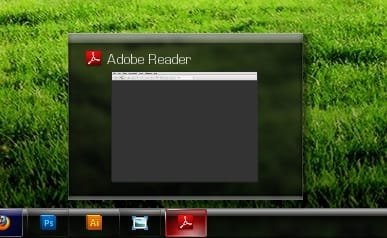
Forgive me , as the Adobe Reader component does not exist at all in the target location, I cannot put it there using Resource hacker (an utility that permits you to edit system resources such as Icons, Bitmaps , Metadata , etc ) . So I have no other way but put the thing back . For that, I've reinstalled Adobe Reader . now look at the change in my installer folder :
Untitled3.jpg
And at my taskbar :
Untitled4.jpg

it is what was my intention to say .

Edit : From the Snips, it is clear that the items in Installer folder are not stored by names, but by long numbers . So it is to search for the desired item manually . As I dont use 3Ds Max , I dont know the number for it :(
 

My Computer My Computer

Computer type
PC/Desktop
Computer Manufacturer/Model Number
Self Assembled
OS
Microsoft Windows 10 Pro Insider Preview 64-bit
CPU
Intel(R) Core(TM) i3-4130 CPU @ 3.40GHz
Motherboard
Gigabyte Technology Co., Ltd. B85M-D3H
Memory
Corsair Vengence 4GB x2 (8.00GB Dual-Channel DDR3 @ 798MHz)
Graphics Card(s)
2047MB GeForce GTS 450 (ZOTAC International)
Sound Card
Onboard (Realtek High Definition Audio)
Monitor(s) Displays
LG Flatron E2040T
Screen Resolution
1600x900
Hard Drives
Western Digital 1 TB
Seagate 500 GB
PSU
Corsair VS550
Case
Cooler Master K380
Cooling
Cooler Master Seidon 120V Plus
Keyboard
Logitech MK260r
Mouse
Logitech MK260r
Internet Speed
PMPL Broadband
Antivirus
Windows Defender + MBAM
Browser
Firefox
Other Info
Dell Studio 15" Laptop
I found the 3ds Max folder in "C:\Windows\Installer" like you said Arc and put it's icons in there (it had none) but that didn't solve it. I guess I'll just leave it like this. The "You will be using these programs at your own risk." Anak said makes me not want to use the Resource Hacker. I'll probably just create big problems, better just stick to this silly one. Thanks for the help guys.
 
desktop icons turned to templates?

I uploaded an on-line games toolbar and it reversed all my games desktop icons to programme templates and it states that there are no shortcuts to their programmes despite the programmes exe files being logged in their respectives properties. How can I restore without re-installing the entire games?
 
Last edited:

My Computer My Computer

OS
Windows 7 ulitmate x64
When you go to the game's uninstall there might be a repair button as well. I tried that for the problem I was having and it made new shortcuts for it. Maybe if you do that for each of your games you'll get new shortcuts.
 
I found the 3ds Max folder in "C:\Windows\Installer" like you said Arc and put it's icons in there (it had none) but that didn't solve it. I guess I'll just leave it like this. The "You will be using these programs at your own risk." Anak said makes me not want to use the Resource Hacker. I'll probably just create big problems, better just stick to this silly one. Thanks for the help guys.
KIUJOL, I have not given up looking for a solution to your situation.

It may take a few days, but If I find anything, good or bad I will post back.

There is one thing I would like to know, though. The exact numbers for the 3dsMax version you have .
You should be able to find them in the >Help >About section of the 3ds Menu-bar.

Arc, nice tutorial!
 

My Computer My Computer

Computer type
PC/Desktop
Computer Manufacturer/Model Number
Gateway DX4831-01e (Mid-Tower Desktop)
OS
Originally Win 7 Hm Prem x64 Ver 6.1.7600 Build 7601-SP1 | Upgraded to Windows 10 December 14, 2019
CPU
Intel i3 530 2.93GHz, 2933MHz 2 Cores 4 Logical Processors
Motherboard
Gateway H57M01 133 megahertz
Memory
6GB of 1,333MHz DDR3 SDRAM
Graphics Card(s)
32MB Intel Graphics Media Accelerator HD IGChip
Sound Card
Realtek High Definition Audio
Monitor(s) Displays
Gateway HX2000 20inch TFT active matrix TN
Screen Resolution
1600 x 900 x 59 hertz
Hard Drives
WDC WD10EADS-00M2B0 [HDD] (1000.20 GB) -- drive 0,
HL-DT-ST DVDRAM GH41N [CD-ROM dr]
Four card readers, and Four USB 2.0
PSU
300watts.
Case
Mid-Tower Desktop
Cooling
Stock from Gateway
Keyboard
Natural Ergonomic Keyboard 4000, see Other Info
Mouse
Orig. Gateway wore out now using Insignia USB wired optical
Internet Speed
Vz FIOS 10ms png 57.64Mbps down 65.53Mbps up Speedtest.org
Antivirus
Zamana Anti-logger with Anti-malware, MSE, Windows Firewall,
Browser
IE11.0.9600.19399-Upd ver11.0.135, Firefox 68.0.1 x64
Other Info
System Specs by Belarc.

BIOS: American Megatrends Inc. P01-A0 11/17/2009

Replaced the MS 'Natural' Standard PS/2 Enhanced 101-102 Keyboard with a new Natural Ergonomic Keyboard 4000 on August 1st 2014.

Canon Pixma MG3222 Printer.

Updated to IE11 on 12102015 | Fios Quantum Router g1100

Additional AV: SpywareBlaster, manual Mbam, SAS
Wow, thanks a lot Anak. I apreciate that. On the Help -> About 3ds Max, it shows "Release Version 13.0 Commercial". If you need anything else just ask and thanks again.
 
Back
Top