
How to rotate an upside .mov

meebers

Multicomplacator
Power User
Local time
5:52 PM
Messages
327
Took some video's on my cell phone, turned out I was holding the phone upside down. Now how do I get it upright? Unlike still pictures, there is no option to rotate it. :(
 

My Computer My Computer

At a glance

Windows 7 Professional X64 Service Pack 1AMD Phenom II X4 955 3.20GHz8GGX550 Ti
Computer type
PC/Desktop
Computer Manufacturer/Model Number
Self Build
OS
Windows 7 Professional X64 Service Pack 1
CPU
AMD Phenom II X4 955 3.20GHz
Motherboard
Gigabyte GA-MA790X-UD4P
Memory
8G
Graphics Card(s)
GX550 Ti
Sound Card
On board
Monitor(s) Displays
Asus VW246H & Syncmaster 2243swx
Screen Resolution
1920x1080 & 1920x1080
Hard Drives
M4-CT128 SSD2, Samsung 840 256GB, 1 WDC 1TB
PSU
Corsair TX750W-V2
Case
Antec
Cooling
2 120mm fan
Keyboard
Microsoft Wireless 3050
Mouse
Microsoft Wireless 5000
Internet Speed
72/6Mbs (Cable)
Other Info
Asus AC1900 router, 8 port Trendnet Switch - Logitech Webcam Pro 9000
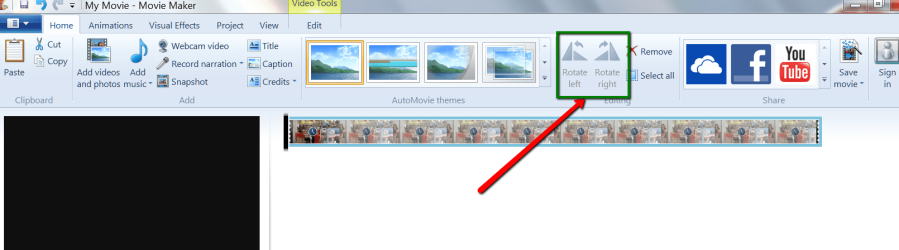
Easy in Windows Live Movie Maker.
 

Attachments

  • 2013-12-10_1403.png
    2013-12-10_1403.png
    58.1 KB · Views: 4

My Computer My Computer

At a glance

Vista, Windows7, Mint Mate, Zorin, Windows 8from 1.6GHz Duo to i7
Computer Manufacturer/Model Number
HP, Dell, Gateway, Toshiba - 4 laptops and 2 desktops
OS
Vista, Windows7, Mint Mate, Zorin, Windows 8
CPU
from 1.6GHz Duo to i7
Monitor(s) Displays
2x HP w2207
Hard Drives
5x HDD, 7x SSD, 12x Externals
Keyboard
with trackball - no mices
Mouse
Trackball mice
Internet Speed
DSL 6000
"Turn your monitor upside down or better still stand on your head and watch" says one in yahoo answers. :p

Jokes apart, one easy way of flipping a video is to use Windows Live Movie Maker as whs suggested. But I understand that you may export the corrected video only in .wmv format. whs may correct me if I am wrong.

You may also use the Rotate function in the EDIT menu of Freemake Video Converter and export it to the format of your choice.

Both methods may involve a drop in quality, depending on the original footage and the settings used.

You may also try Free Video Flip and Rotate Free Video Flip and Rotate: rotate video, flip video!

Note: I haven't used any so far for that purpose, so do not hold me guilty.:)

Let us know what you did and how it worked.
 

My Computer My Computer

At a glance

Windows 7 Home Premium 32 bit
OS
Windows 7 Home Premium 32 bit
Well if you don't want It to be much complicated for a short term you try the following :

Press, control+alt+down arrow

This will turn your monitor upside down. Ofcourse it will be difficult to control the mouse.
You can turn it back to normal by pressing control+alt+up arrow.
 

My Computer My Computer

At a glance

Windows 7 Ultimate 64 bitIntel Pentium(R) Dual Core 2.60GHz each4 GBNVIDIA GeForce GT 610 2GB Zotac Synergy Edition
Computer type
PC/Desktop
Computer Manufacturer/Model Number
Unknown
OS
Windows 7 Ultimate 64 bit
CPU
Intel Pentium(R) Dual Core 2.60GHz each
Motherboard
DG41RQ G41 Chipset
Memory
4 GB
Graphics Card(s)
NVIDIA GeForce GT 610 2GB Zotac Synergy Edition
Screen Resolution
1920x1080
Hard Drives
1 TB Seagate Hard Drive
You can also use Format Factory. After you selected the video, go to the 'Output Options' button and then to 'Advanced' (all the way on the bottom).
 

My Computer My Computer

At a glance

Vista, Windows7, Mint Mate, Zorin, Windows 8from 1.6GHz Duo to i7
Computer Manufacturer/Model Number
HP, Dell, Gateway, Toshiba - 4 laptops and 2 desktops
OS
Vista, Windows7, Mint Mate, Zorin, Windows 8
CPU
from 1.6GHz Duo to i7
Monitor(s) Displays
2x HP w2207
Hard Drives
5x HDD, 7x SSD, 12x Externals
Keyboard
with trackball - no mices
Mouse
Trackball mice
Internet Speed
DSL 6000
I have used all three suggestions, all worked. Deciding which to use permanently. Tx All
 

My Computer My Computer

At a glance

Windows 7 Professional X64 Service Pack 1AMD Phenom II X4 955 3.20GHz8GGX550 Ti
Computer type
PC/Desktop
Computer Manufacturer/Model Number
Self Build
OS
Windows 7 Professional X64 Service Pack 1
CPU
AMD Phenom II X4 955 3.20GHz
Motherboard
Gigabyte GA-MA790X-UD4P
Memory
8G
Graphics Card(s)
GX550 Ti
Sound Card
On board
Monitor(s) Displays
Asus VW246H & Syncmaster 2243swx
Screen Resolution
1920x1080 & 1920x1080
Hard Drives
M4-CT128 SSD2, Samsung 840 256GB, 1 WDC 1TB
PSU
Corsair TX750W-V2
Case
Antec
Cooling
2 120mm fan
Keyboard
Microsoft Wireless 3050
Mouse
Microsoft Wireless 5000
Internet Speed
72/6Mbs (Cable)
Other Info
Asus AC1900 router, 8 port Trendnet Switch - Logitech Webcam Pro 9000
Back
Top