
How to search jpg metadata, specifically comments?

joema

New member
Member
Local time
5:20 AM
Messages
52
I have thousands of .jpg images which also have metadata in the .jpg header. One of these metadata fields is "comments", e.g. "My dog spot when he was 2 yrs old".

Is there any way Windows Search can search jpg metadata, specifically the comments field? I've tried it but can't make it work. Is there some trick using Advanced Query Syntax?
 

My Computer My Computer

At a glance

Windows 7 Home Premium 64 bitIntel i7-860 @ 3.78 Ghz8GB Mushkin Enhanced DS1600-6G HP3-12800EVGA GTX275
Computer Manufacturer/Model Number
Digital Storm
OS
Windows 7 Home Premium 64 bit
CPU
Intel i7-860 @ 3.78 Ghz
Motherboard
EVGA P55 FTW
Memory
8GB Mushkin Enhanced DS1600-6G HP3-12800
Graphics Card(s)
EVGA GTX275
Monitor(s) Displays
LG Flatron W2361VG
Hard Drives
300GB 7200 rpm WD Velociraptor SATA
2 x 1.5TB Seagate ST31500341AS 7200 rpm SATA (non-RAID)
PSU
Thermaltake TR2 RX-850 AP (850 watts)
Case
HAF922
Cooling
Noctua NH-D14
Internet Speed
6 megabit DSL (6 megabit/sec down, 512 kilobit/sec up)
Other Info
DSL modem: Westell C90-610030-06 rev G
Router: NetGear WNDR3700
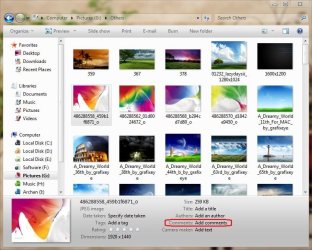
Open the explorer window where the jpeg image is situated. slelct the image so that it displays in the details pane. You can see the comments field there. Just as the attached image :)
 

Attachments

  • Capture.JPG
    Capture.JPG
    91.2 KB · Views: 189

My Computer My Computer

At a glance

Microsoft Windows 10 Pro Insider Preview 64-bitIntel(R) Core(TM) i3-4130 CPU @ 3.40GHzCorsair Vengence 4GB x2 (8.00GB Dual-Channel ...2047MB GeForce GTS 450 (ZOTAC International)
Computer type
PC/Desktop
Computer Manufacturer/Model Number
Self Assembled
OS
Microsoft Windows 10 Pro Insider Preview 64-bit
CPU
Intel(R) Core(TM) i3-4130 CPU @ 3.40GHz
Motherboard
Gigabyte Technology Co., Ltd. B85M-D3H
Memory
Corsair Vengence 4GB x2 (8.00GB Dual-Channel DDR3 @ 798MHz)
Graphics Card(s)
2047MB GeForce GTS 450 (ZOTAC International)
Sound Card
Onboard (Realtek High Definition Audio)
Monitor(s) Displays
LG Flatron E2040T
Screen Resolution
1600x900
Hard Drives
Western Digital 1 TB
Seagate 500 GB
PSU
Corsair VS550
Case
Cooler Master K380
Cooling
Cooler Master Seidon 120V Plus
Keyboard
Logitech MK260r
Mouse
Logitech MK260r
Internet Speed
PMPL Broadband
Antivirus
Windows Defender + MBAM
Browser
Firefox
Other Info
Dell Studio 15" Laptop
Thanks, the .jpg comments are already present and viewable in Explorer if Organize | Layout | Details is enabled.

My question is how to *search* through many photos for already-existing comments.

The various file metadata attributes (inc'l comments) can be seen in Details pane. Those attributes (inc'l comments) can also appear in a column if you right-click on the column and select that attribute.

Those same attributes can be searched. E.g, using Advanced Query Syntax: Type:JPEG, or SIZE:424kb.

However you cannot apparently search for .jpg comments. This is illogical as it's unstructured text just like any other text document which Windows Search handles.

Is there some special technique or query syntax needed to search the comments field of .jpg files?
 

My Computer My Computer

At a glance

Windows 7 Home Premium 64 bitIntel i7-860 @ 3.78 Ghz8GB Mushkin Enhanced DS1600-6G HP3-12800EVGA GTX275
Computer Manufacturer/Model Number
Digital Storm
OS
Windows 7 Home Premium 64 bit
CPU
Intel i7-860 @ 3.78 Ghz
Motherboard
EVGA P55 FTW
Memory
8GB Mushkin Enhanced DS1600-6G HP3-12800
Graphics Card(s)
EVGA GTX275
Monitor(s) Displays
LG Flatron W2361VG
Hard Drives
300GB 7200 rpm WD Velociraptor SATA
2 x 1.5TB Seagate ST31500341AS 7200 rpm SATA (non-RAID)
PSU
Thermaltake TR2 RX-850 AP (850 watts)
Case
HAF922
Cooling
Noctua NH-D14
Internet Speed
6 megabit DSL (6 megabit/sec down, 512 kilobit/sec up)
Other Info
DSL modem: Westell C90-610030-06 rev G
Router: NetGear WNDR3700
did you try "comments:something" ?
 

My Computer My Computer

At a glance

Windows 10 Pro (x64)Intel Core i7-3930K (3.2GHz - 4.5GHz)4x Samsung 4GB PC3-12800 DDR3 (16GB 1600MHz)Nvidia Geforce GTX 690
Computer type
PC/Desktop
Computer Manufacturer/Model Number
Alienware Aurora ALX R4
OS
Windows 10 Pro (x64)
CPU
Intel Core i7-3930K (3.2GHz - 4.5GHz)
Motherboard
Alienware Aurora-R4 x79
Memory
4x Samsung 4GB PC3-12800 DDR3 (16GB 1600MHz)
Graphics Card(s)
Nvidia Geforce GTX 690
Sound Card
SteelSeries Siberia Elite
Monitor(s) Displays
Dell UltraSharp U3011
Screen Resolution
2560x1600
Hard Drives
Samsung 850 Pro 256 GB, Seagate 1TB Desktop Hybrid HDD, 2x Western Digital 4TB Green HDD
PSU
875W Some Dell PSU <.<
Case
Alienware Aurora ALX
Cooling
Custom Liquid Cooling (EK CPU & GPU blocks) dual EK 480RAD
Keyboard
Logitech G710+ Mechanical
Mouse
Logitech G700s
Internet Speed
Verizon Fios (50 mbps average)
Other Info
Server: Intel NUC D54250WYK: i5-4250U, 16GB, 256 GB mSATA, Windows Server 2012 R2
Yes I tried all combinations using the "Comments" keyword: delimited and non-delimited arguments, leading and trailing wildcards, search terms at beginning of comment field, etc. Nothing works.

Also dropped and rebuilt indexes, verified .jpg file suffix selected in index advance properties, verified "contents and data" selected for that suffix, etc.
 

My Computer My Computer

At a glance

Windows 7 Home Premium 64 bitIntel i7-860 @ 3.78 Ghz8GB Mushkin Enhanced DS1600-6G HP3-12800EVGA GTX275
Computer Manufacturer/Model Number
Digital Storm
OS
Windows 7 Home Premium 64 bit
CPU
Intel i7-860 @ 3.78 Ghz
Motherboard
EVGA P55 FTW
Memory
8GB Mushkin Enhanced DS1600-6G HP3-12800
Graphics Card(s)
EVGA GTX275
Monitor(s) Displays
LG Flatron W2361VG
Hard Drives
300GB 7200 rpm WD Velociraptor SATA
2 x 1.5TB Seagate ST31500341AS 7200 rpm SATA (non-RAID)
PSU
Thermaltake TR2 RX-850 AP (850 watts)
Case
HAF922
Cooling
Noctua NH-D14
Internet Speed
6 megabit DSL (6 megabit/sec down, 512 kilobit/sec up)
Other Info
DSL modem: Westell C90-610030-06 rev G
Router: NetGear WNDR3700
Once I used a trial of Adobe Photoshop Album Starter Edition. It can arrange picture library, sort them on the basis of metadata, and arrange them accordingly. You may have a try, but this is not free. Alternatively, Acdsee or Picassa may do the job.
 

My Computer My Computer

At a glance

Microsoft Windows 10 Pro Insider Preview 64-bitIntel(R) Core(TM) i3-4130 CPU @ 3.40GHzCorsair Vengence 4GB x2 (8.00GB Dual-Channel ...2047MB GeForce GTS 450 (ZOTAC International)
Computer type
PC/Desktop
Computer Manufacturer/Model Number
Self Assembled
OS
Microsoft Windows 10 Pro Insider Preview 64-bit
CPU
Intel(R) Core(TM) i3-4130 CPU @ 3.40GHz
Motherboard
Gigabyte Technology Co., Ltd. B85M-D3H
Memory
Corsair Vengence 4GB x2 (8.00GB Dual-Channel DDR3 @ 798MHz)
Graphics Card(s)
2047MB GeForce GTS 450 (ZOTAC International)
Sound Card
Onboard (Realtek High Definition Audio)
Monitor(s) Displays
LG Flatron E2040T
Screen Resolution
1600x900
Hard Drives
Western Digital 1 TB
Seagate 500 GB
PSU
Corsair VS550
Case
Cooler Master K380
Cooling
Cooler Master Seidon 120V Plus
Keyboard
Logitech MK260r
Mouse
Logitech MK260r
Internet Speed
PMPL Broadband
Antivirus
Windows Defender + MBAM
Browser
Firefox
Other Info
Dell Studio 15" Laptop
I tried Irfanview 4.25, FastStone 4.2, and Scott's JPEG Commenter ver 1.2. None work for .jpg comments entered by the Windows 7 Explorer.

IOW JPEG comments entered by Win7 Explorer aren't visible to these utilities, and comments entered by them aren't visible to Explorer.

Picasa 3.6.0 nor Photoshop Elements 7 show the comments, either.

I don't have earlier Windows versions to test, but maybe it has existed on Vista or even XP. There is apparently some incompatibility. Windows is using unicode or a special offset in the JPEG header or something which is incompatible with all the 3rd-party utilities I've tested so far.

This is fairly serious: all JPEG comment data entered in Windows is inaccessible to all or most JPEG/EXIF utilities, and vice-versa. Also Windows apparently cannot search JPEG comments. This means you should essentially never use Windows to enter JPEG comments.

My goal is to use the existing JPEG header for comments, not use some 3rd party tool which stores data in a "sidecar" file. Using a utility is OK if there was a common, reliable way whereby both Windows and the utility could read/write JPEG comment data in a mutually-compatible fashion.

I can't believe I'm the first person to encounter this. There must be some obvious, simple solution.
 

My Computer My Computer

At a glance

Windows 7 Home Premium 64 bitIntel i7-860 @ 3.78 Ghz8GB Mushkin Enhanced DS1600-6G HP3-12800EVGA GTX275
Computer Manufacturer/Model Number
Digital Storm
OS
Windows 7 Home Premium 64 bit
CPU
Intel i7-860 @ 3.78 Ghz
Motherboard
EVGA P55 FTW
Memory
8GB Mushkin Enhanced DS1600-6G HP3-12800
Graphics Card(s)
EVGA GTX275
Monitor(s) Displays
LG Flatron W2361VG
Hard Drives
300GB 7200 rpm WD Velociraptor SATA
2 x 1.5TB Seagate ST31500341AS 7200 rpm SATA (non-RAID)
PSU
Thermaltake TR2 RX-850 AP (850 watts)
Case
HAF922
Cooling
Noctua NH-D14
Internet Speed
6 megabit DSL (6 megabit/sec down, 512 kilobit/sec up)
Other Info
DSL modem: Westell C90-610030-06 rev G
Router: NetGear WNDR3700
Looking over EXIF/IPTC there is nothing that says "Comments" I'm going to assume the "Comments" shown by explorer is a file property.
 

My Computer My Computer

At a glance

Windows 10 Pro (x64)Intel Core i7-3930K (3.2GHz - 4.5GHz)4x Samsung 4GB PC3-12800 DDR3 (16GB 1600MHz)Nvidia Geforce GTX 690
Computer type
PC/Desktop
Computer Manufacturer/Model Number
Alienware Aurora ALX R4
OS
Windows 10 Pro (x64)
CPU
Intel Core i7-3930K (3.2GHz - 4.5GHz)
Motherboard
Alienware Aurora-R4 x79
Memory
4x Samsung 4GB PC3-12800 DDR3 (16GB 1600MHz)
Graphics Card(s)
Nvidia Geforce GTX 690
Sound Card
SteelSeries Siberia Elite
Monitor(s) Displays
Dell UltraSharp U3011
Screen Resolution
2560x1600
Hard Drives
Samsung 850 Pro 256 GB, Seagate 1TB Desktop Hybrid HDD, 2x Western Digital 4TB Green HDD
PSU
875W Some Dell PSU <.<
Case
Alienware Aurora ALX
Cooling
Custom Liquid Cooling (EK CPU & GPU blocks) dual EK 480RAD
Keyboard
Logitech G710+ Mechanical
Mouse
Logitech G700s
Internet Speed
Verizon Fios (50 mbps average)
Other Info
Server: Intel NUC D54250WYK: i5-4250U, 16GB, 256 GB mSATA, Windows Server 2012 R2
"Comments" are a JPEG header item. There's a 0xFFFE comment marker in the header, followed by a 2-byte length field. Comments are unformatted free text.

The confusion comes from Windows *also* calling textual photo descriptions "comments", which are stored in the JPEG header but different from JPEG comments.

I've found there are significant problems with using Win7 Explorer (also likely Vista or XP) to enter JPEG comments.

(1) The JPEG comments read/written by Explorer in Windows XP, Vista or 7 are different from the normal JPEG comments typically accessed by other utilities. Comments written by Windows are typically not readable by other utilities, and vice-versa.

The confusion stems from both being called "comments", and Windows displaying those alongside other JPEG header fields -- which implies they are JPEG comments. In fact they are Windows comments, stored in the JPEG header but distinct from JPEG comments.

(2) Windows "JPEG" comments are not searchable by Win7 search. Since they aren't typically accessible by 3rd-party utilities, this effectively means you can't search on photo comments entered by Windows Explorer. It's really a deplorable situation.

There is one command-line utility ExifTool that can read & update both jpeg and "XP" comments entered by Windows Explorer: ExifTool by Phil Harvey

Provided you know all this, the solution is simple: just don't use Windows Explorer to add JPEG comments, and don't use Windows Search -- use a 3rd party utility to enter/search the JPEG comments. You also must always remember those comments won't show up in Explorer -- the comments field will just be blank from the Windows standpoint.
 

My Computer My Computer

At a glance

Windows 7 Home Premium 64 bitIntel i7-860 @ 3.78 Ghz8GB Mushkin Enhanced DS1600-6G HP3-12800EVGA GTX275
Computer Manufacturer/Model Number
Digital Storm
OS
Windows 7 Home Premium 64 bit
CPU
Intel i7-860 @ 3.78 Ghz
Motherboard
EVGA P55 FTW
Memory
8GB Mushkin Enhanced DS1600-6G HP3-12800
Graphics Card(s)
EVGA GTX275
Monitor(s) Displays
LG Flatron W2361VG
Hard Drives
300GB 7200 rpm WD Velociraptor SATA
2 x 1.5TB Seagate ST31500341AS 7200 rpm SATA (non-RAID)
PSU
Thermaltake TR2 RX-850 AP (850 watts)
Case
HAF922
Cooling
Noctua NH-D14
Internet Speed
6 megabit DSL (6 megabit/sec down, 512 kilobit/sec up)
Other Info
DSL modem: Westell C90-610030-06 rev G
Router: NetGear WNDR3700
It's now October 2018 and it appears Microsoft and other OSs haven't addressed this problem yet, even. It should not be the responsibility of third party software engineers to provide comprehensive file and folder metadata field management and search features via add-on programs. These should be the sole responsibility of the operating system, and if OS engineers would do that, it would automatically force the industry to adopt a universal standard for metadata tagging of all content. Currently, both Windows and Mac OS are woefully deficient, still stuck in turn-of-the-century file/folder metaphors that are totally incapable of delivering the kinds of advanced content management/search features that people worldwide need. Shame!!!
 

My Computer My Computer

At a glance

62 bit Windows 7
Computer type
Laptop
Computer Manufacturer/Model Number
Dell Latitude e6500
OS
62 bit Windows 7
Browser
Firefox
Back
Top