
how to share files when using user profiles

jediknight83

New member
Local time
1:37 AM
Messages
14
Hi there

Im running win 7 on the main desktop PC and i have different user profiles set up for various family members.

I also run win 7 on my own laptop and xp on another laptop.

I used to run XP on the home pc and vista on my laptop but i have only just started using user profiles since upgrading to win 7

I did have the my docs folder on the home pc shared and i could access files on both the vista and xp machines.

Im not sure if its the win7 upgrade or because ive only just started using profiles but i cant get the individual user files shared now? Ive shared the users folder and it allows me to see 'guest' and 'public' but despite sharing the individual user folders it wont let me access them on either laptops?

any help would be appreciated.

regards
 

My Computer

Computer Manufacturer/Model Number
HP Pavillion dv6920ea
OS
7 enterprise
CPU
Intel Core 2 Duo T5750 2GHz
Motherboard
err?
Memory
3gb
Screen Resolution
1280x800
when you share the users folder, users will have access to their own folder but not access to anyone else's (at least not the private stuff). Unless of course you modify share and folder permissions.
 

My Computer

Computer Manufacturer/Model Number
Too many to list.
OS
XP, Seven, 2008R2
CPU
AMD, Intel, VIA
Motherboard
Various
Memory
Corsair, Kingston, etc.
Graphics Card(s)
ATI, NVIDIA
Monitor(s) Displays
Samsung
Hard Drives
Maxtor, Western Digital
Keyboard
qwerty
Internet Speed
22 Mb/s @ home, 1 Gb/s @ server
Other Info
All of my systems still run fastest on XP 32-bit for the most part. Win7 is fun to play with, but I still prefer XP for raw speed, security, and functionality.
The easiest way to share between profiles is to use the public folders for the files you want to share. That is part of the reason your documents "library" includes both your user location and the public location.

Or if you don't want to use the public folders... when you are logged into a profile you want to share you can right click on the folder you want to share and select "share with" from the fly-out menu. From the share with dialog box you can select individual users or everyone.
 

My Computer

Computer Manufacturer/Model Number
ultraplanet - model 23
OS
Windows 7
CPU
P4 3.0 HT
Motherboard
Intel DQ965GF
Memory
4 gigs of Crucial DDR2
Graphics Card(s)
nVidia GeForce 7800GT 256MB 256-bit w/ ACCELS1 Rev 2
Sound Card
on board
Monitor(s) Displays
HP 2509m
Screen Resolution
1920x1080
Hard Drives
2x 320gb Seagate Barracuda's - SATA 3Gbit/s - RAID-0 array
PSU
650 watt
Case
Antec
Cooling
Cool Master
Keyboard
Logitech diNovo Media Desktop
Mouse
see keyboard
Internet Speed
comcast cable
Other Info
7 Ultimate and 7 Pro twice each at home - Gigabit on the Network - Tomato on the Linksys - I freely share my wireless with my neighbors (8-10 additional devices)
Sorry perhaps i didnt explain myself properly.

On the home PC i have win7 with 4 user accounts set up. I want to share the my docs folder of a couple of these profiles with laptops on the same network with the same workgroup names.

All the users are set up as administrators. Logged in as myself on the home pc i go to c:\users\nathan and right click the docs folder and set it to share.

Then on the laptop I go to the network and browse for the shared folder and it wont let me access it.

I did manage though to share the public and guest folders though.??
 

My Computer

Computer Manufacturer/Model Number
HP Pavillion dv6920ea
OS
7 enterprise
CPU
Intel Core 2 Duo T5750 2GHz
Motherboard
err?
Memory
3gb
Screen Resolution
1280x800
Or if you don't want to use the public folders... when you are logged into a profile you want to share you can right click on the folder you want to share and select "share with" from the fly-out menu. From the share with dialog box you can select individual users or everyone.

AH HA!! i THINK this has fixed it. Just going to run a few tests but thanks very much.
 

My Computer

Computer Manufacturer/Model Number
HP Pavillion dv6920ea
OS
7 enterprise
CPU
Intel Core 2 Duo T5750 2GHz
Motherboard
err?
Memory
3gb
Screen Resolution
1280x800
yes this indeed solved my problem

thanks very much
 

My Computer

Computer Manufacturer/Model Number
HP Pavillion dv6920ea
OS
7 enterprise
CPU
Intel Core 2 Duo T5750 2GHz
Motherboard
err?
Memory
3gb
Screen Resolution
1280x800

My Computer

Computer Manufacturer/Model Number
ultraplanet - model 23
OS
Windows 7
CPU
P4 3.0 HT
Motherboard
Intel DQ965GF
Memory
4 gigs of Crucial DDR2
Graphics Card(s)
nVidia GeForce 7800GT 256MB 256-bit w/ ACCELS1 Rev 2
Sound Card
on board
Monitor(s) Displays
HP 2509m
Screen Resolution
1920x1080
Hard Drives
2x 320gb Seagate Barracuda's - SATA 3Gbit/s - RAID-0 array
PSU
650 watt
Case
Antec
Cooling
Cool Master
Keyboard
Logitech diNovo Media Desktop
Mouse
see keyboard
Internet Speed
comcast cable
Other Info
7 Ultimate and 7 Pro twice each at home - Gigabit on the Network - Tomato on the Linksys - I freely share my wireless with my neighbors (8-10 additional devices)
Win7 FILE Share is too complicated and flaky

Ok, i followed the tutorial for Win7 share and could see each of my WIN7 PCs.
However, I was not able to access the files that each had using the same options
as the MS:cry: video showed. I have tried public. BTW, all these pcs are in my home
and each has my unique pc name plus the password it gave me for each is installed
on each. Right now, I can see all pc clicking the status but not so on any files.
I did see the printer though. To add insult to injury, this sharing files and printers
worked fine with xp and vista. Now, I guess I will try turning off passwords
just to see if that is what prevents each of Win7 pcs from letting me see files.
Hopefully, MICROSOFT will look at totally rewriting this share setup for the
HOME GROUP. This reminds somewhat of UAC in vista but a little more time
consuming to find the culprit as to holding me back from seeing files.

PS. I gave up on SHARING Win7 with xp and vista. I installed Win7 on all
but now need to find what is preventing this mess from working.
 

My Computer

OS
Windows 7
Ok, i followed the tutorial for Win7 share and could see each of my WIN7 PCs.
However, I was not able to access the files that each had using the same options
as the MS:cry: video showed. I have tried public. BTW, all these pcs are in my home
and each has my unique pc name plus the password it gave me for each is installed
on each. Right now, I can see all pc clicking the status but not so on any files.
I did see the printer though. To add insult to injury, this sharing files and printers
worked fine with xp and vista. Now, I guess I will try turning off passwords
just to see if that is what prevents each of Win7 pcs from letting me see files.
Hopefully, MICROSOFT will look at totally rewriting this share setup for the
HOME GROUP. This reminds somewhat of UAC in vista but a little more time
consuming to find the culprit as to holding me back from seeing files.

PS. I gave up on SHARING Win7 with xp and vista. I installed Win7 on all
but now need to find what is preventing this mess from working.

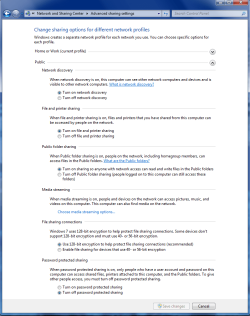
Just use the "Public" file sharing feature when you are sharing between different Op systems.
It has to look like this and you need have file sharing "full access" enabled on all the non Win 7 machines.

You can resecure the Win 7 machine by just enabling "password protected sharing".
 

Attachments

  • public sharing enabled all.PNG
    public sharing enabled all.PNG
    39.7 KB · Views: 71

My Computer

Computer type
PC/Desktop
Computer Manufacturer/Model Number
Home built
OS
Windows 7 Ult, Windows 8.1 Pro,
CPU
Q9650-4.275GHz, E8600 4.5GHz, E6750-3.8GHz
Motherboard
Evga 780i FTW
Memory
G.Skill PC2 9600 1200Mhz 5 5 5 15 2T
Graphics Card(s)
GTX480
Sound Card
Asus Xonar D2
Monitor(s) Displays
HannsG
Screen Resolution
1680X1050
Hard Drives
GSkill Phoenix Pro 120GB SSD
PSU
ThermalTake Toughpower 1000Watt modular
Case
ThermalTake XaserV
Cooling
Xigmatek S1283
Keyboard
Logitech G15
Mouse
Logitech G9
Internet Speed
T1
Share win7 delimena why so difficult in HOME?

Using Public may work BUT that is not what the video reflects in my HOME with all three WIN7 OSes now. I have not had time to uncover the quirk right now but all the options you showed is what I have tried in ADVANCED. I still found xp and vista sharing much easier to make work. The only reason I gave up on them was that I have heard it works more smoothly in Win7. As of today, I now have all Win7 pcs
in my HOME with the same given crytic password as described in MS cute video tutorial.
I can see all three pcs in SEE FULL MAP. Now, if I could click on each and open
them is where the flakiness starts. The only one that opens is the pc I am using.
Who knows why other than as I see it. MS needs to reconsider the IN HOME
sharing when all pcs are logged into by me. Just that two are older and contain
older music,pictures,and documents. Note two of these pcs have 32bit and the other is 64bit. All pcs using WIN7 PRO NOW. I will turn off password protect and
click Public but I would rather not have Public in the long run. My past experience
with Public was that I had to copy those files into Public for share to see on other
pcs. Maybe PUBLIC takes on a different meaning nowdays. Thanks for your reply
though.
 

My Computer

OS
Windows 7
Back
Top