Oh Gawd, How to recover windows 10 from a failed duel boot of 7

tsol

New member
Local time
5:50 PM
Messages
6
I have windows 7 and when 10 came out, I upgraded but I duel booted it. Keep my 7 OS on a seperate drive and installed 10 on my new SSD.

I had a hankering to play Black and White 2 but windows 10 didn't support it, so i booted up my old 7 to play it. The 7 OS had somehow become corrupt and I had to reinstall (repair failed). So I grabbed my disk and opened a new partition and installed 7 on one of my spare drives. Updated it and got it up and running.

I restarted to boot back into 10 to make sure all was still well and my 10 boot seems to have disappeared. 7 changed the name of my 10 drive, and removed the little icon saying it was an OS drive. The files appear to still be there but the ability to boot from it gone.

I restarted and change my boot cycle to my original drive with 10 on it, and it just doesn't recognize 10 anymore. Like its been hidden or removed; only giving me the option to boot with 7.

All my personal files and what not, are still there, so are the windows 10 files but I can't figure out how to get my windows 10 boot back.

Any help or suggestions guys?
 

My Computer My Computer

At a glance

IL
Computer type
PC/Desktop
OS
IL
For starters with your problem post a maximized/resized screen print of Disk Management so all info is shown.
Here's the tutorial:
Disk Management - Post a Screen Capture Image

I'm assuming you can still boot Win 7 with the other drives attached.
 

My Computer My Computer

At a glance

Multi-Boot W7_Pro_x64 W8.1_Pro_x64 W10_Pro_x6...AMD Athlon II x4 6206GB GSkill DDR2 800AMD 4670 GPU + AMD 4200 IGP
Computer type
PC/Desktop
Computer Manufacturer/Model Number
home built
OS
Multi-Boot W7_Pro_x64 W8.1_Pro_x64 W10_Pro_x64 +Linux_VMs +Chromium_VM
CPU
AMD Athlon II x4 620
Motherboard
Gigabyte GA-MA785G-UD3H
Memory
6GB GSkill DDR2 800
Graphics Card(s)
AMD 4670 GPU + AMD 4200 IGP
Sound Card
on board Realtek ALC889A
Monitor(s) Displays
RCA 40" LCD TV, Insignia 32" LCD TV, HP 15" LCD monitor
Screen Resolution
1680 x 1050
Hard Drives
OCZ Vertex 3 120GB,
Samsung F3 1TB (3),
Several others - WD, Seagate, Hitachi, ...
PSU
Corsair 500 W
Case
Rosewill mid tower
Cooling
CM 90mm rifle
Keyboard
Gyration wireless, Logitech wireless, Dell USB wired
Mouse
Gyration wireless, Logitech wireless, V7 USB wired
Internet Speed
Spectrum - 100Mbps D / 10Mbps U
Antivirus
Avast, MBAM3, EMET, WinPatrol
Browser
Pale Moon, Firefox, IE
Other Info
2 multi-boot PC's
Mainly HTPC/Office/Gen purpose (no gaming).
Trendnet USB KVM.
LG DVD burner/Blue Ray Player.
Tray system for removable SATA backup drives.

Not currently OCd, under-volted.
I use Hybrid sleep, rarely re-boot or shutdown.

Hauppauge HD-PVR, Avermedia PCIe TV Tuner, Hauppauge PCI TV Tuner.
Yes, all my other drives are still function and I can access all my old information. With the exception I can no longer boot in windows 10.

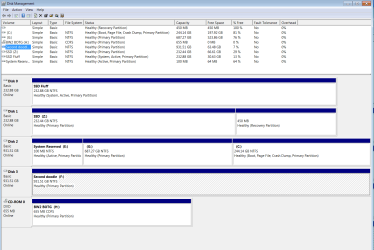
Heres a picture. My new boot/bootdrive is in drive C. I made a 250gigish partition for it. My original windows 10 boot was from drive Z. Which after booting widnows 7 changed its drive name to D which I changed back to Z.
 

Attachments

  • disk pictures.jpg
    disk pictures.jpg
    256.4 KB · Views: 5

My Computer My Computer

At a glance

IL
Computer type
PC/Desktop
OS
IL
Here is a full info box with the drive details
 

Attachments

  • full info.png
    full info.png
    41 KB · Views: 7

My Computer My Computer

At a glance

IL
Computer type
PC/Desktop
OS
IL
You need to wait for someone else smarter than me for this.
You have 2 drives with bootloaders, Disk 0 and Disk 2.
The Active flag means the drive has a bootloader.

You are now using the bootloader on Disk 0 , it's Active and System .
You are running Windows on Disk 2, it shows as the Boot partition.

You can try using the one-time boot menu to choose what Drive to boot from.
Select Disk 2 and see if that starts Win 10.

The one-time boot menu is different for different PC's, you have to read your manual to find what key displays this menu on that PC.
 

My Computer My Computer

At a glance

Multi-Boot W7_Pro_x64 W8.1_Pro_x64 W10_Pro_x6...AMD Athlon II x4 6206GB GSkill DDR2 800AMD 4670 GPU + AMD 4200 IGP
Computer type
PC/Desktop
Computer Manufacturer/Model Number
home built
OS
Multi-Boot W7_Pro_x64 W8.1_Pro_x64 W10_Pro_x64 +Linux_VMs +Chromium_VM
CPU
AMD Athlon II x4 620
Motherboard
Gigabyte GA-MA785G-UD3H
Memory
6GB GSkill DDR2 800
Graphics Card(s)
AMD 4670 GPU + AMD 4200 IGP
Sound Card
on board Realtek ALC889A
Monitor(s) Displays
RCA 40" LCD TV, Insignia 32" LCD TV, HP 15" LCD monitor
Screen Resolution
1680 x 1050
Hard Drives
OCZ Vertex 3 120GB,
Samsung F3 1TB (3),
Several others - WD, Seagate, Hitachi, ...
PSU
Corsair 500 W
Case
Rosewill mid tower
Cooling
CM 90mm rifle
Keyboard
Gyration wireless, Logitech wireless, Dell USB wired
Mouse
Gyration wireless, Logitech wireless, V7 USB wired
Internet Speed
Spectrum - 100Mbps D / 10Mbps U
Antivirus
Avast, MBAM3, EMET, WinPatrol
Browser
Pale Moon, Firefox, IE
Other Info
2 multi-boot PC's
Mainly HTPC/Office/Gen purpose (no gaming).
Trendnet USB KVM.
LG DVD burner/Blue Ray Player.
Tray system for removable SATA backup drives.

Not currently OCd, under-volted.
I use Hybrid sleep, rarely re-boot or shutdown.

Hauppauge HD-PVR, Avermedia PCIe TV Tuner, Hauppauge PCI TV Tuner.
Thanks for the input, I'll give that a try and see if it helps/works.
 

My Computer My Computer

At a glance

IL
Computer type
PC/Desktop
OS
IL
I tried to use the one boot drive, and it just skips it and goes straight to 7. Im googling to see if anyone else has had this issue.
 

My Computer My Computer

At a glance

IL
Computer type
PC/Desktop
OS
IL
Then the disk 2 bootloader and/or the win 10 os is probably corrupt.
You can try adding the Win 10 partition (Z) to your working bootloader that boots Win 7.
For this, i would use EasyBCD to add Win 10.
EasyBCD - NeoSmart Technologies

Then when you boot the PC it should display a boot menu listing each OS, maybe it will work and you can run Win 10.
 

My Computer My Computer

At a glance

Multi-Boot W7_Pro_x64 W8.1_Pro_x64 W10_Pro_x6...AMD Athlon II x4 6206GB GSkill DDR2 800AMD 4670 GPU + AMD 4200 IGP
Computer type
PC/Desktop
Computer Manufacturer/Model Number
home built
OS
Multi-Boot W7_Pro_x64 W8.1_Pro_x64 W10_Pro_x64 +Linux_VMs +Chromium_VM
CPU
AMD Athlon II x4 620
Motherboard
Gigabyte GA-MA785G-UD3H
Memory
6GB GSkill DDR2 800
Graphics Card(s)
AMD 4670 GPU + AMD 4200 IGP
Sound Card
on board Realtek ALC889A
Monitor(s) Displays
RCA 40" LCD TV, Insignia 32" LCD TV, HP 15" LCD monitor
Screen Resolution
1680 x 1050
Hard Drives
OCZ Vertex 3 120GB,
Samsung F3 1TB (3),
Several others - WD, Seagate, Hitachi, ...
PSU
Corsair 500 W
Case
Rosewill mid tower
Cooling
CM 90mm rifle
Keyboard
Gyration wireless, Logitech wireless, Dell USB wired
Mouse
Gyration wireless, Logitech wireless, V7 USB wired
Internet Speed
Spectrum - 100Mbps D / 10Mbps U
Antivirus
Avast, MBAM3, EMET, WinPatrol
Browser
Pale Moon, Firefox, IE
Other Info
2 multi-boot PC's
Mainly HTPC/Office/Gen purpose (no gaming).
Trendnet USB KVM.
LG DVD burner/Blue Ray Player.
Tray system for removable SATA backup drives.

Not currently OCd, under-volted.
I use Hybrid sleep, rarely re-boot or shutdown.

Hauppauge HD-PVR, Avermedia PCIe TV Tuner, Hauppauge PCI TV Tuner.
You installed Win 7 with the other drives connected, didn't you?
BIOS takes the boot process to a MBR of a disk that has a link to the boot loader on a partition that can be on another disk.

Lets make Win 10 boot able.
- Make disk 1 (Z) active (Z has win10, right?).
- Detach all other drives from the MB.
- Boot from the Win 10 installation disk and do a startup repair. If you succeed you'll be able to boot from win 10 on disk 1.

Report
 

My Computers My Computers

  • At a glance

    Windows 7 HP 64i5 6600K - 800MHz to 4200MHz4+4G GSkill DDR4 3000IG - Intel 530
    Computer type
    PC/Desktop
    Computer Manufacturer/Model Number
    custom build
    OS
    Windows 7 HP 64
    CPU
    i5 6600K - 800MHz to 4200MHz
    Motherboard
    GA-Z170-HD3P
    Memory
    4+4G GSkill DDR4 3000
    Graphics Card(s)
    IG - Intel 530
    Monitor(s) Displays
    Samsung 226BW
    Screen Resolution
    1680x1050
    Hard Drives
    (1) -1 SM951 – 128GB M.2 AHCI PCIe SSD drive for Windows 7 and Lubuntu
    (2) -1 WD SATA 3 - 1T for Data
    (3) -1 WD SATA 3 - 1T for backup
    PSU
    Thermaltake 450W TR2 gold
    Keyboard
    Old and good Chicony mechanical keyboard
    Mouse
    Logitech mX performance - 9 buttons (had to disable some)
    Internet Speed
    500Mb/s
    Browser
    Firefox 64
    Other Info
    TinyWall firewall
  • At a glance

    Windows 7 Proi7-4500U 800MHz to 3.0GHz(4+4)G DDR3 1600IG intel 4400 + NVIDIA GeForce GT 745M
    Computer type
    Laptop
    System Manufacturer/Model Number
    Asus Q550LF
    OS
    Windows 7 Pro
    CPU
    i7-4500U 800MHz to 3.0GHz
    Motherboard
    Asus Q550LF
    Memory
    (4+4)G DDR3 1600
    Graphics Card(s)
    IG intel 4400 + NVIDIA GeForce GT 745M
    Sound Card
    Realtek
    Monitor(s) Displays
    LG Display LP156WF4-SPH1
    Screen Resolution
    1920 x 1080
    Hard Drives
    BX500 120G SSD for Windows and programs +
    1T HDD for data
    Internet Speed
    500 Mb/s
    Browser
    Firefox
    Other Info
    TinyWall firewall
BCDBoot Command-Line Options

BCDBoot is a command-line tool used to configure the boot files on a PC or device to run the Windows operating system. You can use the tool in the following scenarios:

Repair the system partition. If the system partition has been corrupted, you can use BCDBoot to recreate the system partition files by using new copies of these files from the Windows partition.

Set up or repair the boot menu on a dual-boot PC. If you've installed more than one copy of Windows on a PC, you can use BCDBoot to add or repair the boot menu.

How to use BCDBoot to add or repair the boot menu on a dual-boot PC.
Look at post #3 in this thread: Solved EasyBCD Dual Boot management for Win10 and Win7 on separate drives - Windows 10 Forums
 
Last edited:

My Computer My Computer

At a glance

Windows 10
Computer type
PC/Desktop
OS
Windows 10
Thanks for the input, I'm trying the DCBboot menu, and if I can't figure that out, I'll unplug my other harddrives and do a wind10 repair.
 

My Computer My Computer

At a glance

IL
Computer type
PC/Desktop
OS
IL
Back
Top