How to stop windows7x64 from installing drivers

Raner

New member
Local time
5:52 PM
Messages
40
HI, can someone tell me what settings to use to stop windows 7 from auto installing sound drivers. I have Realteck onboard audio on my Asrock 890 Deluxe Am3 motherboard. And have ATI catalyst for my ATI video Cards (crossfired) . I want to use Realteck as my for default sound, so when I go to device manager and uninstall the ati hd audio drivers they get deleted, but when I reboot my pc windows 7 reinstalls the ati hd drivers. How can I stop windows 7 from reinstalling the ati hd drivers. The reason I don't want two well really three sets of audio drivers because the cards are crossfired windows 7 is installing two sets of ati hd sound drivers one for each video card and the Realteck drivers, is because windows 7 is crashing when gaming and I think the sound drivers are conflicting and causing the crashes.Thanks RaneR
 
Last edited:

My Computer My Computer

At a glance

windows 7 professional x 64
OS
windows 7 professional x 64
The drivers that are installed by ATI are for the HDMI outputs on the video cards.
I would just disable the HD audio for the video cards in the device manager if you think there is a conflict.
 

My Computer My Computer

At a glance

Windows 10 Pro x64, Windows 8.1 Pro x64, Wind...INTEL i9-7920X LGA 206664 GB (4 X 16 GB) G-Skill V Series DDR4 3200 ...EVGA GTX 1060 SC 3 GB
Computer type
PC/Desktop
Computer Manufacturer/Model Number
Custom Built
OS
Windows 10 Pro x64, Windows 8.1 Pro x64, Windows 7 Ultimate x64 SP1,
CPU
INTEL i9-7920X LGA 2066
Motherboard
Gigabyte X299-WU8 F3
Memory
64 GB (4 X 16 GB) G-Skill V Series DDR4 3200 Quad Channel
Graphics Card(s)
EVGA GTX 1060 SC 3 GB
Sound Card
Realtek Onboard ALC1220
Monitor(s) Displays
2 x Samsung S27E310
Screen Resolution
1920x1080
Hard Drives
Samsung 2 x 970 EVO Plus 500 GB NVMe
1 x 6TB WD 6003FZBX SATA
1 x 6TB WD 60EFRX SATA
12 x 3TB WD 30EFRX SATA
PSU
Seasonic X-1050
Case
Thermaltake Armor+
Cooling
Corsair H80i V2 Liquid AOI Cooler
Keyboard
Logitech G510s
Mouse
Logitech MX Master 2S
Internet Speed
200 Mb/s
Antivirus
ESET NOD32 13.1
Browser
EDGE (Dev, Canary, Beta), Chrome
Other Info
ASUS RT-AC68U router
Malwarebytes 4.0.4
Ok thanks,sorry for the miss spelling on drivers on the heading of post, tryed to fix it but it won't change.
 

My Computer My Computer

At a glance

windows 7 professional x 64
OS
windows 7 professional x 64
O.K., PBCopter just came back to let you know I gamed for 4 hours and my on line game did not crash worked great. Windows 7x64 was crashing in 15 to 20 minutes on the game I checked it out with and all the other FPS games I have installed which by the way are quite a few. Looks like windows 7x64 bit pro does not like multiple sound drivers, I had a feeling that was causing the crashes but I was not sure. I wish there was a way to completly remove the ATI HD sound drivers because I have no use for them at this point, but since windows 7 just installes them back as soon as I reboot will just leave them disabled for now. I think the next time I upgrade my ATI catalyst I'll do a custom Install and see if I can leave them out. There are a ton of gamers having this crash problem and I checked all over the place and there are just gueses as to what is causing the crashes but no real fix. So keep this post in mind and if someone posts about windows 7 crashing when gaming this might do the trick for them. If it got a ATI crossfire rig going I'm sure it will also fix a single card rig also. Don't know about nvidia but they have HDMI outputs also!!! Later and thanks again for answering my post RaneR.
 

My Computer My Computer

At a glance

windows 7 professional x 64
OS
windows 7 professional x 64
To stop auto install of drivers, GoTo > Control Panel\All Control Panel Items\Devices and Printers.

Click on the yellow bar that appears and choose Open device installation settings.

In the next window you have two or three options regarding drivers and one concerning "enhanced icons".

HTH.
 

My Computer My Computer

At a glance

windows 7 ultimate
OS
windows 7 ultimate
Hey fimbel, thanks for the comeback!
Went to All Control Panel Items\Devices and Printers.
but no yellow bar that appears and choose Open device installation settings.
Maybe it's because I have auto downloads disabled.
But I did find this will it do the same thing as you discribed

Update: Some people complained that the original method doesn’t work at all. Reader mufuti0815 points out a method to properly disable automatic driver installation. I have tested it and it seems to be working. Here is what you need to do:
  • Go to Start–>Search type in gpedit.msc
  • Click the file to open the Local Group Policy Editor and show Windows who is in control!!
  • You want to go here: Computer Configuration->Administrative Templates->System->Device Installation. Click on the subfolder Device Installation on the left and on the right side you will see the possible restrictions.
  • Right Click on Prevent Installation of Devices not described by other policy settings and edit this option, set it on ENABLED.
    Reboot Windows and enjoy its inability to pollute your system with its standard driver, open gpedit.msc again and revert the change so you will be able to install your driver.
 

My Computer My Computer

At a glance

windows 7 professional x 64
OS
windows 7 professional x 64
Thanks for the info!
 

My Computer My Computer

At a glance

windows 7 ultimate
OS
windows 7 ultimate
Your Welcome
 

My Computer My Computer

At a glance

windows 7 professional x 64
OS
windows 7 professional x 64
have Realtek onboard audio on my Asrock 890 Deluxe Am3 motherboard. And have ATI catalyst for my ATI video Cards (crossfired) . I want to use Realtek as my for default sound
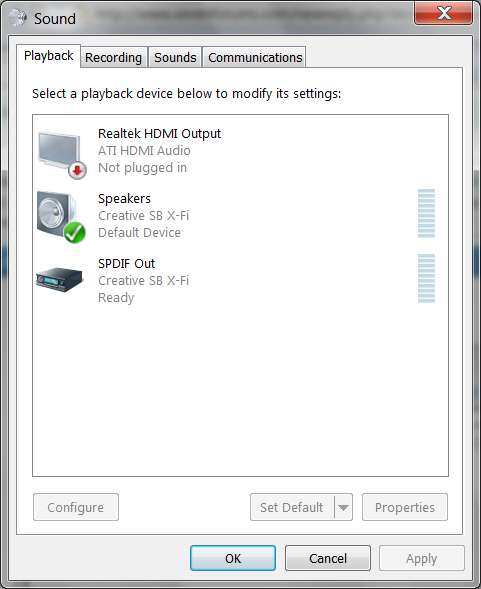
That what "playback devices" is for... to select your default sound device.

Right-click on the speaker icon in system tray, select "playback devices".

Then choose the particular device (and presumably connected speakers) you want to hear sound through.

For example, in my case I want to hear sound through my Creative X-Fi card, not through the ATI HDMI output from my ATI video card, nor from the onboard Realtek sound chip (which I've disabled in the BIOS, so it doesn't even get involved at Win7 install time or subsequently).

I DO have the ATI HDMI audio drivers installed (actually, I installed the Realtek HMDI audio driver, not the ATI HDMI audio driver) just to satisfy things so I don't have a yellow question mark, but I don't use it. Really doesn't matter which HDMI audio driver I'd installed, but I've had better luck with both the Realtek HD audio codec sound driver as well the Realtek HDMI audio driver (for the ATI video card).

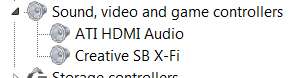
Anyway, here's what it looks like in Device manager:

sounddevices.jpg


And here's what it looks like in "Playback Devices":

defaultsound.jpg


Just select your Realtek onboard HD audio as your default playback, and don't worry about the HDMI audio on the video card.

Here's from my second machine, which actually DOES use the Realtek onboard sound chip, and again has that checked as the default playback device. Again, the ATI HDMI sound is not used.

realteksound.jpg
 
Last edited:

My Computer My Computer

At a glance

Windows 7 Pro x64 (1), Win7 Pro X64 (2)i5-3350p 3.1Ghz/6MB-cache (1); E8400 3.0Ghz/6...8GB PC3-12800 DDR3 (1); 4GB PC3-10600 DDR3 (2)ATI HD7750 (1), (see TV cards); ATI R7 250 (2)
Computer type
PC/Desktop
Computer Manufacturer/Model Number
Home-built, two systems (1) and (2)
OS
Windows 7 Pro x64 (1), Win7 Pro X64 (2)
CPU
i5-3350p 3.1Ghz/6MB-cache (1); E8400 3.0Ghz/6MB-cache (2)
Motherboard
ASUS P8Z77-V Pro (1); ASUS P5Q3 (2)
Memory
8GB PC3-12800 DDR3 (1); 4GB PC3-10600 DDR3 (2)
Graphics Card(s)
ATI HD7750 (1), (see TV cards); ATI R7 250 (2)
Sound Card
Realtek ALC892 HD Audio (1); Realtek ALC1200 HD Audio (2)
Monitor(s) Displays
Eizo HD2441W LCD, Eizo S2433W (1); Eizo 24" S2433W (2)
Screen Resolution
1920x1200, 1920x1200 (1); 1920x1200 (2)
Hard Drives
(1) 1TB SATA-II (7200RPM), 2x2TB SATA-III (7200RPM), 250GB SATA-III (10000RPM) for OS; 2x2TB external USB 3.0

(2) 320GB SATA-II (7200RPM), 750GB SATA-II (7200RPM), 150GB SATA-II (10000RPM) for OS; 2TB external USB 3.0
PSU
Nesteq ECS-6001 600W (1); Nesteq ECS-5001 500W (2)
Case
Acousti-Case 360 (1) and (2)
Cooling
Noctua NH-U12P SE2 for CPU, 2x120mm case fans (1) and (2)
Keyboard
IBM PS/2 (1) and (2)
Mouse
Logitech MX Revolution wireless (1); Microsoft wired (2)
Internet Speed
100mbps down / 10mbps up
Antivirus
Microsoft Security Essentials; Malwarebyte Anti-Malware Pro
Browser
Firefox
Other Info
Ceton InfiniTV 4-tuner cablecard-enabled TV card as well as Hauppauge HVR-2250 OTA/ATSC 2-tuner TV card in (1), running under Win7 WMC
Back
Top