How to System Image C: Partition only?

chrisb

New member
Local time
12:50 AM
Messages
2
I want to use Windows Backup & Restore - Create a System Image. I have 3 hard drives, one of which is partitioned into C: & D:. I just want to image the C:.

7 insists on doing both C: & D: because "The drives that are required for Windows to run are included by default". D: is huge and is mostly data, which I back up routinely in another fashion. D: does have some D:\Program Files but these are not important for me, and the majority are at C:\Program Files. The Paging File is on C: & F:.

How can I get it to image just the C: ?

I know I can use Acronis True Image etc, but I love the idea of imaging from within Windows with a Windows tool.

btw, its 7RC

Thanks so much
Chris
 

My Computer My Computer

OS
7 RC; XP SP3
Wonder if D: has somehow marked itself active, causing Win7 Backup Imaging to think that it is a system drive.

Just to confirm, the checkbox to deselect D: is greyed out, correct?

Can you post back here a screen shot of your full Disk Management map, using Snipping Tool in Start Menu, attached using paper clip in reply box.

Or check if D: is marked Active there.
 
Last edited:
I want to use Windows Backup & Restore - Create a System Image. I have 3 hard drives, one of which is partitioned into C: & D:. I just want to image the C:.


Thanks so much
Chris

If im not mistaken, unless your C and D are on seperate physical HDD, you won't be able to use the 7 to just image C and not D as these are partitions of the same single HDD.
 

My Computer My Computer

Computer Manufacturer/Model Number
Lenovo ThinkPad T60
OS
Windows 7 Ultimate 64Bit
CPU
GenuineIntel Intel(R) Core(TM) DuoCore T2400 @ 1.83GHz
Motherboard
Intel(R) 82801G (ICH7 Family)
Memory
2.00 GB
Graphics Card(s)
Mobile Intel(R) 945 Express Chipset
Sound Card
SoundMAX Integrated Digital HD Audio
Monitor(s) Displays
ThinkPad Display
Screen Resolution
1400x1050
Hard Drives
100Gb SATA
Keyboard
Standard Keyboard
Mouse
HID-compliant Mouse
Internet Speed
Cable Broadband - 54Mbps
Other Info
Intel(R) PRO/1000 PL Network Connection
11a/b/g Wireless LAN Mini PCI Express Adapter
Think you might be right aem.

On my HD, it lets me uncheck the partition where I have the WindowsImageBackup stored, so I thought just maybe he could uncheck a data partition.

But most of what i've read is that it images the whole HD.

Others recommend free Macrium Reflect to image single partitions.

Edit: Just installed and looked over Macrium. You can def choose any partition listed with checkbox, and save to drive, network or DVD. It reimages using Linux CD it will make.
 
Last edited:
Well the idea of doing an image backup (or as i refer it as ghosting) is so you get the exact copy of your HDD so when you go to re-image your HDD or a new HDD you'll get the exact clone. For a whole reimaging of a HDD, best to go with Acronis or Ghost (others i have not used so can't recommend). If you just want a partition backup, this is not alot different to a system restore (restore points).
 

My Computer My Computer

Computer Manufacturer/Model Number
Lenovo ThinkPad T60
OS
Windows 7 Ultimate 64Bit
CPU
GenuineIntel Intel(R) Core(TM) DuoCore T2400 @ 1.83GHz
Motherboard
Intel(R) 82801G (ICH7 Family)
Memory
2.00 GB
Graphics Card(s)
Mobile Intel(R) 945 Express Chipset
Sound Card
SoundMAX Integrated Digital HD Audio
Monitor(s) Displays
ThinkPad Display
Screen Resolution
1400x1050
Hard Drives
100Gb SATA
Keyboard
Standard Keyboard
Mouse
HID-compliant Mouse
Internet Speed
Cable Broadband - 54Mbps
Other Info
Intel(R) PRO/1000 PL Network Connection
11a/b/g Wireless LAN Mini PCI Express Adapter
I guess the consensus is that if C and D are on the same drive, you can't use the Windows tool to image C alone.

Under that scenario, has anyone confirmed that if you therefore image the entire drive (C and D), can you then restore only C???

If not, the tool is useless for my purposes. I would never want to restore my D (data) drive from an image because that would overwrite existing data--which would be newer than the data in the image file.

Looks like I'll stick with either Macrium or Acronis.
 

My Computer My Computer

Computer type
PC/Desktop
Computer Manufacturer/Model Number
Ignatz Special; 4 speed manual gearbox; factory air conditioning; one of one
OS
Windows 7 Home Premium SP1, 64-bit
CPU
Intel Skylake i5-6600K, not overclocked
Motherboard
AsRock Z170M Extreme 4, micro ATX
Memory
8 GB HyperX DDR4-2666 (2 x 4 GB)
Graphics Card(s)
none; graphics are integrated on CPU
Sound Card
onboard: Realtek ALC1150; external: USB Behringer UF0-202
Monitor(s) Displays
Dell S2340M 23 inch IPS
Screen Resolution
1600 x 900
Hard Drives
System: Crucial MX100 series SSD, 128 GB;
Data: Samsung Spinpoint 103SJ, 1 TB;
Backup: WD Caviar Green WD30EZRX-00D8PB0, 3 TB
PSU
Rosewill SilentNight 500 watt fanless, semi-modular
Case
Antec Solo II
Cooling
Noctua NH-U12S; Noctua F12 intake, Noctua S12A exhaust
Keyboard
Microsoft 200 6JH-00001 USB
Mouse
Dell or Microsoft optical wired; USB
Antivirus
Microsoft Security Essentials and Malwarebytes Premium
Browser
Pale Moon
Other Info
All fans PWM; speeds at idle: CPU circa 500 rpm; intake circa 600 rpm; exhaust circa 600 rpm; CPU temps 27 idle and 47 C load in a warm room (27 C/81 F) when running Intel Extreme Tuning Utility stress test.
Iggy I recommend you try it because it does show boxes to check and uncheck next to partitions both on the imaging and restore.

Right now it will let me uncheck my D recov partition (where image is stored on drive).

Sometimes they are inexplicably greyed out but maybe not for your purposes.
 
I may take a further look at it. My goal of course is to never get in a situation where I would have to rely on an image. I have my data backed up in other ways and am willing to reinstall if I have to.
 

My Computer My Computer

Computer type
PC/Desktop
Computer Manufacturer/Model Number
Ignatz Special; 4 speed manual gearbox; factory air conditioning; one of one
OS
Windows 7 Home Premium SP1, 64-bit
CPU
Intel Skylake i5-6600K, not overclocked
Motherboard
AsRock Z170M Extreme 4, micro ATX
Memory
8 GB HyperX DDR4-2666 (2 x 4 GB)
Graphics Card(s)
none; graphics are integrated on CPU
Sound Card
onboard: Realtek ALC1150; external: USB Behringer UF0-202
Monitor(s) Displays
Dell S2340M 23 inch IPS
Screen Resolution
1600 x 900
Hard Drives
System: Crucial MX100 series SSD, 128 GB;
Data: Samsung Spinpoint 103SJ, 1 TB;
Backup: WD Caviar Green WD30EZRX-00D8PB0, 3 TB
PSU
Rosewill SilentNight 500 watt fanless, semi-modular
Case
Antec Solo II
Cooling
Noctua NH-U12S; Noctua F12 intake, Noctua S12A exhaust
Keyboard
Microsoft 200 6JH-00001 USB
Mouse
Dell or Microsoft optical wired; USB
Antivirus
Microsoft Security Essentials and Malwarebytes Premium
Browser
Pale Moon
Other Info
All fans PWM; speeds at idle: CPU circa 500 rpm; intake circa 600 rpm; exhaust circa 600 rpm; CPU temps 27 idle and 47 C load in a warm room (27 C/81 F) when running Intel Extreme Tuning Utility stress test.
Why reinstall?

Imaging puts it all back in 15 minutes!

Just save the one from when it was running best.
 
Yes, C: & D: are on the same drive. D: is grayed out, cant untick it.
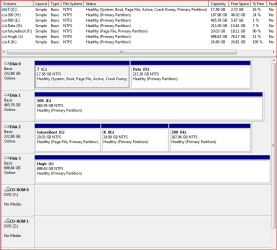
D: isn't Active in Disk Manager. (Ive tried to attach a Disk Manager snip via the paperclip).

Having to image D: is not on for me; I want to image C: fairly regularly, with manageable image sizes. Storing multiple C:+D: images is way over the top size-wise.

Shame the 7 Imager is so inflexible. It could be a great feature.
 

Attachments

  • Disk Manager.PNG
    Disk Manager.PNG
    19.6 KB · Views: 209

My Computer My Computer

OS
7 RC; XP SP3
I think they wanted HD imaging, so that's what we got.

I downloaded and sampled Macrium Reflect free version which is highly recommended around here.

Def allows you to select your partition to image. You could save it to another internal HD there.

Suggest you format primary the partition where you store backup image so it is autodetected by Macrium's linux restore CD>
 
Greg:

Take a look at my post in the software section regarding Macrium.

Comment there if you have any insight.
 

My Computer My Computer

Computer type
PC/Desktop
Computer Manufacturer/Model Number
Ignatz Special; 4 speed manual gearbox; factory air conditioning; one of one
OS
Windows 7 Home Premium SP1, 64-bit
CPU
Intel Skylake i5-6600K, not overclocked
Motherboard
AsRock Z170M Extreme 4, micro ATX
Memory
8 GB HyperX DDR4-2666 (2 x 4 GB)
Graphics Card(s)
none; graphics are integrated on CPU
Sound Card
onboard: Realtek ALC1150; external: USB Behringer UF0-202
Monitor(s) Displays
Dell S2340M 23 inch IPS
Screen Resolution
1600 x 900
Hard Drives
System: Crucial MX100 series SSD, 128 GB;
Data: Samsung Spinpoint 103SJ, 1 TB;
Backup: WD Caviar Green WD30EZRX-00D8PB0, 3 TB
PSU
Rosewill SilentNight 500 watt fanless, semi-modular
Case
Antec Solo II
Cooling
Noctua NH-U12S; Noctua F12 intake, Noctua S12A exhaust
Keyboard
Microsoft 200 6JH-00001 USB
Mouse
Dell or Microsoft optical wired; USB
Antivirus
Microsoft Security Essentials and Malwarebytes Premium
Browser
Pale Moon
Other Info
All fans PWM; speeds at idle: CPU circa 500 rpm; intake circa 600 rpm; exhaust circa 600 rpm; CPU temps 27 idle and 47 C load in a warm room (27 C/81 F) when running Intel Extreme Tuning Utility stress test.
Yeah, I'm not gonna budge from Win7 Backup Imaging on our 7 home computers until it lets me down. So far a half dozen reimages have gone fine.

There was a failure due to bad block on external, but I was able to reimage from a backup over the network from boot with a dodgy network adapter, so I am impressed with Win7 imaging.

Acronis has saved my XP install several times. I prefer the built-in for Win7 until it disproves itself.
 
Back
Top