Solved How to view Pictures..quickly!?

Peter Stock

New member
Local time
9:37 AM
Messages
12
When I click Start/Documents..taken directly to all my documents...all ok
When I click Start/Pictures - nothing!
To access Pictures I need to click Start/This pc/C/Users/Pete/My Pictures
Anyone advise on how to arrange to access my pictures from Start/Pictures?
Thanks,
Pete
 

My Computer My Computer

Computer type
PC/Desktop
Computer Manufacturer/Model Number
Custom built
OS
Windows 7 Home 32
CPU
Intel duo E8500
Motherboard
Gigabyte EP45-DS3L
Memory
4GB DDR2
Graphics Card(s)
ATI Radeon HD 4800
Hard Drives
Seagate ST3500418AS 500GB
Antivirus
AVG free
Browser
IE 11
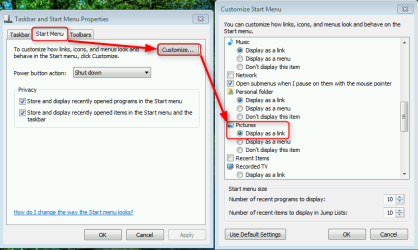
The Pictures link in Start Menu should by default open your Pictures library. Check how it is set on your PC by right clicking Taskbar and selecting Properties, then like this:

2014-06-10_11h56_49.png

If you want to you can also change how the link behaves and set it to open your Pictures folder instead of Pictures library. See this tutorial: http://www.sevenforums.com/tutorial...der-buttons-open-users-instead-libraries.html

You can also pin any folder, including your Users\Your_Username\Pictures folder directly to Start Menu as told in this tutorial: http://www.sevenforums.com/tutorials/5736-start-menu-pin-unpin-folder-drive-library.html

Kari
 

My Computer My Computer

Computer type
Laptop
Computer Manufacturer/Model Number
HP ENVY 17-1150eg
OS
Windows 10 Pro x64 EN-GB
CPU
1.6 GHz Intel Core i7-720QM Processor
Memory
6 GB
Graphics Card(s)
ATI Mobility Radeon HD 5850 Graphics
Sound Card
Beats sound system with integrated subwoofer
Monitor(s) Displays
17" laptop display, 22" LED and 32" Full HD TV through HDMI
Screen Resolution
1600*900 (1), 1920*1080 (2&3)
Hard Drives
Internal: 2 x 500 GB SATA Hard Disk Drive 7200 rpm
External: 2TB for backups, 3TB USB3 network drive for media
Cooling
As Envy runs a bit warm, I have it on a Cooler Master pad
Keyboard
Logitech diNovo Media Desktop Laser (bluetooth)
Mouse
Logitech Performance Mouse MX
Internet Speed
50/10 Mbps VDSL
Antivirus
Windows Defender 4.3.9431.0
Browser
Maxthon 3.5.2., IE11
In addition to the excellent information supplied by Kari, you can Right Click on the word Pictures on the Start Menu & select Properties, this will open a small window to add further information for opening your Picture Library.
 

My Computer My Computer

Computer type
PC/Desktop
Computer Manufacturer/Model Number
Self built using existing case
OS
Windows 7 Home Premium 64 bit sp1
CPU
Intel i5 3570 3.4Ghz Ivy Bridge SKT 1155 quad core
Motherboard
Gigabyte Z77-HD3 SKT 1155 2xSata 3, 4x USB 3.0
Memory
G-Skill Rip Jaws 16Gb (8x2) DDR3 -1600 PC3 12800 CL 10 red
Graphics Card(s)
Gigabyte NVIDIA GT610 1Gb DDR3 810/1200 PCI-E 2.0 Silent
Sound Card
NVIDIA High Definition & Realtech High Definition Audio
Monitor(s) Displays
2 x Philips 226V4L 16:9 aspect ratio
Screen Resolution
1920 x 1080 HD
Hard Drives
Samsung 840 Pro 256gb SSD, SATA 3.
Hitachi Touro Portable 1tb, USB 3.0 HDD used for image b/ups.
PSU
Corsair VS450
Case
Codeng
Cooling
PSU fan & CPU fan
Keyboard
Logitech
Mouse
Logitech Wireless trackball M570
Internet Speed
Wireless 3G. 3mg down & 550kb up.
Antivirus
Bitdefender Internet Security 2020
Browser
Opera (Current Version) & Firefox
Other Info
MS Office 2013 Pro. Davis weather station software. MGE Nova 600 avr UPS.
I do appreciate the help provided..so easy when its explained! :)
Now I understand.
TVM,
Pete
------------------------------
 

My Computer My Computer

Computer type
PC/Desktop
Computer Manufacturer/Model Number
Custom built
OS
Windows 7 Home 32
CPU
Intel duo E8500
Motherboard
Gigabyte EP45-DS3L
Memory
4GB DDR2
Graphics Card(s)
ATI Radeon HD 4800
Hard Drives
Seagate ST3500418AS 500GB
Antivirus
AVG free
Browser
IE 11
Back
Top