c0V3Ro
New member
My Computer
- OS
- windows 7 ultimate x64 beta
thx!
download the last 3 drivers for 3600 series. came one for amd64, one for ia64 e other for x86. all cabinet file. how do i use this tipe of file? no .inf or .exe extension
thx again.
figger it out.You only need the AMD64 one the others are not for your system.

figger it out.
extracted all files but a windows error pop up.
used the following procedure: add a printer, add local printer, port usb001, clicked have disk button, select the location of extracted files, select only .inf file prnhp001.inf , selected the deskjet 3600 series, next, and the error appears.
![]()
You don't need to extract the cab files just browse to where they are located.
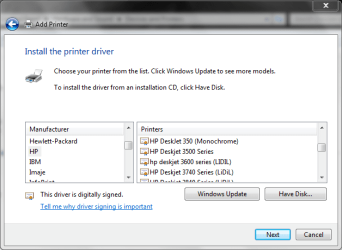
Choose LPT1: (printer port) as indicated here
If the 3600 series do not work you can use the 3500 series
Romulinx2 - I have never known or heard of "The Microsoft Product Catalog"? The Point being, is I have a Gateway AMD 64-bit with 2 GB of Ram. I loaded Windows 7 Build 7077 (32 bit) - got all the way to the Installation of My Officejet J4550 All-in-One Printer. Apparently HP has discontinued selling this printer even though I bought it less than six months ago?? I went to install the driver I had downloaded from HP for Vista 32/64 and it would not install in Windows 7 because the Software did recognize Windows 7 as an authorized Microsoft system. Next I went to HP Tech Support and they could/didn't know what to do when I asked them about installing their drivers in Windows 7. Is the "The Microsoft Product Catalog" a way to get around this. Any extra explanation You can offer here would be greatly appreciated. I need to learn as much as I can about this. Thank You ahead of time & God's Speed - Patrick CHi,
Here's the direct link to all the drivers for HP Deskjets from Microsoft.
Microsoft Update Catalog
![]()
Yup-Yup - Totally Kooool. I had windows 7 build 7077 completely installed. The HP software didn't recognize Windows 7 as an operating system. I completely re-installed Vista - Then re-installed Windows 7 after seeing the method You recommended. When I ran the Software in the Compatibility mode - selected the Trouble shooting option - the Compatibilty software allowed me to run the software in Vista (SP2) mode. I watched it (details are available) and the software went out - queried the Windows Catalog and downloaded what was required. In Windows 7 there is an interface for the Printer (Deviced and Printers) once it is installed that can be accessed by the right-click on the printer. It allows some functionailty but full functionality of the software came when I use the HP software. Very Nice. Windows 7 has really turned out to be very useful. The Windows 7 forum and the Experienced People hear are extremely helpful. God's Speed and Thank You again. PatrickCThe Microsoft Product Catalog has drivers that recognize windows 7 so yes that is a way around the error, there are several ways of doing this.
1. You can try and run the vista driver in compatibility mode.
2. If your set to check windows update just plug the usb device in and let it search windows update.
3. You can download the driver from the product catalog (same thing windows update does).
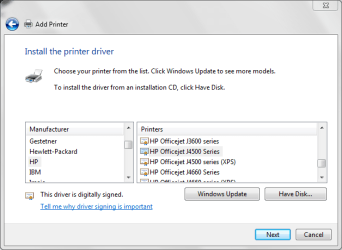
4. You can run the add printer wizard and click "windows update" let it populate the list then select "HP" on the left and your model (HP Officejet 4500 series) on the right, see pic