HP Laserjet 3052/3055 Scan

swordfish147

New member
Local time
2:03 PM
Messages
5
Has anyone had any luck with installing the drivers and software for HP's Laserjets 3052/3055 multifunction laser printers? I can print to it OK but no matter which way I try (including using compatibility mode), I can't install the software to scan. HP support seems oblivious to the fact that they're already selling Win 7 upgradeable hardware...
 

My Computer My Computer

OS
Windows 7 RC1
I started using Windows 7 Ultimate and I can't believe it, but my Laserjet 3055 Scanner finally works again!!

Hooray. It worked fine before with XP, but once I got my new desktop and it only came with Vista - the Scanner was NO MORE. Installed Windows 7 and it automatically detected it and I couldn't be happier.:D
 

My Computer My Computer

OS
Windows 7
Has anyone had any luck with installing the drivers and software for HP's Laserjets 3052/3055 multifunction laser printers? I can print to it OK but no matter which way I try (including using compatibility mode), I can't install the software to scan. HP support seems oblivious to the fact that they're already selling Win 7 upgradeable hardware...
After doing some searching I would have to agree, this seems to ne an older multifunction printer and HP may never update the drivers for seven. The poster above was kind enough to share his success simply by allowing windows to choose the drivers. so Have you tried letting windows do a search for them? Good Luck. Fabe
 

My Computer My Computer

Computer Manufacturer/Model Number
Self Built
OS
Windows 7 ultimate 64 bit / XP Home sp3
CPU
intel Core 2 Duo E8400 3.0ghz
Motherboard
Asus P5ND bios 1401
Memory
8 gigs 1066 OCZ Fata1ty
Graphics Card(s)
EVGA GTX 580 Call of Duty Black Ops Edition
Sound Card
Creative Soundblaster Audigy 2zs
Monitor(s) Displays
Asus 24in LCD's 2MS X2
Screen Resolution
1920x1080p @60Hz
Hard Drives
WD Caviar 500 Black/ WD Caviar 200 Blue
PSU
OCZ 700W GameXtreme
Case
NZXT Apollo
Cooling
Corsair H50 CPU/120mm x3 /60mm x2 /Corsair Dominator Ram
Keyboard
Logitech Bluetooth Wireless MX5000
Mouse
Logitech Bluetooth Wireless MX1000
Internet Speed
Download 19.83 Upload 0.97
Other Info
Logitech Z2300 Speakers/ Bose Noise Cancelling Headphones/Avermedia PCI-e Hybrid TV Bravo/Epson NX415 all in one/ 4 Port Powered USB Hub/ LG 10x Bluray Burner /TSST Corp DVDRW External
Network functionality

Apparently HP released information suggesting that USB scanning was supported natively.

These are professional networked printers which many SME's use across several offices (we certainly do). Simply saying they won't be supported as a network scanning device on the replacement of Vista seems ludicrous.

Most Vista applications run fine on Win 7, but for some reason HP when it wrote the scanning software for these machines decided to hard code a verification that the OS was Vista and Win7 can't pass that test, which renders the software and the printers useless.
 

My Computer My Computer

OS
Windows 7 RC1
I'd like to refresh this thread.
Did anyone successfully run scanner using network with HP LaserJet 3055?
On HP support page there is only printer driver. Does it mean that HP doesn't plan to support network scanning for this device?
 

My Computer My Computer

Computer Manufacturer/Model Number
Own made
OS
7 RC 64bit
CPU
AMD Phenom II X4 965 BE
Motherboard
ASUS M4N32 Deluxe
Memory
4 GB OCZ Reaper (2x2GB)
Graphics Card(s)
GIGABYTE GEFORCE GTX 275 896MB DDR3 OVERCLOCKED ULTRA DURABL
Sound Card
Sound Blaster X-Fi Audio
Monitor(s) Displays
Samsung SyncMaster 226BW
Screen Resolution
1680x1050
Hard Drives
1x160GB Intel SSD
3x250 Sata Barracuda in RAID 0 (disconnected. Switching to SSD)
1x160 Caviar disconnected (running as USB drive with router)
PSU
Yeisco FL-550ATX
Case
ThermalTake TaiChi
Cooling
ThermalRight TrueCopper
Keyboard
Logitech G15
Mouse
Steelseries WoW MMO Gaming Mouse
Internet Speed
4MBit/4Mbit
Other Info
Almost passive cooling. One 120 fan:
Noctua 120x120x25 NF-S12-1200 6/17dBA
running half speed on massive CPU cooler (6dB in theory) plus stock graphics card cooling.
LOL. I'm on the chat with HP support now...

[5 listopada 2009 19:36] -- Vasantha K says:
I understand that you have issues scanning from the Windows 7. Right?

[5 listopada 2009 19:36] -- Marek Polański says:
Yes. I have 3055 connected via network. And I can't find any scanner drivers for it.

[5 listopada 2009 19:37] -- Marek Polański says:
It works with XP and linux (with hplip) but it doesn't with Windows 7

[5 listopada 2009 19:40] -- Vasantha K says:
I understand.

[5 listopada 2009 19:43] -- Vasantha K says:
Sorry to say that the software is not yet released for the scanning.

[5 listopada 2009 19:43] -- Vasantha K says:
But you may try the vista software in the compatibility mode.

[5 listopada 2009 19:43] -- Vasantha K says:
1. Right click on the installation file> Properties
2. Click on Compatibility tab
3. Select the option 'Run this program in compatibility mode for'
Select Vista

[5 listopada 2009 19:43] -- Marek Polański says:
When it will be released? Windows 7 is out already.

[5 listopada 2009 19:44] -- Marek Polański says:
Vista 64-bit doesn't have scanning drivers also.

[5 listopada 2009 19:45] -- Marek Polański says:
So I guess I should use XP drivers in compatibility mode, but I've already tried that, and it doesn't work.

[5 listopada 2009 19:46] -- Marek Polański says:
Or should I try 32 bit software?

[5 listopada 2009 19:46] -- Vasantha K says:
64 bit operating system do not support scanning.


Can you believe it?
 

My Computer My Computer

Computer Manufacturer/Model Number
Own made
OS
7 RC 64bit
CPU
AMD Phenom II X4 965 BE
Motherboard
ASUS M4N32 Deluxe
Memory
4 GB OCZ Reaper (2x2GB)
Graphics Card(s)
GIGABYTE GEFORCE GTX 275 896MB DDR3 OVERCLOCKED ULTRA DURABL
Sound Card
Sound Blaster X-Fi Audio
Monitor(s) Displays
Samsung SyncMaster 226BW
Screen Resolution
1680x1050
Hard Drives
1x160GB Intel SSD
3x250 Sata Barracuda in RAID 0 (disconnected. Switching to SSD)
1x160 Caviar disconnected (running as USB drive with router)
PSU
Yeisco FL-550ATX
Case
ThermalTake TaiChi
Cooling
ThermalRight TrueCopper
Keyboard
Logitech G15
Mouse
Steelseries WoW MMO Gaming Mouse
Internet Speed
4MBit/4Mbit
Other Info
Almost passive cooling. One 120 fan:
Noctua 120x120x25 NF-S12-1200 6/17dBA
running half speed on massive CPU cooler (6dB in theory) plus stock graphics card cooling.
[5 listopada 2009 19:52] -- Marek Polański says:
SO what you say is that HP won't support scanning under 64 bit systems ever?

[5 listopada 2009 19:53] -- Vasantha K says:
You are right.

[5 listopada 2009 19:55] -- Marek Polański says:
That's sad. 64 bit systems are made for home use this days. And 3055 is not really home printer, but device used in places where 64 bit system is totally justified.

[5 listopada 2009 19:55] -- Marek Polański says:
Ok. So is this official HP statement, that you won't support scanning in Windows 7 64 bit for business devices?

[5 listopada 2009 19:58] -- Vasantha K says:
Marek, please wait for some time to see if there is software released for Windows 7 64 bit too ?

[5 listopada 2009 19:58] -- Marek Polański says:
How long?

[5 listopada 2009 19:59] -- Vasantha K says:
We do no have an update on the exact time for the software release. It is supposed to be out very soon.

[5 listopada 2009 20:00] -- Vasantha K says:
Please refer to the link below to have information regarding the software.

HP Color LaserJet CP6015 Printer series- HP LaserJet, Color LaserJet and LaserJet MFP Products - Product Support for Microsoft Windows 7 - c01856597 - HP Business Support Center

[5 listopada 2009 20:01] -- Marek Polański says:
Well, I just hope that HP driver support will be at least decent soon. Now there is no support for business clients as I can see, which is real shame for company like HP.

[5 listopada 2009 20:03] -- Marek Polański says:
Thanks for your time then. Bye.


IMO it's sad. I always thought that HP driver support is pretty good, and didn't really had problems with it.

 

My Computer My Computer

Computer Manufacturer/Model Number
Own made
OS
7 RC 64bit
CPU
AMD Phenom II X4 965 BE
Motherboard
ASUS M4N32 Deluxe
Memory
4 GB OCZ Reaper (2x2GB)
Graphics Card(s)
GIGABYTE GEFORCE GTX 275 896MB DDR3 OVERCLOCKED ULTRA DURABL
Sound Card
Sound Blaster X-Fi Audio
Monitor(s) Displays
Samsung SyncMaster 226BW
Screen Resolution
1680x1050
Hard Drives
1x160GB Intel SSD
3x250 Sata Barracuda in RAID 0 (disconnected. Switching to SSD)
1x160 Caviar disconnected (running as USB drive with router)
PSU
Yeisco FL-550ATX
Case
ThermalTake TaiChi
Cooling
ThermalRight TrueCopper
Keyboard
Logitech G15
Mouse
Steelseries WoW MMO Gaming Mouse
Internet Speed
4MBit/4Mbit
Other Info
Almost passive cooling. One 120 fan:
Noctua 120x120x25 NF-S12-1200 6/17dBA
running half speed on massive CPU cooler (6dB in theory) plus stock graphics card cooling.
I still have not been able to get my scanner to work. Have the HP Laserjet 3055, Windows 7 Ultimate 64 bit.
 

My Computer My Computer

Computer Manufacturer/Model Number
Velocity Micro
OS
Windows 7 Ultimate 64 bit
CPU
2.66 duo core
Memory
4 GB
Graphics Card(s)
GTX 260 NVidia
64-bit unlikely

HP never even came out with a 64-bit version of the software for Vista, so I'm not holding my breath for a 64-bit Windows 7 version either.

I have a HP desktop which came natively with vista 64 and because of this, I had to find a way to install Vista 32-bit instead just so I can have one machine in the office able to use the scanner!!!

With all the time Microsoft gave to the community to play with Win7, I find it hard to believe HP can have the nerve not to have released scanning drivers for this series of printers.
 

My Computer My Computer

OS
Windows 7 RC1
Yeah, I called HP yesterday and though out of warrenty the support guy basically told me that I'd have to try a third party scanning software solution or the native Win7 scanning software (which we already know doesn't work because Win7 doesn't recognize the scanner).

Sadly, my workaround is to use an old laptop that I have XP on as my 'scanning' station right now.
 

My Computer My Computer

Computer Manufacturer/Model Number
Velocity Micro
OS
Windows 7 Ultimate 64 bit
CPU
2.66 duo core
Memory
4 GB
Graphics Card(s)
GTX 260 NVidia
and here is the official response back from HP. Now, how much faith you may have in them actually posting a compatibe version of software......

"Thank you for contacting Hewlett-Packard's Commercial Solutions Center.

On reviewing your e-mail, we understand from your response that you are able to print but are not able to scan from your HP LJ 3055 AIO.

We regret to inform you that currently there is no printer software available which is compatible with the Windows 7 O/S, so you will not be able to install the printer software that came with the printer in CD or download it from the website. The compatible software will be available very soon and it will be updated on HP website as it is available.

You may also register on the HP website using the below link for notification when the Compatible software is available:

https://h30046.www3.hp.com/subprofile.php?SUBSCRIPTION=DRIVERSIGNUP&regioncode=NA&langcode=USENG&jumpid=in_SC-GEN__driverBSC&subs=DRIVERSIGNUP

HP aspires to provide the most up-to-date information on HP drivers and software. Please check back soon for updates.


Once again, thank you for contacting Hewlett-Packard's Commercial Solutions Center.

Kind Regards,
Reed"
 

My Computer My Computer

Computer Manufacturer/Model Number
Velocity Micro
OS
Windows 7 Ultimate 64 bit
CPU
2.66 duo core
Memory
4 GB
Graphics Card(s)
GTX 260 NVidia
Got it to work with W7 Ultimate 64bit!!!

Simple solution: XP mode.

XP drivers work perfectly fine on XP mode virtual machine.
There is some issue with XP's firewall, and I turned it off for the moment. I will investigate that later.
Anyway, printing, scanning, even status display in HP Toolbox works fine.

PS. It doesn't mean I don't expect HP to release 64bit drivers. This solution won't work for those Home version users.
 

My Computer My Computer

Computer Manufacturer/Model Number
Own made
OS
7 RC 64bit
CPU
AMD Phenom II X4 965 BE
Motherboard
ASUS M4N32 Deluxe
Memory
4 GB OCZ Reaper (2x2GB)
Graphics Card(s)
GIGABYTE GEFORCE GTX 275 896MB DDR3 OVERCLOCKED ULTRA DURABL
Sound Card
Sound Blaster X-Fi Audio
Monitor(s) Displays
Samsung SyncMaster 226BW
Screen Resolution
1680x1050
Hard Drives
1x160GB Intel SSD
3x250 Sata Barracuda in RAID 0 (disconnected. Switching to SSD)
1x160 Caviar disconnected (running as USB drive with router)
PSU
Yeisco FL-550ATX
Case
ThermalTake TaiChi
Cooling
ThermalRight TrueCopper
Keyboard
Logitech G15
Mouse
Steelseries WoW MMO Gaming Mouse
Internet Speed
4MBit/4Mbit
Other Info
Almost passive cooling. One 120 fan:
Noctua 120x120x25 NF-S12-1200 6/17dBA
running half speed on massive CPU cooler (6dB in theory) plus stock graphics card cooling.
Using XP mode

Yes, funnily enough I actually also decided to try it out with XP mode and so far the scanning over network is going OK. I'll try it a little longer before I make my final judgment call and upgrade my main machine from Vista to 7.

The only downside to this solution is that XP mode is only available for Windows 7 Pro and above. This limits people with a Home Premium license which is the most common version of Windows 7 out there.
 

My Computer My Computer

OS
Windows 7 RC1
I upgraded to Windows 7 Pro 32Bit. Everything has worked fine, even some archaic software for controlling police scanners, everything except the scanning on my Laserjet 3055. I've tried scanning with both the Windows Fax and Scan Utility as well as CutePDF. I can't seem to get them to work, the best I get is the first third of a page and then an error. I've tried uninstalling the 3055 and reinstalling it using the Windows Drivers as well as the HP Software, nothing works.

Can someone walk me through installing the drivers in XP Compatibility Mode???

Also, based on how long it took HP to get scanning compatibility to Vista, I think they are purposely delaying the drivers to force us into buying new equipment when our current equipment is still working fine. Class Action Law Suit anyone?

-Jared
 

My Computer My Computer

OS
Windows 7 Pro
For Windows 7 32 bit download windows xp software

I was setting up a 3055 and a 3052 network multifunction. Printer on a windows 7 Pro 32 bit machine.

I couldn't get it to work with the built in windows 7 scaner it doesn't see the HP printer as a network scanner.

So since they are both 32bit I went to HP's site and downloaded the 32 bit full software package for the printer.

I did not turn on XP compatibilty mode I just turned off UAC and the user was part of the local administrators group.

It sees the printer on the network and from the software I have full network scanning ability. I assume it will work on 64 bit machines as well but I have not tried it.

Personal opinion is that these HP multufunction network printers are crap and aren't made to be true network scanners. They rely on the client side software where as the bigger network multifunction printers have the scanner features built in and accessible from the web interface on the printer itself.
 

My Computer My Computer

OS
Win7
which version works with UAC?

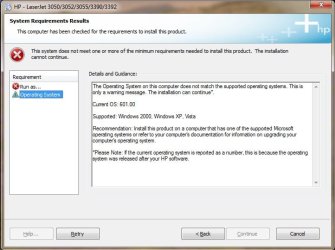
Can you post exactly which software version you installed with UAC turned off? I've used the "hp_LJ3050-3052-3055-3390-3392_Full_Solution" with UAC turned off and still getting the error message early on in the install process:
"This software cannot be installed using the "Run as..." command. The installation cannot continue until this is resolved. (see screen shot).


When checking the Operating system tab, it seems to me that the software is making a check for the Windows version and is not happy that Windows 7 has a higher version number than allowed. Most software usually check you set the minimum requirements, not maximum. Surely Win7 is not that different from Vista that HP could not fix that really easy. This is nonsense.
 

Attachments

  • error1.jpg
    error1.jpg
    44.8 KB · Views: 1,022
  • error2.jpg
    error2.jpg
    49.8 KB · Views: 713

My Computer My Computer

OS
Windows 7 RC1
BTW, HP have been notorious for being clueless about software support for their hardware.
I have a 3052 on my LAN.
It couldn't be used either as a printer or as a scanner by a clean Windows 7 Ultimate x86 with any driver provided by the OS.
On my side 2 actions got their crap installed and working both for the printer and the scanner through the LAN on 7.
The 'software' was the latest bundle I was able to find somewhere deeply buried on their ftp. It was named "3055fullsoftwaresolution.zip" and contained a folder named "AEC Driver Version 3.0" with the installation files inside. After unpacking, it would not start installing, but there is an easy workaround - (action 1) start "hpsetup.exe" in compatibility mode selecting "Windows XP (Service Pack 3)". Install with extended capabilities to get the scanner accessible. After the installation (action 2) go to %ProgramFiles%\HP\Digital Imaging\bin\ and start "hpqscnvw.exe" also in compatibility mode selecting "Windows XP (Service Pack 3)". The main scan application "hpscan3.exe" could not be used with any degree of reliability on my side with any of the compatibility options - sometimes it would start and scan, but in most cases it would just freeze when clicking the "Accept" button after a scan was done, and without being able to terminate it in any other way but an OS restart.

Hope it helps.

(Forgot to add that the above does not require Virtual PC in XP mode, which is not available on some 7 flavors).
 
Last edited:

My Computer My Computer

Computer Manufacturer/Model Number
Self-built
OS
Windows 7
CPU
Intel Celeron E1400
Motherboard
GA-73PVM-S2H
Memory
2 GB
Graphics Card(s)
GeForce 7100 / nForce 630i
Sound Card
NVIDIA High Definition Audio
Monitor(s) Displays
MEC Inspire 117
Hard Drives
Hitachi HDS721616PLA380 ATA
PSU
MEC M300-S13
Case
MEC M-Force MF105-12B17-TB
Cooling
n/a
Alternate Solution

I just built a new PC only to find that unfortunately I don't have the scanning ability anymore through my network at home. My solution was to setup the printer/scanner software on an old PC with limited resources and then RDP to the computer that was running Windows XP and had the HP Drivers on it. I set up and access password and saved the profile and it works great. The only issue is that it will only allow you to save the scans locally, so I just have to add the folder as a shared folder on my windows 7 PC and I'm fine. If you’re doing this in a business, just give the PC with the Driver on it limited access (no internet, just domain access) and setup as a standalone PC on the network.

Not the best solution but it works and if you only need a few people to be able to scan it's a solution that gets around the need to upgrade the printer because of HP none support.
 

My Computer My Computer

OS
Windows 7
CPU
AMD Athlon II X3
Motherboard
MSI NF750-G55
Memory
4Gb
Graphics Card(s)
Onboard Chip
Sound Card
standard
Monitor(s) Displays
23inch
Hard Drives
160GB Western Digital Blue and an old 160 Maxtor from an old computer.
I have given up waiting for HP and rather suspect they're using this as method of selling us newer kit. My HP 3055 is great and losing the scan to pdf function when I upgraded from XP to W7 was a real pain. So, as I work from home and need to scan multi page docs to PDF I am now using ScanWiz from www.Softi.co.uk. This seems to solve the problem and allows me to control the scanner from the PC to get PDF output. I had to tick all the advanced setting options to get it to work. Am sure there are others that can do it but this seems to work for me. Hope this helps, the software cost is cheaper than a new MFP.
 

My Computer My Computer

OS
Windows 7
Here is a link to drivers I used for a windows 7 32bit machine.

HP LaserJet 3055 All-in-One Printer -  HP LaserJet 3050/3052/3055/3390/3392 North America/Western Europe Full Software Solution - HP Business Support Center

just installed the software and used it as if it was an XP machine didn't need to make any changes. The printer is on the network and not directly connected. I would assume you could use this software on a 64bit system as well since most software is still 32bit and runs on 64bit windows.
 

My Computer My Computer

OS
Win7
Back
Top