HP Pavilion DV9700, no audio output device installed

jdd89

New member
Local time
11:17 AM
Messages
6
Hi everyone,

I recently updated a friends laptop (HP Pavilion DV9700) from Windows Vista to Windows 7 and there has been no audio since the upgrade. I know the sound card is good, since it worked before upgrading. I have searched the HP Driver and Support webpage, but unfortunately all of the drivers are Windows Vista only and do not work on the computer (no effect) It asks me to restart and upon restarting there is still a white X within a red circle on the speaker logo in the system tray. I have been scouring Google and have tried installing the HP support tool, adding legacy hardware, installed Realtek drivers, installed the HP Vista drivers, among several others. I have been working on this for well over 6 hours, banging my head against the wall...... This is a clean install of windows 7 home 64 bit. If I hover over the icon it states "No audio output device installed."

I am exhausted at trying to figure this out. Please it you have any advise I will appreciate it.

Thank you

-Jon
 

My Computer My Computer

At a glance

Windows 7 Home Edition 64 Bit
Computer type
PC/Desktop
OS
Windows 7 Home Edition 64 Bit
Jon read this ditty of mine and use PART B: to look at the components and see if there is an audio device listed in it
Using HW Info
PART A:
You can test the volts on the PSU with HW Info HWiNFO, HWiNFO32/64 - Download < download the right bit version and close the right hand window select Sensors and scroll down to the power section where you will see what the volts are doing see my pic. In my pic the section (Nuvoton) with VBATT is a dead give away you are in the section for the rail voltages. There are other section titles and one that pops up often is ITE
Now the voltage on the different rails have to be within 5% =+/- of what is required or the machine will not work properly if at all.
Limits +/-
12v = 11.4 – 12.6v
5v = 4.74 – 5.25v
3.3v = 3.135 – 3.465v
The Power good signal voltage at pin 8 on the 24 pin plug (grey cable) should be the same as the 5v rail reading/s
See this for the rail voltage info
Power Supply 101: A Reference Of Specifications - Power Supplies (Section 2.)
The original right hand window shows the machine running and is handy for that but for looking at the components in some detail close it and use the main left hand side panel
FOR OTHER COMPONENTS
PART B:
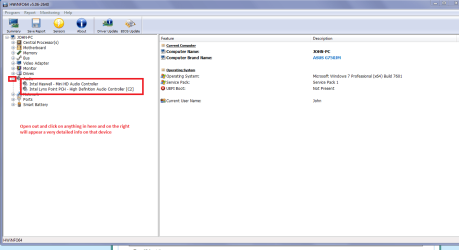
Open each small square with + in it on the section the components are in and then click on the individual component/s (it will highlight in blue) - in the right hand side will appear all sorts of details including brands speeds and other essential info that particular device. See pic for example.


My pic is of my main laptop but just highlight the individual devices and in the right hand window will appear very detailed info on that highlighted device
 

Attachments

  • AUDIO.PNG
    AUDIO.PNG
    28.7 KB · Views: 0

My Computer My Computer

At a glance

Desk1 7 Home Prem / Desk2 10 Pro / Main lap A...Desk1 i5 3750K / Laptop i7 GTX 860M / Desk2 i...Desk1 8GB (1866) / Desk2 16GB (1333) / Laptop...Desk 1& 2NVidia GTX 650 & Laptops on board Intel
Computer type
PC/Desktop
Computer Manufacturer/Model Number
Own build (new) Desk1 / Asus ROG Win 7 / Desk2 1st build
OS
Desk1 7 Home Prem / Desk2 10 Pro / Main lap Asus ROG 10 Pro 2 laptop Toshiba 7 Pro Asus P2520 7 & 10
CPU
Desk1 i5 3750K / Laptop i7 GTX 860M / Desk2 i5 2500
Motherboard
Desk1 Asus P877-V / Desk2 Gigabyte H67 UD3H / Laptop ?
Memory
Desk1 8GB (1866) / Desk2 16GB (1333) / Laptop 8Gb DDR3
Graphics Card(s)
Desk 1& 2NVidia GTX 650 & Laptops on board Intel
Sound Card
Desk 1 & 2 -XONAR DG Realtek High Def audio Laptop
Monitor(s) Displays
Desk 1 Benq HD 2450 / Desk2 Philips 24" / Laptop 17.5"
Screen Resolution
1920x1080 D1 & D2 & Laptop 1
Hard Drives
Desk1 Samsung 120GB 830 SSD
Asus ROG 256GB 850 Pro SSD
Desk2 Samsung 840 256 SSD
Toshiba 120GB EVO
PSU
Desk 1 Corsair HX 1050/ Laptop ? / Desk 2 Corsair HX 650
Case
Desk 1 Cooler HAF XM ? Toshiba laptop / Desk2 Coolermaster
Cooling
Fans on all Desk1 -2 Desk2 - all Coolermasters 5 Laptop ?
Keyboard
Desk 1 MS Sidewinder X6 Desk 2 MS Sidewinder X 4
Mouse
Desk 1&2 - Gigabyte MS 900 gamer - laptop - Logitec wireless
Internet Speed
ADSL2+
Other Info
One other Desktop (tester) and spare Toshba laptop both with SSD's
Running Kaspersky 2016 ISS on all machines config'd identically
Logitec audio stereo systems on each machine (x3)
Canon MG5250MFC
Router/modem TP-Link running WPA2SK
List the hardware id's

Open the Device Manager
Right Click on the Device in question
Properties
Details Tab

In XP the VEN_ #### and DEV_ #### is located under Device Instance ID
In Vista and Win7 the VEN_ #### and DEV_#### is located under Hardware ID
Also check bios and make sure audio is enabled
 

My Computer My Computer

At a glance

win 10
Computer type
PC/Desktop
Computer Manufacturer/Model Number
dell xps 9000
OS
win 10
Hi ICIT2LOL.

I installed HWiNFO 64 bit, and within the audio section (pressing the +) it says "unknown or none." Within device manager there is nothing to be found. There are a few that state Base System Device (see below for hardware Id's), a co-processor, and an unknown device. I installed the chipset driver, video driver, ethernet driver, and sound driver in that order, however I could only download the Vista version since they do not make a Windows 7 version. I am beginning to believe that some of this hardware is not Windows 7 compatible. I can usually download Driver Booster from Iobit and it automatically finds everything, but this is not the case. If I didn't know whether or not it was broken prior to the upgrade I would have questioned the integrity of the sound card, but the odds of the sound card going out at the installation of Windows 7 sounds to me like a software issue.

Base System #1 PCI\VEN_1180&DEV_0843&SUBSYS_30CF103C&REV_12
PCI\VEN_1180&DEV_0843&SUBSYS_30CF103C
PCI\VEN_1180&DEV_0843&CC_088000
PCI\VEN_1180&DEV_0843&CC_0880

Base System #2 PCI\VEN_1180&DEV_0852&SUBSYS_30CF103C&REV_12
PCI\VEN_1180&DEV_0852&SUBSYS_30CF103C
PCI\VEN_1180&DEV_0852&CC_088000
PCI\VEN_1180&DEV_0852&CC_0880

Base System #3 PCI\VEN_1180&DEV_0592&SUBSYS_30CF103C&REV_12
PCI\VEN_1180&DEV_0592&SUBSYS_30CF103C
PCI\VEN_1180&DEV_0592&CC_088000
PCI\VEN_1180&DEV_0592&CC_0880

Coprocessor PCI\VEN_1180&DEV_0543&SUBSYS_30CF103C&REV_12
PCI\VEN_1180&DEV_0543&SUBSYS_30CF103C
PCI\VEN_1180&DEV_0543&CC_088000
PCI\VEN_1180&DEV_0543&CC_0880

Unknown Device ACPI\HPQ0007
*HPQ0007

Thanks again for your help.

-Jon
 

My Computer My Computer

At a glance

Windows 7 Home Edition 64 Bit
Computer type
PC/Desktop
OS
Windows 7 Home Edition 64 Bit
jdd89, check in Device Manager, expand the System devices section and look for the High Definition Audio Controller device. If that is there, then the Realtek HD audio device should work (unless it's disabled in the BIOS). If it is not there, then there's a problem with the HD audio controller itself (and the Realtek audio device won't show up in Device manager at all).

I sort of had this problem on an HP Pavilion A6110N desktop computer where the High Definition Audio Controller device does not show up when I turn on the computer and the Realtek HD audio driver cannot load (and thus the "No Audio Output Device is Installed" message shows up). Turns out the High Definition Audio Controller device driver (hdaudbus.sys) for my Realtek audio device is sharing IRQ23 with the Standard Enhanced PCI to USB Host Controller device and its driver (usbehci.sys) is also using IRQ23 and the onboard nVidia Geforce 6150SE device (using device driver nvlddmkm.sys) is also using IRQ23. Like dang, 3 devices sharing a single IRQ - one or more of these devices won't work. What I did was remove the Standard Enhanced USB Controller and the Standard Openhcd USB Host Controller devices in Device Manager, rebooted and went into BIOS setup to disable some unnecessary hardware (like the 1394 firewire & built-in LAN) which freed up some IRQ resources, set the onboard audio controller to Enabled instead of Auto, exited BIOS and reloaded Win7. Win7 reinstalled the Standard EHCI Controller and reassigned the IRQ to 22 instead of 23, the High Definition Audio Controller device also reassigned the IRQ resource to 22 and the Geforce 6150se and Standard OHCI Controller are the only two devices using IRQ23.

In other words, it was a combination of a hardware & software problem (aka IRQ sharing problem & perhaps one of those drivers loading out of order); granted this problem was on a desktop computer, not at laptop.

I did however upgrade my cousin's HP Pavilion DV6648SE home entertainment laptop PC from Vista to Win7 (a 32bit version) earlier this year and the onboard Realtek audio ALC268 worked fine on Win7 [I had installed v6.0.1.7707 of the driver] but the Win7 OS was giving a battery warning "Consider replacing your battery" message which I did not encounter on Vista. When I ran BatteryInfoView on the HP dv6648se laptop, the battery "wear level" was 34.5% meaning it was time to replace the laptop battery, which I did. Ordering & installing a replacement battery eliminated the battery warning message in Win7. My cousin bought that HP laptop sometime in 2008.


By the way, PCI\VEN_1180&DEV_0592, PCI\VEN_1180&DEV_0852 & PCI\VEN_1180&DEV_0843 seem to be Ricoh card reader devices. Obtain the latest Win7 compatible Ricoh card reader drivers from Microsoft Update Catalog (use IE to access that web site), which I did with my cousin's HP dv6648se laptop. You will have to use Device Manager to install the Ricoh card reader controller drivers.
 

My Computer My Computer

At a glance

Windows 7 SP1 Home Premium 64bit [x64]Intel(R) Core(TM) i5-2310 CPU @ 2.90GHz6 GBIntel HD Graphics 2000
Computer type
PC/Desktop
Computer Manufacturer/Model Number
Dell Inspiron 620
OS
Windows 7 SP1 Home Premium 64bit [x64]
CPU
Intel(R) Core(TM) i5-2310 CPU @ 2.90GHz
Memory
6 GB
Graphics Card(s)
Intel HD Graphics 2000
Sound Card
Conexant CX20641 HD Audio
Hard Drives
Western Digital 1TB (1024GB) WD10EALX-759BA1
Internet Speed
Spectrum Cable Internet up to 100Mbps
Back
Top