Hi all,
Need your guidance and expertise please.
We just purchased an HP Pavilion P7-1254 PC 64-bit with Windows 7 Home Premium. The existing printer is an HP Photosmart 7760 which was connected to our old computer which ran XP via the LPT1 port.
I'm feel extremely computer illiterate at the moment, so please give me "dummy proof" instruction
Here's what I've done so far . . . went to Add Printer. Driver didn't come up so I selected "have disk". Said everything installed fine, but still no printer.
Then read a thread stating we should perform Windows Update so all updated drivers are downloaded. Did that. No success.
Then I further read that HP doesn't offer a driver for 64-bit, but could use either Vista drivers or a patch or even Deskjet 5400? (I went through this for my Vista machine a few years ago and it was successful)
Still . . . wanted to check with you guys first before doing this because that thread said it was for upgrading Vista to Windows 7. I'm not doing that.
Sooo, two questions please:
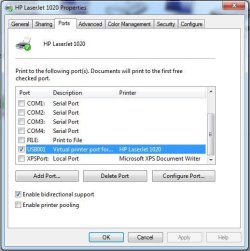
1. What port am I supposed to be using? The Add Printer selected LPT1 (which was the port used on our old XP machine) and I'm not sure that's correct for this new one. I think I have to use a USB port here? If this is the case, do I simply need to get a converter for my printer so I can use the USB? Please confirm.
2. I read a thread on this Forum named[FONT="]: Installing [/FONT][FONT="]HP[/FONT][FONT="]Photosmart[/FONT][FONT="] 7660 [/FONT][FONT="]Printer[/FONT][FONT="] on Windows Vista[/FONT][FONT="] [/FONT]Will this also work for a brand new computer that came with Windows 7?
Have clipped the instructions from the above thread down below for convenience. If it won't work, could you please offer some guidance on what I should do?
Thank you all in advance for your assistance. Sorry about the length of this. Should have come here in the first place!
Thanks again.
Meltie
[FONT="]Thread: Installing [/FONT][FONT="]HP[/FONT][FONT="]Photosmart[/FONT][FONT="] 7660 [/FONT][FONT="]Printer[/FONT][FONT="] on Windows Vista[/FONT]
[FONT="]1. If your [/FONT][FONT="]printer[/FONT][FONT="] is connected to your computer, disconnect it.
2. Click on the Start menu.
3. Click on Control Panel
4. Click on the Hardware & Sounds control panel.
5. Click Printers.
6. Click "Add a [/FONT][FONT="]Printer[/FONT][FONT="]"
7. Click "Add a Local [/FONT][FONT="]Printer[/FONT][FONT="]"
8. Check off the "Use an existing port" check box.
9. In the list entitled "Use an existing port" choose "LPT1: ([/FONT][FONT="]Printer[/FONT][FONT="] Port)
10. Click on the "Next" button
11. Choose "[/FONT][FONT="]HP[/FONT][FONT="]" as the manufacturer from the list of manufacturers
12. In the printers list that shows up, choose "Deskjet 5600"
13. Click on the "Next" button
14. In the text box called "[/FONT][FONT="]Printer[/FONT][FONT="] name" type "[/FONT][FONT="]Photosmart[/FONT][FONT="] 7660"
15. Wait for the computer to say that the [/FONT][FONT="]printer[/FONT][FONT="] has been successfully added.
16. Connect your [/FONT][FONT="]printer[/FONT][FONT="] to your computer (i.e. connect the cable to the USB port at the back of your computer.
17. A "Found New Hardware" screen should show up. Click Cancel on this window. (if it keeps showing up, just keep on clicking cancel until no more windows pop up)
18. Go back to the [/FONT][FONT="]printer[/FONT][FONT="] folder (i.e. the one where you clicked "Add a [/FONT][FONT="]Printer[/FONT][FONT="]"
19. Right Click on "[/FONT][FONT="]Photosmart[/FONT][FONT="] 7660"
20. Click on "Properties" in the menu that popped up.
21. Select the "Ports" tab.
22. Change the port from "LPT1" to "USB"
23. Click on the "Apply" button.
[/FONT]
Need your guidance and expertise please.
We just purchased an HP Pavilion P7-1254 PC 64-bit with Windows 7 Home Premium. The existing printer is an HP Photosmart 7760 which was connected to our old computer which ran XP via the LPT1 port.
I'm feel extremely computer illiterate at the moment, so please give me "dummy proof" instruction
Here's what I've done so far . . . went to Add Printer. Driver didn't come up so I selected "have disk". Said everything installed fine, but still no printer.
Then read a thread stating we should perform Windows Update so all updated drivers are downloaded. Did that. No success.
Then I further read that HP doesn't offer a driver for 64-bit, but could use either Vista drivers or a patch or even Deskjet 5400? (I went through this for my Vista machine a few years ago and it was successful)
Still . . . wanted to check with you guys first before doing this because that thread said it was for upgrading Vista to Windows 7. I'm not doing that.
Sooo, two questions please:
1. What port am I supposed to be using? The Add Printer selected LPT1 (which was the port used on our old XP machine) and I'm not sure that's correct for this new one. I think I have to use a USB port here? If this is the case, do I simply need to get a converter for my printer so I can use the USB? Please confirm.
2. I read a thread on this Forum named[FONT="]: Installing [/FONT][FONT="]HP[/FONT][FONT="]Photosmart[/FONT][FONT="] 7660 [/FONT][FONT="]Printer[/FONT][FONT="] on Windows Vista[/FONT][FONT="] [/FONT]Will this also work for a brand new computer that came with Windows 7?
Have clipped the instructions from the above thread down below for convenience. If it won't work, could you please offer some guidance on what I should do?
Thank you all in advance for your assistance. Sorry about the length of this. Should have come here in the first place!
Thanks again.
Meltie
[FONT="]Thread: Installing [/FONT][FONT="]HP[/FONT][FONT="]Photosmart[/FONT][FONT="] 7660 [/FONT][FONT="]Printer[/FONT][FONT="] on Windows Vista[/FONT]
[FONT="]1. If your [/FONT][FONT="]printer[/FONT][FONT="] is connected to your computer, disconnect it.
2. Click on the Start menu.
3. Click on Control Panel
4. Click on the Hardware & Sounds control panel.
5. Click Printers.
6. Click "Add a [/FONT][FONT="]Printer[/FONT][FONT="]"
7. Click "Add a Local [/FONT][FONT="]Printer[/FONT][FONT="]"
8. Check off the "Use an existing port" check box.
9. In the list entitled "Use an existing port" choose "LPT1: ([/FONT][FONT="]Printer[/FONT][FONT="] Port)
10. Click on the "Next" button
11. Choose "[/FONT][FONT="]HP[/FONT][FONT="]" as the manufacturer from the list of manufacturers
12. In the printers list that shows up, choose "Deskjet 5600"
13. Click on the "Next" button
14. In the text box called "[/FONT][FONT="]Printer[/FONT][FONT="] name" type "[/FONT][FONT="]Photosmart[/FONT][FONT="] 7660"
15. Wait for the computer to say that the [/FONT][FONT="]printer[/FONT][FONT="] has been successfully added.
16. Connect your [/FONT][FONT="]printer[/FONT][FONT="] to your computer (i.e. connect the cable to the USB port at the back of your computer.
17. A "Found New Hardware" screen should show up. Click Cancel on this window. (if it keeps showing up, just keep on clicking cancel until no more windows pop up)
18. Go back to the [/FONT][FONT="]printer[/FONT][FONT="] folder (i.e. the one where you clicked "Add a [/FONT][FONT="]Printer[/FONT][FONT="]"
19. Right Click on "[/FONT][FONT="]Photosmart[/FONT][FONT="] 7660"
20. Click on "Properties" in the menu that popped up.
21. Select the "Ports" tab.
22. Change the port from "LPT1" to "USB"
23. Click on the "Apply" button.
[/FONT]
My Computer
At a glance
Vista Home Premium 64-bitNVidia 900 series
- Computer Manufacturer/Model Number
- HP m8530f
- OS
- Vista Home Premium 64-bit
- Graphics Card(s)
- NVidia 900 series
- Monitor(s) Displays
- ASUS VE 205