
You are using an out of date browser. It may not display this or other websites correctly.
You should upgrade or use an alternative browser.
You should upgrade or use an alternative browser.
HP Upgrade 32bit and 64bit
- Thread starter Kennedy
- Start date

- Local time
- 2:05 AM
- Messages
- 34
Rule #1 when trying to upgrade OS, even with an awesome OS like Windows 7.
BACKUP BACKUP BACKUP
Better to be safe than sorry
BACKUP BACKUP BACKUP
Better to be safe than sorry
My Computer
- Computer Manufacturer/Model Number
- HP G60-125NR Notebook PC
- OS
- Windows 7 Professional
- CPU
- 2.00 GHz AMD Turion X2 RM-70 Dual-Core Mobile Processor
- Motherboard
- Integrated NVIDIA nForce Chipset
- Memory
- 3072 MB
- Graphics Card(s)
- NVIDIA GeForce 8200M
- Monitor(s) Displays
- 15.6" Diagonal High Definition HP Brightview Display
- Screen Resolution
- 1366x768
- Hard Drives
- 250 GB (5400 rpm)
- Keyboard
- Full size keyboard with integrated numeric keypad
- Mouse
- Touch Pad with dedicated vertical scroll Up/Down pad

Hi Kennedy, welcome to the Seven Forums.
Normally a retail version of Windows includes both 32-bit and 64-bit versions. You can choose which one you install and activate, you can not use both. The activation key included is the same for both versions. The 64-bit can only be installed if your system supports it.
If you are currently running XP, you have to do a clean install and reinstall all your software. You can use windows Easy Transfer to copy your personal files and folders from XP to Seven.
If you are running Vista, you can also do an upgrade install. It updates your Vista system, keeping your software, files and folders intact. You can upgrade a 32-bit Vista only with a 32-bit Seven and a 64-bit only with 64-bit.
Kari
Normally a retail version of Windows includes both 32-bit and 64-bit versions. You can choose which one you install and activate, you can not use both. The activation key included is the same for both versions. The 64-bit can only be installed if your system supports it.
If you are currently running XP, you have to do a clean install and reinstall all your software. You can use windows Easy Transfer to copy your personal files and folders from XP to Seven.
If you are running Vista, you can also do an upgrade install. It updates your Vista system, keeping your software, files and folders intact. You can upgrade a 32-bit Vista only with a 32-bit Seven and a 64-bit only with 64-bit.
Kari
My Computer
- Computer type
- Laptop
- Computer Manufacturer/Model Number
- HP ENVY 17-1150eg
- OS
- Windows 10 Pro x64 EN-GB
- CPU
- 1.6 GHz Intel Core i7-720QM Processor
- Memory
- 6 GB
- Graphics Card(s)
- ATI Mobility Radeon HD 5850 Graphics
- Sound Card
- Beats sound system with integrated subwoofer
- Monitor(s) Displays
- 17" laptop display, 22" LED and 32" Full HD TV through HDMI
- Screen Resolution
- 1600*900 (1), 1920*1080 (2&3)
- Hard Drives
- Internal: 2 x 500 GB SATA Hard Disk Drive 7200 rpm
External: 2TB for backups, 3TB USB3 network drive for media
- Cooling
- As Envy runs a bit warm, I have it on a Cooler Master pad
- Keyboard
- Logitech diNovo Media Desktop Laser (bluetooth)
- Mouse
- Logitech Performance Mouse MX
- Internet Speed
- 50/10 Mbps VDSL
- Antivirus
- Windows Defender 4.3.9431.0
- Browser
- Maxthon 3.5.2., IE11

Hey.
I hear the Home premium upgrade comes with 32bit and 64bit, is this right. and does its come on seperate discs?
also will upgrade still keep my games my videos and music etc with just simply installing it.
First question: Yes
Second question: It depends....
If you are using 32 bit and want to stay 32 bit or you use 64 bit and want to stay 64 bit then the answer is yes.
If you are using 32 bit and want to upgrade to 64 bit then no....to upgrade from x86(32 bit) to x64(64 bit) (or visa versa) requires a clean install. choose custom and then clean install. You must re-install your programs and games although you can use Windows Easy Transfer to move your configuration files, documents, and music so you just have to do a default install of your programs. You can also find your documents, files, music and pictures in the Windows.old directory after the install.
x64 is rock solid and these forums will assist you with any issues after you upgrade. I would make sure your machine is x64 compatible and check in the gaming threads for game issues prior to upgrade but it is worth it if you plan to do any video/audio editing. x64 is the future and it never hurts to be prepared.
My Computer
- Computer Manufacturer/Model Number
- Systemax N2000 Gaming PC
- OS
- Windows 7 Ultimate x64
- CPU
- Q6600 @2.4ghz (G0 stepping)
- Motherboard
- XFX nforce 680i LT
- Memory
- 8 gb OCZ vista essential sli PC-6400
- Graphics Card(s)
- Dual 9800gt in SLI mode
- Sound Card
- Integrated 8.1 High Definition Audio
- Monitor(s) Displays
- Dual Sceptre x246w 24 inch monitors
- Screen Resolution
- 1920 x 1200 each monitor
- Hard Drives
- 500 GB SATA II / 7500 rpm
- PSU
- Cooler Master Real Power Pro 1250W
- Case
- N2000 server tower
- Cooling
- Thermaltake Bigwater 760 is
- Keyboard
- MS Intelitype 6000 v2.0
- Mouse
- MS Intelipoint 6000
- Internet Speed
- Wi-power 1.5GB up / 512k down
- Other Info
- Windows 7 Ultimate x64, Windows 7 Pro x64, Windows Home Premium X86, Windows XP pro, Windows Home Server x86, Ubuntu 10.4 x86 and x64, Ubuntu server 10.4, SQL Server 2005, MySQL 5.0
If you are using 32 bit and want to upgrade to 64 bit then no....to upgrade from x86(32 bit) to x64(64 bit) (or visa versa) requires a clean install. choose custom and then clean install.
Hi bob,
fist time poster here, and i am after some help in possible please. I have just installed Windows 7 Home Premium. I was running Vista 32 bit and wanted to change to Windows 7 64 bit.
So, when it came to install, i selected custom. But after that i didn't have a choice if to install 32 or 64 bit. I know my system can take 64 bit as i have checked.
What happens is.......
I insert disk, windows 7 Install now. So i click that......
it goes through a few other little things (license agreement, etc)
then, it asks me where i want to install Windows.....
I choose C drive then it says windows is installing.
Nothing about choosing 32 or 64 bit.
Can you help please, the only reason i got W7 is to change to 64 bit.
My Computer
- OS
- Windows 7

What does your Windows 7 Install Disc say on it?
My Computer
- Computer Manufacturer/Model Number
- HAL-9000
- OS
- Windows 7 Ultimate 64bit
- CPU
- Intel i7 3770K
- Motherboard
- Asus Sabertooth Z77
- Memory
- 16GB DDR3 1333 Corsair XMS3
- Graphics Card(s)
- XFX HD6950 2GB EyeFinity
- Sound Card
- Logitech G35 & Sennheiser PC135 & VIA HD
- Monitor(s) Displays
- 23" HP 2310e, 23" Samsung B2230, 21.5" Viewsonic
- Screen Resolution
- 5760x1080
- Hard Drives
- 16TB of Storage
128GB & 256GB Crucial M4 SSD's, 2X 1TB WD Black, 3x 2TB WD, 3x 2TB Samsung F4, 1.5TB Seagate, WD 500GB,
- PSU
- Antec True Power New 650watt
- Case
- Cooler Master HAF-932
- Cooling
- Corsair H60 Hydro Cooler, 3x 230mm Fans, 2x120mm Fan
- Keyboard
- Logitech G15 and G13
- Mouse
- Logitech G700 Gaming Mouse
- Internet Speed
- 50/10 Mbit
- Other Info
- Speakers : Alesis M1 Active Mk2 Studio Monitors , APC RS 1200 UPS, HP 4500DN Color Laser, HP P1006 mono Laser, Kodak 8500 Dye-Sub, Epson 1280 inkjet, Epson Worforce 610 MFC
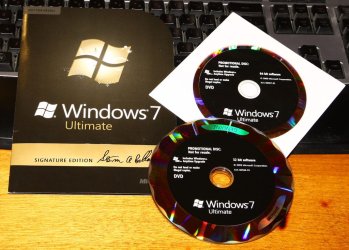
32-bit and 64-bit versions come on separate DVD's. If you start installation from a 32-bit disk, it installs a 32-bit Windows.
To install a 64-bit version you have to install it from 64-bit disk.
Kari
To install a 64-bit version you have to install it from 64-bit disk.
Kari
My Computer
- Computer type
- Laptop
- Computer Manufacturer/Model Number
- HP ENVY 17-1150eg
- OS
- Windows 10 Pro x64 EN-GB
- CPU
- 1.6 GHz Intel Core i7-720QM Processor
- Memory
- 6 GB
- Graphics Card(s)
- ATI Mobility Radeon HD 5850 Graphics
- Sound Card
- Beats sound system with integrated subwoofer
- Monitor(s) Displays
- 17" laptop display, 22" LED and 32" Full HD TV through HDMI
- Screen Resolution
- 1600*900 (1), 1920*1080 (2&3)
- Hard Drives
- Internal: 2 x 500 GB SATA Hard Disk Drive 7200 rpm
External: 2TB for backups, 3TB USB3 network drive for media
- Cooling
- As Envy runs a bit warm, I have it on a Cooler Master pad
- Keyboard
- Logitech diNovo Media Desktop Laser (bluetooth)
- Mouse
- Logitech Performance Mouse MX
- Internet Speed
- 50/10 Mbps VDSL
- Antivirus
- Windows Defender 4.3.9431.0
- Browser
- Maxthon 3.5.2., IE11
32-bit and 64-bit versions come on separate DVD's. If you start installation from a 32-bit disk, it installs a 32-bit Windows.
To install a 64-bit version you have to install it from 64-bit disk.
Kari
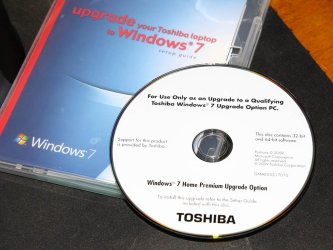
Actually it depends on who it comes from. We got our free Windows 7 Upgrade Disk from Toshiba and it has both 32bit and 64bit on the same DVD.
Attachments
My Computer
- Computer Manufacturer/Model Number
- HAL-9000
- OS
- Windows 7 Ultimate 64bit
- CPU
- Intel i7 3770K
- Motherboard
- Asus Sabertooth Z77
- Memory
- 16GB DDR3 1333 Corsair XMS3
- Graphics Card(s)
- XFX HD6950 2GB EyeFinity
- Sound Card
- Logitech G35 & Sennheiser PC135 & VIA HD
- Monitor(s) Displays
- 23" HP 2310e, 23" Samsung B2230, 21.5" Viewsonic
- Screen Resolution
- 5760x1080
- Hard Drives
- 16TB of Storage
128GB & 256GB Crucial M4 SSD's, 2X 1TB WD Black, 3x 2TB WD, 3x 2TB Samsung F4, 1.5TB Seagate, WD 500GB,
- PSU
- Antec True Power New 650watt
- Case
- Cooler Master HAF-932
- Cooling
- Corsair H60 Hydro Cooler, 3x 230mm Fans, 2x120mm Fan
- Keyboard
- Logitech G15 and G13
- Mouse
- Logitech G700 Gaming Mouse
- Internet Speed
- 50/10 Mbit
- Other Info
- Speakers : Alesis M1 Active Mk2 Studio Monitors , APC RS 1200 UPS, HP 4500DN Color Laser, HP P1006 mono Laser, Kodak 8500 Dye-Sub, Epson 1280 inkjet, Epson Worforce 610 MFC
Similar threads
- Replies
- 4
- Views
- 1K

- Replies
- 3
- Views
- 7K

- Replies
- 2
- Views
- 13K