I bit the Bullet

TechnoMage2016

Retired PC Tech
Pro User
VIP
Local time
12:35 AM
Messages
717
Location
Central Florida
Since Win-10 made its first appearance, I've always said that I'd never run Windows 10, unless something forced me into it. Well, Win-10 is no longer the POS that is was originally. And with the new Classic Shell, it looks and runs like Win-7.

So here's what happened:
I was running Windows 7/Pro/x86, and happy as a clam, when my NVIDEA GeForce 210 video card started giving me fits.
It was running HOT, and sometimes would blank the screen. I'm a Board-Level Repair tech. but not when it comes to Video Cards.:(

The only solution was to just buy a new video card....something I could afford. I wound up with a RADION 5450, 2GB card. The klinker was, that I could not find Win-7 drivers for that card. WTF? The video was there, but everything was short and fat! Arggg!

So, I unplugged my Win-7 HD (my SSD) and plugged in my Windows 10/Pro/64 HD (1TB spinner). When Win-10 booted up it was really slow (while it looked for vid card drivers) but as soon as it found the proper driver and installed it, my desktop, on my new 24" monitor, came up and looked GREAT! What a great drivers package Win-10 has!

Now the part that totally blows so many users away..... getting all my stuff off of my SSD and onto the HD with Win-10 on it. I have a 1TB Flash Drive, and I just copied everything I wanted to keep, from Win-7, onto the Flash Drive. Then I booted up the Win-10 HD, and copied all my stuff off of the Flash Drive and onto the Win-10 drive.
Oh, I had some setups to do, but that didn't take long. I keep everything in Folders, and it was just a matter of copying folders.

I can't use Windows Mail any longer, so I've installed O.E. Classic to handle my email. I'm using the FREE version, but I may wind up buying the Pro version, to get all the features I want. It looks and works a lot like, the old favorite "Outlook Express" or "Windows Mail", which I've used for as long as I've had Windows 7.

I did all that today, and now I'm ready for some supper.
Y'all have a great day now, Y'hear?
TM :cool:
 

My Computer

Computer type
PC/Desktop
Computer Manufacturer/Model Number
Various
OS
Win 7 Pro, SP1, x86, Win-11/Pro/64
CPU
AMD
Motherboard
Various
Memory
8GB Crucial
Graphics Card(s)
Various
Sound Card
OnBoard
Monitor(s) Displays
Acer 21.5"
Hard Drives
Crucial SSD, 500 GB
PSU
OEM
Case
SFF Slim Line Case
Cooling
OEM
Keyboard
eMachines
Mouse
Logitech Wireless
Internet Speed
varies
Antivirus
Windows Defender/Super Anti-Spyware
Browser
Firefox
I'm testing Windows 10 AME right now. TEE HEE.

So far very little telemetry coming out of it. (Verified with a network packet sniffer)

Edit-

This guy doesn't know what he's talking about. Why do I want Creative Cloud or any of that? Cortana?! No thanks. Windows 10 Amelioriated: Simply Put Is Not A Good Idea - YouTube

The one thing they did wrong in AME is that they added whole CIDRs to the hosts file. LOL! You can't add CIDRs or IPs to a host file, only domains. Peerblock or just the Windows firewall will suffice. Better yet, Pfsense.

Yes, I built this sucker. I'm not trusting someone else's download. Server is in Russia, too.
 
Last edited:

My Computer

Computer type
PC/Desktop
OS
Windows 7 Ultimate x64
I'm sorry, but I have no idea what you just said. But I defend your right to say it. :confused:

Back to my Upgrade story:
This morning, I saved all the Saved Mail from Window Mail, on my old Win-7 drive, and imported them into O.E.Classic on my new Win-10 drive.

Then I cloned my old Win-7 SSD to a backup drive (2TB Seagate).
Then I moved some cables around and cloned my new Win-10 installation to my 120GB SSD.

Now, with Win-10 all set up the way I want it, and with it now running on my SSD, my upgrade from Win-7 to Win-10 is complete.

And, I still have Win-7 on a backup drive, just in case there was something on there that I forget, but need.

I won't be leaving this forum though, because I still have four PCs that happily run Windows 7.;)

Cheers Mates,
TM :cool:
 

My Computer

Computer type
PC/Desktop
Computer Manufacturer/Model Number
Various
OS
Win 7 Pro, SP1, x86, Win-11/Pro/64
CPU
AMD
Motherboard
Various
Memory
8GB Crucial
Graphics Card(s)
Various
Sound Card
OnBoard
Monitor(s) Displays
Acer 21.5"
Hard Drives
Crucial SSD, 500 GB
PSU
OEM
Case
SFF Slim Line Case
Cooling
OEM
Keyboard
eMachines
Mouse
Logitech Wireless
Internet Speed
varies
Antivirus
Windows Defender/Super Anti-Spyware
Browser
Firefox

My Computer

Computer type
PC/Desktop
Computer Manufacturer/Model Number
HP Desktop & Compaq Laptop
OS
Win 10 x64, Linux Lite, Win 7 x64, BlackArch, & Kali
Hard Drives
Samsung 850 Pro 256Gb,
Hitachi HDD 1Tb,
Crucial MX SSD 250Gb
Segate 3Tb USB 3.0 Ext. Backup HDD
Internet Speed
150Mbps dn, 20Mbps up
Antivirus
Avast Free, Malwarebytes Anti-Exploit & Anti-Ransomware
Browser
Firefox, Chrome, Opera, & VPN
YES! I have it, and use it on every install of 8.1 or 10.

Now, I have to digress. Windows 10 just had too many negatives for me to deal with.
I won't go into all the gory details, but I just found it seriously "Wanting".

So, my alternative was to use an install of Windows 8.1/Pro/64 that I already had installed on a spare HD.
After two days of moving files and updating some older programs, and lots of tweaks and twiddles, I'm finally ready to CLONE this work drive (a 2.5" Laptop Drive) to my SSD, for greatly improved performance.

The devil is surely in the details, and I'm a very detail oriented kind of guy.

The best thing about going to Win-8.1, is that it went out and found and installed the drivers for my new
AMD Radeon 5450 video card. Win-7 did not, and Could Not do that.

I'll still keep on watching this forum, because I still have several PCs that run Win-7.

Happy Valentines Day

TM :cool:


My Computer

Computer type
PC/Desktop
Computer Manufacturer/Model Number
Various
OS
Win 7 Pro, SP1, x86, Win-11/Pro/64
CPU
AMD
Motherboard
Various
Memory
8GB Crucial
Graphics Card(s)
Various
Sound Card
OnBoard
Monitor(s) Displays
Acer 21.5"
Hard Drives
Crucial SSD, 500 GB
PSU
OEM
Case
SFF Slim Line Case
Cooling
OEM
Keyboard
eMachines
Mouse
Logitech Wireless
Internet Speed
varies
Antivirus
Windows Defender/Super Anti-Spyware
Browser
Firefox
You could always use nLite (NTLite) and strip down Windows 10 to your liking.
 

My Computer

Computer type
PC/Desktop
OS
Windows 7 Ultimate x64
I think you missed my point.....that POS WILL NOT run Windows Mail, no matter how you F' with it!!!
Microsoft made dang sure of that. Those b@#$%s!

Windows 8.1/Pro/64 picks up my new Video Card, and runs Windows Mail. I can't ask for anything better'n that!

So that's where I'm at now. Windows 7 is OUT, and Win 10 is OUT, and Win-8.1/Pro/64 is IN.

I just wish I'd done that some time ago. But, better late than never. Eh?

Cheers Mates, (if you live in Texas, you have my sympathy) Stay Warm!

TM :cool:
 

My Computer

Computer type
PC/Desktop
Computer Manufacturer/Model Number
Various
OS
Win 7 Pro, SP1, x86, Win-11/Pro/64
CPU
AMD
Motherboard
Various
Memory
8GB Crucial
Graphics Card(s)
Various
Sound Card
OnBoard
Monitor(s) Displays
Acer 21.5"
Hard Drives
Crucial SSD, 500 GB
PSU
OEM
Case
SFF Slim Line Case
Cooling
OEM
Keyboard
eMachines
Mouse
Logitech Wireless
Internet Speed
varies
Antivirus
Windows Defender/Super Anti-Spyware
Browser
Firefox
I'm confused. Your primary reason for upgrading/avoiding upgrading, is so you can run Windows Mail? The one that Vista came with?
 

My Computer

Computer type
PC/Desktop
Computer Manufacturer/Model Number
Gateway GT5656
OS
Windows 7 x64 SP1
CPU
AMD Athlon 64 X2 6000+ / 3.0 GHz
Motherboard
NVIDIA GeForce 6150 SE
Memory
6 GB
Monitor(s) Displays
Lenovo LED
Screen Resolution
1920 X 1080
Hard Drives
Windows on 500 GB spinner; Ubuntu 16 on Sandisk 250GB SSD; Bodhi5 on Samsung 250GB SSD; another old spinner for fooling around.
PSU
Original that came with computer
Keyboard
Logitech wireless
Mouse
Logitech wireless
Antivirus
Microsoft Sec Essentials
Browser
Vivaldi
Coming at you from Texas here. Whew, it's been a deep freeze, and rolling blackouts where you have no power for 24 hours and it's 17F outside and 40F in the house (unfortunately, no fireplace) -- is unfun. But it's better now. Still have the got-dam rolling blackouts, but the temps are now hovering around freezing, which I can handle easily.

So anyway, I found myself in a similar situation as yours recently and felt I had to comment, if for no other reason than just to say that I feel your pain.

My Win7 system has been using an ASRock 890GX Pro3 mobo for like 12 years, and it's always worked well for me. Until I went and bought an LG 34" ultra-wide screen display, which is HDMI only, at which point I discovered that the ASRock's onboard HDMI wasn't up to the task. I needed 2560 x 1080 resolution and it could only provide 1920 on the high end. So I surfed on over to Amazon and found an NVidia 210 card for cheap -- like $40 or so -- ordered it and installed it a couple days later. This was a couple years ago and, as I dimly recall, I had to tweak something in the BIOS before I could get things where Win7 saw the display. I was running the machine with dual screens and I noticed one day that my old reliable 22" AOC was no longer working. I noticed also that, where I had been using the LG monitor to watch TV, this-had also stopped working. So I began to suspect the video card -- that it was going out on me. So, like you, I ordered the ATI equivalent. Cost about the same -- I don't recall the model number, but what you're reporting sounds about right.

So I go to install the ATI -- now keep in mind this ASRock is an AMD mobo with an AMD chipset and onboard ATI graphics, mind you, and no matter what I tried, I could not get it to work. I even called AMD/ATI tech support, discussed and tried options with a very helpful rep for almost an hour. Still couldn't get it to work. He concluded with regret that it looked like my system was simply incompatible. So I boxed back up the ATI and returned it to Amazon.

I wanted to try it with Win10, but I couldn't get Win10 to install on my system. It errored out after almost completing theu install. Not sure why and I finally gave up trying to install it on that system. Bought a newer mobo that had an HDMI port that could handle 2560 x 1080. Win10 installed without a hitch, thanks possibly to a new SSD drive that was part of the upgrade, so I've simply kept this old system as Win7, keeping it around for legacy hardware and software and stuff.

I don't care for 8.1 so I never even thought to try that upgrade.
 

My Computer

Computer type
PC/Desktop
Computer Manufacturer/Model Number
Home built
OS
Win7 Ulitmate x64
CPU
AMD Phenom II X4 840 3.2 GHz
Motherboard
ASRock 890GX Pro3
Memory
16 GB
Graphics Card(s)
ATI Radion HD 4290 on the MoBo
Sound Card
M-Audio Delta 66, AMD on MoBo
Monitor(s) Displays
LG 34", AOC 22" flat screens
Screen Resolution
2560x1080, 1680x1050
Hard Drives
3 TB, 750 gig, 500 gig
PSU
500w
Case
no-name
Cooling
ps fan, case fan, cpu fan
Keyboard
Logitech
Mouse
Logitech
Internet Speed
45+Mbps
Antivirus
Microsoft Security Essentials
Browser
Mozilla SeaMonkey, Chrome
Other Info
I'm a musician and a composer, so this PC is used primarily as a digital audio workstation (DAW), so sound is king. I'm also a photographer, so I also make use of it for image processing. I find the ATI Radion on the MoBo to be perfectly adequate in this respect and the AOC 22" monitor to be respectable. It's about time for an upgrade, though.
Michael,
It was that NVIDEA 210 vid card of mine that crapped out on me. It still worked, most of the time, then when watching a video the monitor would just go black and I'd hear a squeel coming from someplace, and I'd have to shut my PC off! My only solution was to replace it. I found an AMD Radeon 5450, 2GB, card on Amazon. It works great, but Win-7 drivers were ilusive, so I went to Win-8.1 and it installed it. (not initially, but after a reboot or two)


I was a moderator on an old Windows 8 forum when it first came out. It was not well written and not well accepted either. Seemed to be Buggy.


It was a real mistake for MS to ever name the upgrade 8.1, because that did nothing to erase the bad taste that Win-8 had left in peoples mouths. It would have been better named Windows 9, because 8.1 was really a new OS, and it's so much like Win-10, I think 10 is just a slightly modified version of 8.1. Just a feeling and not necessarily fact.


I've been a working Computer tech since 1980, so I've had, used and got familiar with every OS since DOS 2.0.

I found Win 8.1 backward compatible with many programs, like Windows Mail, which Win-10 is NOT.
And 8.1 virtually comes with the Great hardware driver package like Win-10.


So with Windows Mail compatibility, and the great driver pack, 8.1 is my own OS of choice.
(if 8.1 doesn't have a driver it needs, it will go out and find it.)

I still use the new Classic Shell with it, and I also use the program "Never 10" and the program to stop updates. With a few of my own tweaks and tune up tips, I have 8.1 running every bit as good as Win-7. I think I'll keep it.;)


I've written this on a Toshiba laptop that was given to me as UN-repairable. I repaired it!
Then I installed Win-7 x86 on it, and the rest is history.


Good Luck, And Stay Warm! It will be in the 80's here in FL today. Y'all come on down!


TM :cool:
 

My Computer

Computer type
PC/Desktop
Computer Manufacturer/Model Number
Various
OS
Win 7 Pro, SP1, x86, Win-11/Pro/64
CPU
AMD
Motherboard
Various
Memory
8GB Crucial
Graphics Card(s)
Various
Sound Card
OnBoard
Monitor(s) Displays
Acer 21.5"
Hard Drives
Crucial SSD, 500 GB
PSU
OEM
Case
SFF Slim Line Case
Cooling
OEM
Keyboard
eMachines
Mouse
Logitech Wireless
Internet Speed
varies
Antivirus
Windows Defender/Super Anti-Spyware
Browser
Firefox
Michael,
It was that NVIDEA 210 vid card of mine that crapped out on me. It still worked, most of the time, then when watching a video the monitor would just go black and I'd hear a squeel coming from someplace, and I'd have to shut my PC off! My only solution was to replace it. I found an AMD Radeon 5450, 2GB, card on Amazon. It works great, but Win-7 drivers were ilusive, so I went to Win-8.1 and it installed it. (not initially, but after a reboot or two)


I was a moderator on an old Windows 8 forum when it first came out. It was not well written and not well accepted either. Seemed to be Buggy.


It was a real mistake for MS to ever name the upgrade 8.1, because that did nothing to erase the bad taste that Win-8 had left in peoples mouths. It would have been better named Windows 9, because 8.1 was really a new OS, and it's so much like Win-10, I think 10 is just a slightly modified version of 8.1. Just a feeling and not necessarily fact.


I've been a working Computer tech since 1980, so I've had, used and got familiar with every OS since DOS 2.0.

I found Win 8.1 backward compatible with many programs, like Windows Mail, which Win-10 is NOT.
And 8.1 virtually comes with the Great hardware driver package like Win-10.


So with Windows Mail compatibility, and the great driver pack, 8.1 is my own OS of choice.
(if 8.1 doesn't have a driver it needs, it will go out and find it.)

I still use the new Classic Shell with it, and I also use the program "Never 10" and the program to stop updates. With a few of my own tweaks and tune up tips, I have 8.1 running every bit as good as Win-7. I think I'll keep it.;)


I've written this on a Toshiba laptop that was given to me as UN-repairable. I repaired it!
Then I installed Win-7 x86 on it, and the rest is history.


Good Luck, And Stay Warm! It will be in the 80's here in FL today. Y'all come on down!


TM :cool:

I knew there was more to it. As Spock would say, Fascinating. I have briefly entertained the idea of upgrading to 8.1, as a way of keeping my "Windows drive" alive a little while longer. But it's hard to justify spending the money on it, when it will EOL soon. Just buys me a couple years or so. Still, that is something. If I could find a bargain-basement price, I would consider it.

Windows Mail was cool. I persisted with it awhile after upgrading to Seven, but eventually installed Live Mail, and in time grew to love it. It worked great and was elegant to boot.

It may be nice now in Florida, but wait till summer, when you have to stay in air conditioning to survive. Until the Hurricane comes, you have to leave, and then come back to no power. No air conditioning. you can only remove so many articles of clothing....
 

My Computer

Computer type
PC/Desktop
Computer Manufacturer/Model Number
Gateway GT5656
OS
Windows 7 x64 SP1
CPU
AMD Athlon 64 X2 6000+ / 3.0 GHz
Motherboard
NVIDIA GeForce 6150 SE
Memory
6 GB
Monitor(s) Displays
Lenovo LED
Screen Resolution
1920 X 1080
Hard Drives
Windows on 500 GB spinner; Ubuntu 16 on Sandisk 250GB SSD; Bodhi5 on Samsung 250GB SSD; another old spinner for fooling around.
PSU
Original that came with computer
Keyboard
Logitech wireless
Mouse
Logitech wireless
Antivirus
Microsoft Sec Essentials
Browser
Vivaldi
.....................
So here's what happened:
I was running Windows 7/Pro/x86, and happy as a clam, when my NVIDEA GeForce 210 video card started giving me fits.
It was running HOT, and sometimes would blank the screen. I'm a Board-Level Repair tech. but not when it comes to Video Cards.:(
TM :cool:


Goddam TM!


We're running the same nVidea card. The fan-less one? I wanted something else but the store tech wanted me to buy it back in 2013. Currently, using CPUID, I'm getting 154°F which doesn't seem out of line for a fan-less video card.

I too am a Board-Level, I too get occasional black screen, like someone is turning my monitor off and on,
because if it were the card, you should also get the "no signal" dialogue box, like during a hard reset/shutdown. No dialogue box, just goes black but comes on again.
My crappy house, which I own, is admittedly substandard [tube and knob still in some places] and where I'm worried is over possible voltage drops. Because Seasonic and Antec [actually OEM'd by Seasonic] power supplies compensate for momentary voltage drops, but monitor power supplies, integrated into my decade-old 24-inch ACER mobo doesn't. So I'm worried its the wiring at the wall socket. Seems stable for now, house is at very low humidity and it hasn't acted up in five days. {knock on wood}
I have a multimeter, but its not fast enough to catch voltage drops, and I haven't had time to build a simple eight/seven segment LED voltmeter that can go down to five or six decimal places, since losing the nice house I had and moving here.


So at least here, I don't think its the 2013 workstation, the monitor is old and may be reacting to voltage drops. Can't say if that are your circumstances other than to ask.
When your W7 machine acts up, are you getting that "no signal" dialogue on your monitor?
 

My Computer

Computer type
PC/Desktop
Computer Manufacturer/Model Number
Custom Build
OS
W7 Ultimate 32-bit
Motherboard
ASUS M4N68T-M V2
PSU
Seasonic G-series 650W, can't afford the X,still Top/Line.
Case
Cooler Master Storm Scout 2, Ghost White version.
Cooling
5 fans....no liquid needed, everything under 100F
Keyboard
veteran PS2
Mouse
veteran PS2
Internet Speed
50Mps
Antivirus
AVG 2016 + TinyWall-to enhance Windows 7 firewall.
Browser
several
BlueGuy,
I don't think so, but then the short term memory ain't what it used to be.

Yes, my 210 vid card was the NO-Fan type, but I put a fan on it, back when I first got it. But even with the fan running normally, the card got too hot to touch. So something was just going terribly wrong in that card. I didn't mind replacing it....that's not the first vid card I've ever replaced.

What I minded was that the new card did not come with drivers, and my attempt to get them via the internet fell flat.

So for me, I first tried Win-10 which did install the proper driver for the new AMD Radeon card, but would not run some of my older programs that I rely on. That was a deal breaker.

My next step was to try Win-8.1, which I've had good luck with in the past, for me and several of my customers. Win 8.1 was like a breath of fresh air. It installed quickly and easily and after a re-boot, it also found and installed the correct driver for my new vid card.

My startup and shutdown times with 8.1 are almost identical to Win-7.


I removed the fan from my old vid card and installed it on the new card. That new card is running nice and cool. And, last but not least, Win 8.1 is running great and it runs all my favorite programs, like Windows Mail.

Just for the record, I had no intention of EVER upgrading my Win-7 to a later OS. But the apparent lack of Win-7 drivers for my new vid card, was a deal breaker.

All's well now. My new OS and my new Vid Card are both working great, and I'm able to run all my old programs. No fault, No foul!

I want to wish all the best for our 'Lady F.'

TM :cool:
 

My Computer

Computer type
PC/Desktop
Computer Manufacturer/Model Number
Various
OS
Win 7 Pro, SP1, x86, Win-11/Pro/64
CPU
AMD
Motherboard
Various
Memory
8GB Crucial
Graphics Card(s)
Various
Sound Card
OnBoard
Monitor(s) Displays
Acer 21.5"
Hard Drives
Crucial SSD, 500 GB
PSU
OEM
Case
SFF Slim Line Case
Cooling
OEM
Keyboard
eMachines
Mouse
Logitech Wireless
Internet Speed
varies
Antivirus
Windows Defender/Super Anti-Spyware
Browser
Firefox
BlueGuy,
I don't think so, but then the short term memory ain't what it used to be.

I want to wish all the best for our 'Lady F.'

TM :cool:


She not well?
She said die-hardily she's sticking to W7.


FWIW, should have mentioned this ACER has had two workstations hooked up to it, so it is old.
It had a twin that went through two Pentiums and the current AMD Sempron before going totally
dark. Either the monitor p/s finally caved in or the backlight gave out. So bought a 2017 era 27 inch
ACER for PVR duty. I'm an ACER fanboy because they got me through all my years with Atari™ since they
were the only ones compatible with the ST/TTs weird frequency output.
 

My Computer

Computer type
PC/Desktop
Computer Manufacturer/Model Number
Custom Build
OS
W7 Ultimate 32-bit
Motherboard
ASUS M4N68T-M V2
PSU
Seasonic G-series 650W, can't afford the X,still Top/Line.
Case
Cooler Master Storm Scout 2, Ghost White version.
Cooling
5 fans....no liquid needed, everything under 100F
Keyboard
veteran PS2
Mouse
veteran PS2
Internet Speed
50Mps
Antivirus
AVG 2016 + TinyWall-to enhance Windows 7 firewall.
Browser
several
Of course, I don't know about the UK, but, around here, I have several retail stores that carry the APC Brand of UPS. They are the best, and I have five of them!
So if a surge, spike, dip or brownout comes along, the UPS takes care of it.

For YEARS, I've recommended them to all of my friends and customers. And now, I recommend one to you!

You should never be at the mercy of power line problems.

And, if the line power goes completely OUT, which it does about once a year, I have a Generator!
 

Attachments

  • Predator Generator.jpg
    Predator Generator.jpg
    26 KB · Views: 9

My Computer

Computer type
PC/Desktop
Computer Manufacturer/Model Number
Various
OS
Win 7 Pro, SP1, x86, Win-11/Pro/64
CPU
AMD
Motherboard
Various
Memory
8GB Crucial
Graphics Card(s)
Various
Sound Card
OnBoard
Monitor(s) Displays
Acer 21.5"
Hard Drives
Crucial SSD, 500 GB
PSU
OEM
Case
SFF Slim Line Case
Cooling
OEM
Keyboard
eMachines
Mouse
Logitech Wireless
Internet Speed
varies
Antivirus
Windows Defender/Super Anti-Spyware
Browser
Firefox
I bought one APC shortly after moving from Atari™ to Windows '98, hooked it up according to instructions and when the town's power went out, it didn't work, so since I just viewed them as rip-offs.

I'd probably be better getting that bug chunky one from Canadian Tire, than another APC unit.
 

My Computer

Computer type
PC/Desktop
Computer Manufacturer/Model Number
Custom Build
OS
W7 Ultimate 32-bit
Motherboard
ASUS M4N68T-M V2
PSU
Seasonic G-series 650W, can't afford the X,still Top/Line.
Case
Cooler Master Storm Scout 2, Ghost White version.
Cooling
5 fans....no liquid needed, everything under 100F
Keyboard
veteran PS2
Mouse
veteran PS2
Internet Speed
50Mps
Antivirus
AVG 2016 + TinyWall-to enhance Windows 7 firewall.
Browser
several
They DO work, if connected properly. I had one customer tell me his UPS didn't work, and I found that he did have the battery connected, and the UPS was plugged into the wall outlet, but.....So was his computer.
Dumb! Dumb!
Once I connected his PC to the proper outlet on the UPS, it worked like a Champ.
Sorry, but I'd have a hard time believing your problem was not, Operator Error. It happens!

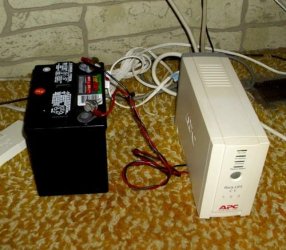
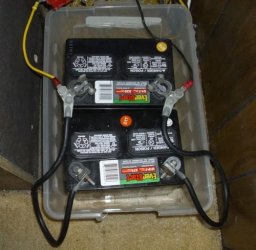
One thing I've done on all but one of my UPS's, is to remove the little internal Gel-Cell battery and extend the wires out to a Lead Acid Battery, like you would put in a car. So instead of having a UPS that would only run for a few minutes, I have one that will run for several hours.

I even have one OLD APC UPS that is rated at 600VA and runs off of Two Car Batteries. It supports my big LED TV, satellite box, etc.
 

Attachments

  • An Old UPS.jpg
    An Old UPS.jpg
    40.3 KB · Views: 6
  • New UPS Batteries.jpg
    New UPS Batteries.jpg
    36.5 KB · Views: 6

My Computer

Computer type
PC/Desktop
Computer Manufacturer/Model Number
Various
OS
Win 7 Pro, SP1, x86, Win-11/Pro/64
CPU
AMD
Motherboard
Various
Memory
8GB Crucial
Graphics Card(s)
Various
Sound Card
OnBoard
Monitor(s) Displays
Acer 21.5"
Hard Drives
Crucial SSD, 500 GB
PSU
OEM
Case
SFF Slim Line Case
Cooling
OEM
Keyboard
eMachines
Mouse
Logitech Wireless
Internet Speed
varies
Antivirus
Windows Defender/Super Anti-Spyware
Browser
Firefox
Once I connected his PC to the proper outlet on the UPS, it worked like a Champ.
Sorry, but I'd have a hard time believing your problem was not, Operator Error. It happens!

.


No, I daisy-chained like you're supposed to, power bar into the unit, even the old Acer/Canon CRT monitor.
Didn't function as advertised, maybe when I can afford it, get the clunky one from Canadian Tire.
 

My Computer

Computer type
PC/Desktop
Computer Manufacturer/Model Number
Custom Build
OS
W7 Ultimate 32-bit
Motherboard
ASUS M4N68T-M V2
PSU
Seasonic G-series 650W, can't afford the X,still Top/Line.
Case
Cooler Master Storm Scout 2, Ghost White version.
Cooling
5 fans....no liquid needed, everything under 100F
Keyboard
veteran PS2
Mouse
veteran PS2
Internet Speed
50Mps
Antivirus
AVG 2016 + TinyWall-to enhance Windows 7 firewall.
Browser
several
Back
Top