I broke 7100... temporarily

garysgold

MIA
Guru
Gold Member
VIP
Local time
5:27 AM
Messages
3,141
Location
Maine, USA
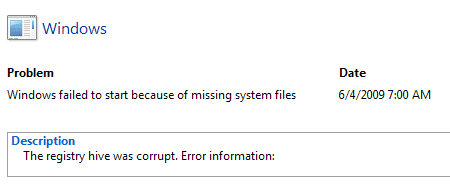
Well I've just had an interesting morning. When I went to boot W7, I got a corrupt system warning. It wanted to do a sys. restore to try to fix. That didn't help. Put the 7100 CD in and it said boot record corrupt, want to repair? yes. Didn't help. Went through a bunch of diagnostics. No joy, but I could boot into my other OS to save my app data just in case. Only thing I could think of that I had change was in msconfig/advanced options I had check the use 4 CPU option and the maximum memory option. Finally got into safe mode with cmd. prompt and opened msconfig. Unchecked both boxes and everything back to normal.

Anyone else seen anything like this?

Thanks to these forums and learning a bit about the cmd. prompt I was able to get myself out of a total reinstall. Thanks.

Gary
 

My Computer My Computer

At a glance

Vista Ult 64 bit Seven Ult RTM x64Intel Core2 Quad Q6600 2.40 gigahertzCrucial Ballistix 4x2GB PC2 6400NVIDIA GeForce 8600 GTS 256 MB
Computer Manufacturer/Model Number
Dell XPS420
OS
Vista Ult 64 bit Seven Ult RTM x64
CPU
Intel Core2 Quad Q6600 2.40 gigahertz
Memory
Crucial Ballistix 4x2GB PC2 6400
Graphics Card(s)
NVIDIA GeForce 8600 GTS 256 MB
Sound Card
Creative SB X-Fi audio
Monitor(s) Displays
HP w2207 + HPvs15
Screen Resolution
1680x1050 + 1024x768
Hard Drives
2-WD5000AAKS-500 GB
WD5000AAV-500 GB external
Keyboard
Microsoft Comfort Curve
Mouse
MX Revolution
Other Info
Wacom Intuos 2 Graphics Tablet
Experience Index=5.5
So the option to use all cores and more memory at boot was the culprit? I have been using those settings for months. It must depend on a lot of different factors and the CPU and RAM type. Interesting.
 

My Computer My Computer

At a glance

Windows 7 Professional x64Intel Core i7 8604GB DDR3 Mushkin 1600Mhz @ 7-8-7-20MSI GTS250 1GB DDR3 Twin Frozr
Computer Manufacturer/Model Number
Keeps changing - (Custom)
OS
Windows 7 Professional x64
CPU
Intel Core i7 860
Motherboard
Gigabyte GA-P55-UD4P
Memory
4GB DDR3 Mushkin 1600Mhz @ 7-8-7-20
Graphics Card(s)
MSI GTS250 1GB DDR3 Twin Frozr
Sound Card
Onboard realtek
Monitor(s) Displays
Samsung SyncMaster 24" P2450 + Samsung 20" 2033
Screen Resolution
1920 X 1080 and 1600 X 900 (#2 system 1440 X 900)
Hard Drives
Patriot Inferno 120GB SSD + 3 WD Blue 640GB drives
PSU
Corsair 750 HX Modular
Case
Lancool PC-K62
Cooling
Cooler Master TX3 CPU cooler and 4-140mm and 1-120mm case
Keyboard
Gigabyte USB keyboard
Mouse
Microsoft wireless laser mouse 5000
Internet Speed
7 Mb down 1.5 up
Other Info
System #2: AMD Phenom II X6 1055T (Freezer 7 Pro cooler) - Gigabyte 880GMA-UD2H - WD 500GB Black - 9500GT (1GB) 500W OCZ modular PSU - Antec 200 case. System #3 (LapTop) Core 2 Duo T6670 - 320GB 7200RPM HD - 4GB DDR3 RAM.
Somebody posted a long time ago that checking that box to use the 4
cores, is a no no, they say that it is for checking when you have a problem
with your CPU, to let the system know something or other, if I come across it
I will post a link.
 

My Computer My Computer

At a glance

Vista Ult64, Win7600Intel Core 2 Quad Q6600 @ 2400 MHz 64bit OS4096 MB DDR3-SDRAMATI Radeon HD 3870 Series x2 Crossfired
Computer Manufacturer/Model Number
Self Build 64bit
OS
Vista Ult64, Win7600
CPU
Intel Core 2 Quad Q6600 @ 2400 MHz 64bit OS
Motherboard
Asus P5E3 Deluxe WiFi @p 64 bit OS
Memory
4096 MB DDR3-SDRAM
Graphics Card(s)
ATI Radeon HD 3870 Series x2 Crossfired
Sound Card
Realtek on board
Monitor(s) Displays
Samsung SyncMaster - 23 inches
Screen Resolution
1680x1050 pixels at 60 Hz in True Colors
Hard Drives
Hitachi (250 GB)/Samsung 750 GB. /Barracuda 160 GB.
My Book 1 TB external..
PSU
Cooler Master 1000w
Case
Cooler Master Cosmos 1000.
Cooling
Fans and fresh air,
Keyboard
Wireless
Mouse
Wireless
Internet Speed
Never fast enough
Other Info
I use a Magnum.
I have used those settings with all the previous builds I've tried with no problems. By the time I ran diagnostics and tried various things I finally remembered what I had done (wasn't awake yet) and everything now seems fine. Gonna try it again later (now that I know the fix) and change only one setting at a time to see which one it was.

Gary

Edit: thanks jfar. I'll try the memory first then. ;)
 

My Computer My Computer

At a glance

Vista Ult 64 bit Seven Ult RTM x64Intel Core2 Quad Q6600 2.40 gigahertzCrucial Ballistix 4x2GB PC2 6400NVIDIA GeForce 8600 GTS 256 MB
Computer Manufacturer/Model Number
Dell XPS420
OS
Vista Ult 64 bit Seven Ult RTM x64
CPU
Intel Core2 Quad Q6600 2.40 gigahertz
Memory
Crucial Ballistix 4x2GB PC2 6400
Graphics Card(s)
NVIDIA GeForce 8600 GTS 256 MB
Sound Card
Creative SB X-Fi audio
Monitor(s) Displays
HP w2207 + HPvs15
Screen Resolution
1680x1050 + 1024x768
Hard Drives
2-WD5000AAKS-500 GB
WD5000AAV-500 GB external
Keyboard
Microsoft Comfort Curve
Mouse
MX Revolution
Other Info
Wacom Intuos 2 Graphics Tablet
Experience Index=5.5
Well, it was apparently the cpu cores that was the problem. Checking the max memory caused no problem. Odd since I had checked both boxes in Vista and several builds of 7 with no problems up to now.
 

My Computer My Computer

At a glance

Vista Ult 64 bit Seven Ult RTM x64Intel Core2 Quad Q6600 2.40 gigahertzCrucial Ballistix 4x2GB PC2 6400NVIDIA GeForce 8600 GTS 256 MB
Computer Manufacturer/Model Number
Dell XPS420
OS
Vista Ult 64 bit Seven Ult RTM x64
CPU
Intel Core2 Quad Q6600 2.40 gigahertz
Memory
Crucial Ballistix 4x2GB PC2 6400
Graphics Card(s)
NVIDIA GeForce 8600 GTS 256 MB
Sound Card
Creative SB X-Fi audio
Monitor(s) Displays
HP w2207 + HPvs15
Screen Resolution
1680x1050 + 1024x768
Hard Drives
2-WD5000AAKS-500 GB
WD5000AAV-500 GB external
Keyboard
Microsoft Comfort Curve
Mouse
MX Revolution
Other Info
Wacom Intuos 2 Graphics Tablet
Experience Index=5.5
Hello Gary,

What is strange is that the default if you do not check the box and set the number of cores is to use all cores.

This would suggest to me that this may be a bug that effects your machine rather than a more general one :confused:
 

My Computers My Computers

  • At a glance

    Windows 11 Pro x64 [Latest Release and Releas...Ryzen 9 5950X, 3.8 - 5.2 MHz64GB [2 x 32GB] DDR4 3200MHz4GB NVIDIA GEFORCE GTX 1650 Ti
    Computer type
    PC/Desktop
    Computer Manufacturer/Model Number
    ChillBlast - Custom to my design
    OS
    Windows 11 Pro x64 [Latest Release and Release Preview]
    CPU
    Ryzen 9 5950X, 3.8 - 5.2 MHz
    Motherboard
    Asus Prime X570-Pro
    Memory
    64GB [2 x 32GB] DDR4 3200MHz
    Graphics Card(s)
    4GB NVIDIA GEFORCE GTX 1650 Ti
    Sound Card
    On-board SPDIF to 5.1 System + HDMI [5.1 system]
    Monitor(s) Displays
    32" UHD 32 Bit HDR Monitor + 43" UHD 4K 32Bit HDR TV
    Screen Resolution
    2 x 3840 x 2160 @60Hz
    Hard Drives
    1TB M2 SSD OS, 500GB Fast Access SSD, 2 x 8TB Data + Various Externals from 1TB to 4TB, 10TB NAS
    PSU
    NZXT C750 80 PLUS Gold 750W Modular PSU
    Case
    Workstation Case [Matt Black]
    Cooling
    NZXT Kraken X63 280mm CPU Cooler +2x Quiet Case fans
    Keyboard
    Logitech Wireless MX Keys & K400 + others
    Mouse
    Logitech Wireless MX Master 3S
    Internet Speed
    920 MB Down 50 MB Up
    Antivirus
    BitDefender Total Security Pro
    Browser
    Chrome (always run latest Non-Beta)
    Other Info
    Also run ...
    Laptop - Quad 8GB - Windows 10 Pro x64
    Nexus 7 Android tablet x2
    Samsung 10.2" tablet
    Blackview TAB 8 4G Android Tablet c/w Keyboard
    Wacom Intuos Pro Medium Pen Pad
    Wacom Intuos Pro Small Pen Pad
    Wacom Expresskeys Remote
    Loopdeck+ Graphics Controller
    Shuttle Pro v2 Control
  • At a glance

    Windows 11 Pro x64 Latest RPIntel I7 10750H 5.0GHz32GB [2x16GB] DDR4 2933 MHznVidia GTX1650Ti 4 GB GDDR6
    Computer type
    Laptop
    System Manufacturer/Model Number
    Dell XPS 17 10750H
    OS
    Windows 11 Pro x64 Latest RP
    CPU
    Intel I7 10750H 5.0GHz
    Motherboard
    Dell XPS
    Memory
    32GB [2x16GB] DDR4 2933 MHz
    Graphics Card(s)
    nVidia GTX1650Ti 4 GB GDDR6
    Sound Card
    Stock [Realtek] 4 Speaker
    Monitor(s) Displays
    17" IPS UHD+ Infinity Edge Touchscreen
    Screen Resolution
    3840 x 2400
    Hard Drives
    2TB M2 NVMe, 4TB External + various 500GB & 1TB External NVMe (also have access to spinner HDD from
    PSU
    Stock
    Case
    Stock XPS Aluminium & Carbon Fibre
    Cooling
    Stock - Active Fan Control
    Keyboard
    Backlit + Various Logitech
    Mouse
    Stock Track Pad + Logitech MX Trackball
    Internet Speed
    72 MB Down 18MB Up
    Browser
    Chrome
    Other Info
    Also run ...
    Laptop - Quad 8GB - Windows 10 Pro x64
    Nexus 7 Android tablet x2
    10.2" tablet
    Sony Z3 Android Smartphone
    Wacom Intuos Pro Medium Pen Pad
    Wacom Intuos Pro Small Pen Pad
    Wacom Expresskeys Remote
    Loopdeck+ Graphics Controller
    Shuttle Pro v2 Control Pad
    10TB NAS
I read that checking these boxes makes no difference anyways. If you have 4 cores, windows will use 4 cores. No need to tell it to use them if they already show up fine. Or is setting them to manually provide some benefit?
 

My Computer My Computer

At a glance

Windows 7 Build 7600|16384- 64bitAMD Phenom II X4 810 - 2.61ghz Deneb4GB DDR3 Mushkin (1600 O.C. Rated)ATI HD Radeon 4890 1GB
Computer Manufacturer/Model Number
Custom Made
OS
Windows 7 Build 7600|16384- 64bit
CPU
AMD Phenom II X4 810 - 2.61ghz Deneb
Motherboard
Asus M4A79T Deluxe
Memory
4GB DDR3 Mushkin (1600 O.C. Rated)
Graphics Card(s)
ATI HD Radeon 4890 1GB
Sound Card
Realtek HD Onboard Audio
Monitor(s) Displays
AOC 912vwa-1
Screen Resolution
1440x900 (Max Monitor)
Hard Drives
10000RPM 150GB Western Digital Velociraptor
PSU
Corsair TSX750W
Case
Antec Nine Hundred
Cooling
Air Cooled
Keyboard
Logitech Elite
Mouse
Logitech MX518
Internet Speed
Comcast High-Speed (+Powerboost)
What is funny is that with all the other builds all the way back to pre-beta, this has never caused a problem. When I have time to mess around I may just try it again to make sure it wasn't some odd combination of things that brought it about. A near perfect storm so to speak.
 

My Computer My Computer

At a glance

Vista Ult 64 bit Seven Ult RTM x64Intel Core2 Quad Q6600 2.40 gigahertzCrucial Ballistix 4x2GB PC2 6400NVIDIA GeForce 8600 GTS 256 MB
Computer Manufacturer/Model Number
Dell XPS420
OS
Vista Ult 64 bit Seven Ult RTM x64
CPU
Intel Core2 Quad Q6600 2.40 gigahertz
Memory
Crucial Ballistix 4x2GB PC2 6400
Graphics Card(s)
NVIDIA GeForce 8600 GTS 256 MB
Sound Card
Creative SB X-Fi audio
Monitor(s) Displays
HP w2207 + HPvs15
Screen Resolution
1680x1050 + 1024x768
Hard Drives
2-WD5000AAKS-500 GB
WD5000AAV-500 GB external
Keyboard
Microsoft Comfort Curve
Mouse
MX Revolution
Other Info
Wacom Intuos 2 Graphics Tablet
Experience Index=5.5
Maybe Microsoft is getting rid of option to make Windows 7 dummy proof? Not saying you are in any way, but maybe that option will be removed in the future, or atleast have some other use. Seems weird that it would start causing an error. Have you checked any logs to see if it got reported?
 

My Computer My Computer

At a glance

Windows 7 Build 7600|16384- 64bitAMD Phenom II X4 810 - 2.61ghz Deneb4GB DDR3 Mushkin (1600 O.C. Rated)ATI HD Radeon 4890 1GB
Computer Manufacturer/Model Number
Custom Made
OS
Windows 7 Build 7600|16384- 64bit
CPU
AMD Phenom II X4 810 - 2.61ghz Deneb
Motherboard
Asus M4A79T Deluxe
Memory
4GB DDR3 Mushkin (1600 O.C. Rated)
Graphics Card(s)
ATI HD Radeon 4890 1GB
Sound Card
Realtek HD Onboard Audio
Monitor(s) Displays
AOC 912vwa-1
Screen Resolution
1440x900 (Max Monitor)
Hard Drives
10000RPM 150GB Western Digital Velociraptor
PSU
Corsair TSX750W
Case
Antec Nine Hundred
Cooling
Air Cooled
Keyboard
Logitech Elite
Mouse
Logitech MX518
Internet Speed
Comcast High-Speed (+Powerboost)
I have to find a program to open the memory dump files. Saw something about that around here somewhere. Haven't had too much time to look into it. In the event logs I have several that say various services failed to start either because a dependency service or group failed to start or a device attached to the system is not functioning. Got these from the reliability monitor.
broke.PNG brokeit.PNG

Gary
 

My Computer My Computer

At a glance

Vista Ult 64 bit Seven Ult RTM x64Intel Core2 Quad Q6600 2.40 gigahertzCrucial Ballistix 4x2GB PC2 6400NVIDIA GeForce 8600 GTS 256 MB
Computer Manufacturer/Model Number
Dell XPS420
OS
Vista Ult 64 bit Seven Ult RTM x64
CPU
Intel Core2 Quad Q6600 2.40 gigahertz
Memory
Crucial Ballistix 4x2GB PC2 6400
Graphics Card(s)
NVIDIA GeForce 8600 GTS 256 MB
Sound Card
Creative SB X-Fi audio
Monitor(s) Displays
HP w2207 + HPvs15
Screen Resolution
1680x1050 + 1024x768
Hard Drives
2-WD5000AAKS-500 GB
WD5000AAV-500 GB external
Keyboard
Microsoft Comfort Curve
Mouse
MX Revolution
Other Info
Wacom Intuos 2 Graphics Tablet
Experience Index=5.5
Mem dump app

Gary

Me to, I have been seeing double from looking at un-readible mem dumps. There has to be a better way.

Let me know if you find one

Ken
 

My Computer My Computer

At a glance

Win 8 Release candidate 8400[email protected]4 gigsNvidia 9600M
Computer Manufacturer/Model Number
HP Pavillion dv-7 1005 Tx
OS
Win 8 Release candidate 8400
CPU
[email protected]
Memory
4 gigs
Graphics Card(s)
Nvidia 9600M
Sound Card
HD built-in
Monitor(s) Displays
17" Wxga
Screen Resolution
1440x900
Cooling
none
Internet Speed
45Mb down 5Mb up
Let me know if this works.


From time to time, we're faced with the dreaded BSOD, or bugcheck, on a Windows machine. The procedures below guide you through the steps necessary to analyze and debug dump files.
For a downloadable copy of these procedures, click here: How%20To%20Debug%20Memory%20Dumps.doc

  • Download and install the Microsoft Debugging Tools from http://www.microsoft.com/whdc/devtools/debugging/installx86.mspx
  • Go to Start All Programs Debugging Tools For Windows WinDbg
  • Click on File Symbol File Path, enter:
    SRV*c:\symbols*Symbol information
    and click OK.
  • Click File Save Workspace so that your symbols path is saved for future use.
  • Now locate your memory dumps. Small memory dumps are usually located in %systemroot%\minidump and Kernel memory dumps are located in %systemroot%\MEMORY.DMP.
  • Go to File Open Crash Dump and load the file. You may get a message to save base workspace information. If so, choose No. Now you will get a debugging screen. It may take a little bit to run, since the symbols are downloaded as they are needed. Then you will see information such as:
Microsoft (R) Windows Debugger Version 6.7.0005.0
Copyright (c) Microsoft Corporation. All rights reserved.

Loading Dump File [\\hoem02\c$\windows\MEMORY.DMP]
Kernel Summary Dump File: Only kernel address space is available

Symbol search path is: SRV*c:\symbols*Symbol information
Executable search path is:
Windows Server 2003 Kernel Version 3790 MP (4 procs) Free x86 compatible
Product: Server, suite: TerminalServer SingleUserTS
Built by: 3790.srv03_gdr.050225-1827
Kernel base = 0xe0b49000 PsLoadedModuleList = 0xe0be66a8
Debug session time: Wed May 9 02:01:49.965 2007 (GMT-7)
System Uptime: 6 days 22:51:23.840
Loading Kernel Symbols
......................................................................................................
Loading User Symbols
PEB is paged out (Peb.Ldr = 7ffff00c). Type ".hh dbgerr001" for details
Loading unloaded module list
..
*******************************************************************************
* *
* Bugcheck Analysis *
* *
*******************************************************************************

Use !analyze -v to get detailed debugging information.

BugCheck A, {4, 2, 0, e0b6136d}

Probably caused by : volsnap.sys ( volsnap!VspWriteVolumePhase35+3a )

Followup: MachineOwner
---------


  • So far, we can tell that the bugcheck was caused by volsnap.sys, which is the Microsoft volume shadow copy driver. Use !analyze -v to get detailed debugging information. The most useful information is at the top of the analysis:
*******************************************************************************
* *
* Bugcheck Analysis *
* *
*******************************************************************************

IRQL_NOT_LESS_OR_EQUAL (a)

An attempt was made to access a pageable (or completely invalid) address at an interrupt request level (IRQL) that is too high. This is usually caused by drivers using improper addresses.

If a kernel debugger is available get the stack backtrace.
Arguments:
Arg1: 00000004, memory referenced
Arg2: 00000002, IRQL
Arg3: 00000000, value 0 = read operation, 1 = write operation
Arg4: e0b6136d, address which referenced memory

  • From here, we can tell that volsnap.sys tried to read memory from an IRQL that was too high. This is usually caused by a bad driver, in this case, volsnap.sys.
  • Next, let's find out what process was calling volsnap.sys. Enter !thread in the kd> command line input box and look for the line that begins with Owning Process:
2: kd> !thread
THREAD faa03658 Cid 0568.1954 Teb: 7ffac000 Win32Thread: 00000000 RUNNING on processor 2
Not impersonating
DeviceMap e1003978
Owning Process fc1913b0 Image: cvd.exe
Wait Start TickCount 38443765 Ticks: 0


  • Now enter !process fc1913b0 0 (the hex number of the Owning Process), a space and the number 0.
2: d> !process fc1913b0 0
PROCESS fc1913b0 SessionId: 0 Cid: 0568 Peb: 7ffff000 ParentCid: 0218
DirBase: dd4a3000 ObjectTable: e141a910 HandleCount: 475.
Image: cvd.exe


  • We can now tell that the cvd.exe process (used by Commvault) called the volsnap.sys driver. Since volsnap.sys is a Microsoft driver, a quick check on TechNet reveals that there is an updated VSS package available for our server (http://support.microsoft.com/kb/887827) which addresses the problem.
Note: Writing debugging information must be configured on the machine prior to the BSOD in order to get a memory dump. This is done in the Advanced tab of system properties. Set it to "Kernel memory dump" in order to get the process information.

 

My Computer My Computer

At a glance

Windows 7 Build 7600|16384- 64bitAMD Phenom II X4 810 - 2.61ghz Deneb4GB DDR3 Mushkin (1600 O.C. Rated)ATI HD Radeon 4890 1GB
Computer Manufacturer/Model Number
Custom Made
OS
Windows 7 Build 7600|16384- 64bit
CPU
AMD Phenom II X4 810 - 2.61ghz Deneb
Motherboard
Asus M4A79T Deluxe
Memory
4GB DDR3 Mushkin (1600 O.C. Rated)
Graphics Card(s)
ATI HD Radeon 4890 1GB
Sound Card
Realtek HD Onboard Audio
Monitor(s) Displays
AOC 912vwa-1
Screen Resolution
1440x900 (Max Monitor)
Hard Drives
10000RPM 150GB Western Digital Velociraptor
PSU
Corsair TSX750W
Case
Antec Nine Hundred
Cooling
Air Cooled
Keyboard
Logitech Elite
Mouse
Logitech MX518
Internet Speed
Comcast High-Speed (+Powerboost)
Thanks Avien,

Forgot I had already installed that. Just not thinking to clear as I just found out my sister is very ill. Not been a good day.

This is what I get.

Code:
*******************************************************************************
*                                                                             *
*                        Bugcheck Analysis                                    *
*                                                                             *
*******************************************************************************

Use !analyze -v to get detailed debugging information.

BugCheck 74, {2, fffff88003d3fb20, 2, ffffffffc000009a}

Probably caused by : ntkrnlmp.exe ( nt!CmpLoadHiveThread+23a )

Followup: MachineOwner
---------

0: kd> !analyze -v
*******************************************************************************
*                                                                             *
*                        Bugcheck Analysis                                    *
*                                                                             *
*******************************************************************************

BAD_SYSTEM_CONFIG_INFO (74)
Can indicate that the SYSTEM hive loaded by the osloader/NTLDR
was corrupt.  This is unlikely, since the osloader will check
a hive to make sure it isn't corrupt after loading it.
It can also indicate that some critical registry keys and values
are not present.  (i.e. somebody used regedt32 to delete something
that they shouldn't have)  Booting from LastKnownGood may fix
the problem, but if someone is persistent enough in mucking with
the registry they will need to reinstall or use the Emergency
Repair Disk.
Arguments:
Arg1: 0000000000000002, (reserved)
Arg2: fffff88003d3fb20, (reserved)
Arg3: 0000000000000002, (reserved)
Arg4: ffffffffc000009a, usually the NT status code.

Debugging Details:
------------------


DEFAULT_BUCKET_ID:  VISTA_DRIVER_FAULT

BUGCHECK_STR:  0x74

PROCESS_NAME:  System

CURRENT_IRQL:  0

LAST_CONTROL_TRANSFER:  from fffff80003149e3a to fffff80002cdcf80

STACK_TEXT:  
fffff880`03d3fa68 fffff800`03149e3a : 00000000`00000074 00000000`00000002 fffff880`03d3fb20 00000000`00000002 : nt!KeBugCheckEx
fffff880`03d3fa70 fffff800`02f62e66 : 00000000`0234ebb5 fffffa80`01dff060 00000000`00000080 fffffa80`003dc890 : nt!CmpLoadHiveThread+0x23a
fffff880`03d3fd40 fffff800`02c8fa86 : fffff880`02f63180 fffffa80`01dff060 fffff880`02f6dfc0 fffff880`01266a30 : nt!PspSystemThreadStartup+0x5a
fffff880`03d3fd80 00000000`00000000 : fffff880`03d40000 fffff880`03d3a000 fffff880`03d3efc0 00000000`00000000 : nt!KxStartSystemThread+0x16


STACK_COMMAND:  kb

FOLLOWUP_IP: 
nt!CmpLoadHiveThread+23a
fffff800`03149e3a cc              int     3

SYMBOL_STACK_INDEX:  1

SYMBOL_NAME:  nt!CmpLoadHiveThread+23a

FOLLOWUP_NAME:  MachineOwner

MODULE_NAME: nt

IMAGE_NAME:  ntkrnlmp.exe

DEBUG_FLR_IMAGE_TIMESTAMP:  49ee9439

FAILURE_BUCKET_ID:  X64_0x74_nt!CmpLoadHiveThread+23a

BUCKET_ID:  X64_0x74_nt!CmpLoadHiveThread+23a

Followup: MachineOwner
---------

Doubt if it has anything to do with the registry as I have shutdown and rebooted several times since I last played in there. If you see anything obvious, let me know, otherwise it will have to wait.

Thanks again.

Gary
 

My Computer My Computer

At a glance

Vista Ult 64 bit Seven Ult RTM x64Intel Core2 Quad Q6600 2.40 gigahertzCrucial Ballistix 4x2GB PC2 6400NVIDIA GeForce 8600 GTS 256 MB
Computer Manufacturer/Model Number
Dell XPS420
OS
Vista Ult 64 bit Seven Ult RTM x64
CPU
Intel Core2 Quad Q6600 2.40 gigahertz
Memory
Crucial Ballistix 4x2GB PC2 6400
Graphics Card(s)
NVIDIA GeForce 8600 GTS 256 MB
Sound Card
Creative SB X-Fi audio
Monitor(s) Displays
HP w2207 + HPvs15
Screen Resolution
1680x1050 + 1024x768
Hard Drives
2-WD5000AAKS-500 GB
WD5000AAV-500 GB external
Keyboard
Microsoft Comfort Curve
Mouse
MX Revolution
Other Info
Wacom Intuos 2 Graphics Tablet
Experience Index=5.5
All i see is a lot of information about Vista. Did you install any Vista drivers lately?
 

My Computer My Computer

At a glance

Windows 7 Build 7600|16384- 64bitAMD Phenom II X4 810 - 2.61ghz Deneb4GB DDR3 Mushkin (1600 O.C. Rated)ATI HD Radeon 4890 1GB
Computer Manufacturer/Model Number
Custom Made
OS
Windows 7 Build 7600|16384- 64bit
CPU
AMD Phenom II X4 810 - 2.61ghz Deneb
Motherboard
Asus M4A79T Deluxe
Memory
4GB DDR3 Mushkin (1600 O.C. Rated)
Graphics Card(s)
ATI HD Radeon 4890 1GB
Sound Card
Realtek HD Onboard Audio
Monitor(s) Displays
AOC 912vwa-1
Screen Resolution
1440x900 (Max Monitor)
Hard Drives
10000RPM 150GB Western Digital Velociraptor
PSU
Corsair TSX750W
Case
Antec Nine Hundred
Cooling
Air Cooled
Keyboard
Logitech Elite
Mouse
Logitech MX518
Internet Speed
Comcast High-Speed (+Powerboost)
I may have replaced the Windows nVidia driver to the latest Vista one, but I don't think so. I did install the nVidia control panel. I device manager the nVidia driver is 8.15.11.8585. I think that is the Windows driver. Also an XP driver for my printer. Also my MX revolution mouse driver is Vista.
 

My Computer My Computer

At a glance

Vista Ult 64 bit Seven Ult RTM x64Intel Core2 Quad Q6600 2.40 gigahertzCrucial Ballistix 4x2GB PC2 6400NVIDIA GeForce 8600 GTS 256 MB
Computer Manufacturer/Model Number
Dell XPS420
OS
Vista Ult 64 bit Seven Ult RTM x64
CPU
Intel Core2 Quad Q6600 2.40 gigahertz
Memory
Crucial Ballistix 4x2GB PC2 6400
Graphics Card(s)
NVIDIA GeForce 8600 GTS 256 MB
Sound Card
Creative SB X-Fi audio
Monitor(s) Displays
HP w2207 + HPvs15
Screen Resolution
1680x1050 + 1024x768
Hard Drives
2-WD5000AAKS-500 GB
WD5000AAV-500 GB external
Keyboard
Microsoft Comfort Curve
Mouse
MX Revolution
Other Info
Wacom Intuos 2 Graphics Tablet
Experience Index=5.5
What did you edit in your registry?

BAD_SYSTEM_CONFIG_INFO (74)
Can indicate that the SYSTEM hive loaded by the osloader/NTLDR
was corrupt. This is unlikely, since the osloader will check
a hive to make sure it isn't corrupt after loading it.
It can also indicate that some critical registry keys and values
are not present. (i.e. somebody used regedt32 to delete something
that they shouldn't have) Booting from LastKnownGood may fix
the problem, but if someone is persistent enough in mucking with
the registry they will need to reinstall or use the Emergency
Repair Disk.
 

My Computer My Computer

At a glance

Windows 7 Build 7600|16384- 64bitAMD Phenom II X4 810 - 2.61ghz Deneb4GB DDR3 Mushkin (1600 O.C. Rated)ATI HD Radeon 4890 1GB
Computer Manufacturer/Model Number
Custom Made
OS
Windows 7 Build 7600|16384- 64bit
CPU
AMD Phenom II X4 810 - 2.61ghz Deneb
Motherboard
Asus M4A79T Deluxe
Memory
4GB DDR3 Mushkin (1600 O.C. Rated)
Graphics Card(s)
ATI HD Radeon 4890 1GB
Sound Card
Realtek HD Onboard Audio
Monitor(s) Displays
AOC 912vwa-1
Screen Resolution
1440x900 (Max Monitor)
Hard Drives
10000RPM 150GB Western Digital Velociraptor
PSU
Corsair TSX750W
Case
Antec Nine Hundred
Cooling
Air Cooled
Keyboard
Logitech Elite
Mouse
Logitech MX518
Internet Speed
Comcast High-Speed (+Powerboost)
Yeah, saw that, but as I said, I haven't played with the registry for a bit and have shutdown/rebooted several times since. I'm sure that unchecking the cpu box in msconfig wouldn't have fixed a corrupt hive. Checking that box may just have made it inaccessible for some reason. As it says, it would have checked the hive once loaded. I did get a couple BSOD's, but it rebooted before I could read anything.
 

My Computer My Computer

At a glance

Vista Ult 64 bit Seven Ult RTM x64Intel Core2 Quad Q6600 2.40 gigahertzCrucial Ballistix 4x2GB PC2 6400NVIDIA GeForce 8600 GTS 256 MB
Computer Manufacturer/Model Number
Dell XPS420
OS
Vista Ult 64 bit Seven Ult RTM x64
CPU
Intel Core2 Quad Q6600 2.40 gigahertz
Memory
Crucial Ballistix 4x2GB PC2 6400
Graphics Card(s)
NVIDIA GeForce 8600 GTS 256 MB
Sound Card
Creative SB X-Fi audio
Monitor(s) Displays
HP w2207 + HPvs15
Screen Resolution
1680x1050 + 1024x768
Hard Drives
2-WD5000AAKS-500 GB
WD5000AAV-500 GB external
Keyboard
Microsoft Comfort Curve
Mouse
MX Revolution
Other Info
Wacom Intuos 2 Graphics Tablet
Experience Index=5.5
Have you gotten any BSOD lately? If so turn off automatic restart on error so you can get a good look at the screen.
 

My Computer My Computer

At a glance

Windows 7 Build 7600|16384- 64bitAMD Phenom II X4 810 - 2.61ghz Deneb4GB DDR3 Mushkin (1600 O.C. Rated)ATI HD Radeon 4890 1GB
Computer Manufacturer/Model Number
Custom Made
OS
Windows 7 Build 7600|16384- 64bit
CPU
AMD Phenom II X4 810 - 2.61ghz Deneb
Motherboard
Asus M4A79T Deluxe
Memory
4GB DDR3 Mushkin (1600 O.C. Rated)
Graphics Card(s)
ATI HD Radeon 4890 1GB
Sound Card
Realtek HD Onboard Audio
Monitor(s) Displays
AOC 912vwa-1
Screen Resolution
1440x900 (Max Monitor)
Hard Drives
10000RPM 150GB Western Digital Velociraptor
PSU
Corsair TSX750W
Case
Antec Nine Hundred
Cooling
Air Cooled
Keyboard
Logitech Elite
Mouse
Logitech MX518
Internet Speed
Comcast High-Speed (+Powerboost)
Nope. Everything seems to be fine. Been running fine all day. Several reboots with no issues. That checkbox is the only change. The reg changes I've made are tweaks that I've seen here, but I'm sure it's not them. Things like removing entries from the 'new' context menu and such. Nothing scary or that I haven't done a half dozen times before. I had forgotten to turn off auto restart as I usually do that right off also, but will take care of that when I reboot into 7100. Thanks for the input.

Gary
 

My Computer My Computer

At a glance

Vista Ult 64 bit Seven Ult RTM x64Intel Core2 Quad Q6600 2.40 gigahertzCrucial Ballistix 4x2GB PC2 6400NVIDIA GeForce 8600 GTS 256 MB
Computer Manufacturer/Model Number
Dell XPS420
OS
Vista Ult 64 bit Seven Ult RTM x64
CPU
Intel Core2 Quad Q6600 2.40 gigahertz
Memory
Crucial Ballistix 4x2GB PC2 6400
Graphics Card(s)
NVIDIA GeForce 8600 GTS 256 MB
Sound Card
Creative SB X-Fi audio
Monitor(s) Displays
HP w2207 + HPvs15
Screen Resolution
1680x1050 + 1024x768
Hard Drives
2-WD5000AAKS-500 GB
WD5000AAV-500 GB external
Keyboard
Microsoft Comfort Curve
Mouse
MX Revolution
Other Info
Wacom Intuos 2 Graphics Tablet
Experience Index=5.5

My Computer My Computer

At a glance

Vista Ult64, Win7600Intel Core 2 Quad Q6600 @ 2400 MHz 64bit OS4096 MB DDR3-SDRAMATI Radeon HD 3870 Series x2 Crossfired
Computer Manufacturer/Model Number
Self Build 64bit
OS
Vista Ult64, Win7600
CPU
Intel Core 2 Quad Q6600 @ 2400 MHz 64bit OS
Motherboard
Asus P5E3 Deluxe WiFi @p 64 bit OS
Memory
4096 MB DDR3-SDRAM
Graphics Card(s)
ATI Radeon HD 3870 Series x2 Crossfired
Sound Card
Realtek on board
Monitor(s) Displays
Samsung SyncMaster - 23 inches
Screen Resolution
1680x1050 pixels at 60 Hz in True Colors
Hard Drives
Hitachi (250 GB)/Samsung 750 GB. /Barracuda 160 GB.
My Book 1 TB external..
PSU
Cooler Master 1000w
Case
Cooler Master Cosmos 1000.
Cooling
Fans and fresh air,
Keyboard
Wireless
Mouse
Wireless
Internet Speed
Never fast enough
Other Info
I use a Magnum.
Back
Top