Solved I Broke Windows 7

I clicked on the link, but it only brought up the SevenForums front page.

Repost the link. It's starting to make sense to me now.
 

My Computer My Computer

Computer type
PC/Desktop
Computer Manufacturer/Model Number
Custom Build
OS
Windows 7 Professional x64 SP1
CPU
Intel i7-980x @ 3.6GHz
Motherboard
Intel DX58SO
Memory
Corsair 12GB DDR3 RAM (3x4GB)
Graphics Card(s)
EVGA NVIDIA GeForce GTX 760 SC
Sound Card
Intel High Definition 7.1 Audio Subsystem - Realtek ALC889
Monitor(s) Displays
Dual Display - LG Electronics Flatron L227WTG
Screen Resolution
1680 x 1050 60Hz 32-bit
Hard Drives
2 Seagate Constellation ST1000NM0033 1TB SATA 6Gb/s HDDs configured as Intel SATA Array 0, RST RAID 1, Vol. 0 (C:\) & Vol. 1 (D:\), & 2 Seagate Barracuda ST500DM002 500GB SATA 6Gb/s HDDs configured as Intel SATA Array 1 RST RAID 1, Vol. 0 (E:\)
PSU
Corsair HX850W
Case
Antec P182
Cooling
Stock Intel i7-980x Cooling Solution + 4 120mm Case Fans
Keyboard
Microsoft Wireless Multimedia Keyboard 1.1
Mouse
Microsoft Standard Wireless Optical Mouse
Internet Speed
DSL - 3.0 Mb/s download 768 Kb/s upload
Antivirus
ESET Smart Security 12, Defender & SuperAntiSpyware Pro
Browser
Firefox Quantum 64-bit
Other Info
Optical Drives: Pioneer DVR-216R & TSSTcorp SH-S223Q, Anker USB 3.0 PCI-E Card, Hauppauge WinTV-HVR 2250 Dual TV Tuner Board for Windows Media Center, Bose Companion 3 Series II multimedia speaker system, APC Smart-UPS SMT1500
Hi! You're both awesome. Thanks again for all your time and effort.

Sorry for the slow response. So I turned on and off my computer to look for the POST text you described, and sadly I don't think there's much. The only think that flashes (very quickly) is a statement about the esc key bringing up the startup menu, I think.

I'm having lots of trouble identifying my motherboard specifics. The only think that came reasonably close to helping is this PDF: http://h10032.www1.hp.com/ctg/Manual/c03317323.pdf.
It doesn't list model number or manufacturer or anything, but googleing the replacement part number doesn't help with specifics much either. Maybe you guys can glean some better info from it...? I know nominally what all the configuration specifics are, i.e. what buttons I clicked when I ordered the thing, but aside from the processor I'm having a hard time nailing down manufacturers and specifics about any internal components.

I'd be totally happy with literally any configuration we could get up, as long as it actually includes my hard drive somewhere =).
 

My Computer My Computer

Computer type
Laptop
Computer Manufacturer/Model Number
HP
OS
Windows 7
CPU
intel i7
Motherboard
?
Memory
?
Graphics Card(s)
NVIDIA GT650
Hard Drives
500GB HDD
32GB SDD
I think we can get you up and running in your new out-of-box configuration, but we'll need the tech documents for your system. The Intel Rapid Storage Technology Accelerated Storage System feature appears to be a nice enhancement that improves hdd performance.

I think that if you download the hdd and ssd manufacturer's disk utilities and do a full erase or low level format to return these drives to "new" condition and then attempt to install Win 7 with the computer manufacturer's tools and DVDs/CDs and the Intel Rapid Storage Technology enabled in your BIOS, as well as all BIOS items related to Accelerated Storage enabled, the Win 7 should install on the hdd with the sdd used as a non-volatile cache. You should be able to see both drives at their full capacity. After that, the only tasks remaining would be minor configuration settings.

From my reading, I don't think you can run a dual boot system with Win 7 and Linux on a system running Intel Rapid Storage Technology. The requirements and limitations are very clear about using this feature with Windows OS only.

In general, before you try something new like a dual boot, you've got to do some research to ensure everything is compatible. In this case, I think that you would find that a dual boot with Win 7 and Linux on a system running Intel RST wouldn't be compatible, because your Linux OS would need an Intel RST driver. I don't think there is one.

For now, I would stay away from all third party utilities until we get your system up and running in original configuration. Then, you should burn an image so that you can restore your system after you crash it with experimental configurations.

Contact the computer manufacturer through there support website and find out what you need to completely restore your system after a full erase of both drives. Download what you need and we can start from there.

Regards
 

My Computer My Computer

Computer type
PC/Desktop
Computer Manufacturer/Model Number
Custom Build
OS
Windows 7 Professional x64 SP1
CPU
Intel i7-980x @ 3.6GHz
Motherboard
Intel DX58SO
Memory
Corsair 12GB DDR3 RAM (3x4GB)
Graphics Card(s)
EVGA NVIDIA GeForce GTX 760 SC
Sound Card
Intel High Definition 7.1 Audio Subsystem - Realtek ALC889
Monitor(s) Displays
Dual Display - LG Electronics Flatron L227WTG
Screen Resolution
1680 x 1050 60Hz 32-bit
Hard Drives
2 Seagate Constellation ST1000NM0033 1TB SATA 6Gb/s HDDs configured as Intel SATA Array 0, RST RAID 1, Vol. 0 (C:\) & Vol. 1 (D:\), & 2 Seagate Barracuda ST500DM002 500GB SATA 6Gb/s HDDs configured as Intel SATA Array 1 RST RAID 1, Vol. 0 (E:\)
PSU
Corsair HX850W
Case
Antec P182
Cooling
Stock Intel i7-980x Cooling Solution + 4 120mm Case Fans
Keyboard
Microsoft Wireless Multimedia Keyboard 1.1
Mouse
Microsoft Standard Wireless Optical Mouse
Internet Speed
DSL - 3.0 Mb/s download 768 Kb/s upload
Antivirus
ESET Smart Security 12, Defender & SuperAntiSpyware Pro
Browser
Firefox Quantum 64-bit
Other Info
Optical Drives: Pioneer DVR-216R & TSSTcorp SH-S223Q, Anker USB 3.0 PCI-E Card, Hauppauge WinTV-HVR 2250 Dual TV Tuner Board for Windows Media Center, Bose Companion 3 Series II multimedia speaker system, APC Smart-UPS SMT1500
Did you disable IRST in BIOS setup then boot into Win7 Installer to see if HD shows up for install?

Check all BIOS tabs again for Storage Controller settings. I've not seen a modern BIOS without one. Settings should include AHCI and IRST. If it cannot be found then Reset BIOS to Defaults and check again.

Try cleaning both HD's as shown in second IRST tutorial above.

Check HP Support Downloads webpage for newer BIOS update.

Please do not skip any steps or proceed until they are completed. This thread is strewn with ignored steps. It is up to you to ask back enough questions to get each step done. In a case like this we almost always find a skipped step is the fix.
 
Hi!

So, progress! maybe. YESS!
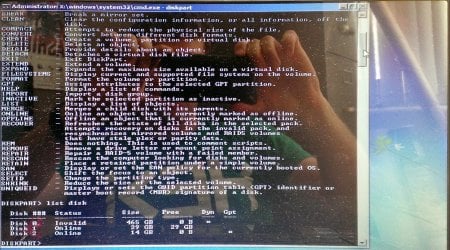
Thanks I ran the command prompt tool under system repair. when I ran system repair before I disabled ISRT, the repair just shot an error and failed (you were right about missed steps). Now, with ISRT disabled, it loaded. I went to the command prompt, ran the list disk, and the window shown below popped up. I cleaned both the SATA and the SSD, and now the install finds both drives!

So now, uhh... how should I configure the drives for installation? Is there a way I should just dump windows on the 32GB drive and let it spill onto the SATA when it's finished? I'm not really set on any one school of thought here, so what would you guys do?
 

Attachments

  • Office Lens_20140820_105339_processed.jpg
    Office Lens_20140820_105339_processed.jpg
    303.9 KB · Views: 1

My Computer My Computer

Computer type
Laptop
Computer Manufacturer/Model Number
HP
OS
Windows 7
CPU
intel i7
Motherboard
?
Memory
?
Graphics Card(s)
NVIDIA GT650
Hard Drives
500GB HDD
32GB SDD
Please understand that we deal with hundreds of these cases regularly and they are always resolved, but since every BIOS is different we need to see and adjust often masked BIOS settings.

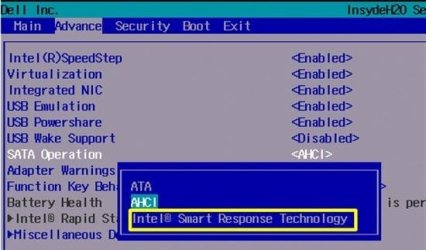
Now what should happen next is to re-enable IRST but normally this is done in SATA controller setting as pictured below, While Intel Rapid Start is another feature and treated as such. So you can re-enable the IRST you show in BIOS to see if the drives create their hybrid RAID to do the install.

Or you can reset the BIOS to defaults to see if the SATA controller setting with AHCI vs IRST choice appears which we know is the correct setting. I've never not seen it on a modern BIOS are you sure you have the latest BIOS version?
 

Attachments

  • image.jpg
    image.jpg
    29.1 KB · Views: 15
Hey,

I tried to re-enable the ISRT and the drives still show up as two different drive options.

I checked the bios from the HP website, and I am using an old version. The version is F.35, and the most up-to-date is F.39. How can I update the Bios? should I install windows 7 on the main SATA drive, update the bios, change the settings, and reinstall?
 

My Computer My Computer

Computer type
Laptop
Computer Manufacturer/Model Number
HP
OS
Windows 7
CPU
intel i7
Motherboard
?
Memory
?
Graphics Card(s)
NVIDIA GT650
Hard Drives
500GB HDD
32GB SDD
I'd install the OS to the SSD so you can compare the difference. Then run your Windows Updates so it is patched before running the BIOS update following the steps given with the Download or in the Read Me file. If your power is cut or update is otherwise interrupted it could brick your mobo.

Then after examining the BIOS settings for IRST to re-enable you can decide if you want to reinstall to IRST hybrid RAID or move your User folders and install lesser used programs above 30 gb to the HDD.

SSD is such a quantum upgrade it makes this worth it if only to compare the difference. You may want to buy an SSD once you experience the difference, or juggle what you have. From all reports IRST makes little speed difference, and almost none compared to SSD.
 
Your plan sounds perfectly reasonable, and conveniently easy to implement.

Sorry to require a bit of pedantry, but I want to confirm that I know what I'm doing before I proceed.
First, install windows 7 like normal on the SSD, basically the 29.8GB drive. Apply windows OS updates and let it do it's thing. Then, apply the BIOS updates following the directions EXACTLY, without skipping steps or using any guesswork. From there I can decide if the OS on the SSD is slower than it was before, and if I decide it's worth it, I'll go into the updated BIOS and find the necessary settings to revert to the RAID configuration and reinstall.

If I decide to keep the OS on the SSD (unless it's way slower, I probably will for simplicity's sake), I'll need to install most of my programs (excepting maybe a few commonly used ones) on the main HDD in some D: drive or whatnot, since the SSD will already be almost full. I'd also simply cut and paste my user directory over so all documents and whatnot are on the HDD as well.

That sounds about right?
 

My Computer My Computer

Computer type
Laptop
Computer Manufacturer/Model Number
HP
OS
Windows 7
CPU
intel i7
Motherboard
?
Memory
?
Graphics Card(s)
NVIDIA GT650
Hard Drives
500GB HDD
32GB SDD
Fine. Once you copy your User files over you should move each to the new location on that User folder's Proprties Location tab. You can also do this all at once on the User's named profile Properties Location tab.
http://www.sevenforums.com/tutorials/18629-user-folders-change-default-location.html

Be sure to read the Reinstall tutorial under picture below to do a perfect install, especially how drivers are handled.

I would set paging file to System Managed and decide if I want Hibernate each of which will take up space equivalent to your RAM size. Some set their paging file to 2 gb to save space. I would use both at defaults then use remaining SSD space for most used programs, install others to HD.
 
ugh.

so everything was going swimmingly, until I update the BIOS to the latest version. I added drivers from HP, followed the installation instructions, and finally, set to update the BIOS from the HP website. It updated, restarted a couple times, and then when it restarted again it just showed an error that there is no bootable drive. I suppose I should roll back the BIOS? or do you have other thoughts?
 

My Computer My Computer

Computer type
Laptop
Computer Manufacturer/Model Number
HP
OS
Windows 7
CPU
intel i7
Motherboard
?
Memory
?
Graphics Card(s)
NVIDIA GT650
Hard Drives
500GB HDD
32GB SDD
Settngs in the new BIOS must be adjusted. It probably enabled IRST by default.

Is there now a SATA controlller setting?

What is IRST setting?

What other settings differ from earlier picture?

Boot Win7 installer to see if it's ready to install to RAID.

Did BIOS update instructions say to boot into BIOS Setup to reset to Defaults? Read them again to see if you actually completed it or skipped steps again.
 
Well, it won't boot to the windows installer USB. I think it's having trouble with UEFI or something, cuz it detects that the USB is there but when I select "boot from USB" it just jumps back to "no bootable device..."
 

My Computer My Computer

Computer type
Laptop
Computer Manufacturer/Model Number
HP
OS
Windows 7
CPU
intel i7
Motherboard
?
Memory
?
Graphics Card(s)
NVIDIA GT650
Hard Drives
500GB HDD
32GB SDD
it does boot to the Ubuntu live DVD... which is nice at least =)

In the short time I played with it (installing drivers and restarting over and over) it was much faster than before. I know it's probably because there's basically no bloatware and whatnot, but still, it means the SDD being the main OS drive worked fine and didn't slow anything down.
 

My Computer My Computer

Computer type
Laptop
Computer Manufacturer/Model Number
HP
OS
Windows 7
CPU
intel i7
Motherboard
?
Memory
?
Graphics Card(s)
NVIDIA GT650
Hard Drives
500GB HDD
32GB SDD
Answer my questions please. You may not have completed BIOS update and should have new settings which need to be adjusted.

New record: you ignored every question. Five at once!
 
Sorry about that.

No there is not a new SATA setting, as far as I can tell. Everything in the BIOS looks completely identical to what it was before. The report on the website just described it as a security update for UEFI EDK2.

The IRST setting is defaulted to enabled, I tried booting with it disabled and it did not change the result. I believe it was enabled when I installed windows 7, as suggested in the installation guide you recommended I follow.

The bios instructions were basically nil. On the website, it simply says to double click the link after downloading and follow the on-screen instructions, which I did. There were no additional instructions on the window that popped up beyond clicking next a few times and allowing the computer to reboot.
 

My Computer My Computer

Computer type
Laptop
Computer Manufacturer/Model Number
HP
OS
Windows 7
CPU
intel i7
Motherboard
?
Memory
?
Graphics Card(s)
NVIDIA GT650
Hard Drives
500GB HDD
32GB SDD
I thought you disabled IRST to choose to install to SSD.

Are all USB settings enabled?

Try booting USB as non-UEFI device.

Try DVD install.
 
I disabled IRST to clean the disks, as apparently if it's enabled I can't do that using the command prompt on the install tool.

There is only one USB setting, "USB3.0 configuration in pre-OS", which defaults to "auto". I tried with it enabled, no change.

How would I go about using the USB as non-UEFI? I made it bootable using Rufus, and selected a GPT partition scheme for UEFI comp. Would I need to re-make the USB for non-UEFI use?
 

My Computer My Computer

Computer type
Laptop
Computer Manufacturer/Model Number
HP
OS
Windows 7
CPU
intel i7
Motherboard
?
Memory
?
Graphics Card(s)
NVIDIA GT650
Hard Drives
500GB HDD
32GB SDD
Boot same USB as Legacy Device in F9 Boot Menu.

Delete all partitions to clear GPT.

If necessary wipe the disk first, add command to Convert MBR.
 
A few notables:
You cannot format the USB installation media with the NTFS for a UEFI install.
You said you used Rufus and formatted for GPT UEFI, but was the file system FAT32 or NTFS?

The easiest thing is to use a DVD install media for any UEFI install

HP doesn't give you a whole lot of options in BIOS. They default to AHCI and there's no way to change it.
Any changes regarding Intel Rapid Storage Technologies will have to be made in that section of BIOS. I would think that since you're using the mSATA drive as boot that IRST should be disabled.

I also suggest that any updates or changes to BIOS be completed before installing Windows.

Other than that, you're in good hands with Greg.

I'm back to the camp fire for a few more days.

References:

Bill
.
 

My Computer My Computer

Computer type
Laptop
Computer Manufacturer/Model Number
HP Pavilion dv6-6c10us
OS
x64 (6.3.9600) Win8.1 Pro & soon dual boot x64 (6.1.7601) Win7_SP1 HomePrem
CPU
AMD A6-3420M APU with Radeon(tm) HD Graphics
Motherboard
Hewlett-Packard 1805
Memory
6.00 GB
Graphics Card(s)
AMD Radeon(TM) HD 6520G
Sound Card
(1) AMD High Definition Audio Device (2) IDT High Definiti
Monitor(s) Displays
HP W2072a 20" LCD (1600 x 900) @ 60 Hz
Screen Resolution
1366 x 768 x 32 bits (4294967296 colors) @ 60 Hz
Hard Drives
ST640LM0 00 HM641JI SATA Disk Device
Keyboard
Logitech k520 wireless KB
Mouse
Logitech m320 wireless mouse (bundled with KB)
Internet Speed
15/5 | 54 MB Wireless 'n'
Antivirus
Realtime: Defender or Avast | On-demand: Malwarebytes, ESET
Browser
IE 11 on Win8, IE 10 on win 7
Other Info
Media: [Gimp, Audacity, VLC] || Comm: [WEmail 2012, Skype] || Productivity: [OpenOffice,| Textpad] || Utils: [Sysinternals, cCleaner, Speccy, Defraggler]
Back
Top