Solved I cannot Access the website "Speedtest.net"

AngryCircle

New member
Member
VIP
Local time
8:27 PM
Messages
113
Location
Romford, Essex
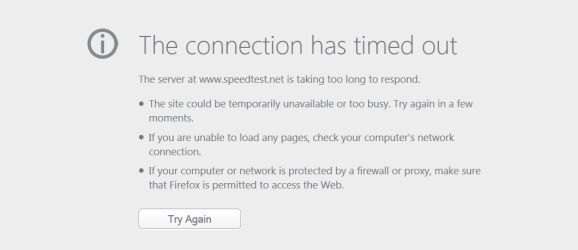
Hey, i am trying to access the website said in the title. I just keep recieving the same error message, Whish i have attached to this thread. I have also tried a lot of googling and trying out all the answers people have to offer. But nothing seems to be working. I have also sent an email to the ookla, hopefully they get back to me soon as possible and ill update here.

Here is a SCREEN CAP aswell:
VVCap Image

If the link is dead, please let me know and ill update the link.

I am able to access their support site: https://support.speedtest.net/home

EDIT 1: Here is another thing that pops up if i dont get the other one: http://vvcap.net/db/GpUownenMN-PjyIsSMr-.htp

EDIT 2: I don't really want to give up on this but its looking more and more like i will have too. Because it strange. My brother (lives in same house) can access Speedtest.net by Ookla - The Global Broadband Speed Test. Is that strange? could it be mearly a setting that i have on my pc that is blocking it? or could it be an issue that i read the other day from some guy, that Speedtest has banned my Ip for some reason and that i should Change my mac address and reset the router to see if that fixes it <<<< should i try this? or not recommended?
 

Attachments

  • Error Message-speedtest.png
    Error Message-speedtest.png
    11.5 KB · Views: 5
  • Error Number 2 speedtest.png
    Error Number 2 speedtest.png
    12.9 KB · Views: 3
  • PingTestResults.png
    PingTestResults.png
    20 KB · Views: 3
  • Whats in my Hosts.png
    Whats in my Hosts.png
    21.7 KB · Views: 3
Last edited:

My Computer

Computer type
PC/Desktop
Computer Manufacturer/Model Number
Nooo idea... Custom built PC
OS
Windows 7 Professional X64
CPU
Intel(R) Core(TM) i7 CPU X990 @ 3.47GHz
Motherboard
Don't know the motherboard.. will look up
Memory
12GB RAM
Graphics Card(s)
GTX 780ti Overclocked
Sound Card
NVIDIA High Definition Audio/Realtek High Definition Audio
Monitor(s) Displays
32" LG 3D Full HD TV
Screen Resolution
1920x1080
Hard Drives
1T Hard Drive.
PSU
1000W
Case
Not Sure.
Cooling
Cool Master
Keyboard
MicroSoft Comfort Curve.
Mouse
logitec Mouse
Internet Speed
25mb
Antivirus
Avast-Anti Virus
Browser
FireFox/Chrome
Thanks for the reply. I shall try this when I get home tomorrow!
 

My Computer

Computer type
PC/Desktop
Computer Manufacturer/Model Number
Nooo idea... Custom built PC
OS
Windows 7 Professional X64
CPU
Intel(R) Core(TM) i7 CPU X990 @ 3.47GHz
Motherboard
Don't know the motherboard.. will look up
Memory
12GB RAM
Graphics Card(s)
GTX 780ti Overclocked
Sound Card
NVIDIA High Definition Audio/Realtek High Definition Audio
Monitor(s) Displays
32" LG 3D Full HD TV
Screen Resolution
1920x1080
Hard Drives
1T Hard Drive.
PSU
1000W
Case
Not Sure.
Cooling
Cool Master
Keyboard
MicroSoft Comfort Curve.
Mouse
logitec Mouse
Internet Speed
25mb
Antivirus
Avast-Anti Virus
Browser
FireFox/Chrome
No problem if that does not resolve the issue Adobe could be the cause ...
 

My Computer

Computer Manufacturer/Model Number
W530-3630QM1
OS
windows 7 home 64bit
CPU
INTEL-CORE I7
Memory
16GB
Hard Drives
750GB
Browser
Chrome
I thought adobe was the issue to start with. So I did a clean install of all their browser products.
 

My Computer

Computer type
PC/Desktop
Computer Manufacturer/Model Number
Nooo idea... Custom built PC
OS
Windows 7 Professional X64
CPU
Intel(R) Core(TM) i7 CPU X990 @ 3.47GHz
Motherboard
Don't know the motherboard.. will look up
Memory
12GB RAM
Graphics Card(s)
GTX 780ti Overclocked
Sound Card
NVIDIA High Definition Audio/Realtek High Definition Audio
Monitor(s) Displays
32" LG 3D Full HD TV
Screen Resolution
1920x1080
Hard Drives
1T Hard Drive.
PSU
1000W
Case
Not Sure.
Cooling
Cool Master
Keyboard
MicroSoft Comfort Curve.
Mouse
logitec Mouse
Internet Speed
25mb
Antivirus
Avast-Anti Virus
Browser
FireFox/Chrome
That rules that side of things out any how .. Hopefully the Link i Posted helps ..
 

My Computer

Computer Manufacturer/Model Number
W530-3630QM1
OS
windows 7 home 64bit
CPU
INTEL-CORE I7
Memory
16GB
Hard Drives
750GB
Browser
Chrome

My Computer

Computer type
PC/Desktop
Computer Manufacturer/Model Number
Home made Desktop
OS
Windows 10 Pro. 64/ version 1709 Windows 7 Pro/64
CPU
Intel i7-6800K @ 4.3
Motherboard
ASUS X-99 Deluxe II
Memory
Corsair Platinum 16 gig @2400
Graphics Card(s)
EVGA GTX 1070 OC
Monitor(s) Displays
Asus 27" LED LCD/VE278Q
Screen Resolution
1920-1080 or 1280-720 HDMI
Hard Drives
INTEL SSD 730-240 Gb Sata 3.0/
PSU
EVGA Platium 1200W
Case
Phanteks Luxe Tempered Glass 8 fans/ one radiator
Cooling
XSPC/ Water Cooled CPU
Keyboard
Das 4 Professional
Mouse
Logitech M705/MX Anywhere 2-S
Internet Speed
100 mbits
Antivirus
Microsoft Security Essentials/ Malwarebytes Premium 3.0/ SAS
Browser
I.E. 11 default/Firefox/ ISP Time Warner Cable/Spectrum
Other Info
LG BluRay Burner/
Sound system-KLipsch-THX/
Icy Dock ssd Hot Swap bays.
Hey, i am trying to access the website said in the title. I just keep recieving the same error message...

I thought adobe was the issue to start with. So I did a clean install of all their browser products.
It probably has nothing to do with Adobe's flash - at least not directly.

If you look at the path in the error message you will see a part that says omni.ja! Everything in the path after the exclamation point is referencing the path of stuff inside the file omni JAR file. That JAR file is a compressed file that contains tons of stuff. It also contains the text/code for the error webpage named netError.xhtml.

If everything had worked as it should have, you should have seen this:
error.PNG

Instead, your Firefox (FF) browser probably received some (but not all) of the speedtest website. FF does not always handle partial page loads well. FF was going to tell you that it could not load the page, but there was a problem with FF processing the few lines of info that it did get from speedtest and FF's internal code that presents the "can't load the page" image shown above. When this conflict happens, FF just barfs out the error that you posted. This has been an issue for years now. (Notice the 2010 date on this bug report and notice the modified date of 17 Oct 2014.) FF's developers don't seem to be able to fix the issue.


As an aside, you can copy the file omni.ja named to your desktop and rename the ja extension to ZIP. Windows (file) Explorer will then let you snoop around the Chrome stuff that is a part of Firefox.

Having said all of that - I would suggest that you abandon Firefox as provided by Mozilla and try Pale Moon's Firefox build (which is optimized for the Windows OS). I'm using the 64bit version of Pale Moon. If you transition to Pale Moon, you won't get the parsing error that you showed in your first post because Pale Moon's developer does not use the omni.ja file. See the debate in this thread.


If you really want to stick with Firefox as built by Mozilla, then I cannot suggest anything that will prevent you from sometimes seeing the parsing error that you mentioned in your first post. If you Google "omni.ja", you will find lots of forum threads with no real resolution. Most say to just re-install Firefox. Doing so probably won't help you.

I have no idea why the speedtest website did not fully load for you when using the Firefox browser. When I have issues with websites via Pale Moon*, I fire up IE and/or Chrome and see if it is browser specific.

*I cannot even recall the last time that I had any problems with Pale Moon... but you get my point.
 

My Computer

Computer type
Laptop
Computer Manufacturer/Model Number
Employer provided Dell Latitude
OS
W7 Pro SP1 64bit
CPU
i7
Memory
8GB
Graphics Card(s)
Intel HD Graphics
Hard Drives
crappy SSD
Antivirus
Employer mandated Symantec Endpoint Protection
Browser
Pale Moon 64bit, IE11 64bit & Chrome 64bit
Site works for me with Firefox 33.0, Windows 7 Home Premium, and other assorted applications, extensions, plugins, etc.
 

My Computer

Computer type
PC/Desktop
Computer Manufacturer/Model Number
Intel(R) Core(TM) i5-2320 CPU @ 3.00GHz (Gateway computer)
OS
Microsoft Windows 7 Home Premium 64-bit 7601 Multiprocessor Free Service Pack 1
CPU
Intel(R) Core(TM) i5-2320 CPU @ 3.00GHz
Motherboard
Gateway IPISB-VR
Memory
8.00 GB
Graphics Card(s)
Intel(R) HD Graphics
Sound Card
(1) Realtek High Definition Audio (2) Intel(R) Display Aud
Monitor(s) Displays
ViewSonic 2250 Series
Screen Resolution
1920 x 1080 x 32 bits (4294967296 colors) @ 60 Hz
Hard Drives
(1) WDC WD10EADX-22TDHB0 (2) Generic Mini SD Reader USB Device (3) Generic USB CF Reader USB Device (4) Generic USB MS Reader USB Device (5) Generic USB SD Reader USB Device (6) Generic USB xD/SM Reader USB Device (7) Seagate FreeAgent Go
Keyboard
Gateway
Mouse
Logitech
Internet Speed
20 Mbps (Theoretical.)
Antivirus
Avast
Browser
Firefox

My Computer

Computer type
PC/Desktop
Computer Manufacturer/Model Number
Custom assembled by me :}
OS
Win-7-Pro64bit 7-H-Prem-64bit
CPU
i7-5930K 2nd i9-9940x both water blocked VRM's too
Motherboard
ASUS SABERTOOTH X99 2nd ASUS x299 Apex
Memory
Trident-z 3200C14 2nd Trident-z 3600C16
Graphics Card(s)
EVGA 1080ti ftw3 2nd Titan Xp both water blocked
Sound Card
Built-in Realtek
Monitor(s) Displays
1-AOC G2460PG 24"G-Sync 144Hz/ 2nd 1-ASUS VG248QE 24" 144Hz
Screen Resolution
1920 x 1080 144Hz
Hard Drives
2-Samsung M.2 Evo & Evo Plus
2-Samsung 850 EVO 500GB SSD's/ 3-2.5 W.D. Black 1tb-&3-1tb/3-3.5 WD Black 1tb hdd's
PSU
EVGA SuperNOVA 1000-P2 2nd 1200-P2
Case
2-Corsair Obsidian Series 450D Black ATX Mid Tower
Cooling
Custom water loops
Keyboard
Logitech G710+/ 2nd Logitech G910
Mouse
2-RedDragon M901 Perdition 16400 dpi Gaming mouse = wired
Internet Speed
Comcast Ping 19ms 89.31mbps download speed 6.12mbps upload
Antivirus
Malwarebytes Pro/ Superantispyware Pro
Browser
FireFox & Pale moon
Other Info
2nd ASUS X299 Apex/Intel i9-9940x with Custom water loop/7H-Prem-x64/Corsair 450D case/Ram Trident-z 3600C16 4x8gb / Samsung970Evo plus 500gb SSD/Dual ssd EZ swap evo/PSU EVGA SuperNova 1200w-P2 80+Platinum/GPU Titan Xp /8-ML-140 on push-pull on 2-280GTX rads
Speedtest.net works just fine in Firefox for me.
 

My Computer

Computer type
PC/Desktop
Computer Manufacturer/Model Number
Home made Desktop
OS
Windows 10 Pro. 64/ version 1709 Windows 7 Pro/64
CPU
Intel i7-6800K @ 4.3
Motherboard
ASUS X-99 Deluxe II
Memory
Corsair Platinum 16 gig @2400
Graphics Card(s)
EVGA GTX 1070 OC
Monitor(s) Displays
Asus 27" LED LCD/VE278Q
Screen Resolution
1920-1080 or 1280-720 HDMI
Hard Drives
INTEL SSD 730-240 Gb Sata 3.0/
PSU
EVGA Platium 1200W
Case
Phanteks Luxe Tempered Glass 8 fans/ one radiator
Cooling
XSPC/ Water Cooled CPU
Keyboard
Das 4 Professional
Mouse
Logitech M705/MX Anywhere 2-S
Internet Speed
100 mbits
Antivirus
Microsoft Security Essentials/ Malwarebytes Premium 3.0/ SAS
Browser
I.E. 11 default/Firefox/ ISP Time Warner Cable/Spectrum
Other Info
LG BluRay Burner/
Sound system-KLipsch-THX/
Icy Dock ssd Hot Swap bays.
Wow a lot of replies and ill get around to replying to them all. I like the pale moon idea which UsernameIssues said. But i do question it a little, due to the fact i tried; Internet explorer and chrome also. These gave me the same answer. Not the exact same but along the same lines.
 

My Computer

Computer type
PC/Desktop
Computer Manufacturer/Model Number
Nooo idea... Custom built PC
OS
Windows 7 Professional X64
CPU
Intel(R) Core(TM) i7 CPU X990 @ 3.47GHz
Motherboard
Don't know the motherboard.. will look up
Memory
12GB RAM
Graphics Card(s)
GTX 780ti Overclocked
Sound Card
NVIDIA High Definition Audio/Realtek High Definition Audio
Monitor(s) Displays
32" LG 3D Full HD TV
Screen Resolution
1920x1080
Hard Drives
1T Hard Drive.
PSU
1000W
Case
Not Sure.
Cooling
Cool Master
Keyboard
MicroSoft Comfort Curve.
Mouse
logitec Mouse
Internet Speed
25mb
Antivirus
Avast-Anti Virus
Browser
FireFox/Chrome

My Computer

Computer type
PC/Desktop
Computer Manufacturer/Model Number
Nooo idea... Custom built PC
OS
Windows 7 Professional X64
CPU
Intel(R) Core(TM) i7 CPU X990 @ 3.47GHz
Motherboard
Don't know the motherboard.. will look up
Memory
12GB RAM
Graphics Card(s)
GTX 780ti Overclocked
Sound Card
NVIDIA High Definition Audio/Realtek High Definition Audio
Monitor(s) Displays
32" LG 3D Full HD TV
Screen Resolution
1920x1080
Hard Drives
1T Hard Drive.
PSU
1000W
Case
Not Sure.
Cooling
Cool Master
Keyboard
MicroSoft Comfort Curve.
Mouse
logitec Mouse
Internet Speed
25mb
Antivirus
Avast-Anti Virus
Browser
FireFox/Chrome

My Computer

Computer type
PC/Desktop
Computer Manufacturer/Model Number
Nooo idea... Custom built PC
OS
Windows 7 Professional X64
CPU
Intel(R) Core(TM) i7 CPU X990 @ 3.47GHz
Motherboard
Don't know the motherboard.. will look up
Memory
12GB RAM
Graphics Card(s)
GTX 780ti Overclocked
Sound Card
NVIDIA High Definition Audio/Realtek High Definition Audio
Monitor(s) Displays
32" LG 3D Full HD TV
Screen Resolution
1920x1080
Hard Drives
1T Hard Drive.
PSU
1000W
Case
Not Sure.
Cooling
Cool Master
Keyboard
MicroSoft Comfort Curve.
Mouse
logitec Mouse
Internet Speed
25mb
Antivirus
Avast-Anti Virus
Browser
FireFox/Chrome
Hey, i am trying to access the website said in the title. I just keep recieving the same error message...

I thought adobe was the issue to start with. So I did a clean install of all their browser products.
It probably has nothing to do with Adobe's flash - at least not directly.

If you look at the path in the error message you will see a part that says omni.ja! Everything in the path after the exclamation point is referencing the path of stuff inside the file omni JAR file. That JAR file is a compressed file that contains tons of stuff. It also contains the text/code for the error webpage named netError.xhtml.

If everything had worked as it should have, you should have seen this:
View attachment 337399

Instead, your Firefox (FF) browser probably received some (but not all) of the speedtest website. FF does not always handle partial page loads well. FF was going to tell you that it could not load the page, but there was a problem with FF processing the few lines of info that it did get from speedtest and FF's internal code that presents the "can't load the page" image shown above. When this conflict happens, FF just barfs out the error that you posted. This has been an issue for years now. (Notice the 2010 date on this bug report and notice the modified date of 17 Oct 2014.) FF's developers don't seem to be able to fix the issue.


As an aside, you can copy the file omni.ja named to your desktop and rename the ja extension to ZIP. Windows (file) Explorer will then let you snoop around the Chrome stuff that is a part of Firefox.

Having said all of that - I would suggest that you abandon Firefox as provided by Mozilla and try Pale Moon's Firefox build (which is optimized for the Windows OS). I'm using the 64bit version of Pale Moon. If you transition to Pale Moon, you won't get the parsing error that you showed in your first post because Pale Moon's developer does not use the omni.ja file. See the debate in this thread.


If you really want to stick with Firefox as built by Mozilla, then I cannot suggest anything that will prevent you from sometimes seeing the parsing error that you mentioned in your first post. If you Google "omni.ja", you will find lots of forum threads with no real resolution. Most say to just re-install Firefox. Doing so probably won't help you.

I have no idea why the speedtest website did not fully load for you when using the Firefox browser. When I have issues with websites via Pale Moon*, I fire up IE and/or Chrome and see if it is browser specific.

*I cannot even recall the last time that I had any problems with Pale Moon... but you get my point.

Hello, thanks for your reply.

I still get the same issue with palemoon as i do on firefox, chrome and IE

Link: http://vvcap.net/db/xK7Sm4-Om0r0ZZkT52TF.htm
 

Attachments

  • ErrorUsingPaleMoon.png
    ErrorUsingPaleMoon.png
    51.2 KB · Views: 1

My Computer

Computer type
PC/Desktop
Computer Manufacturer/Model Number
Nooo idea... Custom built PC
OS
Windows 7 Professional X64
CPU
Intel(R) Core(TM) i7 CPU X990 @ 3.47GHz
Motherboard
Don't know the motherboard.. will look up
Memory
12GB RAM
Graphics Card(s)
GTX 780ti Overclocked
Sound Card
NVIDIA High Definition Audio/Realtek High Definition Audio
Monitor(s) Displays
32" LG 3D Full HD TV
Screen Resolution
1920x1080
Hard Drives
1T Hard Drive.
PSU
1000W
Case
Not Sure.
Cooling
Cool Master
Keyboard
MicroSoft Comfort Curve.
Mouse
logitec Mouse
Internet Speed
25mb
Antivirus
Avast-Anti Virus
Browser
FireFox/Chrome

My Computer

Computer type
PC/Desktop
Computer Manufacturer/Model Number
Custom assembled by me :}
OS
Win-7-Pro64bit 7-H-Prem-64bit
CPU
i7-5930K 2nd i9-9940x both water blocked VRM's too
Motherboard
ASUS SABERTOOTH X99 2nd ASUS x299 Apex
Memory
Trident-z 3200C14 2nd Trident-z 3600C16
Graphics Card(s)
EVGA 1080ti ftw3 2nd Titan Xp both water blocked
Sound Card
Built-in Realtek
Monitor(s) Displays
1-AOC G2460PG 24"G-Sync 144Hz/ 2nd 1-ASUS VG248QE 24" 144Hz
Screen Resolution
1920 x 1080 144Hz
Hard Drives
2-Samsung M.2 Evo & Evo Plus
2-Samsung 850 EVO 500GB SSD's/ 3-2.5 W.D. Black 1tb-&3-1tb/3-3.5 WD Black 1tb hdd's
PSU
EVGA SuperNOVA 1000-P2 2nd 1200-P2
Case
2-Corsair Obsidian Series 450D Black ATX Mid Tower
Cooling
Custom water loops
Keyboard
Logitech G710+/ 2nd Logitech G910
Mouse
2-RedDragon M901 Perdition 16400 dpi Gaming mouse = wired
Internet Speed
Comcast Ping 19ms 89.31mbps download speed 6.12mbps upload
Antivirus
Malwarebytes Pro/ Superantispyware Pro
Browser
FireFox & Pale moon
Other Info
2nd ASUS X299 Apex/Intel i9-9940x with Custom water loop/7H-Prem-x64/Corsair 450D case/Ram Trident-z 3600C16 4x8gb / Samsung970Evo plus 500gb SSD/Dual ssd EZ swap evo/PSU EVGA SuperNova 1200w-P2 80+Platinum/GPU Titan Xp /8-ML-140 on push-pull on 2-280GTX rads

My Computer

Computer type
PC/Desktop
Computer Manufacturer/Model Number
Nooo idea... Custom built PC
OS
Windows 7 Professional X64
CPU
Intel(R) Core(TM) i7 CPU X990 @ 3.47GHz
Motherboard
Don't know the motherboard.. will look up
Memory
12GB RAM
Graphics Card(s)
GTX 780ti Overclocked
Sound Card
NVIDIA High Definition Audio/Realtek High Definition Audio
Monitor(s) Displays
32" LG 3D Full HD TV
Screen Resolution
1920x1080
Hard Drives
1T Hard Drive.
PSU
1000W
Case
Not Sure.
Cooling
Cool Master
Keyboard
MicroSoft Comfort Curve.
Mouse
logitec Mouse
Internet Speed
25mb
Antivirus
Avast-Anti Virus
Browser
FireFox/Chrome
I don't really want to give up on this but its looking more and more like i will have too. Because it strange. My brother (lives in same house) can access Speedtest.net by Ookla - The Global Broadband Speed Test. Is that strange? could it be mearly a setting that i have on my pc that is blocking it? or could it be an issue that i read the other day from some guy, that Speedtest has banned my Ip for some reason and that i should Change my mac address and reset the router to see if that fixes it <<<< should i try this? or not recommended?
 

My Computer

Computer type
PC/Desktop
Computer Manufacturer/Model Number
Nooo idea... Custom built PC
OS
Windows 7 Professional X64
CPU
Intel(R) Core(TM) i7 CPU X990 @ 3.47GHz
Motherboard
Don't know the motherboard.. will look up
Memory
12GB RAM
Graphics Card(s)
GTX 780ti Overclocked
Sound Card
NVIDIA High Definition Audio/Realtek High Definition Audio
Monitor(s) Displays
32" LG 3D Full HD TV
Screen Resolution
1920x1080
Hard Drives
1T Hard Drive.
PSU
1000W
Case
Not Sure.
Cooling
Cool Master
Keyboard
MicroSoft Comfort Curve.
Mouse
logitec Mouse
Internet Speed
25mb
Antivirus
Avast-Anti Virus
Browser
FireFox/Chrome
Do not think it is worth all that bother just for one Website ...
 

My Computer

Computer Manufacturer/Model Number
W530-3630QM1
OS
windows 7 home 64bit
CPU
INTEL-CORE I7
Memory
16GB
Hard Drives
750GB
Browser
Chrome
Do not think it is worth all that bother just for one Website ...

It does seem a bit much right? but this kind of thing should not happen. If there is a fix about then it could well fix a lot of peoples issues with loading certain websites.
 

My Computer

Computer type
PC/Desktop
Computer Manufacturer/Model Number
Nooo idea... Custom built PC
OS
Windows 7 Professional X64
CPU
Intel(R) Core(TM) i7 CPU X990 @ 3.47GHz
Motherboard
Don't know the motherboard.. will look up
Memory
12GB RAM
Graphics Card(s)
GTX 780ti Overclocked
Sound Card
NVIDIA High Definition Audio/Realtek High Definition Audio
Monitor(s) Displays
32" LG 3D Full HD TV
Screen Resolution
1920x1080
Hard Drives
1T Hard Drive.
PSU
1000W
Case
Not Sure.
Cooling
Cool Master
Keyboard
MicroSoft Comfort Curve.
Mouse
logitec Mouse
Internet Speed
25mb
Antivirus
Avast-Anti Virus
Browser
FireFox/Chrome
Back
Top