I'm posting this possible solution in a few places for anyone still trying to search.
Our office is using Windows 7 Professional, Office 2007, and a mix of Outlook and Windows Live Mail.
With Outlook the "send" function works fine. With Windows Live Mail the "send" function will not automatically open a new email. I wanted to find a fix for WLM instead of having to re-install Outlook and setting it up. I saw the following in a forum somewhere (not quite sure where) that worked for us.
This requires adding entries to the registry and isn't that difficult even for you not-so-savvy users.
Click: Start menu > Accessories > Run
Type: regedit
Click: OK and Yes if Account Control pops up
In the left pane browse to:
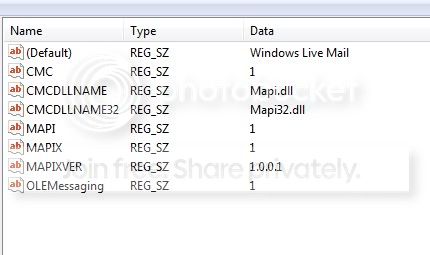
HKEY_LOCAL_MACHINE > Software > Microsoft > Windows Messaging Subsystem
The right pane should contain/look like the following:
***Caution, if there are different entries in your Windows Messaging Subsystem write them down, take a picture or print screen and paste into Paint...something just incase you need to change it back***
Right-click (Default) > Modify...
In the Value data box type: Windows Live Mail
Click: OK
To add the other items right-click in the empty space in the right pane: New > String Value
- Name the new item as stated above
- Once again right-click > Modify...
- Enter the corresponding value
- Rinse and Repeat for all items. Then exit registry.
This has worked for me on three separate systems. Now the "send" function in both Word and Excel opens a new message from WLM.
I also read in another forum (but didn't try it) where someone suggested chagning the registry key:
HKEY_LOCAL_MACHINE > Software > Clients > Mail
from (Default) REG_SZ (value not set)
to (Default) REG_SZ Windows Live Mail
Note: For users who wish to email as PDF or XPS (it's not available by default), simply search for: "office 2007 save as pdf" and download the small 1mb file and run. The link is currently:
Download: 2007 Microsoft Office Add-in: Microsoft Save as PDF or XPS - Microsoft Download Center - Download Details
Hope this helps. Goodluck!

 Everything has been working great but I have one problem that I have been unable to solve. I cannot send email (windows Live) from MS Office 2007. After resetting the defaults 50 times and reinstalling almost everything, I was able to get IE explorer 8 to recognize live mail as the default and email links etc. When I hit send in office it thinks Mail has not been installed but it does open the mail.
 Then It gives me an error about Ms exchange and then No mail installed. To add to the woes I cannot make a new post so i must feed off a Thread and hope someone will notice this. thanks for any help I can get.