Solved I can't install Windows updates after failed update

marshall99

New member
Local time
2:02 AM
Messages
7
Hi all,

Running Win 7 Home Premium (SP1) 64 bit.
I always downloaded and installed the Windows updates for my computer without problems. However, a few days ago, after I downloaded and installed 14 updates, my Windows Explorer started to act very odd: for example, I was not able to copy / paste the files using right click. Immediately, I used the restore point created before the updates => the Windows Explorer issue was solved and the computer seemed to return to normal.
But now, although the Windows Update screen shows the 14 updates as downloaded, when I click on "Install", the green indicator goes left and right for hours, but the installation doesn't happen.
I looked for solution online and I tried the following resources without success:

- FixIt tool: it gets stuck in the "Checking for Updates" screen.

- Run Malwarebytes, Lavasoft, Spybot: all clear.

- http://answers.microsoft.com/en-us/windows/forum/window... => I tried to apply the "Most Helpful Reply" (by miluethi) =>
1. Run services.msc
2. Stop service Windows-Update
3. Delete folder content of C:\Windows\SoftwareDistribution\
4. Start service Windows-Update again
5. Run Windows Update
I was not able to Stop the Windows Update service (I got the 1053 error)

- Run registry cleanup.

- Tried all the processes disabling Norton.

I will appreciate any help.
Thank you in advance,

Marsh
 

My Computer

Computer type
PC/Desktop
OS
Win7 Home Premium (SP1) 64 bit
As a quick start Marsh TURN OFF your computer fully.
what registry cleaner did you use .

Roy
 

My Computer

Computer type
PC/Desktop
Computer Manufacturer/Model Number
medionl/Aspire 6930G/acer x55a
OS
W7 home premium 32bit/W7HP 64bit/w10 tp insider ring
CPU
E5300 dual core
Motherboard
medion MS7366
Memory
3gb
Graphics Card(s)
Nvidia Geforce 7100 Nforce 630i
Monitor(s) Displays
avixc
Internet Speed
n (isp resticted to 72)
Antivirus
mse/pands
Browser
palemoon
Other Info
Belkin Fd7050 n USB using Railink RT2870 drivers, more upto date
Hi Roy,

Thank you for your answer.

1 - I turn off my computer (fully) every night.
2 - I used Norton Utilities Disk optimization that includes registry cleanup.

Regards,

Marsh
 

My Computer

Computer type
PC/Desktop
OS
Win7 Home Premium (SP1) 64 bit
Hi Marsh,
Please post a copy of the last day Windows Update log.
from C windows >> windows update.

Roy
 

My Computer

Computer type
PC/Desktop
Computer Manufacturer/Model Number
medionl/Aspire 6930G/acer x55a
OS
W7 home premium 32bit/W7HP 64bit/w10 tp insider ring
CPU
E5300 dual core
Motherboard
medion MS7366
Memory
3gb
Graphics Card(s)
Nvidia Geforce 7100 Nforce 630i
Monitor(s) Displays
avixc
Internet Speed
n (isp resticted to 72)
Antivirus
mse/pands
Browser
palemoon
Other Info
Belkin Fd7050 n USB using Railink RT2870 drivers, more upto date
Hi Roy,

The last day is today (this morning I tried several resources) => the log is attached.

Thanks,

Marsh
 

Attachments

My Computer

Computer type
PC/Desktop
OS
Win7 Home Premium (SP1) 64 bit
Hi Marsh,
Can you run the fixit from this link
http://aka.ms/diag_wu
might work, but wont hurt.

Reboot.
Try updating, if this doesn't work.
Were going to have to up the Ante

CREATE A RESTORE POINT.
REBOOT.


1). Open an elevated command prompt
2). At the command prompt type the following commands:

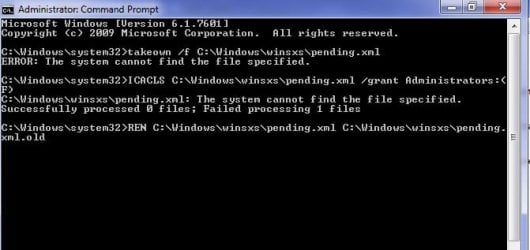
takeown /f C:\Windows\winsxs\pending.xml
ICACLS C:\Windows\winsxs\pending.xml /grant Administrators:(F)
REN C:\Windows\winsxs\pending.xml C:\Windows\winsxs\pending.xml.old


close the window, and reboot

REBOOT again but please wait 30 minutes between the 2.

Did you get a confirmation that the above completed successfully.

Try updating, if they still fail can you run

sfc /scannow, followed by SURT, (link) Download System Update Readiness Tool for Windows 7 for x64-based Systems (KB947821) [October 2014] from Official Microsoft Download Center

and copy/paste the results of the CBS log.

Roy
 
Last edited by a moderator:

My Computer

Computer type
PC/Desktop
Computer Manufacturer/Model Number
medionl/Aspire 6930G/acer x55a
OS
W7 home premium 32bit/W7HP 64bit/w10 tp insider ring
CPU
E5300 dual core
Motherboard
medion MS7366
Memory
3gb
Graphics Card(s)
Nvidia Geforce 7100 Nforce 630i
Monitor(s) Displays
avixc
Internet Speed
n (isp resticted to 72)
Antivirus
mse/pands
Browser
palemoon
Other Info
Belkin Fd7050 n USB using Railink RT2870 drivers, more upto date
STUPID smileys
should read colon : left bracket (
hopefully when you copy/ paste the command it will revert.

Roy
 

My Computer

Computer type
PC/Desktop
Computer Manufacturer/Model Number
medionl/Aspire 6930G/acer x55a
OS
W7 home premium 32bit/W7HP 64bit/w10 tp insider ring
CPU
E5300 dual core
Motherboard
medion MS7366
Memory
3gb
Graphics Card(s)
Nvidia Geforce 7100 Nforce 630i
Monitor(s) Displays
avixc
Internet Speed
n (isp resticted to 72)
Antivirus
mse/pands
Browser
palemoon
Other Info
Belkin Fd7050 n USB using Railink RT2870 drivers, more upto date
Roy,

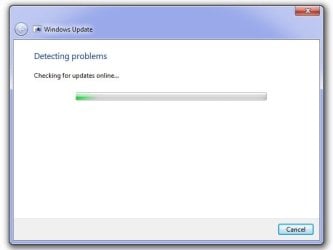
1 - I am trying to run the first step (WindowsUpdateDiagnostic.diagcab), however, as it happened with the FixIt tool, the bar is running from left to rigth for the last 30 minutes, without any change (see attached) should I wait or should I abort the process?

2 - The sentence with the smiley when copied / pasted appears as
ICACLS C:\Windows\winsxs\pending.xml /grant AdministratorsF)
I don't think that it is correct. As per your last post, should be
ICACLS C:\Windows\winsxs\pending.xml /grant Administrator,(F)
Can you confirm, please?

Thanks,

Marsh
 

Attachments

  • Checking for updates online.jpg
    Checking for updates online.jpg
    14.7 KB · Views: 14

My Computer

Computer type
PC/Desktop
OS
Win7 Home Premium (SP1) 64 bit
Hi Marsh
ICACLS C:\Windows\winsxs\pending.xml /grant Administrator,(F)


the comma should be a colon --> :

Roy
 

My Computer

Computer type
PC/Desktop
Computer Manufacturer/Model Number
medionl/Aspire 6930G/acer x55a
OS
W7 home premium 32bit/W7HP 64bit/w10 tp insider ring
CPU
E5300 dual core
Motherboard
medion MS7366
Memory
3gb
Graphics Card(s)
Nvidia Geforce 7100 Nforce 630i
Monitor(s) Displays
avixc
Internet Speed
n (isp resticted to 72)
Antivirus
mse/pands
Browser
palemoon
Other Info
Belkin Fd7050 n USB using Railink RT2870 drivers, more upto date
OK, thanks.

Regarding my question # 1? wait? abort?
 

My Computer

Computer type
PC/Desktop
OS
Win7 Home Premium (SP1) 64 bit
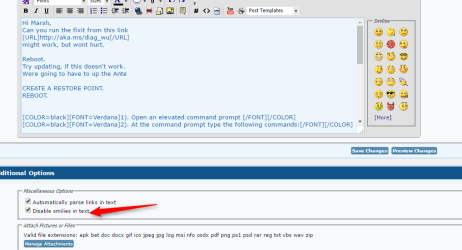
STUPID smileys
should read colon : left bracket (
hopefully when you copy/ paste the command it will revert.

Roy

Go advanced> Check the box to disable smilies in text,

2016-06-28_18h01_12.png

Fixed the post for you.
 

My Computer

Computer type
PC/Desktop
Computer Manufacturer/Model Number
Self Built
OS
Win 10 Pro x64
CPU
Intel I5-2500K @3.3GHz
Motherboard
Asrock P67 Extreme4
Memory
16GB G.Skill Ripjaws X (4x4GB)
Graphics Card(s)
EVGA GeForce 750 Ti SC 2GB
Sound Card
ASUS Xonar DG 5.1 Channels 24-bit 96KHz PCI Interface Sound
Monitor(s) Displays
auria eq2367
Screen Resolution
1920 x 1080
Hard Drives
250GB Samsung 850 EVO SSD
1TB WD Blue
1TB Hitachi
PSU
SeaSonic X 650W 80 Plus Gold
Case
Corsair Obsidian 750D
Cooling
Corsair H60, Three 140mm case fans
Keyboard
Logitech Wireless Keyboard K520
Mouse
Logitech Wireless Mouse M310
Internet Speed
Wave Broadband ~ 100 dn 5 up
Antivirus
Windows Defender, Malwarebytes Premium
Browser
Edge, IE11, Chrome
Other Info
Laptop specs: HP g7-1365dx /
CPU: AMD A6-3420M APU with Radeon(tm) HD Graphics /
RAM: Crucial 8Gb (2x4Gb) /
SSD: Crucial M4-CT128M4SSD2 ATA Device/ FW 000F /
GFX: AMD Radeon HD 6520G /
OS: Windows 10 Pro x64
OK, I aborted the first step.

Tried to do the second step => screenshot is attached => should I proceed with the step 3?

Additional note: when I shut off my computer, it installed an update. Tried to update the computer, but no luck.

Thanks again,

Marsh
 

Attachments

  • Step 2.jpg
    Step 2.jpg
    27.3 KB · Views: 10

My Computer

Computer type
PC/Desktop
OS
Win7 Home Premium (SP1) 64 bit
Surprise, surprise...
Last night, before I turned off my computer, I tried to update, but nothing happened. However, this morning, first thing, I tried to update, and all was OK and it run very fast.
Not sure if the step # 2 actually solved the problem, but all is working fine, including the Windows Explorer.

Thank you for your help! :D

Marsh
 

My Computer

Computer type
PC/Desktop
OS
Win7 Home Premium (SP1) 64 bit
Back
Top