Solved I can't perform disk check even scheduling the task fails

Jacksparrow1

New member
Local time
3:33 AM
Messages
8
Hello,

I'm trying to install Ubunut at the same Windows OS partition (i.e. C However, it seems that using "wubi" caused some problems to my partition.

I try to perform a check disk on my C: drive but it fails. It gives me the error "windows can't check the disk while its in use". So, I tired to schedule the check until after the reboot. Surprisingly, it fails too. after the reboot, when the timer runs out, it fails and gives me an error that reads "cannot open volumes for direct access...Autochk cannot run due to an error caused by a recently installed software package".

I also read few of the similar problems over here and tried some solutions, but non has worked for me.
for example, I tried running the "sfc /scannow" hoping it can do some fixing, but no hopes. I tried to perform the check disk again but the main problem still persist.

Now I want to be able to fix the problem, run the disk check, and get rid of any errors caused to my HD by the linux installation works I done.
 

My Computer My Computer

At a glance

Microsoft Windows 7 Home Premium 64-bit 7601 ...Intel(R) Core(TM) i5-3210M CPU @ 2.50GHz8.00 GB(1) Intel(R) HD Graphics 4000 (2) NVIDIA GeFo...
Computer type
Laptop
Computer Manufacturer/Model Number
Asus A55V
OS
Microsoft Windows 7 Home Premium 64-bit 7601 Multiprocessor Free Service Pack 1
CPU
Intel(R) Core(TM) i5-3210M CPU @ 2.50GHz
Motherboard
ASUSTeK COMPUTER INC. K55VM
Memory
8.00 GB
Graphics Card(s)
(1) Intel(R) HD Graphics 4000 (2) NVIDIA GeForce GT 630M
Sound Card
(1) Realtek High Definition Audio (2) Intel(R) Display Aud
Screen Resolution
0 x 0 x 0 bits (0 colors) @ 0 Hz
Hard Drives
ST9750420AS

My Computer My Computer

At a glance

Desk1 7 Home Prem / Desk2 10 Pro / Main lap A...Desk1 i5 3750K / Laptop i7 GTX 860M / Desk2 i...Desk1 8GB (1866) / Desk2 16GB (1333) / Laptop...Desk 1& 2NVidia GTX 650 & Laptops on board Intel
Computer type
PC/Desktop
Computer Manufacturer/Model Number
Own build (new) Desk1 / Asus ROG Win 7 / Desk2 1st build
OS
Desk1 7 Home Prem / Desk2 10 Pro / Main lap Asus ROG 10 Pro 2 laptop Toshiba 7 Pro Asus P2520 7 & 10
CPU
Desk1 i5 3750K / Laptop i7 GTX 860M / Desk2 i5 2500
Motherboard
Desk1 Asus P877-V / Desk2 Gigabyte H67 UD3H / Laptop ?
Memory
Desk1 8GB (1866) / Desk2 16GB (1333) / Laptop 8Gb DDR3
Graphics Card(s)
Desk 1& 2NVidia GTX 650 & Laptops on board Intel
Sound Card
Desk 1 & 2 -XONAR DG Realtek High Def audio Laptop
Monitor(s) Displays
Desk 1 Benq HD 2450 / Desk2 Philips 24" / Laptop 17.5"
Screen Resolution
1920x1080 D1 & D2 & Laptop 1
Hard Drives
Desk1 Samsung 120GB 830 SSD
Asus ROG 256GB 850 Pro SSD
Desk2 Samsung 840 256 SSD
Toshiba 120GB EVO
PSU
Desk 1 Corsair HX 1050/ Laptop ? / Desk 2 Corsair HX 650
Case
Desk 1 Cooler HAF XM ? Toshiba laptop / Desk2 Coolermaster
Cooling
Fans on all Desk1 -2 Desk2 - all Coolermasters 5 Laptop ?
Keyboard
Desk 1 MS Sidewinder X6 Desk 2 MS Sidewinder X 4
Mouse
Desk 1&2 - Gigabyte MS 900 gamer - laptop - Logitec wireless
Internet Speed
ADSL2+
Other Info
One other Desktop (tester) and spare Toshba laptop both with SSD's
Running Kaspersky 2016 ISS on all machines config'd identically
Logitec audio stereo systems on each machine (x3)
Canon MG5250MFC
Router/modem TP-Link running WPA2SK
That's right..windows there first and now I wanna install Ubuntu.
Thanx for the link I checked it and it will be useful later on anyway.
But first,my question here is regarding the failure of check disk...
 

My Computer My Computer

At a glance

Microsoft Windows 7 Home Premium 64-bit 7601 ...Intel(R) Core(TM) i5-3210M CPU @ 2.50GHz8.00 GB(1) Intel(R) HD Graphics 4000 (2) NVIDIA GeFo...
Computer type
Laptop
Computer Manufacturer/Model Number
Asus A55V
OS
Microsoft Windows 7 Home Premium 64-bit 7601 Multiprocessor Free Service Pack 1
CPU
Intel(R) Core(TM) i5-3210M CPU @ 2.50GHz
Motherboard
ASUSTeK COMPUTER INC. K55VM
Memory
8.00 GB
Graphics Card(s)
(1) Intel(R) HD Graphics 4000 (2) NVIDIA GeForce GT 630M
Sound Card
(1) Realtek High Definition Audio (2) Intel(R) Display Aud
Screen Resolution
0 x 0 x 0 bits (0 colors) @ 0 Hz
Hard Drives
ST9750420AS
That's right..windows there first and now I wanna install Ubuntu.
Thanx for the link I checked it and it will be useful later on anyway.
But first,my question here is regarding the failure of check disk...
Now depending on how you set it up depends on how it runs I always use the command prompt (Option 2) method see these I do them in that order as matter of routine;)

http://www.sevenforums.com/tutorials/1538-sfc-scannow-command-system-file-checker.html

http://www.sevenforums.com/tutorials/433-disk-check.html< if necessary include the /f and /r in the command line as per Option2
 

My Computer My Computer

At a glance

Desk1 7 Home Prem / Desk2 10 Pro / Main lap A...Desk1 i5 3750K / Laptop i7 GTX 860M / Desk2 i...Desk1 8GB (1866) / Desk2 16GB (1333) / Laptop...Desk 1& 2NVidia GTX 650 & Laptops on board Intel
Computer type
PC/Desktop
Computer Manufacturer/Model Number
Own build (new) Desk1 / Asus ROG Win 7 / Desk2 1st build
OS
Desk1 7 Home Prem / Desk2 10 Pro / Main lap Asus ROG 10 Pro 2 laptop Toshiba 7 Pro Asus P2520 7 & 10
CPU
Desk1 i5 3750K / Laptop i7 GTX 860M / Desk2 i5 2500
Motherboard
Desk1 Asus P877-V / Desk2 Gigabyte H67 UD3H / Laptop ?
Memory
Desk1 8GB (1866) / Desk2 16GB (1333) / Laptop 8Gb DDR3
Graphics Card(s)
Desk 1& 2NVidia GTX 650 & Laptops on board Intel
Sound Card
Desk 1 & 2 -XONAR DG Realtek High Def audio Laptop
Monitor(s) Displays
Desk 1 Benq HD 2450 / Desk2 Philips 24" / Laptop 17.5"
Screen Resolution
1920x1080 D1 & D2 & Laptop 1
Hard Drives
Desk1 Samsung 120GB 830 SSD
Asus ROG 256GB 850 Pro SSD
Desk2 Samsung 840 256 SSD
Toshiba 120GB EVO
PSU
Desk 1 Corsair HX 1050/ Laptop ? / Desk 2 Corsair HX 650
Case
Desk 1 Cooler HAF XM ? Toshiba laptop / Desk2 Coolermaster
Cooling
Fans on all Desk1 -2 Desk2 - all Coolermasters 5 Laptop ?
Keyboard
Desk 1 MS Sidewinder X6 Desk 2 MS Sidewinder X 4
Mouse
Desk 1&2 - Gigabyte MS 900 gamer - laptop - Logitec wireless
Internet Speed
ADSL2+
Other Info
One other Desktop (tester) and spare Toshba laptop both with SSD's
Running Kaspersky 2016 ISS on all machines config'd identically
Logitec audio stereo systems on each machine (x3)
Canon MG5250MFC
Router/modem TP-Link running WPA2SK
Done the system file checker and I got "no integrity violations" then ran check disk at reboot- as I can not run it due to the msg "drive being used by another user" and again the check disk fails

Here I attached my sfc scan result if that could help
 

Attachments

My Computer My Computer

At a glance

Microsoft Windows 7 Home Premium 64-bit 7601 ...Intel(R) Core(TM) i5-3210M CPU @ 2.50GHz8.00 GB(1) Intel(R) HD Graphics 4000 (2) NVIDIA GeFo...
Computer type
Laptop
Computer Manufacturer/Model Number
Asus A55V
OS
Microsoft Windows 7 Home Premium 64-bit 7601 Multiprocessor Free Service Pack 1
CPU
Intel(R) Core(TM) i5-3210M CPU @ 2.50GHz
Motherboard
ASUSTeK COMPUTER INC. K55VM
Memory
8.00 GB
Graphics Card(s)
(1) Intel(R) HD Graphics 4000 (2) NVIDIA GeForce GT 630M
Sound Card
(1) Realtek High Definition Audio (2) Intel(R) Display Aud
Screen Resolution
0 x 0 x 0 bits (0 colors) @ 0 Hz
Hard Drives
ST9750420AS
Assuming you don't have an SSD, try running SeaTools.
Prefered first the SMART, short generic and long generic tests.


Diagnostics Test

 HDD TEST


arrow.png
Run SeaTools to check the integrity of your HDD. http://www.sevenforums.com/tutorials/313457-seatools-dos-windows-how-use.html

   Note
Do not run SeaTools on an SSD as the results will be invalid.


Please fill in your system specs
Please follow this tutorial and download the tool. The tool will give you detailed information about your system specs, please fill in your system specs more completely.
How to fill in your system specs:
picture.php

picture.php
 

My Computer My Computer

At a glance

Windows 10 Proi5-650016GB DDR4 2133 Crucial Ballistix Sport LTMSI GeForce GTX 1060 GAMING X 6G
Computer type
PC/Desktop
Computer Manufacturer/Model Number
Custom build
OS
Windows 10 Pro
CPU
i5-6500
Motherboard
Gigabyte B150-HD3P-CF
Memory
16GB DDR4 2133 Crucial Ballistix Sport LT
Graphics Card(s)
MSI GeForce GTX 1060 GAMING X 6G
Sound Card
Intel Display Audio
Monitor(s) Displays
Liyama ProLite XB2483HSU-B2
Screen Resolution
1920 x 1080
Hard Drives
Crucial MX200 500GB & Toshiba DT01ACA300 3TB
PSU
Corsair RM550x
Case
Fractal Design Define S
Cooling
Cooler Master TX3 i
Keyboard
Func KB-460 (MX Red)
Mouse
Corsair Gaming M65 RGB
Antivirus
Bitdefender Total Security 2016 + MBAM Pro + MBAE Pro
Browser
Google Chrome
Other Info
Creative Sound Blaster Tactic3D Rage V2 headset
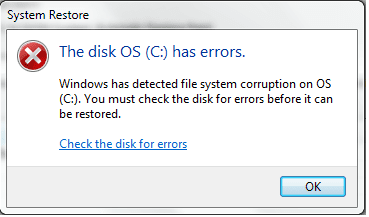
I have been trying to make windows repair since even system restore fails as shown in the attached image.
so I created a system repair CD- this is because my Asus comes with the Asus preload wizard that takes over the repair process whenever you choose the system repair option form the windows recovery menu- from within the windows and then booted into the CD but again I was faced with the Asus Prelaod wizard.

So after a some researches here and there I found the only way to get around that wizard is to go with windows ISO image- in DVD or USB- and boot into it just as if I'm going to install fresh windows.

After creating my bootable usb with the same windows version that I have (i.e win 7 HP 64) using rufus, and booted into the usb- thanx God this time I could escape the-freaking- Asus preload wizard. But unfortunately, I received the error "This version of System Recovery Options is not compatible with the version of windows you are trying to repair. Try using a recovery disc that is compatible with this version of windows"

I tried the UEFI solution but it didn't work too.

I don't know what to do next.
 

Attachments

  • system resotre fails.png
    system resotre fails.png
    7.5 KB · Views: 22

My Computer My Computer

At a glance

Microsoft Windows 7 Home Premium 64-bit 7601 ...Intel(R) Core(TM) i5-3210M CPU @ 2.50GHz8.00 GB(1) Intel(R) HD Graphics 4000 (2) NVIDIA GeFo...
Computer type
Laptop
Computer Manufacturer/Model Number
Asus A55V
OS
Microsoft Windows 7 Home Premium 64-bit 7601 Multiprocessor Free Service Pack 1
CPU
Intel(R) Core(TM) i5-3210M CPU @ 2.50GHz
Motherboard
ASUSTeK COMPUTER INC. K55VM
Memory
8.00 GB
Graphics Card(s)
(1) Intel(R) HD Graphics 4000 (2) NVIDIA GeForce GT 630M
Sound Card
(1) Realtek High Definition Audio (2) Intel(R) Display Aud
Screen Resolution
0 x 0 x 0 bits (0 colors) @ 0 Hz
Hard Drives
ST9750420AS
Sounds simplistic but did you run chkdsk in safe mode??

Now I know usually one doesn't run tests on a SSD but Seagate have this http://knowledge.seagate.com/articles/en_US/FAQ/005706en

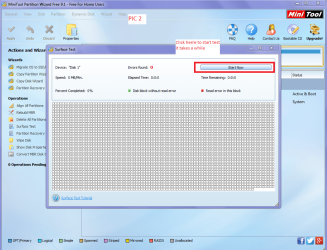
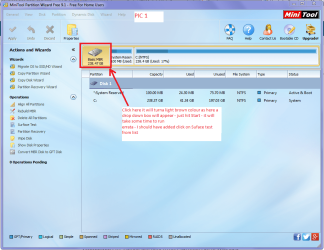
While we are testing the drive assuming as axe said you do not have a SSD but a spinner you could test the physical state of the platters and to some extent the read/write actuated arms you can use Partition Wizard see pics MiniTool Partition Wizard | Best partition magic alternative for Windows PC and Server

Oh the specs please mate:p
 

Attachments

  • SURFACE TEST 2.PNG
    SURFACE TEST 2.PNG
    142.2 KB · Views: 0
  • SURFACE TEST 1.PNG
    SURFACE TEST 1.PNG
    203.2 KB · Views: 1

My Computer My Computer

At a glance

Desk1 7 Home Prem / Desk2 10 Pro / Main lap A...Desk1 i5 3750K / Laptop i7 GTX 860M / Desk2 i...Desk1 8GB (1866) / Desk2 16GB (1333) / Laptop...Desk 1& 2NVidia GTX 650 & Laptops on board Intel
Computer type
PC/Desktop
Computer Manufacturer/Model Number
Own build (new) Desk1 / Asus ROG Win 7 / Desk2 1st build
OS
Desk1 7 Home Prem / Desk2 10 Pro / Main lap Asus ROG 10 Pro 2 laptop Toshiba 7 Pro Asus P2520 7 & 10
CPU
Desk1 i5 3750K / Laptop i7 GTX 860M / Desk2 i5 2500
Motherboard
Desk1 Asus P877-V / Desk2 Gigabyte H67 UD3H / Laptop ?
Memory
Desk1 8GB (1866) / Desk2 16GB (1333) / Laptop 8Gb DDR3
Graphics Card(s)
Desk 1& 2NVidia GTX 650 & Laptops on board Intel
Sound Card
Desk 1 & 2 -XONAR DG Realtek High Def audio Laptop
Monitor(s) Displays
Desk 1 Benq HD 2450 / Desk2 Philips 24" / Laptop 17.5"
Screen Resolution
1920x1080 D1 & D2 & Laptop 1
Hard Drives
Desk1 Samsung 120GB 830 SSD
Asus ROG 256GB 850 Pro SSD
Desk2 Samsung 840 256 SSD
Toshiba 120GB EVO
PSU
Desk 1 Corsair HX 1050/ Laptop ? / Desk 2 Corsair HX 650
Case
Desk 1 Cooler HAF XM ? Toshiba laptop / Desk2 Coolermaster
Cooling
Fans on all Desk1 -2 Desk2 - all Coolermasters 5 Laptop ?
Keyboard
Desk 1 MS Sidewinder X6 Desk 2 MS Sidewinder X 4
Mouse
Desk 1&2 - Gigabyte MS 900 gamer - laptop - Logitec wireless
Internet Speed
ADSL2+
Other Info
One other Desktop (tester) and spare Toshba laptop both with SSD's
Running Kaspersky 2016 ISS on all machines config'd identically
Logitec audio stereo systems on each machine (x3)
Canon MG5250MFC
Router/modem TP-Link running WPA2SK
System Specs. is done
I hope it can help

I tired going into safe mode but it fails, stuck at the screen where drivers and other stuff being listed-uploading. It then just go back to windows and start it normally.

I didn't run the Seagate tool as I don't have enough space on my ex. HD for the system Image-but it seems enough for the other things to be backed up. I do not know this system image how significant is it? any suggestions on this is much appreciated
 

My Computer My Computer

At a glance

Microsoft Windows 7 Home Premium 64-bit 7601 ...Intel(R) Core(TM) i5-3210M CPU @ 2.50GHz8.00 GB(1) Intel(R) HD Graphics 4000 (2) NVIDIA GeFo...
Computer type
Laptop
Computer Manufacturer/Model Number
Asus A55V
OS
Microsoft Windows 7 Home Premium 64-bit 7601 Multiprocessor Free Service Pack 1
CPU
Intel(R) Core(TM) i5-3210M CPU @ 2.50GHz
Motherboard
ASUSTeK COMPUTER INC. K55VM
Memory
8.00 GB
Graphics Card(s)
(1) Intel(R) HD Graphics 4000 (2) NVIDIA GeForce GT 630M
Sound Card
(1) Realtek High Definition Audio (2) Intel(R) Display Aud
Screen Resolution
0 x 0 x 0 bits (0 colors) @ 0 Hz
Hard Drives
ST9750420AS
Now I am assuming you can actually gets into Windows because you say it goes back to it and starts it normally.

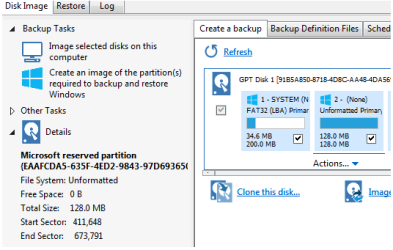
Now if that is the case then if it were me I would be using this to a new and separate external drive http://www.sevenforums.com/tutorials/73828-imaging-free-macrium.html because you may be looking at a reinstall:( This will image the system as it says and one can get back the data from it (see the little links at the bottom of that tutorial - more tutorials)
I am no expert and it seems to me you have corrupted the drive with the attempt at getting Ubuntu on board.

Now one ting yu can doo if you can boot into Windows is run these

http://www.superantispyware.com/

http://www.malwarebytes.org/products/malwarebytes_free/

https://toolslib.net/downloads/viewdownload/1-adwcleaner/

delete any rubbish found with the malware scans

(NBIf one is running Kaspersky security it may rant about ADW - just ignore it ordisable Kaspersky while the ADW is being used)
If these do not find anything much then it might be worth a try with this Kaspersky Rescue Disk 10 it takes a while but will scan for malware without involving Windows. Now I use a disk but you can use a USB stick it is a matter of preference.

If you are at all concerned you can use this to retrieve important data.

BOOTABLE UBUNTU

Make a bootable Ubuntu disk Download Ubuntu Desktop | Download | Ubuntu

Set the BIOS to boot from the optical when themachine boots it will show you a screen with TRY or INSTALL >select TRY not INSTALL

When it is finished - it takes very little time youwill get a screen like in the pic .

Open the drive you want > User and dig downuntil you get to the data / settings you may be able to copy / paste thematerial you want to an external source or other installed drive doing this.

I am not sure if it will but I have recovered tonsof data etc using this method both on "dead" or just plain drivesthat you cannot get data from using Windows.
 

My Computer My Computer

At a glance

Desk1 7 Home Prem / Desk2 10 Pro / Main lap A...Desk1 i5 3750K / Laptop i7 GTX 860M / Desk2 i...Desk1 8GB (1866) / Desk2 16GB (1333) / Laptop...Desk 1& 2NVidia GTX 650 & Laptops on board Intel
Computer type
PC/Desktop
Computer Manufacturer/Model Number
Own build (new) Desk1 / Asus ROG Win 7 / Desk2 1st build
OS
Desk1 7 Home Prem / Desk2 10 Pro / Main lap Asus ROG 10 Pro 2 laptop Toshiba 7 Pro Asus P2520 7 & 10
CPU
Desk1 i5 3750K / Laptop i7 GTX 860M / Desk2 i5 2500
Motherboard
Desk1 Asus P877-V / Desk2 Gigabyte H67 UD3H / Laptop ?
Memory
Desk1 8GB (1866) / Desk2 16GB (1333) / Laptop 8Gb DDR3
Graphics Card(s)
Desk 1& 2NVidia GTX 650 & Laptops on board Intel
Sound Card
Desk 1 & 2 -XONAR DG Realtek High Def audio Laptop
Monitor(s) Displays
Desk 1 Benq HD 2450 / Desk2 Philips 24" / Laptop 17.5"
Screen Resolution
1920x1080 D1 & D2 & Laptop 1
Hard Drives
Desk1 Samsung 120GB 830 SSD
Asus ROG 256GB 850 Pro SSD
Desk2 Samsung 840 256 SSD
Toshiba 120GB EVO
PSU
Desk 1 Corsair HX 1050/ Laptop ? / Desk 2 Corsair HX 650
Case
Desk 1 Cooler HAF XM ? Toshiba laptop / Desk2 Coolermaster
Cooling
Fans on all Desk1 -2 Desk2 - all Coolermasters 5 Laptop ?
Keyboard
Desk 1 MS Sidewinder X6 Desk 2 MS Sidewinder X 4
Mouse
Desk 1&2 - Gigabyte MS 900 gamer - laptop - Logitec wireless
Internet Speed
ADSL2+
Other Info
One other Desktop (tester) and spare Toshba laptop both with SSD's
Running Kaspersky 2016 ISS on all machines config'd identically
Logitec audio stereo systems on each machine (x3)
Canon MG5250MFC
Router/modem TP-Link running WPA2SK
Personally, based on my humble knowledge and knowing what I have been installing on my PC as well as the on going issue, I see no reason of running the malware detection tools, I do appreciate all the help given I thank you so much ,so I just decided to reinstall my windows after making image using Macrium,its very helpful piece of software thanx.

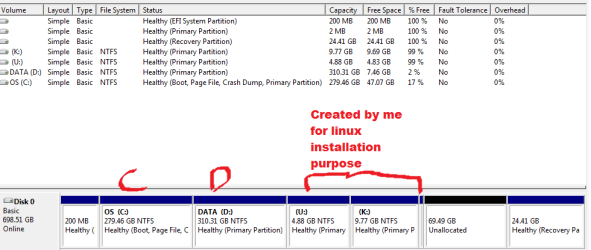
But before I progress I have something to ask regarding the partitions I have currently on my system as from the attachment you can see that I have :


  1. C drive that's my windows partition
  2. D drive is my non-system partition I use it to store my data.
  3. U & K drives are created by me when I wanted to install Ubuntu & kali-linux as well as the 2mb partition-I guess I made it to be the /swap for linux.
  4. The 200 & 24.41 mb drives are what exactly I want to ask about. Now that I want to reinstall win. what would happen to these two drives.So far, I know recovery partition is meant to be used by windows, but what about the other 200mb drive. bottom line I want to know which of these to keep and not tamper and which one I can claim its space and use it, instead of just sitting there unusable.
  5. there also one drive that makes a space of 128mb, which only macrium shows it but not seen at the disk management, macrium says its "system reserved partition"


P.S I found that my HDD is SSD so running seatools is invalid, therefore I didn't run it
 

Attachments

  • drive manager.png
    drive manager.png
    12.8 KB · Views: 1
  • macrium.png
    macrium.png
    11.5 KB · Views: 15
Last edited:

My Computer My Computer

At a glance

Microsoft Windows 7 Home Premium 64-bit 7601 ...Intel(R) Core(TM) i5-3210M CPU @ 2.50GHz8.00 GB(1) Intel(R) HD Graphics 4000 (2) NVIDIA GeFo...
Computer type
Laptop
Computer Manufacturer/Model Number
Asus A55V
OS
Microsoft Windows 7 Home Premium 64-bit 7601 Multiprocessor Free Service Pack 1
CPU
Intel(R) Core(TM) i5-3210M CPU @ 2.50GHz
Motherboard
ASUSTeK COMPUTER INC. K55VM
Memory
8.00 GB
Graphics Card(s)
(1) Intel(R) HD Graphics 4000 (2) NVIDIA GeForce GT 630M
Sound Card
(1) Realtek High Definition Audio (2) Intel(R) Display Aud
Screen Resolution
0 x 0 x 0 bits (0 colors) @ 0 Hz
Hard Drives
ST9750420AS
Ok well it is up to you re the malware scans and the U and K are partitions not drives - I stand to be corrected of course. In that case then I am just assuming that as the drive is just one drive with different artitions Windows is chasing it's tails as to what it is supposed to be checking. If those othr partitons have nothing in them then yes it should run a chkdsk on the drive.

Now the Seatools test is available for SSD's I thought I linked that but if you don't want to use it it is your choice of course.

So maybe I shall refer it to more help as I am just chasing my own tail here.
 

My Computer My Computer

At a glance

Desk1 7 Home Prem / Desk2 10 Pro / Main lap A...Desk1 i5 3750K / Laptop i7 GTX 860M / Desk2 i...Desk1 8GB (1866) / Desk2 16GB (1333) / Laptop...Desk 1& 2NVidia GTX 650 & Laptops on board Intel
Computer type
PC/Desktop
Computer Manufacturer/Model Number
Own build (new) Desk1 / Asus ROG Win 7 / Desk2 1st build
OS
Desk1 7 Home Prem / Desk2 10 Pro / Main lap Asus ROG 10 Pro 2 laptop Toshiba 7 Pro Asus P2520 7 & 10
CPU
Desk1 i5 3750K / Laptop i7 GTX 860M / Desk2 i5 2500
Motherboard
Desk1 Asus P877-V / Desk2 Gigabyte H67 UD3H / Laptop ?
Memory
Desk1 8GB (1866) / Desk2 16GB (1333) / Laptop 8Gb DDR3
Graphics Card(s)
Desk 1& 2NVidia GTX 650 & Laptops on board Intel
Sound Card
Desk 1 & 2 -XONAR DG Realtek High Def audio Laptop
Monitor(s) Displays
Desk 1 Benq HD 2450 / Desk2 Philips 24" / Laptop 17.5"
Screen Resolution
1920x1080 D1 & D2 & Laptop 1
Hard Drives
Desk1 Samsung 120GB 830 SSD
Asus ROG 256GB 850 Pro SSD
Desk2 Samsung 840 256 SSD
Toshiba 120GB EVO
PSU
Desk 1 Corsair HX 1050/ Laptop ? / Desk 2 Corsair HX 650
Case
Desk 1 Cooler HAF XM ? Toshiba laptop / Desk2 Coolermaster
Cooling
Fans on all Desk1 -2 Desk2 - all Coolermasters 5 Laptop ?
Keyboard
Desk 1 MS Sidewinder X6 Desk 2 MS Sidewinder X 4
Mouse
Desk 1&2 - Gigabyte MS 900 gamer - laptop - Logitec wireless
Internet Speed
ADSL2+
Other Info
One other Desktop (tester) and spare Toshba laptop both with SSD's
Running Kaspersky 2016 ISS on all machines config'd identically
Logitec audio stereo systems on each machine (x3)
Canon MG5250MFC
Router/modem TP-Link running WPA2SK
Hello here goes what I have been working on to solve the problem.

1. I tired burning Win7 hp 64 on my USB and boot from there but in this case the setup wizard after clicking the (install now) I get the error "A required CD/DVD drive device driver is missing. if you have driver floppy disk....ect" I found some people have tried some solutions such as killing the installation here and goes back to the previous step and change the USB port.However, this did not work for me.
2. I changed the my pendrive and also changed the software to makes the bootable USB but no luck yet, still getting the same error.
3. I have guessed it could be my pendrive causing the problem. So, I get myself a DVD and burnt win7 into it and boot from there but this time it is the missing drive error has gone, sighhhhh. Wait, not party time yet buddy, I have a problem in proceeding with the installation after the step where I select the drive to be used. the "where do you want to install Windwos" wizard shows me for every partition that I can not use that specific-highlighted-drive partition to install Windows. The reason-as it show- is that partition is of GPT partition style. This is even with the "C:" partition where Windows originally is installed.
4. So my last resort was to submit to "Asus Preload Wizard" which I thought it wouldn't help me in the first place by only factory resetting my laptop.
But I try the first option from the wizard list of options and now my laptop is back to normal state

I would like to thank you for the help and suggested solution-though non worked and some not been tried- but I learnt a lot.

I hope this "lengthy" reply in particular and my post in general would be of benefits of other users.
 

My Computer My Computer

At a glance

Microsoft Windows 7 Home Premium 64-bit 7601 ...Intel(R) Core(TM) i5-3210M CPU @ 2.50GHz8.00 GB(1) Intel(R) HD Graphics 4000 (2) NVIDIA GeFo...
Computer type
Laptop
Computer Manufacturer/Model Number
Asus A55V
OS
Microsoft Windows 7 Home Premium 64-bit 7601 Multiprocessor Free Service Pack 1
CPU
Intel(R) Core(TM) i5-3210M CPU @ 2.50GHz
Motherboard
ASUSTeK COMPUTER INC. K55VM
Memory
8.00 GB
Graphics Card(s)
(1) Intel(R) HD Graphics 4000 (2) NVIDIA GeForce GT 630M
Sound Card
(1) Realtek High Definition Audio (2) Intel(R) Display Aud
Screen Resolution
0 x 0 x 0 bits (0 colors) @ 0 Hz
Hard Drives
ST9750420AS
Well mate at least it got fixed and I often wonder at soem of the fixes because at times the fix seems to have no relationship with the problem.

A good example is my main desktop suddenly lost the use of the USB ports and it turned out to be the Samsung Magician software for the SSD that needed to be uninstalled and bingo it worked. Now it just so happened that another member had seen this problem before and as soon as I sent details of my hard drive he picked it straight away. But as I say the problem would still be in situ because I would never have thought a hard drive software would take out the USB ports!!
 

My Computer My Computer

At a glance

Desk1 7 Home Prem / Desk2 10 Pro / Main lap A...Desk1 i5 3750K / Laptop i7 GTX 860M / Desk2 i...Desk1 8GB (1866) / Desk2 16GB (1333) / Laptop...Desk 1& 2NVidia GTX 650 & Laptops on board Intel
Computer type
PC/Desktop
Computer Manufacturer/Model Number
Own build (new) Desk1 / Asus ROG Win 7 / Desk2 1st build
OS
Desk1 7 Home Prem / Desk2 10 Pro / Main lap Asus ROG 10 Pro 2 laptop Toshiba 7 Pro Asus P2520 7 & 10
CPU
Desk1 i5 3750K / Laptop i7 GTX 860M / Desk2 i5 2500
Motherboard
Desk1 Asus P877-V / Desk2 Gigabyte H67 UD3H / Laptop ?
Memory
Desk1 8GB (1866) / Desk2 16GB (1333) / Laptop 8Gb DDR3
Graphics Card(s)
Desk 1& 2NVidia GTX 650 & Laptops on board Intel
Sound Card
Desk 1 & 2 -XONAR DG Realtek High Def audio Laptop
Monitor(s) Displays
Desk 1 Benq HD 2450 / Desk2 Philips 24" / Laptop 17.5"
Screen Resolution
1920x1080 D1 & D2 & Laptop 1
Hard Drives
Desk1 Samsung 120GB 830 SSD
Asus ROG 256GB 850 Pro SSD
Desk2 Samsung 840 256 SSD
Toshiba 120GB EVO
PSU
Desk 1 Corsair HX 1050/ Laptop ? / Desk 2 Corsair HX 650
Case
Desk 1 Cooler HAF XM ? Toshiba laptop / Desk2 Coolermaster
Cooling
Fans on all Desk1 -2 Desk2 - all Coolermasters 5 Laptop ?
Keyboard
Desk 1 MS Sidewinder X6 Desk 2 MS Sidewinder X 4
Mouse
Desk 1&2 - Gigabyte MS 900 gamer - laptop - Logitec wireless
Internet Speed
ADSL2+
Other Info
One other Desktop (tester) and spare Toshba laptop both with SSD's
Running Kaspersky 2016 ISS on all machines config'd identically
Logitec audio stereo systems on each machine (x3)
Canon MG5250MFC
Router/modem TP-Link running WPA2SK
Yeah man I'm so happy- though I have to start again installing all my applications that were gone and the frustration I had over the past weeks.

And yeah I totally agree with you. An unexpected problem hits you, basically for simple thing you did, that you are pretty sure in the worst case, if a problem happened it wouldn't be as catastrophic as what hits you. and an unprompted try simply does better than all professional tries.

"Welcome to the computer world"
 

My Computer My Computer

At a glance

Microsoft Windows 7 Home Premium 64-bit 7601 ...Intel(R) Core(TM) i5-3210M CPU @ 2.50GHz8.00 GB(1) Intel(R) HD Graphics 4000 (2) NVIDIA GeFo...
Computer type
Laptop
Computer Manufacturer/Model Number
Asus A55V
OS
Microsoft Windows 7 Home Premium 64-bit 7601 Multiprocessor Free Service Pack 1
CPU
Intel(R) Core(TM) i5-3210M CPU @ 2.50GHz
Motherboard
ASUSTeK COMPUTER INC. K55VM
Memory
8.00 GB
Graphics Card(s)
(1) Intel(R) HD Graphics 4000 (2) NVIDIA GeForce GT 630M
Sound Card
(1) Realtek High Definition Audio (2) Intel(R) Display Aud
Screen Resolution
0 x 0 x 0 bits (0 colors) @ 0 Hz
Hard Drives
ST9750420AS
Back
Top