I cant seem to allocate more partition space to C drive

alazar14

New member
Local time
11:55 PM
Messages
7
I am trying to allocate space to the C drive on the netbook I just bought. This netbook comes Windows 7 Starter edition as well as as a very annoying partition on the hard drive.

The hard drive on this netbook is divided into 2 different partitions. C and D.

I went into the administrative tools and disc management program where it shows the 3 partitions.

1 is partition C with 100GB of space and the system stuff in it.

Then there is a 15GB healthy primary partition sitting there in the middle for some reason.

Then the Disc D with 117.86 GB of space completely empty.

What I tried to do was to shrink disc D into like 10GB and leave 107 GB of unallocated space. Then I right clicked on disc C and the option for "extend volume...was not letting me extend the damn volume -_-" however when I did the same thing on disc D Extend volume it let me re- put the 107GB I made into unallocated space.

Similarly if i split disc C and make some of it by shrinking volume unallocated space I can re attach it but only to disc C.....how do I add all of the space in Disc D to disc C so I can just have 1 HDD...or better yet, how do I simply make Disc D 10GB and the rest of the space placed on disc C....also what is the purpose of a 15GB "Healthy primary partition..if I already have all the windows data on disc C.. however when I open the my computer screen, I only have it showing Disc C and disc D...


I hope I made sense about my problem. I wanted to put up pictures to make it easier to understand but I dont know how to add pictures to this post on this forum from my netbook.

hope you guys can help me plz ^_^
 

My Computer My Computer

At a glance

Windows 7 StarterIntel Atom Dual core N5501GB DDR3Nvidia Ion2
Computer Manufacturer/Model Number
Asus
OS
Windows 7 Starter
CPU
Intel Atom Dual core N550
Memory
1GB DDR3
Graphics Card(s)
Nvidia Ion2

My Computer My Computer

At a glance

Windows 8.1 Pro w/Media Center 64bit, Windows...Phenom II X6 1100TCrucial Balistic 8gb DDR3-1866 CL9MSI R6850 Cyclone IGD5 PE
Computer type
PC/Desktop
Computer Manufacturer/Model Number
Home Built
OS
Windows 8.1 Pro w/Media Center 64bit, Windows 7 HP 64bit
CPU
Phenom II X6 1100T
Motherboard
ASUS M5A99X EVO
Memory
Crucial Balistic 8gb DDR3-1866 CL9
Graphics Card(s)
MSI R6850 Cyclone IGD5 PE
Sound Card
On Board
Monitor(s) Displays
ASUS VE258Q 25" LED with DVI-HDMI-DisplayPort
Screen Resolution
1920 x 1080
Hard Drives
Two WD Cavier Black 2TB Sata III, WD My Book Essential 2TB USB 3.0
PSU
Seasonic X650 80 Plus GOLD Modular
Case
Corsair 400R
Cooling
Antec Kuhler H2O 620, Two 120mm and four 140mm
Keyboard
Logitech K120
Mouse
Logitech Marble Mouse USB, Logitech Precision Game Pad
Internet Speed
15MB
Antivirus
Norton IS 2013, Malwarebytes Pro Beta 2
Browser
IE-11, FF-27
Other Info
APC UPS ES 750, Netgear WNR3500L Gigabit & Wireless N Router with SamKnows Test Program, Motorola SB6120 Gigabit Cable Modem. Brother HL-2170W Laser Printer, Epson V300 Scanner
This really confused me equally as much...I guess my question is how in the world do I move partition D next to partition C...if that other partition of 15Gb is in between it..I tried to combine partition D and then the 15GB into a single one...to then maybe some how transfer some of the GB to partition C but it doesnt let me add to partition 15GB that has no name (Which is prob recovery)...
basically this is how it looks

Partition C 100gb /Mystery 15GB partition)/ Partition D. 117gb

That program doesn't help me much if I cant find a way to make partition C accept the open space I make from partition D...heck I even went as far as making all of partition D nothing more than unallocated space but that did not work either..
 

My Computer My Computer

At a glance

Windows 7 StarterIntel Atom Dual core N5501GB DDR3Nvidia Ion2
Computer Manufacturer/Model Number
Asus
OS
Windows 7 Starter
CPU
Intel Atom Dual core N550
Memory
1GB DDR3
Graphics Card(s)
Nvidia Ion2
The mystery partition is undoubtedly a recovery partition put there by the manufacturer.

As it sits now you can't expand C or D with Windows own tools. Phone Man linked you to the best tool for the job.

With Windows own tools, you can expand a partition ONLY into unallocated space to the IMMEDIATE right.

So if you split C, or D, you couldn't do anything with it with Windows own tool.

You could delete the recovery partition if you wanted. That would give you 15 unallocated between C and D. I think you can do that with Windows?

If you have nothing on D, you can delete it and generate more unallocated space.

You could then add the unallocated space from the mystery partition and the unallocated space from the deleted D to C

If you want to keep the reserved mystery partition, you should move it to the far left, so it is not between the current C and the current D. Then you can operate with Windows own tools.

Use the tool Phone Man linked if you want to keep the recovery partition.
 

My Computer My Computer

At a glance

Windows 7 Home Premium SP1, 64-bitIntel Skylake i5-6600K, not overclocked8 GB HyperX DDR4-2666 (2 x 4 GB)none; graphics are integrated on CPU
Computer type
PC/Desktop
Computer Manufacturer/Model Number
Ignatz Special; 4 speed manual gearbox; factory air conditioning; one of one
OS
Windows 7 Home Premium SP1, 64-bit
CPU
Intel Skylake i5-6600K, not overclocked
Motherboard
AsRock Z170M Extreme 4, micro ATX
Memory
8 GB HyperX DDR4-2666 (2 x 4 GB)
Graphics Card(s)
none; graphics are integrated on CPU
Sound Card
onboard: Realtek ALC1150; external: USB Behringer UF0-202
Monitor(s) Displays
Dell S2340M 23 inch IPS
Screen Resolution
1600 x 900
Hard Drives
System: Crucial MX100 series SSD, 128 GB;
Data: Samsung Spinpoint 103SJ, 1 TB;
Backup: WD Caviar Green WD30EZRX-00D8PB0, 3 TB
PSU
Rosewill SilentNight 500 watt fanless, semi-modular
Case
Antec Solo II
Cooling
Noctua NH-U12S; Noctua F12 intake, Noctua S12A exhaust
Keyboard
Microsoft 200 6JH-00001 USB
Mouse
Dell or Microsoft optical wired; USB
Antivirus
Microsoft Security Essentials and Malwarebytes Premium
Browser
Pale Moon
Other Info
All fans PWM; speeds at idle: CPU circa 500 rpm; intake circa 600 rpm; exhaust circa 600 rpm; CPU temps 27 idle and 47 C load in a warm room (27 C/81 F) when running Intel Extreme Tuning Utility stress test.
I guess I just dont know how to move it to the far left with the program..I keep dragging but nothing happens.

When i click the move button on the wizard and drag it all the way to the left it tells me this...


The last opperation will create an overlapping partition, it is a bug of minitool partition wizard. And your last operation will be cancelled.
 

My Computer My Computer

At a glance

Windows 7 StarterIntel Atom Dual core N5501GB DDR3Nvidia Ion2
Computer Manufacturer/Model Number
Asus
OS
Windows 7 Starter
CPU
Intel Atom Dual core N550
Memory
1GB DDR3
Graphics Card(s)
Nvidia Ion2

My Computer My Computer

At a glance

Windows 7 Home Premium SP1, 64-bitIntel Skylake i5-6600K, not overclocked8 GB HyperX DDR4-2666 (2 x 4 GB)none; graphics are integrated on CPU
Computer type
PC/Desktop
Computer Manufacturer/Model Number
Ignatz Special; 4 speed manual gearbox; factory air conditioning; one of one
OS
Windows 7 Home Premium SP1, 64-bit
CPU
Intel Skylake i5-6600K, not overclocked
Motherboard
AsRock Z170M Extreme 4, micro ATX
Memory
8 GB HyperX DDR4-2666 (2 x 4 GB)
Graphics Card(s)
none; graphics are integrated on CPU
Sound Card
onboard: Realtek ALC1150; external: USB Behringer UF0-202
Monitor(s) Displays
Dell S2340M 23 inch IPS
Screen Resolution
1600 x 900
Hard Drives
System: Crucial MX100 series SSD, 128 GB;
Data: Samsung Spinpoint 103SJ, 1 TB;
Backup: WD Caviar Green WD30EZRX-00D8PB0, 3 TB
PSU
Rosewill SilentNight 500 watt fanless, semi-modular
Case
Antec Solo II
Cooling
Noctua NH-U12S; Noctua F12 intake, Noctua S12A exhaust
Keyboard
Microsoft 200 6JH-00001 USB
Mouse
Dell or Microsoft optical wired; USB
Antivirus
Microsoft Security Essentials and Malwarebytes Premium
Browser
Pale Moon
Other Info
All fans PWM; speeds at idle: CPU circa 500 rpm; intake circa 600 rpm; exhaust circa 600 rpm; CPU temps 27 idle and 47 C load in a warm room (27 C/81 F) when running Intel Extreme Tuning Utility stress test.
Sadly as this machine is a netbook It does not have a CD drive nor do I own an external drive.

secondly, the only backup that came with it is that which was installed on the netbook itself, it did not come with backup discs of any kind.
 

My Computer My Computer

At a glance

Windows 7 StarterIntel Atom Dual core N5501GB DDR3Nvidia Ion2
Computer Manufacturer/Model Number
Asus
OS
Windows 7 Starter
CPU
Intel Atom Dual core N550
Memory
1GB DDR3
Graphics Card(s)
Nvidia Ion2
Partition Wizard comes in 2 versions: the bootable disk version and the "regular install" version.

Can you install the regular version on your netbook? Never laid eyes on one, but I assume they have drives and accept applications?

I'm not sure where that would leave you, but it might still enable you to move that partition.
 

My Computer My Computer

At a glance

Windows 7 Home Premium SP1, 64-bitIntel Skylake i5-6600K, not overclocked8 GB HyperX DDR4-2666 (2 x 4 GB)none; graphics are integrated on CPU
Computer type
PC/Desktop
Computer Manufacturer/Model Number
Ignatz Special; 4 speed manual gearbox; factory air conditioning; one of one
OS
Windows 7 Home Premium SP1, 64-bit
CPU
Intel Skylake i5-6600K, not overclocked
Motherboard
AsRock Z170M Extreme 4, micro ATX
Memory
8 GB HyperX DDR4-2666 (2 x 4 GB)
Graphics Card(s)
none; graphics are integrated on CPU
Sound Card
onboard: Realtek ALC1150; external: USB Behringer UF0-202
Monitor(s) Displays
Dell S2340M 23 inch IPS
Screen Resolution
1600 x 900
Hard Drives
System: Crucial MX100 series SSD, 128 GB;
Data: Samsung Spinpoint 103SJ, 1 TB;
Backup: WD Caviar Green WD30EZRX-00D8PB0, 3 TB
PSU
Rosewill SilentNight 500 watt fanless, semi-modular
Case
Antec Solo II
Cooling
Noctua NH-U12S; Noctua F12 intake, Noctua S12A exhaust
Keyboard
Microsoft 200 6JH-00001 USB
Mouse
Dell or Microsoft optical wired; USB
Antivirus
Microsoft Security Essentials and Malwarebytes Premium
Browser
Pale Moon
Other Info
All fans PWM; speeds at idle: CPU circa 500 rpm; intake circa 600 rpm; exhaust circa 600 rpm; CPU temps 27 idle and 47 C load in a warm room (27 C/81 F) when running Intel Extreme Tuning Utility stress test.
This will enable you to run multiple tools including partition wizard from a single USB.
Boot Multiple ISO from USB (MultiBoot USB) | USB Pen Drive Linux
I strongly suggest you make reliable images of your netbook before attempting any partition changes.
For this situation I recommend Macrium Reflect and image every partition including the factory recovery partition. You will need an external USB HDD. Without recovery DVDs (& no DVD reader), the factory recovery partition (prob. the 15GB) is important.

Edit: Note the installed version (MiniTool) of Partition Wizard can be unreliable and you are best using the bootable version. This is the version generally recommended by members.
 
Last edited:

My Computer My Computer

At a glance

Windows 7x64 Home Premium SP1Intel i7 2600kG.Skill Ripjaws (DDR3-1600) 2x4GBNvidia GeForce GTS 450; Intel HD Graphics 300...
Computer type
PC/Desktop
Computer Manufacturer/Model Number
Own build
OS
Windows 7x64 Home Premium SP1
CPU
Intel i7 2600k
Motherboard
ASUS P8Z68 Deluxe
Memory
G.Skill Ripjaws (DDR3-1600) 2x4GB
Graphics Card(s)
Nvidia GeForce GTS 450; Intel HD Graphics 3000(GT2+)
Monitor(s) Displays
Dell Ultrasharp IPS panel U2311H, Samsung SyncMaster P2350
Screen Resolution
1920x1080
Hard Drives
Samsung 850 Pro SSD 256GB, Samsung SSD 840 120GB, Seagates 1TB Barracuda ST31000528AS x2
PSU
Seasonic M12II 520W
Case
Lian Li Lancool PC-K60
Cooling
Case: 1x120mm, 3x140mm CPU: Hyper 212+
Keyboard
Logitech MK520 (wireless)
Mouse
Logitech MK520
Internet Speed
6-7 Mbps
Antivirus
Norton Security Premium, Malwarebytes on 2 (MSE on 3rd PC)
Browser
FireFox
Other Info
Audio: Logitech Z523 2.1
Here is the tutorial for Partition Wizard.

Resize Partition for Windows Server 2000/2003/2008 - Move/Resize Partition safely

Basically you would select the D partition and drag the left side to the right to create unallocated space to its left. Then select the 15G partition and drag the right side up against the D and then drag the left side to the right there by creating unallocated space between the C and 15G. You could also delete D making it unallocated and then drag the 15g all the way to the right.

Jim :geek:
 

My Computer My Computer

At a glance

Windows 8.1 Pro w/Media Center 64bit, Windows...Phenom II X6 1100TCrucial Balistic 8gb DDR3-1866 CL9MSI R6850 Cyclone IGD5 PE
Computer type
PC/Desktop
Computer Manufacturer/Model Number
Home Built
OS
Windows 8.1 Pro w/Media Center 64bit, Windows 7 HP 64bit
CPU
Phenom II X6 1100T
Motherboard
ASUS M5A99X EVO
Memory
Crucial Balistic 8gb DDR3-1866 CL9
Graphics Card(s)
MSI R6850 Cyclone IGD5 PE
Sound Card
On Board
Monitor(s) Displays
ASUS VE258Q 25" LED with DVI-HDMI-DisplayPort
Screen Resolution
1920 x 1080
Hard Drives
Two WD Cavier Black 2TB Sata III, WD My Book Essential 2TB USB 3.0
PSU
Seasonic X650 80 Plus GOLD Modular
Case
Corsair 400R
Cooling
Antec Kuhler H2O 620, Two 120mm and four 140mm
Keyboard
Logitech K120
Mouse
Logitech Marble Mouse USB, Logitech Precision Game Pad
Internet Speed
15MB
Antivirus
Norton IS 2013, Malwarebytes Pro Beta 2
Browser
IE-11, FF-27
Other Info
APC UPS ES 750, Netgear WNR3500L Gigabit & Wireless N Router with SamKnows Test Program, Motorola SB6120 Gigabit Cable Modem. Brother HL-2170W Laser Printer, Epson V300 Scanner
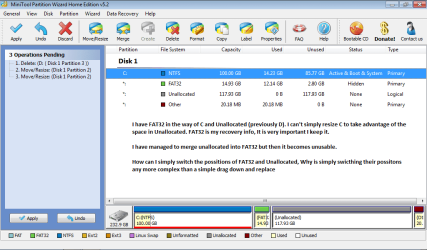
In here i have attached a picture with the exact issue I am encountering...maybe via visualization its easier to help me with it. In the pic i explain the problem.
 

Attachments

  • pic.png
    pic.png
    31.1 KB · Views: 88

My Computer My Computer

At a glance

Windows 7 StarterIntel Atom Dual core N5501GB DDR3Nvidia Ion2
Computer Manufacturer/Model Number
Asus
OS
Windows 7 Starter
CPU
Intel Atom Dual core N550
Memory
1GB DDR3
Graphics Card(s)
Nvidia Ion2
Have you failed at dragging FAT 32 to the right as mentioned by Phone Man??????
 

My Computer My Computer

At a glance

Windows 7 Home Premium SP1, 64-bitIntel Skylake i5-6600K, not overclocked8 GB HyperX DDR4-2666 (2 x 4 GB)none; graphics are integrated on CPU
Computer type
PC/Desktop
Computer Manufacturer/Model Number
Ignatz Special; 4 speed manual gearbox; factory air conditioning; one of one
OS
Windows 7 Home Premium SP1, 64-bit
CPU
Intel Skylake i5-6600K, not overclocked
Motherboard
AsRock Z170M Extreme 4, micro ATX
Memory
8 GB HyperX DDR4-2666 (2 x 4 GB)
Graphics Card(s)
none; graphics are integrated on CPU
Sound Card
onboard: Realtek ALC1150; external: USB Behringer UF0-202
Monitor(s) Displays
Dell S2340M 23 inch IPS
Screen Resolution
1600 x 900
Hard Drives
System: Crucial MX100 series SSD, 128 GB;
Data: Samsung Spinpoint 103SJ, 1 TB;
Backup: WD Caviar Green WD30EZRX-00D8PB0, 3 TB
PSU
Rosewill SilentNight 500 watt fanless, semi-modular
Case
Antec Solo II
Cooling
Noctua NH-U12S; Noctua F12 intake, Noctua S12A exhaust
Keyboard
Microsoft 200 6JH-00001 USB
Mouse
Dell or Microsoft optical wired; USB
Antivirus
Microsoft Security Essentials and Malwarebytes Premium
Browser
Pale Moon
Other Info
All fans PWM; speeds at idle: CPU circa 500 rpm; intake circa 600 rpm; exhaust circa 600 rpm; CPU temps 27 idle and 47 C load in a warm room (27 C/81 F) when running Intel Extreme Tuning Utility stress test.
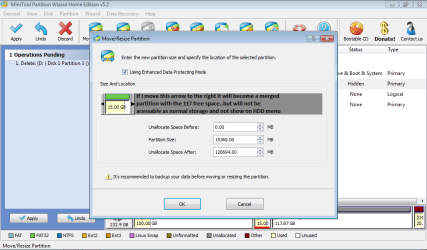
This is what happens when I do that


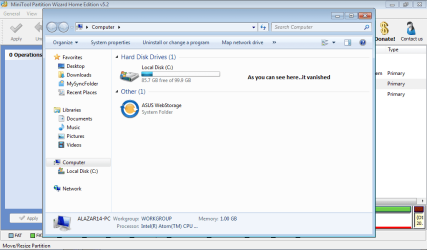
As you can see....there is no usable space there when I merged them together even though the invisible HDD is now 137 or so GB...
 

Attachments

  • Untitled22.png
    Untitled22.png
    29.7 KB · Views: 54
  • Untitled444.png
    Untitled444.png
    29.2 KB · Views: 28

My Computer My Computer

At a glance

Windows 7 StarterIntel Atom Dual core N5501GB DDR3Nvidia Ion2
Computer Manufacturer/Model Number
Asus
OS
Windows 7 Starter
CPU
Intel Atom Dual core N550
Memory
1GB DDR3
Graphics Card(s)
Nvidia Ion2
Regarding the left hand picture, 2 questions:

1 Where is your C drive in that picture?

2: is the grey space you typed into now all "unallocated space"?

Answer those 2 questions and go to Windows Disk Management and take a current snapshot of your disks, after you are temporarily done with Partition Wizard. Post those pictures.
 

My Computer My Computer

At a glance

Windows 7 Home Premium SP1, 64-bitIntel Skylake i5-6600K, not overclocked8 GB HyperX DDR4-2666 (2 x 4 GB)none; graphics are integrated on CPU
Computer type
PC/Desktop
Computer Manufacturer/Model Number
Ignatz Special; 4 speed manual gearbox; factory air conditioning; one of one
OS
Windows 7 Home Premium SP1, 64-bit
CPU
Intel Skylake i5-6600K, not overclocked
Motherboard
AsRock Z170M Extreme 4, micro ATX
Memory
8 GB HyperX DDR4-2666 (2 x 4 GB)
Graphics Card(s)
none; graphics are integrated on CPU
Sound Card
onboard: Realtek ALC1150; external: USB Behringer UF0-202
Monitor(s) Displays
Dell S2340M 23 inch IPS
Screen Resolution
1600 x 900
Hard Drives
System: Crucial MX100 series SSD, 128 GB;
Data: Samsung Spinpoint 103SJ, 1 TB;
Backup: WD Caviar Green WD30EZRX-00D8PB0, 3 TB
PSU
Rosewill SilentNight 500 watt fanless, semi-modular
Case
Antec Solo II
Cooling
Noctua NH-U12S; Noctua F12 intake, Noctua S12A exhaust
Keyboard
Microsoft 200 6JH-00001 USB
Mouse
Dell or Microsoft optical wired; USB
Antivirus
Microsoft Security Essentials and Malwarebytes Premium
Browser
Pale Moon
Other Info
All fans PWM; speeds at idle: CPU circa 500 rpm; intake circa 600 rpm; exhaust circa 600 rpm; CPU temps 27 idle and 47 C load in a warm room (27 C/81 F) when running Intel Extreme Tuning Utility stress test.
NEVERMIND I GOT IT WOOOT! Resize to the right like you said...then move the small partition again to the right and it puts the large free space freely bellow C drive THANKS SO MUCH FOR ALL YOUR HELP! you guys rock
 

My Computer My Computer

At a glance

Windows 7 StarterIntel Atom Dual core N5501GB DDR3Nvidia Ion2
Computer Manufacturer/Model Number
Asus
OS
Windows 7 Starter
CPU
Intel Atom Dual core N550
Memory
1GB DDR3
Graphics Card(s)
Nvidia Ion2
Go to the Partition Wizard and under tutorials look at copy a partition. This may let you make a new fat32 partition to the far right and then copy the existing fat32 to it. Then you can delete the old fat32. Do you have a way to backup your hard drive to an external drive before you do this.
Macrium Reflect FREE Edition - Information and download is a good image program. You can create a rescue disk from this program and then if things go south you can restore the disk to original.

I need to get some sleep but will check back tomorrow.

Jim :geek:
 

My Computer My Computer

At a glance

Windows 8.1 Pro w/Media Center 64bit, Windows...Phenom II X6 1100TCrucial Balistic 8gb DDR3-1866 CL9MSI R6850 Cyclone IGD5 PE
Computer type
PC/Desktop
Computer Manufacturer/Model Number
Home Built
OS
Windows 8.1 Pro w/Media Center 64bit, Windows 7 HP 64bit
CPU
Phenom II X6 1100T
Motherboard
ASUS M5A99X EVO
Memory
Crucial Balistic 8gb DDR3-1866 CL9
Graphics Card(s)
MSI R6850 Cyclone IGD5 PE
Sound Card
On Board
Monitor(s) Displays
ASUS VE258Q 25" LED with DVI-HDMI-DisplayPort
Screen Resolution
1920 x 1080
Hard Drives
Two WD Cavier Black 2TB Sata III, WD My Book Essential 2TB USB 3.0
PSU
Seasonic X650 80 Plus GOLD Modular
Case
Corsair 400R
Cooling
Antec Kuhler H2O 620, Two 120mm and four 140mm
Keyboard
Logitech K120
Mouse
Logitech Marble Mouse USB, Logitech Precision Game Pad
Internet Speed
15MB
Antivirus
Norton IS 2013, Malwarebytes Pro Beta 2
Browser
IE-11, FF-27
Other Info
APC UPS ES 750, Netgear WNR3500L Gigabit & Wireless N Router with SamKnows Test Program, Motorola SB6120 Gigabit Cable Modem. Brother HL-2170W Laser Printer, Epson V300 Scanner
Playing around with your recovery partition like this with no other backup is/was very risky. If you can still do a factory recovery in the future you'll be lucky.
I have some experience here and doing a large partition (your 15GB) copy/move with the installed partition wizard is risky. I hope it works out for you.
 

My Computer My Computer

At a glance

Windows 7x64 Home Premium SP1Intel i7 2600kG.Skill Ripjaws (DDR3-1600) 2x4GBNvidia GeForce GTS 450; Intel HD Graphics 300...
Computer type
PC/Desktop
Computer Manufacturer/Model Number
Own build
OS
Windows 7x64 Home Premium SP1
CPU
Intel i7 2600k
Motherboard
ASUS P8Z68 Deluxe
Memory
G.Skill Ripjaws (DDR3-1600) 2x4GB
Graphics Card(s)
Nvidia GeForce GTS 450; Intel HD Graphics 3000(GT2+)
Monitor(s) Displays
Dell Ultrasharp IPS panel U2311H, Samsung SyncMaster P2350
Screen Resolution
1920x1080
Hard Drives
Samsung 850 Pro SSD 256GB, Samsung SSD 840 120GB, Seagates 1TB Barracuda ST31000528AS x2
PSU
Seasonic M12II 520W
Case
Lian Li Lancool PC-K60
Cooling
Case: 1x120mm, 3x140mm CPU: Hyper 212+
Keyboard
Logitech MK520 (wireless)
Mouse
Logitech MK520
Internet Speed
6-7 Mbps
Antivirus
Norton Security Premium, Malwarebytes on 2 (MSE on 3rd PC)
Browser
FireFox
Other Info
Audio: Logitech Z523 2.1
Glad you got it working.

Jim :geek:
 

My Computer My Computer

At a glance

Windows 8.1 Pro w/Media Center 64bit, Windows...Phenom II X6 1100TCrucial Balistic 8gb DDR3-1866 CL9MSI R6850 Cyclone IGD5 PE
Computer type
PC/Desktop
Computer Manufacturer/Model Number
Home Built
OS
Windows 8.1 Pro w/Media Center 64bit, Windows 7 HP 64bit
CPU
Phenom II X6 1100T
Motherboard
ASUS M5A99X EVO
Memory
Crucial Balistic 8gb DDR3-1866 CL9
Graphics Card(s)
MSI R6850 Cyclone IGD5 PE
Sound Card
On Board
Monitor(s) Displays
ASUS VE258Q 25" LED with DVI-HDMI-DisplayPort
Screen Resolution
1920 x 1080
Hard Drives
Two WD Cavier Black 2TB Sata III, WD My Book Essential 2TB USB 3.0
PSU
Seasonic X650 80 Plus GOLD Modular
Case
Corsair 400R
Cooling
Antec Kuhler H2O 620, Two 120mm and four 140mm
Keyboard
Logitech K120
Mouse
Logitech Marble Mouse USB, Logitech Precision Game Pad
Internet Speed
15MB
Antivirus
Norton IS 2013, Malwarebytes Pro Beta 2
Browser
IE-11, FF-27
Other Info
APC UPS ES 750, Netgear WNR3500L Gigabit & Wireless N Router with SamKnows Test Program, Motorola SB6120 Gigabit Cable Modem. Brother HL-2170W Laser Printer, Epson V300 Scanner
As Michael warns, Factory Recovery may lose its link to run from Windows and boot from Recovery key at startup. I would test each to see if Recovery will cue up to run.

Hopefully you made your Recovery disks. You can always order new ones from Tech Support, or reinstall using a clean copy OS DVD with Product Key on COA sticker.

You needed to rightclick the FAT partition to Resize, then left click hold on the partition to drag it intact to the right. Then rightclick Win7 to Resize dragging the right arrow to the right to take up the Unallocated Space.
 
Back
Top