I am trying to stream media to my new WD live media player. When I hit the "turn on media streaming" button in Windows Media Player it will not turn on. When I go to services and change the setting on "Windows media player network sharing service" to automatic then start it does not start and I get an error code "error 3: the system can't find the path specified. I noticed in properties for that service "path to executable" no path is listed. Can anyone help?
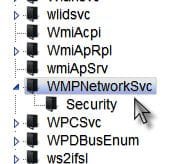
OK, then when you navigate to WMPNetworkSvc as per above
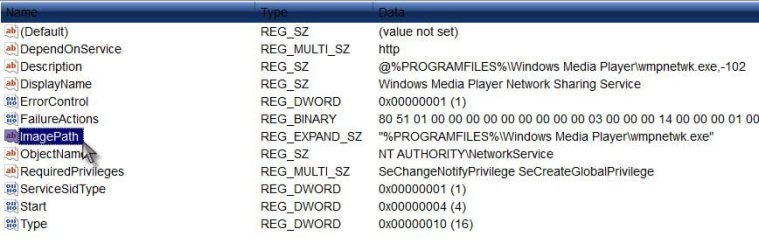
On the right pane, right click and choose New> Expandable string value> Name it ImagePath> When you have a new string called ImagePath, now right click it and choose Modify
In the value data field copy and paste
"%PROGRAMFILES%\Windows Media Player\wmpnetwk.exe"
Click OK
Confirm you have the correct entry as in my system screen shot, now open services.msc and see if the path now shows. Try to start the service.
A Guy
My Computer
At a glance
Windows 10 Home x64INTEL Core i5-750 Quad-Core 3.37GHzHyperX Fury Black Series 8GB (2 x 4GB) 1866MhzEVGA GeForce GTX 750 Superclocked 1GB 128-Bit...
Once again I want to thank you for your help. I have made the changes and I am now able to stream to my tv. I thought I was looking at a re-install of Windows. You saved me a lot of time. Thanks again.
What I'd like to know is how on earth that registry string was changed from the working default setting in the first place? Streaming works perfectly for me by default without having to change anything.
My Computer
At a glance
Windows 7 Ult, Windows 8.1 Pro,Q9650-4.275GHz, E8600 4.5GHz, E6750-3.8GHzG.Skill PC2 9600 1200Mhz 5 5 5 15 2TGTX480
My pleasure Like chev65 said, a mystery how the whole path disappeared. I hope you weren't using "tweaks" or a registry cleaner other then CCleaner's. I'm glad you got it working. Let's hope that's all that was wrong. A Guy
My Computer
At a glance
Windows 10 Home x64INTEL Core i5-750 Quad-Core 3.37GHzHyperX Fury Black Series 8GB (2 x 4GB) 1866MhzEVGA GeForce GTX 750 Superclocked 1GB 128-Bit...
This computer came from Dell and there have been a number of problems from the start. I don't think their install was done properly. The backup and restore does not function properly either. This is my wife's computer and I have been able to save her important files on a separate partition. I have not done any tweaking on her computer and the only cleaner I use is CCleaner. I figure at some point over the winter when I have a lot of time on my hands I will re-install Windows. Thanks again for your help.
Jim Noads
Hi I am new to this forum and been having this problem for a while now. I am wanting to stream from my PC to my PS3 I have tried hundreds of times to turn on media streaming in network and sharing center but every time I press the turn on media streaming button the little circle will pop up as if it is going to turn on the button grey's out for a second or two and doesn't change it will not turn on no matter what I try.
I searched around a bit and seen a potential fix by going into computer management and trying to start the windows media player streaming service but whenever I try to start the service I get this message.
"The Windows Media Network Sharing Service on Local Computer started and then stopped. Some services stop automatically if they are not in use by other services or programs"
I would appreciate any help with this issue. I have tried everything to get this to work and nothing has changed. It worked like a charm before I formatted my desktop a few months back and did a clean install of windows and now all of a sudden it won't work at all.
My Computer
At a glance
Windows 7 Ultimate x64AMD Phenom II X4 965 BE (Deneb) 3.40GHz4 GB DDR3NVIDIA GeForce 9800 GT




 Like chev65 said, a mystery how the whole path disappeared. I hope you weren't using "tweaks" or a registry cleaner other then CCleaner's. I'm glad you got it working. Let's hope that's all that was wrong. A Guy

