Solved I can't uninstall that program

Franky

New member
Member
VIP
Local time
4:47 AM
Messages
472
Location
Kurdistan
Hi all,

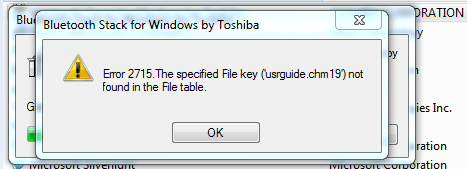
I have a USB bluetooth hardware device that I would use it before without problem. When I would put it into the USB port , the machine would install it's program automatically and I could use it easily. This time that I reinstalled Windows 7 I used the Driverpack for installing drivers. That pack installed a program named "Bluetooth Stack for Windows by Toshiba" for that USB hardware device. And now neither I can use the bluetooth nor I can uninstall that program. Now I want to remove it but I get error (image 2)!!
Any solution?
 

Attachments

  • 1.PNG
    1.PNG
    3.6 KB · Views: 32
  • 2.PNG
    2.PNG
    38.7 KB · Views: 31

My Computer

Computer type
PC/Desktop
OS
windows 7 32-bit
CPU
Intel(R) Core(TM) i3-2120 CPU @ 3.30GHz
Motherboard
Gigabyte Technology Co., Ltd. P61A-D3
Memory
4.00 GB
Graphics Card(s)
NVIDIA GeForce GTS 450
Sound Card
(1) NVIDIA High Definition Audio (2) NVIDIA Virtual Audio
Monitor(s) Displays
Samsung
Hard Drives
ST500DM002-1BC142 ATA Device
Internet Speed
1 Mbps
Antivirus
KIS 2013
Browser
chrome
Do a system restore to a date before you installed the driver pack.

FYI, there is no need to use a driver program with Windows 7 ;)
 

My Computer

Computer type
PC/Desktop
Computer Manufacturer/Model Number
Skylake Special #666
OS
Windows 10 Pro x64
CPU
Intel Core i7 6700K
Motherboard
Asus Sabertooth Z170 Mark 1
Memory
GSkill TridentZ RGB 16GB 3600 16-16-16-36
Graphics Card(s)
EVGA GTX 980 Ti SC x2
Sound Card
Realtek High Definition
Monitor(s) Displays
AOC G2460PG
Screen Resolution
1920 x 1080 144Hz
Hard Drives
Samsung 860 Pro 256GB, Seagate Barracuda 4TB x2
PSU
EVGA 1000 P2, EVGA White Custom Braided Cables
Case
Corsair Vengeance C70 Gunmetal Black
Cooling
Corsair H100i v2, Corsair ML120 x2, Thermal Grizzly Kryonaut
Keyboard
Logitech G910 Orion Spectrum
Mouse
Logitech G700s
Internet Speed
Verizon Fios Quantum Gateway 75/75
Antivirus
Windows Defender, Malwarebytes Free 3.8.3
Browser
Chrome
Other Info
Corsair SP120 x4, LG Blu-ray Drive, Durabrand HT-395 100 Watt Dolby Digital Amp, Corsair H2100 Wireless 7.1 Headset
It's impossible to do a system restore because I installed numerous apps after that installing. And further more, after installing Windows (say 7) I should somehow install the drivers, not? What I need now is a program that uninstall that app I think.
 

My Computer

Computer type
PC/Desktop
OS
windows 7 32-bit
CPU
Intel(R) Core(TM) i3-2120 CPU @ 3.30GHz
Motherboard
Gigabyte Technology Co., Ltd. P61A-D3
Memory
4.00 GB
Graphics Card(s)
NVIDIA GeForce GTS 450
Sound Card
(1) NVIDIA High Definition Audio (2) NVIDIA Virtual Audio
Monitor(s) Displays
Samsung
Hard Drives
ST500DM002-1BC142 ATA Device
Internet Speed
1 Mbps
Antivirus
KIS 2013
Browser
chrome
If the Blue Tooth device is an add on piece of hardware the Toshiba driver pack won't install it. You would need to install it from the provided disk or go online and find the driver, install it, then try uninstalling it.

Well, wait a minute, are you working on the machine in your specs? If so, throw away the "Driver pack for Windows" what is that?
 

My Computer

Computer type
PC/Desktop
Computer Manufacturer/Model Number
Home Built Desktop By DataTech
OS
Windows 7 Ultimate X64 SP1
CPU
Intel i5-2550K, Differing ~4.4-4.8GHz No built in GPU
Motherboard
ASUS P8Z68-V PRO/GEN3
Memory
16GB G.Skill Sniper 1866MHz @ 2133MHz 2x8GB
Graphics Card(s)
ASUS GTX650TIB-DC2OC-2GD5, (650TI Boost)
Sound Card
Onboard Realtek 5-1
Monitor(s) Displays
Samsung P2570HD
Screen Resolution
1920x1080
Hard Drives
Samsung 840 Pro 256GB SSD for OS, 500GB Seagate Constellation (Enterprise drive) for Data
PSU
Corsair HX650W
Case
Inwin Dragon Rider
Cooling
Hyper 212 EVO w/two Noctua fans, push-pull, @1300 RPM
Keyboard
E-Z Eyes, bright yellow keys with large characters
Mouse
steelseries SENSEI Laser Pro Gaming
Internet Speed
48-51Mbs Mbs down, 11 Mbs up Xfinity Cable
Antivirus
Norton Internet Security 2013
Browser
IE 10, Opera, Pale Moon if needed
Other Info
4 case fans, LG BluRay-RE, ASUS DVD-RW, Mr. Fusion power supply, 1.21 gigawatts.
The blue Tooth device is a hardware snip without any name to finding it's driver on the Web and also when putting it into the USB port (for first time), the machine (each machine) itself installs its driver automatically and easily but this time I used that pack for installing its driver which was a mistake!
I also tried to install it again from that pack and then uninstall it but each time I faced that error. I also tried to use the Cleaner tool for uninstalling but same outcome.
Driverpack is a tool which recognizes all drivers of Windows hardware (Audio, Video card, chipset and etc) and easily offers driver for each one. there isn't need to surf the Web for finding the drivers when existing driverpack.
 

My Computer

Computer type
PC/Desktop
OS
windows 7 32-bit
CPU
Intel(R) Core(TM) i3-2120 CPU @ 3.30GHz
Motherboard
Gigabyte Technology Co., Ltd. P61A-D3
Memory
4.00 GB
Graphics Card(s)
NVIDIA GeForce GTS 450
Sound Card
(1) NVIDIA High Definition Audio (2) NVIDIA Virtual Audio
Monitor(s) Displays
Samsung
Hard Drives
ST500DM002-1BC142 ATA Device
Internet Speed
1 Mbps
Antivirus
KIS 2013
Browser
chrome
As AddRAM said, there's really no need for any kind of driver pack. I suspect that has caused the problem.

Please download AdwCleaner:
http://general-changelog-team.fr/fr/downloads/finish/20-outils-de-xplode/2-adwcleaner
Save to the desktop.

Close all open programs.
To run the program, right-click AdwCleaner.exe and select: Run as Administrator

Click on Search and confirm the prompt.
After the program finishes, a text file report opens.
Please post the content of the C:\AdwCleaner[Rx].txt in your reply. In the reply window click the "#" icon at the top and paste the log text between the [code ] Paste Here [ /code] tags.

Do NOT perform the delete part before I or someone else can read the log.


To delete:

Run AdwCleaner once again.
This time click on: Delete
When done, please post the content of the C:\AdwCleaner[Sx].txt in your reply as outlined above..
 

My Computer

Computer type
PC/Desktop
Computer Manufacturer/Model Number
Home Built Desktop By DataTech
OS
Windows 7 Ultimate X64 SP1
CPU
Intel i5-2550K, Differing ~4.4-4.8GHz No built in GPU
Motherboard
ASUS P8Z68-V PRO/GEN3
Memory
16GB G.Skill Sniper 1866MHz @ 2133MHz 2x8GB
Graphics Card(s)
ASUS GTX650TIB-DC2OC-2GD5, (650TI Boost)
Sound Card
Onboard Realtek 5-1
Monitor(s) Displays
Samsung P2570HD
Screen Resolution
1920x1080
Hard Drives
Samsung 840 Pro 256GB SSD for OS, 500GB Seagate Constellation (Enterprise drive) for Data
PSU
Corsair HX650W
Case
Inwin Dragon Rider
Cooling
Hyper 212 EVO w/two Noctua fans, push-pull, @1300 RPM
Keyboard
E-Z Eyes, bright yellow keys with large characters
Mouse
steelseries SENSEI Laser Pro Gaming
Internet Speed
48-51Mbs Mbs down, 11 Mbs up Xfinity Cable
Antivirus
Norton Internet Security 2013
Browser
IE 10, Opera, Pale Moon if needed
Other Info
4 case fans, LG BluRay-RE, ASUS DVD-RW, Mr. Fusion power supply, 1.21 gigawatts.
I clicked on Run as administrator. There wasn't any search so I just confirmed the user Account control prompt. Then I clicked on scan button. It didn't show anything except for my Babylon app in folder column. The text file is as follows:

Code:
# AdwCleaner v3.023 - Report created 05/04/2014 at 17:40:42
# Updated 01/04/2014 by Xplode
# Operating System : Windows 7 Ultimate Service Pack 1 (32 bits)
# Username : CS - CS-PC
# Running from : C:\Users\CS\Desktop\adwcleaner.exe
# Option : Scan

***** [ Services ] *****


***** [ Files / Folders ] *****

Folder Found C:\Program Files\Babylon
Folder Found C:\ProgramData\Babylon
Folder Found C:\Users\CS\AppData\Local\Babylon
Folder Found C:\Users\CS\AppData\Local\Temp\Babylon
Folder Found C:\Users\CS\AppData\Roaming\Babylon

***** [ Shortcuts ] *****


***** [ Registry ] *****

Key Found : HKCU\Software\Babylon
Key Found : HKCU\Software\Microsoft\Office\Powerpoint\Addins\babylonofficeaddin.officeaddin
Key Found : HKCU\Software\Microsoft\Office\Word\Addins\babylonofficeaddin.officeaddin
Key Found : HKLM\Software\Babylon
Key Found : HKLM\SOFTWARE\Classes\.bdc
Key Found : HKLM\SOFTWARE\Classes\.bgl
Key Found : HKLM\SOFTWARE\Classes\.bof
Key Found : HKLM\SOFTWARE\Classes\AppID\{B16632F1-24E0-4D99-A68D-70BFB6447C48}
Key Found : HKLM\SOFTWARE\Classes\AppID\BabylonIEPI.DLL
Key Found : HKLM\SOFTWARE\Classes\BabyDict
Key Found : HKLM\SOFTWARE\Classes\BabyGloss
Key Found : HKLM\SOFTWARE\Classes\BabylonOfficeAddin.OfficeAddin
Key Found : HKLM\SOFTWARE\Classes\BabylonOfficeAddin.OfficeAddin.1
Key Found : HKLM\SOFTWARE\Classes\BabyOptFile
Key Found : HKLM\SOFTWARE\Classes\CLSID\{6AC0BB10-C922-45E2-857D-2A368FE749E5}
Key Found : HKLM\SOFTWARE\Classes\Interface\{B7EA2226-F876-4BE4-B478-76EBAE2A668A}
Key Found : HKLM\SOFTWARE\Classes\Prod.cap
Key Found : HKLM\SOFTWARE\Classes\TypeLib\{A1489C85-4F6F-48C4-AC9E-18B63AF4703E}
Key Found : HKLM\SOFTWARE\Classes\TypeLib\{F310F027-15CB-4A7F-B10D-3A4AFB5013A5}
Key Found : HKLM\SOFTWARE\Microsoft\Shared Tools\MSConfig\startupreg\Babylon Client
Key Found : HKLM\SOFTWARE\Microsoft\Tracing\Babylon_RASAPI32
Key Found : HKLM\SOFTWARE\Microsoft\Windows\CurrentVersion\App Paths\Babylon.exe
Key Found : HKLM\SOFTWARE\Microsoft\Windows\CurrentVersion\Uninstall\Babylon

***** [ Browsers ] *****

-\\ Internet Explorer v11.0.9600.16428


-\\ Mozilla Firefox v25.0.1 (en-US)

[ File : C:\Users\CS\AppData\Roaming\Mozilla\Firefox\Profiles\58oukfr1.default\prefs.js ]


-\\ Google Chrome v33.0.1750.154

[ File : C:\Users\CS\AppData\Local\Google\Chrome\User Data\Default\preferences ]


*************************

AdwCleaner[R5].txt - [2424 octets] - [05/04/2014 17:40:42]

########## EOF - C:\AdwCleaner\AdwCleaner[R5].txt - [2484 octets] ##########
Can I perform the delete part now?
 

My Computer

Computer type
PC/Desktop
OS
windows 7 32-bit
CPU
Intel(R) Core(TM) i3-2120 CPU @ 3.30GHz
Motherboard
Gigabyte Technology Co., Ltd. P61A-D3
Memory
4.00 GB
Graphics Card(s)
NVIDIA GeForce GTS 450
Sound Card
(1) NVIDIA High Definition Audio (2) NVIDIA Virtual Audio
Monitor(s) Displays
Samsung
Hard Drives
ST500DM002-1BC142 ATA Device
Internet Speed
1 Mbps
Antivirus
KIS 2013
Browser
chrome
Yes Run the delete part. It will remove Babylon though, it is a known trouble maker and can bring in others as well. It's not needed and could be causing your issues.
 

My Computer

Computer type
PC/Desktop
Computer Manufacturer/Model Number
Home Built Desktop By DataTech
OS
Windows 7 Ultimate X64 SP1
CPU
Intel i5-2550K, Differing ~4.4-4.8GHz No built in GPU
Motherboard
ASUS P8Z68-V PRO/GEN3
Memory
16GB G.Skill Sniper 1866MHz @ 2133MHz 2x8GB
Graphics Card(s)
ASUS GTX650TIB-DC2OC-2GD5, (650TI Boost)
Sound Card
Onboard Realtek 5-1
Monitor(s) Displays
Samsung P2570HD
Screen Resolution
1920x1080
Hard Drives
Samsung 840 Pro 256GB SSD for OS, 500GB Seagate Constellation (Enterprise drive) for Data
PSU
Corsair HX650W
Case
Inwin Dragon Rider
Cooling
Hyper 212 EVO w/two Noctua fans, push-pull, @1300 RPM
Keyboard
E-Z Eyes, bright yellow keys with large characters
Mouse
steelseries SENSEI Laser Pro Gaming
Internet Speed
48-51Mbs Mbs down, 11 Mbs up Xfinity Cable
Antivirus
Norton Internet Security 2013
Browser
IE 10, Opera, Pale Moon if needed
Other Info
4 case fans, LG BluRay-RE, ASUS DVD-RW, Mr. Fusion power supply, 1.21 gigawatts.
Britton30: It just doubled my problem:mad:! I SAID I WANT TO DELETE THE BLUE TOOTH NOT THE BABYLON.
Now I should waste more than one hour to returning the situation to before and the blue tooth program still exists! I don't know I write in English or Chinese
 

My Computer

Computer type
PC/Desktop
OS
windows 7 32-bit
CPU
Intel(R) Core(TM) i3-2120 CPU @ 3.30GHz
Motherboard
Gigabyte Technology Co., Ltd. P61A-D3
Memory
4.00 GB
Graphics Card(s)
NVIDIA GeForce GTS 450
Sound Card
(1) NVIDIA High Definition Audio (2) NVIDIA Virtual Audio
Monitor(s) Displays
Samsung
Hard Drives
ST500DM002-1BC142 ATA Device
Internet Speed
1 Mbps
Antivirus
KIS 2013
Browser
chrome
Fine, you will have problems as long as you keep Babylon, did you no understand that?
Someone else may have help for you. :shock:
 

My Computer

Computer type
PC/Desktop
Computer Manufacturer/Model Number
Home Built Desktop By DataTech
OS
Windows 7 Ultimate X64 SP1
CPU
Intel i5-2550K, Differing ~4.4-4.8GHz No built in GPU
Motherboard
ASUS P8Z68-V PRO/GEN3
Memory
16GB G.Skill Sniper 1866MHz @ 2133MHz 2x8GB
Graphics Card(s)
ASUS GTX650TIB-DC2OC-2GD5, (650TI Boost)
Sound Card
Onboard Realtek 5-1
Monitor(s) Displays
Samsung P2570HD
Screen Resolution
1920x1080
Hard Drives
Samsung 840 Pro 256GB SSD for OS, 500GB Seagate Constellation (Enterprise drive) for Data
PSU
Corsair HX650W
Case
Inwin Dragon Rider
Cooling
Hyper 212 EVO w/two Noctua fans, push-pull, @1300 RPM
Keyboard
E-Z Eyes, bright yellow keys with large characters
Mouse
steelseries SENSEI Laser Pro Gaming
Internet Speed
48-51Mbs Mbs down, 11 Mbs up Xfinity Cable
Antivirus
Norton Internet Security 2013
Browser
IE 10, Opera, Pale Moon if needed
Other Info
4 case fans, LG BluRay-RE, ASUS DVD-RW, Mr. Fusion power supply, 1.21 gigawatts.
The blue Tooth device is a hardware snip without any name to finding it's driver on the Web and also when putting it into the USB port (for first time), the machine (each machine) itself installs its driver automatically and easily but this time I used that pack for installing its driver which was a mistake!
I also tried to install it again from that pack and then uninstall it but each time I faced that error. I also tried to use the Cleaner tool for uninstalling but same outcome.
Driverpack is a tool which recognizes all drivers of Windows hardware (Audio, Video card, chipset and etc) and easily offers driver for each one. there isn't need to surf the Web for finding the drivers when existing driverpack.

You're right, it was a mistake. You are not the first or the last to have problems with driver finder programs, which is why they are not recommended.

Just bite the bullet and do the system restore, there is this great place called SevenForums that can help you find the correct drivers.

I have no idea why you want to keep Babylon, the security forum is peppered with threads of those trying to get rid of it.
 

My Computer

Computer type
PC/Desktop
Computer Manufacturer/Model Number
Self Built
OS
Win 10 Pro x64
CPU
Intel I5-2500K @3.3GHz
Motherboard
Asrock P67 Extreme4
Memory
16GB G.Skill Ripjaws X (4x4GB)
Graphics Card(s)
EVGA GeForce 750 Ti SC 2GB
Sound Card
ASUS Xonar DG 5.1 Channels 24-bit 96KHz PCI Interface Sound
Monitor(s) Displays
auria eq2367
Screen Resolution
1920 x 1080
Hard Drives
250GB Samsung 850 EVO SSD
1TB WD Blue
1TB Hitachi
PSU
SeaSonic X 650W 80 Plus Gold
Case
Corsair Obsidian 750D
Cooling
Corsair H60, Three 140mm case fans
Keyboard
Logitech Wireless Keyboard K520
Mouse
Logitech Wireless Mouse M310
Internet Speed
Wave Broadband ~ 100 dn 5 up
Antivirus
Windows Defender, Malwarebytes Premium
Browser
Edge, IE11, Chrome
Other Info
Laptop specs: HP g7-1365dx /
CPU: AMD A6-3420M APU with Radeon(tm) HD Graphics /
RAM: Crucial 8Gb (2x4Gb) /
SSD: Crucial M4-CT128M4SSD2 ATA Device/ FW 000F /
GFX: AMD Radeon HD 6520G /
OS: Windows 10 Pro x64
Babylon is a dictionary tool which since I'm not perfect in English so I certainly need it. In addition, suppose I uninstall the babylon but the problem still exists! My purpose is to uninstalling the blue tooth program. And about the system restore dates, there are only three ones which all are after installing drivers!
There isn't any program to uninstall that app really!!!?
 

My Computer

Computer type
PC/Desktop
OS
windows 7 32-bit
CPU
Intel(R) Core(TM) i3-2120 CPU @ 3.30GHz
Motherboard
Gigabyte Technology Co., Ltd. P61A-D3
Memory
4.00 GB
Graphics Card(s)
NVIDIA GeForce GTS 450
Sound Card
(1) NVIDIA High Definition Audio (2) NVIDIA Virtual Audio
Monitor(s) Displays
Samsung
Hard Drives
ST500DM002-1BC142 ATA Device
Internet Speed
1 Mbps
Antivirus
KIS 2013
Browser
chrome
FYI, I used the "iobituninstaller" tool and it solved the problem. Thanks for your opinions.
 

My Computer

Computer type
PC/Desktop
OS
windows 7 32-bit
CPU
Intel(R) Core(TM) i3-2120 CPU @ 3.30GHz
Motherboard
Gigabyte Technology Co., Ltd. P61A-D3
Memory
4.00 GB
Graphics Card(s)
NVIDIA GeForce GTS 450
Sound Card
(1) NVIDIA High Definition Audio (2) NVIDIA Virtual Audio
Monitor(s) Displays
Samsung
Hard Drives
ST500DM002-1BC142 ATA Device
Internet Speed
1 Mbps
Antivirus
KIS 2013
Browser
chrome
Back
Top