I don't have the Catalyst thing

Ciara

English Rose
Local time
1:34 AM
Messages
3,628
Hi :), After looking at the box (its full of cables now) and taking the side of my PC case and getting on the floor so I can see the bottom or top :confused: I have found I have a ATI ASUS Radeon HD 4830 Video Card EAH4830, but I don't have the Catalyst thing (its not in programs so do I need it ?) appreciate any help on this :)
 

My Computer My Computer

Computer Manufacturer/Model Number
Home Built
OS
Windows 7 Professional 64-bit SP1
CPU
Intel E8400
Motherboard
MSI P35 Neo
Memory
4GB Crucial Ballistix
Graphics Card(s)
ATI ASUS Radeon HD 4830
Sound Card
Realtek ALC888 on Board
Monitor(s) Displays
Asus 22-inch VH226H Widescreen
Screen Resolution
1920 x 1080
Hard Drives
Two Western Digital 500GB
PSU
Hiper HPU-4M 530W
Case
Thermaltake Tsunami Dream Black
Cooling
Air/Fans
Keyboard
Saitek Eclipse
Mouse
Razer
Internet Speed
Sky Broadband
Other Info
USB Hub/Card Reader - 2 Pen Drives, 1 Phone Dock
Opinions will vary, but IMHO, unless you're doing multiple monitors, or 3D gaming, or SLI (Crossfire), or overclocking your video chipset, or messing around with the finer details of video settings, you don't really need the Catalyst suite and its drivers.

Back in the XP days, these drivers, and the suite, were a MUST if you wanted large screen resolutions and crisp text, but today, I have an "older" X1650 Radeon card, and I'm hard pressed to see any difference running the default Win7-installed drivers and Catalyst 10.2 (the most current available for my card).

However ... that said, others having more modern cards may have a very different opinion.
 

My Computer My Computer

Computer type
PC/Desktop
Computer Manufacturer/Model Number
Custom
OS
Win7 Pro 32-bit, Win8 Pro 32-bit
CPU
AMD Phenom II X6 1090T
Motherboard
Gigabyte
Memory
4GB ddr3 1300
Graphics Card(s)
AMD HD 4290 onboard
Sound Card
Builtin Realtek HD Audio
Monitor(s) Displays
Samsung 24" widescreen, LG 23" widescreen
Screen Resolution
1920x1200/1920x1080
Hard Drives
Kingston 256GB SSD
Keyboard
Logitech Illuminated Keyboard
Mouse
Logitech M705 wireless mouse
Antivirus
Norton Av 2013
Browser
IE v10
my opinion is that you don't need ccc at all.

it's awfully written and a pain to navigate - at least the last few versions that i tried were.

if you really need more control over your gfx card (which it doesn't seem like you do, Ciara) then there are much better alternatives such as ati tray tools (my personal fave for 4xxx series) or radeonpro
 

My Computer My Computer

Computer Manufacturer/Model Number
mickey megabyte 1234
OS
ultimate 64 sp1
CPU
i5 2500K [email protected]
Motherboard
MSI P67A-GD53
Memory
8 gigs GSkill Ripjaws 1600
Graphics Card(s)
amd hd6950
Sound Card
creative x-fi gamer
Monitor(s) Displays
samsung 24"
Screen Resolution
1920x1080
Hard Drives
ocz vertex 2e 60 gig, samsung f3 1tb, buffalo 2tb ext
PSU
antec 550
Case
antec three hundred
Cooling
i'm a cooling fan
Keyboard
saitek eclipse ii
Mouse
logitech g3
Internet Speed
about 4 Mbps
Other Info
i love win7
Hi Mark Phelps :) thank you for answering and I will go with your advice I don't do any gaming etc.

And thank you mickey megabyte I will stay with the Win7-installed drivers, thanks for your advice :)
 

My Computer My Computer

Computer Manufacturer/Model Number
Home Built
OS
Windows 7 Professional 64-bit SP1
CPU
Intel E8400
Motherboard
MSI P35 Neo
Memory
4GB Crucial Ballistix
Graphics Card(s)
ATI ASUS Radeon HD 4830
Sound Card
Realtek ALC888 on Board
Monitor(s) Displays
Asus 22-inch VH226H Widescreen
Screen Resolution
1920 x 1080
Hard Drives
Two Western Digital 500GB
PSU
Hiper HPU-4M 530W
Case
Thermaltake Tsunami Dream Black
Cooling
Air/Fans
Keyboard
Saitek Eclipse
Mouse
Razer
Internet Speed
Sky Broadband
Other Info
USB Hub/Card Reader - 2 Pen Drives, 1 Phone Dock
I like and use CCC personally, but I have many different settings/profiles for games.

It is also good for Video settings, if you're using HW acceleration.


But as already stated, you don't "need' it, the driver itself is all thats needed.

Its only useful if changing or having control of these settings is important to you, in which case it would be good to have.
 

My Computer My Computer

Computer Manufacturer/Model Number
Custom (Self Build)
OS
Windows 7 Home Premium 64bit
CPU
Intel Core i7 2700k
Motherboard
eVGA P67 SLI
Memory
8GB Mushkin Redline Ridgebacks @1866
Graphics Card(s)
EVGA GTX570 SC
Sound Card
XiFi Titanium HD
Monitor(s) Displays
LG W2453V
Screen Resolution
1920x1080
Hard Drives
Intel 320 80GB -- Intel X25-V 40GB --WD Black 1TB x2 -- WD Blue 640GB
PSU
Seasonic x750
Case
Corsair 600T SE White
Cooling
eVGA Superclocked CPU Cooler
Keyboard
Saitek Cyborg
Antivirus
Kaspersky
Browser
IE
Other Info
LG BD/DVD
wishmaster: what type of settings do you use for certain situations... i currently have just the driver installed because i didnt want to mess with the ccc. id be comfortable with adjusting settings to get better results.. just didnt really think it was worth the hassle. your opinion would be greatly appreciated.
 

My Computer My Computer

Computer type
PC/Desktop
Computer Manufacturer/Model Number
My First Build
OS
Windows 7 64-bit Home
CPU
Intel Core i7-870 Lynnfield 2.93 Ghz
Motherboard
Asus P7P55D-E Pro
Memory
8GB 4x2 A-Data 1333 Mhz
Graphics Card(s)
HIS Radeon HD 5850 1GB
Sound Card
Onboard
Monitor(s) Displays
Dell S2440L 24"
Screen Resolution
1080p
Hard Drives
120 GB Intel X25-M SATA Solid State Drive ///
1 TB Western Digital Caviar Black SATA 6gb/s 7200rpm Drive
PSU
Corsair 650TX 650 Watt
Case
Antec Three Hundred
Cooling
Stock Intel /// 4 Antec Case Fans /// NZXT Sentry-2
Keyboard
Logitech LX 710
Mouse
Logitech LX 710
Other Info
LG Blu-Ray Drive
Perhaps not everyone will find it useful, but I certainly do.

Adjusting Video properties for one, as I use HW acceleration for video playback.

In the AVIVO (Video) settings there are several settings you change.
Dynamic Contrast, Edge Sharpening, De-Noise, Color Vibrance, Flesh Tone Correction, as well as the standard settings for example.


For Games I have several profiles for certain games.
While many can just be set in game, I've found there are quite a few that benefit from forced settings.
(AF, AA and Vsync settings).
So with profiles, you can switch back and forth from forced settings to the default, app managed settings.

Also, if you OC, you have the ATI Overdrive.
Another good use of Profiles IMO.
1 Profile for default clocks, a second profile for OC settings.

I just find it easer for enabling/disbaling things when needed.


As far as games go, as an example, I have FEAR.
When I want to play, I right click the CCC and choose my Fear profile.
This forces x16AF and x8 AA Edge Detect with Vsyc+Tripple Buffering.

Then, as with any game, enable my GPU OC profile, which overclocks the GPU.

When done playing, I can simply go back to profile and set the default 3D settings, which sets all 3D settings back to App managed.
I then choose the Default Clock profile, which turns the Overclock back to standard settings.

Then again, perhaps I prefer this method just because Im used to it too. :)
 

My Computer My Computer

Computer Manufacturer/Model Number
Custom (Self Build)
OS
Windows 7 Home Premium 64bit
CPU
Intel Core i7 2700k
Motherboard
eVGA P67 SLI
Memory
8GB Mushkin Redline Ridgebacks @1866
Graphics Card(s)
EVGA GTX570 SC
Sound Card
XiFi Titanium HD
Monitor(s) Displays
LG W2453V
Screen Resolution
1920x1080
Hard Drives
Intel 320 80GB -- Intel X25-V 40GB --WD Black 1TB x2 -- WD Blue 640GB
PSU
Seasonic x750
Case
Corsair 600T SE White
Cooling
eVGA Superclocked CPU Cooler
Keyboard
Saitek Cyborg
Antivirus
Kaspersky
Browser
IE
Other Info
LG BD/DVD
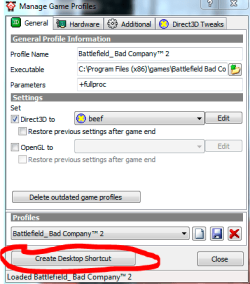
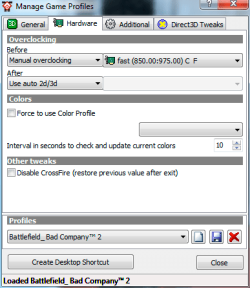
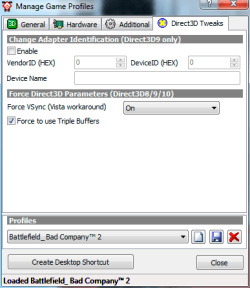
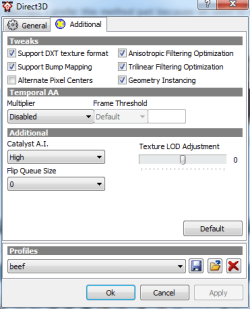
you can do similar profile things with ati tray tools.

it goes a bit further by allowing you to make shortcuts which will load your d3d profile, overclocking/fan control profile and the game with any parameters.

you'll see my 'beef' profile too.

finally there's the OSD feature, which allows you to display info onscreen in-game, such as fps, time, gpu temps, fan speed etc etc

...and a whole host of over/under-clocking, fan control, voltage tweaking stuf that i haven't shown screenshots for. it's great for 4xxx series cards and under, but not so good for the newer models i believe.

one thing it lacks though is the avivo features, which i've never explored. i've been happy watching hd playback without it.
 

Attachments

  • att1.png
    att1.png
    17.4 KB · Views: 2
  • att2.png
    att2.png
    14.7 KB · Views: 1
  • att3.png
    att3.png
    12.9 KB · Views: 1
  • att4.png
    att4.png
    13.3 KB · Views: 1
  • att5.PNG
    att5.PNG
    14.3 KB · Views: 1
  • att6.PNG
    att6.PNG
    12.8 KB · Views: 1

My Computer My Computer

Computer Manufacturer/Model Number
mickey megabyte 1234
OS
ultimate 64 sp1
CPU
i5 2500K [email protected]
Motherboard
MSI P67A-GD53
Memory
8 gigs GSkill Ripjaws 1600
Graphics Card(s)
amd hd6950
Sound Card
creative x-fi gamer
Monitor(s) Displays
samsung 24"
Screen Resolution
1920x1080
Hard Drives
ocz vertex 2e 60 gig, samsung f3 1tb, buffalo 2tb ext
PSU
antec 550
Case
antec three hundred
Cooling
i'm a cooling fan
Keyboard
saitek eclipse ii
Mouse
logitech g3
Internet Speed
about 4 Mbps
Other Info
i love win7
Thanks :) I have never really used ATI tools so that was good info for me.


With that info. , I think it would be safe to say:

Which one to use would likely just be user preference
And neither is actually needed for the card to perform its basic operations, only if you want more control.
 

My Computer My Computer

Computer Manufacturer/Model Number
Custom (Self Build)
OS
Windows 7 Home Premium 64bit
CPU
Intel Core i7 2700k
Motherboard
eVGA P67 SLI
Memory
8GB Mushkin Redline Ridgebacks @1866
Graphics Card(s)
EVGA GTX570 SC
Sound Card
XiFi Titanium HD
Monitor(s) Displays
LG W2453V
Screen Resolution
1920x1080
Hard Drives
Intel 320 80GB -- Intel X25-V 40GB --WD Black 1TB x2 -- WD Blue 640GB
PSU
Seasonic x750
Case
Corsair 600T SE White
Cooling
eVGA Superclocked CPU Cooler
Keyboard
Saitek Cyborg
Antivirus
Kaspersky
Browser
IE
Other Info
LG BD/DVD
yes - ati tray tools is best suited to the tweaking geeking gaming type. :geek:
 

My Computer My Computer

Computer Manufacturer/Model Number
mickey megabyte 1234
OS
ultimate 64 sp1
CPU
i5 2500K [email protected]
Motherboard
MSI P67A-GD53
Memory
8 gigs GSkill Ripjaws 1600
Graphics Card(s)
amd hd6950
Sound Card
creative x-fi gamer
Monitor(s) Displays
samsung 24"
Screen Resolution
1920x1080
Hard Drives
ocz vertex 2e 60 gig, samsung f3 1tb, buffalo 2tb ext
PSU
antec 550
Case
antec three hundred
Cooling
i'm a cooling fan
Keyboard
saitek eclipse ii
Mouse
logitech g3
Internet Speed
about 4 Mbps
Other Info
i love win7

My Computer My Computer

Computer type
PC/Desktop
Computer Manufacturer/Model Number
Me
OS
Win 7 Ultimate x64
CPU
FX-8350 @ 4.6 GHz so far
Motherboard
Asus M5A97 EVO
Memory
ADATA XPG V1 Series Black 8GB DDR3 1600
Graphics Card(s)
Sapphire R9 270x Dual-X
Sound Card
Xonar DGX w/ Corsair Vengence 1300
Monitor(s) Displays
Acer S232HL Abid
Screen Resolution
1920x1080
Hard Drives
120 GB OCZ Vertex 3
500 GB Seagate 7200.12
PSU
Antec Earthwatts 650W Green
Case
Antec Three Hundred
Cooling
Cooler Master 212 EVO
Keyboard
Logitech G510
Mouse
Logitech G500s
Internet Speed
35000/3000
thanks for that stormy - it's good to see that ccc has improved since i last took a look.
 

My Computer My Computer

Computer Manufacturer/Model Number
mickey megabyte 1234
OS
ultimate 64 sp1
CPU
i5 2500K [email protected]
Motherboard
MSI P67A-GD53
Memory
8 gigs GSkill Ripjaws 1600
Graphics Card(s)
amd hd6950
Sound Card
creative x-fi gamer
Monitor(s) Displays
samsung 24"
Screen Resolution
1920x1080
Hard Drives
ocz vertex 2e 60 gig, samsung f3 1tb, buffalo 2tb ext
PSU
antec 550
Case
antec three hundred
Cooling
i'm a cooling fan
Keyboard
saitek eclipse ii
Mouse
logitech g3
Internet Speed
about 4 Mbps
Other Info
i love win7
Back
Top