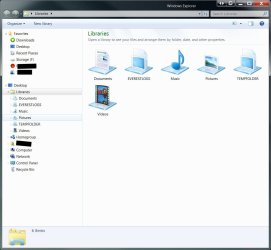
I hate the "Libraries" bring back "My Computer"

Status
Not open for further replies.

Mitsubishiman

New member
Local time
9:46 PM
Messages
9
I hate the "Libraries" bring back "My Computer"

Am I the only one whom dislikes the windows 7 windows explorer, I have ceased using the original "My" Folders years ago, all of my data is on NAS Servers, is there a replacement program that will allow me to customize file access more like XP My computer, All I want to do is access the data, I did not lose anything, I do not need to search for anything and I will organize my data the way I want to - not the way windows thinks I should

Also - I see colors quicker than I can read text - so in previous OS (XP) I would change the folders to icons, really weird that they retained the icons from the original info after I copied my icon folder to the C drive, however it appears as though i cannot change a folder to an icon in W7
 

My Computer

OS
windows 7
Win 7 Explorer

Me too,
I hate the win explorer forced on me in Win 7.
I hate the wishy-washy baby blue colour, the line spacing, the icons & yes the (can't delete) intrusive Libraries.
Does it not occur to MS that some of us depend upon Explorer & we want greater freedom & functionality?
Amazing to find myself saying the explorer layout in XP was superior, good work MS!
 

My Computer

OS
win 7
CPU
Intel Core i7-860 2.8GHz
Motherboard
Gigabyte GA-P55-UD3P P55 1156pin DDR3 MoBrd
Memory
4 Gb
Graphics Card(s)
Gigabyte PCI-E 1Gb 9600GT
Sound Card
On board
Monitor(s) Displays
17" LG Flatron L1730S
Hard Drives
Seagate 1 Tb x 2
PSU
460 watts
Case
Coolmaster Centurion 05
Cooling
120mm + 80mm fans
Me too,
I hate the win explorer forced on me in Win 7.
I hate the wishy-washy baby blue colour, the line spacing, the icons & yes the (can't delete) intrusive Libraries.
Does it not occur to MS that some of us depend upon Explorer & we want greater freedom & functionality?
Amazing to find myself saying the explorer layout in XP was superior, good work MS!

Hello Peter,

If you really want Libraries gone, then you can use the tutorials below to do so.

http://www.sevenforums.com/tutorials/35627-libraries-folder-add-remove-navigation-pane.html

and

http://www.sevenforums.com/tutorials/938-libraries-desktop-icon-add-remove.html


However, if you truly want "greater freedom & functionality", then you might consider trying them out for a bit first. Libraries let you access and arrange items from one or more folders quickly without moving them from their original location. Libraries themselves don't store your files or folders. Instead, they point to different folders on your hard disk, or on an external drive attached to your computer. This gives you easy access to a category of files no matter where they are stored. For instance, if you have music files on your hard disk and on an external drive, you can access all of your music files from the Music library.

Hope this helps,
Shawn
 

My Computer

Computer type
PC/Desktop
Computer Manufacturer/Model Number
Self built custom
OS
64-bit Windows 11 Pro for Workstations
CPU
Intel i7-8700K OC'd to 5 GHz
Motherboard
ASUS ROG Maximus XI Formula Z390
Memory
64 GB (4x16GB) G.SKILL TridentZ RGB DDR4 3600 MHz
Graphics Card(s)
ASUS ROG-STRIX-GTX1080TI-O11G-GAMING
Sound Card
Integrated
Monitor(s) Displays
2 x Samsung Odyssey G7 27"
Screen Resolution
2560x1440
Hard Drives
1TB Samsung 990 PRO M.2,
4TB Samsung 990 PRO PRO M.2,
TerraMaster F8 SSD Plus NAS
PSU
Seasonic Prime Titanium 850W
Case
Thermaltake Core P3
Cooling
Corsair Hydro H115i
Keyboard
Logitech wireless K800
Mouse
Logitech MX Master 4
Internet Speed
2 Gb/s Download and 100 Mb/s Upload
Antivirus
Malwarebyte Anti-Malware Premium
Browser
Google Chrome
Other Info
Logitech Z625 speaker system,
Logitech BRIO 4K Pro webcam,
HP Color LaserJet Pro MFP M477fdn,
APC SMART-UPS RT 1000 XL - SURT1000XLI,
Galaxy S23 Plus phone
You still have essentially the same interface available as before by selecting Computer from the right side of the Start Menu...if you have it enabled in the Start Menu's Properties.
 

My Computer

Computer Manufacturer/Model Number
DIY
OS
W7x64 Pro, SuSe 12.1/** W7 x64 Pro, XP MCE
CPU
Phenom II 1090T w/Noctua NH-D14 /**4400+ X2 w/CM Hyper TX 3
Motherboard
ASRock 890FX Deluxe 4/**A8N-SLI
Memory
2 x 2GB Patriot PGS34g1600LLKA/**4x1GB Corsair VS
Graphics Card(s)
EVGA GTX460 SC/**EVGA 8800GTS
Sound Card
Asus Xonar D2X/**Xonar D1
Monitor(s) Displays
Acer X233H, Dell E152FPc /**LG M237-WD
Screen Resolution
1920x1080 & 1024x768/**1980x1080
Hard Drives
WDC 2TB, 1.5TB, 1TB, 500GB,Seagate 500GB , Maxtor 80GB /**500GB Seagate & WDC 1TB Black
PSU
CM RS600 w/ APC BX1000G/**Antec 500 TP w/ APC BX1000
Case
HAF922/**Antec 1040IIB
Cooling
3x200mm, 1x140 and 1x120mm/**5x80mm fans
Keyboard
Logitech Media USB/**Saitek Eclipse
Mouse
Cordless Trackman Wheel/**Ditto
Internet Speed
3.3Mbps
Other Info
SB 560 5.1 w/ Sennheiser RS140/**Creative T20 speakers, Dvico FusionHDTV7 Gold RT, Cisco E3000, HP 5510V AIO, Linksys E3000, Belkin F5U237 hub and **F5D8055 adapter
(** = 2nd rig)
I personally don't accept change very well. :( But after investing a little time in libraries I wouldn't dream of giving them up!
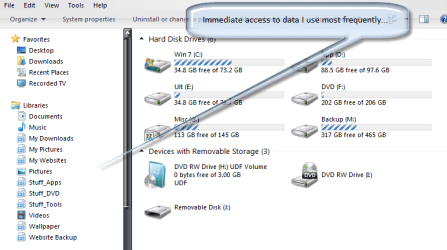
I see little difference between windows explorer in Win7 and explorer in Vista or XP except libraries, and they provide immediate access to the data important to me.

So to each his own, but I recommend spending a little time learning what they can do for you... :geek:

Regards-
 

My Computer

Computer Manufacturer/Model Number
Home Grown
OS
Windows 7 Ultimate (64)
CPU
i7-2600K
Motherboard
Asus P8P67-M Pro
Memory
G.SKILL Ripjaws X Series 8GB (2 x 4GB)
Graphics Card(s)
ATI 5750
Sound Card
On-Board
Monitor(s) Displays
LG W2486L
Screen Resolution
1920X1080
Hard Drives
Intel X-25M 80 Gig SSD | Intel X-25M 160 Gig SSD | WD Black 500MB - External eSata
PSU
Zalman ZM770-XT 770 Watts
Case
Antec 180 mini
Cooling
Cooler Master V8
Internet Speed
15MB - Cable
Other Info
Sissy OC - 4.6 @ 1.3175 24/7 | 18' Idle - 55' Load
Example:
 

Attachments

  • libraries.png
    libraries.png
    28 KB · Views: 433

My Computer

Computer Manufacturer/Model Number
Home Grown
OS
Windows 7 Ultimate (64)
CPU
i7-2600K
Motherboard
Asus P8P67-M Pro
Memory
G.SKILL Ripjaws X Series 8GB (2 x 4GB)
Graphics Card(s)
ATI 5750
Sound Card
On-Board
Monitor(s) Displays
LG W2486L
Screen Resolution
1920X1080
Hard Drives
Intel X-25M 80 Gig SSD | Intel X-25M 160 Gig SSD | WD Black 500MB - External eSata
PSU
Zalman ZM770-XT 770 Watts
Case
Antec 180 mini
Cooling
Cooler Master V8
Internet Speed
15MB - Cable
Other Info
Sissy OC - 4.6 @ 1.3175 24/7 | 18' Idle - 55' Load
I don't use them, since there is only one partition on my HDD, and I am the only using my PC, but I agree it is a bit annoying if you click the task bar icon, then can't get into another folder on your user account, say, the downloads folder.
 

My Computer

Computer Manufacturer/Model Number
Self Built
OS
Windows 7 Home Premium x64(desktop), Windows 7 Professional x86(laptop)
CPU
AMD Phenom II x4 965 @ 3.40GHz Black Edition
Motherboard
ASUS M4A785TD-V Evo
Memory
4GB Corsair XMS3 DDR3
Graphics Card(s)
Sapphire HD 5770 1024MB
Monitor(s) Displays
22" Viewsonic VX2260 Widescreen LCD
Screen Resolution
1900x1080 (1080p)
Hard Drives
Samsung Spinpoint F3 1TB SATA, 32MB Cache, 7200 RPM
PSU
600W OCZ StealthXStream
Case
Antec 902 Ultimate Gaming Case
Cooling
Stock - CPU, GPU, PSU, 3x120MMcase fans 1x200mm case fan
Keyboard
Saitek Eclipse II
Mouse
Roccat Kova Gaming Mouse
I don't use them, since there is only one partition on my HDD, and I am the only using my PC, but I agree it is a bit annoying if you click the task bar icon, then can't get into another folder on your user account, say, the downloads folder.

If you change the target of the Taskbars Explorer Icon properties to:

%windir%\explorer.exe /n,::{20D04FE0-3AEA-1069-A2D8-08002B30309D}

View attachment 42206

It will open on "computer" instead of the libraries.

(Copy the existing target command if you wish to revert back to libraries)
 

My Computer

Computer type
PC/Desktop
Computer Manufacturer/Model Number
Systems by SmartEyeball
OS
8 Pro x64
CPU
i7 3770K 4.6GHz
Motherboard
ASUS P8Z77 WS
Memory
16GB G.Skill Trident X 2666mhz
Graphics Card(s)
x2 EVGA 780 Ti Superclocked SLI
Sound Card
SB X-FI Surround 5.1 PRO USB / ATH-AD900 Headphones
Monitor(s) Displays
x3 Dell U2410 / 58" Samsung
Screen Resolution
5760*1200/ 1920*1200
Hard Drives
2x Intel 520 240GB (RAID 0) * 2x WD Caviar Blacks 2TB (RAID 0) * 2TB WD Caviar Black * Sony Optirac DVD
PSU
Silverstone Strider Evolution 1200W
Case
Thermaltake Level 10 GT Snow Edition
Cooling
Noctua NH-D14
Keyboard
Topre Realforce // Ducky Shine MX Black // Filco Ninja TKL
Mouse
Thermaltake Theron (Highly Recommended) + Razer Imperator
Antivirus
MSE
Browser
IE, FF, WaterFox
Other Info
GT Extreme V2 Sim Racing Cockpit + 40" LCD and K/B Mouse stand ▼
Fanatec CSR Elite Wheel + Clubsport V1 Pedals + CSR shifter/7G-H ▼Saitek X52 Pro ▼ TrackIR 5 Pro
Buttkicker v2 Seat Rumbler with Dedicated 5.1 and Sub Woofer attached to frame ▼
=
Bloody Big Grin
whats wrong with Libraries? you have everything you normally access in one easy location! and if YOU really want my computer, then just click start>Computer, let me ask you whats easier? click the taskbar>music or click start>computer>c:\>Users>*your username*>My Music? i know which one i prefer.....
 

My Computer

Computer type
PC/Desktop
Computer Manufacturer/Model Number
Medion Erazer (note to self: insert model number) - with custom additions
OS
Windows 10 Pro x64
CPU
Intel Core i5 7400 @ 3.00GHz
Motherboard
OEM supllied with PC
Memory
8GB 2133Mhz DDR4 (OEM supplied)
Graphics Card(s)
Gygabyte Windforce GTX 1050Ti (Factory Overclocked)
Sound Card
Realtek
Monitor(s) Displays
Acer Al1980 + HKC
Screen Resolution
1360*768(HKC) / 1280*1024(Acer)
Hard Drives
1TB Toshiba
1TB WD Caviar Green
120GB Samsung Evo 840
PSU
OEM supplied (no power rating on case)
Case
OEM Supplied
Cooling
Stock
Keyboard
Logitech Wireless
Mouse
Logitect Wireless
Internet Speed
40Mb/s Down 10Mb/s Up
Antivirus
Defender
Browser
Firefox
whats wrong with Libraries?

Nothing. Except I personally don't want everything in a library.

i know which one i prefer.....

So do I :)

I find that it takes less clicks to find something when I open explorer this way:

exp a.JPG

As opposed to this way:

exp b.JPG


It all comes down to a users personal preference.
 

My Computer

Computer type
PC/Desktop
Computer Manufacturer/Model Number
Systems by SmartEyeball
OS
8 Pro x64
CPU
i7 3770K 4.6GHz
Motherboard
ASUS P8Z77 WS
Memory
16GB G.Skill Trident X 2666mhz
Graphics Card(s)
x2 EVGA 780 Ti Superclocked SLI
Sound Card
SB X-FI Surround 5.1 PRO USB / ATH-AD900 Headphones
Monitor(s) Displays
x3 Dell U2410 / 58" Samsung
Screen Resolution
5760*1200/ 1920*1200
Hard Drives
2x Intel 520 240GB (RAID 0) * 2x WD Caviar Blacks 2TB (RAID 0) * 2TB WD Caviar Black * Sony Optirac DVD
PSU
Silverstone Strider Evolution 1200W
Case
Thermaltake Level 10 GT Snow Edition
Cooling
Noctua NH-D14
Keyboard
Topre Realforce // Ducky Shine MX Black // Filco Ninja TKL
Mouse
Thermaltake Theron (Highly Recommended) + Razer Imperator
Antivirus
MSE
Browser
IE, FF, WaterFox
Other Info
GT Extreme V2 Sim Racing Cockpit + 40" LCD and K/B Mouse stand ▼
Fanatec CSR Elite Wheel + Clubsport V1 Pedals + CSR shifter/7G-H ▼Saitek X52 Pro ▼ TrackIR 5 Pro
Buttkicker v2 Seat Rumbler with Dedicated 5.1 and Sub Woofer attached to frame ▼
=
Bloody Big Grin
Nothing. Except I personally don't want everything in a library.

sounds like a good idea for a service pack feature; an exclusion option in the library locations, that will include a folder but have the option of excluding certain folder that are contained within.
 

My Computer

Computer Manufacturer/Model Number
Dell Inspiron 1545
OS
Windows 7 build 7100 x86
CPU
Intel Core 2 Duo 2.1GHz
Motherboard
GM45 chipset
Memory
3GB
Graphics Card(s)
Intel(TM) Graphics Media Accelerator X4500HD
Sound Card
Realtek HD
Monitor(s) Displays
15.6" WLED 720p
Screen Resolution
1366x768
Hard Drives
320GB 5400rpm hard drive
Last edited by a moderator:

My Computer

Computer type
PC/Desktop
Computer Manufacturer/Model Number
Home built
OS
Windows 7 Ult, Windows 8.1 Pro,
CPU
Q9650-4.275GHz, E8600 4.5GHz, E6750-3.8GHz
Motherboard
Evga 780i FTW
Memory
G.Skill PC2 9600 1200Mhz 5 5 5 15 2T
Graphics Card(s)
GTX480
Sound Card
Asus Xonar D2
Monitor(s) Displays
HannsG
Screen Resolution
1680X1050
Hard Drives
GSkill Phoenix Pro 120GB SSD
PSU
ThermalTake Toughpower 1000Watt modular
Case
ThermalTake XaserV
Cooling
Xigmatek S1283
Keyboard
Logitech G15
Mouse
Logitech G9
Internet Speed
T1
I like the libraries, It is about time that I can store pictures and music on a seperate HD and have windows know where they are.

If you don't like them, don't use them.
 

My Computer

Computer Manufacturer/Model Number
Asus
OS
Windows 7 Home x64
CPU
Intel i7
Memory
9GB
Graphics Card(s)
Nvidia GTX260 Core 216
You can exclude or include any folder you want from library's. It's the best thing since sliced bread in my book. :)

http://www.sevenforums.com/tutorials/585-library-include-folder.html

But you can't include a folder but exclude a folder that is contained within that folder. Say I wanted to include all of the 'Pictures' folder, but exclude a folder contained within that pictures folder. Windows does not allow for that behaviour.
I think that is the behaviour that the OP was asking for, when he said 'Nothing. Except I personally don't want everything in a library.'
 

My Computer

Computer Manufacturer/Model Number
Dell Inspiron 1545
OS
Windows 7 build 7100 x86
CPU
Intel Core 2 Duo 2.1GHz
Motherboard
GM45 chipset
Memory
3GB
Graphics Card(s)
Intel(TM) Graphics Media Accelerator X4500HD
Sound Card
Realtek HD
Monitor(s) Displays
15.6" WLED 720p
Screen Resolution
1366x768
Hard Drives
320GB 5400rpm hard drive
So you right click on Computer in start menu and put it on desk top wow that was hard
 

My Computer

Computer Manufacturer/Model Number
I made it
OS
Win7 Ultimate
CPU
Celeron E1400 @ 2 gig dual core
Motherboard
MSI MS-7529
Memory
4 gig dual channel
Graphics Card(s)
nVidia 6600LE 512mgs mem
Sound Card
On Board Realtek HD
Monitor(s) Displays
1 Sceptre Flat
Screen Resolution
I like 1280x800
Hard Drives
System Drive: 300 gig Maxtor SATA3 (It was cheap)

My Storage: 160 gig WD SATA3
Wife's Storage 160 gig WD SATA3
Keyboard
MS Dgital Media Pro
Mouse
MS Optical 3000
Internet Speed
1.5 DSL
You can exclude or include any folder you want from library's. It's the best thing since sliced bread in my book. :)

http://www.sevenforums.com/tutorials/585-library-include-folder.html

But you can't include a folder but exclude a folder that is contained within that folder. Say I wanted to include all of the 'Pictures' folder, but exclude a folder contained within that pictures folder. Windows does not allow for that behaviour.
I think that is the behaviour that the OP was asking for, when he said 'Nothing. Except I personally don't want everything in a library.'
Brink has already posted the link: "Add or Remove from Navigation Pane". Sounds like those that don't like libraries should use it. ;)
 

My Computer

Computer Manufacturer/Model Number
Home Grown
OS
Windows 7 Ultimate (64)
CPU
i7-2600K
Motherboard
Asus P8P67-M Pro
Memory
G.SKILL Ripjaws X Series 8GB (2 x 4GB)
Graphics Card(s)
ATI 5750
Sound Card
On-Board
Monitor(s) Displays
LG W2486L
Screen Resolution
1920X1080
Hard Drives
Intel X-25M 80 Gig SSD | Intel X-25M 160 Gig SSD | WD Black 500MB - External eSata
PSU
Zalman ZM770-XT 770 Watts
Case
Antec 180 mini
Cooling
Cooler Master V8
Internet Speed
15MB - Cable
Other Info
Sissy OC - 4.6 @ 1.3175 24/7 | 18' Idle - 55' Load
I read all of the responses and although the idea of being able to find items scattered throughout a computer is probably a serious advantage to some people, however I refuse to store files of any kind on a C drive or any partition of the primary drive, all of my data is very well organized on external NAS Drives, I have 4 PCs networked together in my house, I have used M$ Windows since V 3.1, I have had and have seen far too many hard drives fail and along with the failure - so goes your data, IMHO the C drive is strictly the OS and data is best stored on a RAID system, that is if you value your data, it has been discussed that the next gen of PCs will in fact have individual drives for the OS and for the programs and data will be on its own system, the last 2TB NAS only cost me $330, my 64GB Thumb Drive cost me half of that, within 1 year the 2TB NAS will be below $100 and with all of your data stored neatly in organized folders I can access the data because I know exactly where it is, it appears as though libraries were set up for people who think differently than I do, Thanks for the tutorial on the removal of the libraries, I will be implementing it quite soon, it is a shame that M$ assumed everyone would approve when it appears that a simple switch on-off like a use “Classic My Computer” or “Use Libraries” would have been a nice function.
 

My Computer

OS
windows 7
Unless your NAS mysteriously dies and your USB suddenly needs formattings. Use the C:\ hard drive.
 

My Computer

Computer Manufacturer/Model Number
Sony Vaio Z46GDU
OS
Windows 7 Ultimate x86-64
CPU
[email protected] 1066MHz FSB
Motherboard
Sony branded
Memory
6GB DDR3 1066MHz
Graphics Card(s)
9300M GS 256MB Dedicated (Speed) + Intel4500MHD (Stamina)
Sound Card
Realtek HD Audio
Monitor(s) Displays
13.1' WXGA
Screen Resolution
1600x900
Hard Drives
320GB 7200RPM w/ 16MB cache
Internet Speed
1MB/s
I read all of the responses and although the idea of being able to find items scattered throughout a computer is probably a serious advantage to some people, however I refuse to store files of any kind on a C drive or any partition of the primary drive, all of my data is very well organized on external NAS Drives, I have 4 PCs networked together in my house, I have used M$ Windows since V 3.1, I have had and have seen far too many hard drives fail and along with the failure - so goes your data, IMHO the C drive is strictly the OS and data is best stored on a RAID system, that is if you value your data, it has been discussed that the next gen of PCs will in fact have individual drives for the OS and for the programs and data will be on its own system, the last 2TB NAS only cost me $330, my 64GB Thumb Drive cost me half of that, within 1 year the 2TB NAS will be below $100 and with all of your data stored neatly in organized folders I can access the data because I know exactly where it is, it appears as though libraries were set up for people who think differently than I do, Thanks for the tutorial on the removal of the libraries, I will be implementing it quite soon, it is a shame that M$ assumed everyone would approve when it appears that a simple switch on-off like a use “Classic My Computer” or “Use Libraries” would have been a nice function.

Meh, I can completely understand why you wouldn't trust or use that new feature. even though, you can add folders from other locations (besides your local hdd) into your library. Hard drives made these days are much less prone to errors than those made in the 1990 XD.
"M$ assumed everyone would approve when it appears that a simple switch on-off like a use “Classic My Computer” or “Use Libraries” would have been a nice function."
If microsoft included a switch for every single feature, windows would be a bloated penguin (not linux XD). They are already doing a good job making sure backwards compatibility is achieved. However, think about the pressure between innovation and compatibility with earlier interfaces XD.

btw smarteyeball, your computer's hard drive space is AWESOME XD thatslike 4 terabyte or something :shock:
 

My Computer

Computer Manufacturer/Model Number
Dell XPS 8000/HP G70 258US
OS
Windows 7 64 bit build 7600
CPU
Intel Core i5 750/Intel Pentium Duo T4200 2.00 ghz
Memory
6 gig/4 gig
Graphics Card(s)
ATI Radeon HD 4350/Intel Graphics Media Accelerator 4500MHD
Sound Card
Realtek/Conexant Smartaudio High Definition Device
Monitor(s) Displays
Two
Screen Resolution
1920x1080/1440x900
Hard Drives
750/250 gig
Internet Speed
24 mb
sparkie;538034[COLOR=#323232 said:
[/COLOR]]

btw smarteyeball, your computer's hard drive space is AWESOME XD thatslike 4 terabyte or something :shock:
I thought the same thing!;)

And I was a little skeptical on the library feature at first, but I have grown to appreciate them.:geek:
 

My Computer

Computer type
PC/Desktop
Computer Manufacturer/Model Number
Gigabyte Technology Co., Ltd.
OS
Win 7 Ultimate 64-bit SP1 (desktop)
CPU
Intel Core 2 Duo E8400
Motherboard
Gigabyte GA-EP35-DS3R
Memory
2x 2GB OCZ DDR II SDRAM PC2-6400
Graphics Card(s)
NVIDIA GeForce 9400GT
Monitor(s) Displays
HP 2009m(primary), Acer P191W
Screen Resolution
1600x900, 1440x900
Hard Drives
Internal:WD Caviar Black 640GB 32MB cache 7200RPM
External:Samsung Story Station 1TB HDD desktop drive
500GB Toshiba portable drive
PSU
Antec Earthwatts EA500D
Case
Antec Sonata III
Cooling
4 fans
Keyboard
Logitech Wave
Mouse
Logitech M-SBF90
Internet Speed
Slow due to home Wireless-G router
Antivirus
MSE, Hitman Pro, Malwarebytes
Browser
Chrome and Palemoon
Other Info
Laptop....Acer 5750Z-4835
15.6" HD Widescreen CineCrystal™ LED-backlit LCD Display: (1366x768 resolution, 16:9 aspect ratio)
Intel® Pentium® Processor B940 (2.0GHz, 2MB L3 cache)
Windows® 7 Home Premium,500GB Hard Drive,4GB DDR3 RAM, Intel® HD Graphics,8X DVD-Super Multi Double-Layer Drive
Multi-in-1 Digital Media Card Reader,802.11b/g/n Wi-Fi
Chrome and Palemoon, MSE, Hitman Pro
Status
Not open for further replies.
Back
Top