I hate W7 for one reason!

Did you restart before atempting to take owner ship. If file/folder is locked you probably cannot change much of anything.
 

My Computer

Computer Manufacturer/Model Number
Intel
OS
7 Pro64 Hopefully
CPU
Q8400
Motherboard
DP45SG
Memory
Kingston 4gb
Graphics Card(s)
Sapphire HD2600XT
Monitor(s) Displays
Dell 2007WFP
Hard Drives
WB Black 500gb and 1tb
PSU
Enermax Tomahawk 500w
Case
CoolerMaster Sileo
Simple file sharing is not designed to work with NTFS volumes but with FAT.
To correctly share NTFS partitions you need to use the advanced sharing.

The issue is the same basic NTFS permissions issue - that is because Windows 7 enforces good security practices that were often ignored on XP systems. The basic rules of NTFS permissions have not changed from Windows NT although they were not always used except on Client server network systems

Can't understand a word. What are you telling me to do to fix this issue?

All I want to be able to do is open a file...edit the darn thing and then save it!
Tell me in plain english what I have to do.
 

My Computer

OS
Windows 7
Motherboard
Asus M2N32-SLI Deluxe
Memory
3g
Graphics Card(s)
512
Hard Drives
SATA
To correctly share NTFS partitions you need to use the advanced sharing.
ONLY if you add unnecessary advanced file sharing to the mix.
A locked file/folder is still locked no matter what.
 

My Computer

Computer Manufacturer/Model Number
Intel
OS
7 Pro64 Hopefully
CPU
Q8400
Motherboard
DP45SG
Memory
Kingston 4gb
Graphics Card(s)
Sapphire HD2600XT
Monitor(s) Displays
Dell 2007WFP
Hard Drives
WB Black 500gb and 1tb
PSU
Enermax Tomahawk 500w
Case
CoolerMaster Sileo
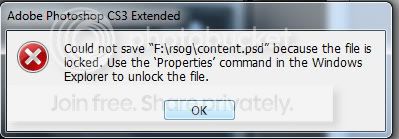
Here is what I get everytime I try to edit a file on my internal storage drive. Doesn't matter what application I'm using...I can't edit files. I can't even overwrite files to that drive using FTP.

three.jpg


However, if I start the application by right clicking on the icon and choosing "Run as Administrator" then it works...but that sucks...it should just work.
 

My Computer

OS
Windows 7
Motherboard
Asus M2N32-SLI Deluxe
Memory
3g
Graphics Card(s)
512
Hard Drives
SATA
Sounds more like adobe, it has ALWAYS keeped files/folders locked after closing. Very irritating trying to eject a usb drive after PS has editted or renaming a folder in XP.
Seems that things are more noticeable in Seven since it follows rules better.
My internet kept breaking in Seven, turned out to be a setting I made in router to block xp-wmp folder.jpg clobber. XP and WMP ignored it, but Seven did as it was told.

Sounds like MS is forcing applications to be more compliant?
should be good in the long term.
 

My Computer

Computer type
PC/Desktop
Computer Manufacturer/Model Number
Apple 17" iMac MA199LL (Early 2006)
OS
Windows 8 Pro (32-bit)
CPU
1.83GHz Intel Core Duo
Memory
2GB 667MHz DDR2 SDRAM (PC2-5300) (upgrade)
Graphics Card(s)
ATI Radeon X1600 with 128MB GDDR3 memory
Monitor(s) Displays
17-inch TFT active-matrix LCD, millions of colors
Screen Resolution
1440 x 900
Hard Drives
Hitachi 320GB HDT721032SLA360 7200RPM SATA II (upgrade)
Keyboard
Microsoft Wired Keyboard 600
Mouse
Microsoft Basic Optical Mouse v2.0
Internet Speed
4 Mbps
Antivirus
Microsoft Security Essentials
Browser
Google Chrome
Other Info
WEI:
Base Score: 3.9 Processor: 4.4 Memory 4.7
Graphics: 3.9 Gaming Graphics: 4.1 Primary HD: 5.9
Take ownership of the whole drive - Ignore errors on system folders - if you have issues with non system folders you will have to manually take ownership of these areas.

Right click on drive in explorer
select permissions
select security tab
select advanced
select owner tab
select edit
choose your user name or type in to add
OK and wait for apply to work

Once you are the owner you will be able to add your user name specifically to the list of users - give this user full control - again any non system drive issues will need to be addressed specifically

back on the security tab

select add
type your user name
select ok
click the full control check box
again wait for the permissions to apply

Ok out of dialogs

If you have to add permissions to a sub folder follow the same procedure after right clicking on the actual folder. This will sometimes happen if the permissions have become confused/corrupted over years of use, but normally the application of permissions to the whole drive will work fine :)

The reason that run as administrator works is that the administrators group has the required permissions but in windows 7 you do not run in that group normally for security reasons. This is due to the UAC running even admin accounts as a standard user by default
 

My Computers

System One System Two

  • Computer type
    PC/Desktop
    Computer Manufacturer/Model Number
    ChillBlast - Custom to my design
    OS
    Windows 11 Pro x64 [Latest Release and Release Preview]
    CPU
    Ryzen 9 5950X, 3.8 - 5.2 MHz
    Motherboard
    Asus Prime X570-Pro
    Memory
    64GB [2 x 32GB] DDR4 3200MHz
    Graphics Card(s)
    4GB NVIDIA GEFORCE GTX 1650 Ti
    Sound Card
    On-board SPDIF to 5.1 System + HDMI [5.1 system]
    Monitor(s) Displays
    32" UHD 32 Bit HDR Monitor + 43" UHD 4K 32Bit HDR TV
    Screen Resolution
    2 x 3840 x 2160 @60Hz
    Hard Drives
    1TB M2 SSD OS, 500GB Fast Access SSD, 2 x 8TB Data + Various Externals from 1TB to 4TB, 10TB NAS
    PSU
    NZXT C750 80 PLUS Gold 750W Modular PSU
    Case
    Workstation Case [Matt Black]
    Cooling
    NZXT Kraken X63 280mm CPU Cooler +2x Quiet Case fans
    Keyboard
    Logitech Wireless MX Keys & K400 + others
    Mouse
    Logitech Wireless MX Master 3S
    Internet Speed
    920 MB Down 50 MB Up
    Antivirus
    BitDefender Total Security Pro
    Browser
    Chrome (always run latest Non-Beta)
    Other Info
    Also run ...
    Laptop - Quad 8GB - Windows 10 Pro x64
    Nexus 7 Android tablet x2
    Samsung 10.2" tablet
    Blackview TAB 8 4G Android Tablet c/w Keyboard
    Wacom Intuos Pro Medium Pen Pad
    Wacom Intuos Pro Small Pen Pad
    Wacom Expresskeys Remote
    Loopdeck+ Graphics Controller
    Shuttle Pro v2 Control
  • Computer type
    Laptop
    System Manufacturer/Model Number
    Dell XPS 17 10750H
    OS
    Windows 11 Pro x64 Latest RP
    CPU
    Intel I7 10750H 5.0GHz
    Motherboard
    Dell XPS
    Memory
    32GB [2x16GB] DDR4 2933 MHz
    Graphics Card(s)
    nVidia GTX1650Ti 4 GB GDDR6
    Sound Card
    Stock [Realtek] 4 Speaker
    Monitor(s) Displays
    17" IPS UHD+ Infinity Edge Touchscreen
    Screen Resolution
    3840 x 2400
    Hard Drives
    2TB M2 NVMe, 4TB External + various 500GB & 1TB External NVMe (also have access to spinner HDD from
    PSU
    Stock
    Case
    Stock XPS Aluminium & Carbon Fibre
    Cooling
    Stock - Active Fan Control
    Keyboard
    Backlit + Various Logitech
    Mouse
    Stock Track Pad + Logitech MX Trackball
    Internet Speed
    72 MB Down 18MB Up
    Browser
    Chrome
    Other Info
    Also run ...
    Laptop - Quad 8GB - Windows 10 Pro x64
    Nexus 7 Android tablet x2
    10.2" tablet
    Sony Z3 Android Smartphone
    Wacom Intuos Pro Medium Pen Pad
    Wacom Intuos Pro Small Pen Pad
    Wacom Expresskeys Remote
    Loopdeck+ Graphics Controller
    Shuttle Pro v2 Control Pad
    10TB NAS
back on the security tab

select add
type your user name
select ok
click the full control check box
again wait for the permissions to apply

Ok out of dialogs

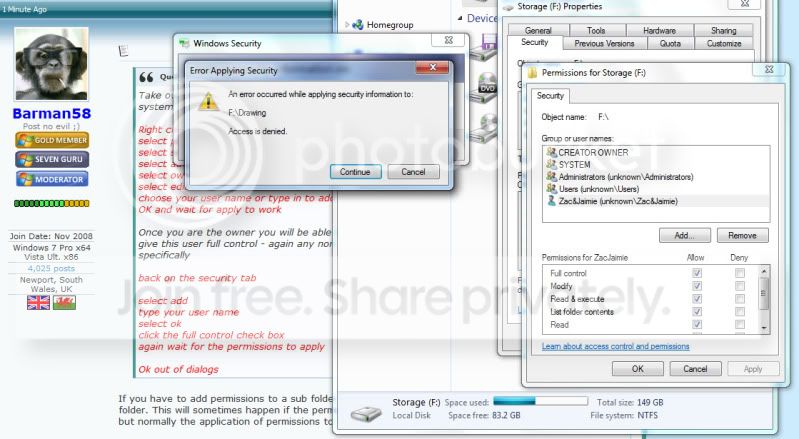
No problems until this part listed above. When I hit apply, I have a hundred dialogs coming up that tell me "Access is Denied"

four.jpg
 

My Computer

OS
Windows 7
Motherboard
Asus M2N32-SLI Deluxe
Memory
3g
Graphics Card(s)
512
Hard Drives
SATA
Can anyone tell me why I'm still getting access denied dialogs like pictured in my last post?
 

My Computer

OS
Windows 7
Motherboard
Asus M2N32-SLI Deluxe
Memory
3g
Graphics Card(s)
512
Hard Drives
SATA
From the screenshot you have provided I have a question - is your computer name - unknown?

The reason I ask this is that the user groups are shown with that as part of that context as system name, (eg unknown\administrators), if your pc is not named unknown then there are serious permissions issues with this drive.
This may be due to the drive not being online during the OS upgrade

To work around these issues you are best enabling the "Hidden Administrator" account.

http://www.sevenforums.com/tutorials/507-built-administrator-account-enable-disable.html

When this is done you should be able to completely reset the drives permissions

These following instructions should clear all existing permissions and reset to a working condition.

log on as the Hidden Administrator and perform the steps for taking ownership.

Once you have ownership of the complete drive.

follow the steps to open the advanced security dialogue and click the change permissions button

uncheck the "include inheritable permissions ..." checkbox and when prompted click "remove"

REMOVE ALL PERMISSIONS - (highlight each user/group and click remove)

Add "administrators" - Full Control
Add "Zak&Jamie" - Full Control (assume this is username you are using)

Click on the "replace all child object permissions with inheritable permissiona from this object"

Click apply (wait for application of permissions)

OK out of the dialogues

Note: You may have to perform this action more than once to ensure that all permissions are reset completely.

To check this is working correctly you may want to perform these steps on a single sub folder on the drive - and then try saving a file there

Log out and back in as your normal user and disable the Hidden Administrator account

 

My Computers

System One System Two

  • Computer type
    PC/Desktop
    Computer Manufacturer/Model Number
    ChillBlast - Custom to my design
    OS
    Windows 11 Pro x64 [Latest Release and Release Preview]
    CPU
    Ryzen 9 5950X, 3.8 - 5.2 MHz
    Motherboard
    Asus Prime X570-Pro
    Memory
    64GB [2 x 32GB] DDR4 3200MHz
    Graphics Card(s)
    4GB NVIDIA GEFORCE GTX 1650 Ti
    Sound Card
    On-board SPDIF to 5.1 System + HDMI [5.1 system]
    Monitor(s) Displays
    32" UHD 32 Bit HDR Monitor + 43" UHD 4K 32Bit HDR TV
    Screen Resolution
    2 x 3840 x 2160 @60Hz
    Hard Drives
    1TB M2 SSD OS, 500GB Fast Access SSD, 2 x 8TB Data + Various Externals from 1TB to 4TB, 10TB NAS
    PSU
    NZXT C750 80 PLUS Gold 750W Modular PSU
    Case
    Workstation Case [Matt Black]
    Cooling
    NZXT Kraken X63 280mm CPU Cooler +2x Quiet Case fans
    Keyboard
    Logitech Wireless MX Keys & K400 + others
    Mouse
    Logitech Wireless MX Master 3S
    Internet Speed
    920 MB Down 50 MB Up
    Antivirus
    BitDefender Total Security Pro
    Browser
    Chrome (always run latest Non-Beta)
    Other Info
    Also run ...
    Laptop - Quad 8GB - Windows 10 Pro x64
    Nexus 7 Android tablet x2
    Samsung 10.2" tablet
    Blackview TAB 8 4G Android Tablet c/w Keyboard
    Wacom Intuos Pro Medium Pen Pad
    Wacom Intuos Pro Small Pen Pad
    Wacom Expresskeys Remote
    Loopdeck+ Graphics Controller
    Shuttle Pro v2 Control
  • Computer type
    Laptop
    System Manufacturer/Model Number
    Dell XPS 17 10750H
    OS
    Windows 11 Pro x64 Latest RP
    CPU
    Intel I7 10750H 5.0GHz
    Motherboard
    Dell XPS
    Memory
    32GB [2x16GB] DDR4 2933 MHz
    Graphics Card(s)
    nVidia GTX1650Ti 4 GB GDDR6
    Sound Card
    Stock [Realtek] 4 Speaker
    Monitor(s) Displays
    17" IPS UHD+ Infinity Edge Touchscreen
    Screen Resolution
    3840 x 2400
    Hard Drives
    2TB M2 NVMe, 4TB External + various 500GB & 1TB External NVMe (also have access to spinner HDD from
    PSU
    Stock
    Case
    Stock XPS Aluminium & Carbon Fibre
    Cooling
    Stock - Active Fan Control
    Keyboard
    Backlit + Various Logitech
    Mouse
    Stock Track Pad + Logitech MX Trackball
    Internet Speed
    72 MB Down 18MB Up
    Browser
    Chrome
    Other Info
    Also run ...
    Laptop - Quad 8GB - Windows 10 Pro x64
    Nexus 7 Android tablet x2
    10.2" tablet
    Sony Z3 Android Smartphone
    Wacom Intuos Pro Medium Pen Pad
    Wacom Intuos Pro Small Pen Pad
    Wacom Expresskeys Remote
    Loopdeck+ Graphics Controller
    Shuttle Pro v2 Control Pad
    10TB NAS
Hi Barman, I have followed your posts with interest. Please allow me to jump in here because I have a similar problem - but with a twist:
I run Windows7 and Vista on the same system. They are seperate installations on 2 physical disks that I switch with the BIOS boot sequence. I installed a seperate partition for all my data and moved the Vista folders with Properties > Location tab to that new partition. Then I included those folders into the Win7 libraries.
Now the Win7 system holds a grip on those folders and I am unable to write anything to them from the Vista system. I can read though after I give permission. With the methods you explained, I could enable the Vista system to get update permission for those folders. But that is not very practical because I switch between the 2 systems several times per day and every time I use them from the Win7 side, they get "locked" again.
Is there a way to tell Win7 not to "lock" the files so that I need not go thru that whole procedure every time I switch back to Vista?
 

My Computer

Computer Manufacturer/Model Number
HP, Dell, Gateway, Toshiba - 4 laptops and 2 desktops
OS
Vista, Windows7, Mint Mate, Zorin, Windows 8
CPU
from 1.6GHz Duo to i7
Monitor(s) Displays
2x HP w2207
Hard Drives
5x HDD, 7x SSD, 12x Externals
Keyboard
with trackball - no mices
Mouse
Trackball mice
Internet Speed
DSL 6000

My Computer

Computer type
PC/Desktop
Computer Manufacturer/Model Number
Bruce ... somewhere in his 40's
OS
Windows 7 Ultimate 32bit SP1
CPU
Intel(R) Core(TM)2 Quad CPU @ 2.40GHz, 2400 MHz
Motherboard
INTEL/D975XBX2
Memory
4 GB
Graphics Card(s)
ATI Radeon HD 2600 Pro
Monitor(s) Displays
Samsung SyncMaster 914v
Screen Resolution
1280 x 1024
Hard Drives
2/500GB each ... ST3500630AS ATA Device.
One is not connected
PSU
Rocketfish 700 W
Case
G.Skill Gigabyte Chassis
Keyboard
Standard PS/2 Keyboard
Mouse
Microsoft PS/2 Mouse
Internet Speed
DSL
Antivirus
Avira Internet Security
Browser
IE 11
Other Info
ATI HDMI Audio
I too have a Vista partition which is in dual boot with my Win7 install.

All I had to do was boot into vista and take ownership of the data drive and apply full control permissions to my user.

Back in win7 I did the same and do not have any issues with access in either operating system.

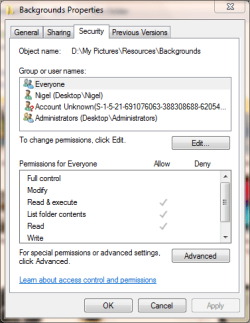
an example of my security tab ....

permissions-data.PNG

The highlighted entry shows my vista user in win7 the settings are similar in Vista but of course the unknown SID is different.

Not sure if the reason that you are having problems is because you disconnected the drive during install but I have no problems - though I use Vista rarely these days - just if I need to try something for a client
 

My Computers

System One System Two

  • Computer type
    PC/Desktop
    Computer Manufacturer/Model Number
    ChillBlast - Custom to my design
    OS
    Windows 11 Pro x64 [Latest Release and Release Preview]
    CPU
    Ryzen 9 5950X, 3.8 - 5.2 MHz
    Motherboard
    Asus Prime X570-Pro
    Memory
    64GB [2 x 32GB] DDR4 3200MHz
    Graphics Card(s)
    4GB NVIDIA GEFORCE GTX 1650 Ti
    Sound Card
    On-board SPDIF to 5.1 System + HDMI [5.1 system]
    Monitor(s) Displays
    32" UHD 32 Bit HDR Monitor + 43" UHD 4K 32Bit HDR TV
    Screen Resolution
    2 x 3840 x 2160 @60Hz
    Hard Drives
    1TB M2 SSD OS, 500GB Fast Access SSD, 2 x 8TB Data + Various Externals from 1TB to 4TB, 10TB NAS
    PSU
    NZXT C750 80 PLUS Gold 750W Modular PSU
    Case
    Workstation Case [Matt Black]
    Cooling
    NZXT Kraken X63 280mm CPU Cooler +2x Quiet Case fans
    Keyboard
    Logitech Wireless MX Keys & K400 + others
    Mouse
    Logitech Wireless MX Master 3S
    Internet Speed
    920 MB Down 50 MB Up
    Antivirus
    BitDefender Total Security Pro
    Browser
    Chrome (always run latest Non-Beta)
    Other Info
    Also run ...
    Laptop - Quad 8GB - Windows 10 Pro x64
    Nexus 7 Android tablet x2
    Samsung 10.2" tablet
    Blackview TAB 8 4G Android Tablet c/w Keyboard
    Wacom Intuos Pro Medium Pen Pad
    Wacom Intuos Pro Small Pen Pad
    Wacom Expresskeys Remote
    Loopdeck+ Graphics Controller
    Shuttle Pro v2 Control
  • Computer type
    Laptop
    System Manufacturer/Model Number
    Dell XPS 17 10750H
    OS
    Windows 11 Pro x64 Latest RP
    CPU
    Intel I7 10750H 5.0GHz
    Motherboard
    Dell XPS
    Memory
    32GB [2x16GB] DDR4 2933 MHz
    Graphics Card(s)
    nVidia GTX1650Ti 4 GB GDDR6
    Sound Card
    Stock [Realtek] 4 Speaker
    Monitor(s) Displays
    17" IPS UHD+ Infinity Edge Touchscreen
    Screen Resolution
    3840 x 2400
    Hard Drives
    2TB M2 NVMe, 4TB External + various 500GB & 1TB External NVMe (also have access to spinner HDD from
    PSU
    Stock
    Case
    Stock XPS Aluminium & Carbon Fibre
    Cooling
    Stock - Active Fan Control
    Keyboard
    Backlit + Various Logitech
    Mouse
    Stock Track Pad + Logitech MX Trackball
    Internet Speed
    72 MB Down 18MB Up
    Browser
    Chrome
    Other Info
    Also run ...
    Laptop - Quad 8GB - Windows 10 Pro x64
    Nexus 7 Android tablet x2
    10.2" tablet
    Sony Z3 Android Smartphone
    Wacom Intuos Pro Medium Pen Pad
    Wacom Intuos Pro Small Pen Pad
    Wacom Expresskeys Remote
    Loopdeck+ Graphics Controller
    Shuttle Pro v2 Control Pad
    10TB NAS
  • Like
Reactions: whs
Thanks for the answer Barman. I will try your suggestion. I am mainly on Windows7 too - especially since it runs a lot faster off my SSD. But there are certain things I still prefer to do in Vista.
 

My Computer

Computer Manufacturer/Model Number
HP, Dell, Gateway, Toshiba - 4 laptops and 2 desktops
OS
Vista, Windows7, Mint Mate, Zorin, Windows 8
CPU
from 1.6GHz Duo to i7
Monitor(s) Displays
2x HP w2207
Hard Drives
5x HDD, 7x SSD, 12x Externals
Keyboard
with trackball - no mices
Mouse
Trackball mice
Internet Speed
DSL 6000

My Computer

Computer Manufacturer/Model Number
Gigabyte
OS
Windows 7 Ultimate
CPU
Sempron 2800+
Motherboard
Gigabyte
Memory
DDR 3200
Graphics Card(s)
Amd 1900XT
Sound Card
Onboard
Monitor(s) Displays
Phillips
Hard Drives
1x80 GB WD
1x160 GB WD
1x120 GB Seagate
1x500 GB WD
PSU
Antec 500w
Case
Don't Remeber
Cooling
Air
Hi blade, thanks for the link, but this is what I got when I clicked it. Maybe it is a false positive, but i don't like to take my chances.

unsafe.png
 

My Computer

Computer Manufacturer/Model Number
HP, Dell, Gateway, Toshiba - 4 laptops and 2 desktops
OS
Vista, Windows7, Mint Mate, Zorin, Windows 8
CPU
from 1.6GHz Duo to i7
Monitor(s) Displays
2x HP w2207
Hard Drives
5x HDD, 7x SSD, 12x Externals
Keyboard
with trackball - no mices
Mouse
Trackball mice
Internet Speed
DSL 6000
Hi Barman, just wanted to let you know that everything works smoothly since I implememted your last suggestion. I can now switch between the systems and have access on both sides. Thank you for your assistance.
 

My Computer

Computer Manufacturer/Model Number
HP, Dell, Gateway, Toshiba - 4 laptops and 2 desktops
OS
Vista, Windows7, Mint Mate, Zorin, Windows 8
CPU
from 1.6GHz Duo to i7
Monitor(s) Displays
2x HP w2207
Hard Drives
5x HDD, 7x SSD, 12x Externals
Keyboard
with trackball - no mices
Mouse
Trackball mice
Internet Speed
DSL 6000
Until Adobe grows a brain these suggestions will be of little help.

Hi there

I can only surmise (since I've been using Photoshop since way way back -- before release 5.0 - and that's probably more times than some people have had hot dinners) that you must be trying to save say in Windows system or an OS protected directory.

I have NEVER EVER had a problem with saving files in Photoshop -- and as this is used by nearly every professional photographer on the planet you can bet your bottom dollar that had there been a problem with photoshop it would certainly have been all around the web - especially on photographers sites like fredmiranda.com: Specialized in Canon - Nikon SLR Cameras, Forum, Photoshop Plugins, Actions, Reviews, Hosting and Digital Darkroom

Just upload a pic of the error and the directory you are trying to save to.

Note also if you are using a WORK computer the whole "C" drive can be protected against writing so you have to save either to your Home directory (usually where the email / user data can be stored), another Local partition such as D if it exists or a shared network drive.

Cheers
jimbo
 

My Computer

Computer type
PC/Desktop
Computer Manufacturer/Model Number
Custom built, several laptops HP/ASUS
OS
Linux CENTOS 7 / various Windows OS'es and servers
CPU
Intel i7 Intel i5
Memory
8GB, 16GB
Graphics Card(s)
On Motherboard
Sound Card
Realtek HD audio
Monitor(s) Displays
Apple Cinema display, Samsung LCD
Screen Resolution
1920 X 1080
Hard Drives
4 X 1TB SATA
Mouse
Toshiba wireless laser
Internet Speed
> 20MB up
Back
Top