I HATE Windows Live Mail

jimbo45

New member
Guru
Gold Member
VIP
Local time
10:46 PM
Messages
5,941
Location
Hafnarfjörður IS
Hi all

a while ago people complained about the fact that there was no built in email client in W7.

I suggested that you could make VISTA mail work without problems - this is true but so many people said this is a waste of time -- why not use Windows Live Mail.

( My main email client is Outlook 2007 which I'm actually quite happy with).

However in the interests of "Science" I thought I might just as well test Windows Live Mail.

Well

I HATE IT already

1) You have to sign in to Windows live when you want to use it -- that's ANOTHER application / user id / password combination to remember -- hasn't Microsoft ever herad of SSO (Single sign on) or at least automate the login script so when you open windows live mail it logs you straight in just like Outlook / Outlook express / Vista Windows Mail

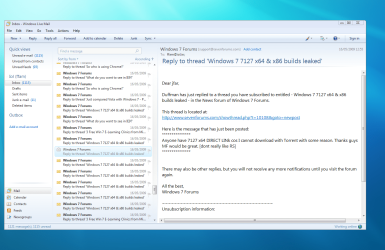
2) I can't get rid of the reading preview pane.

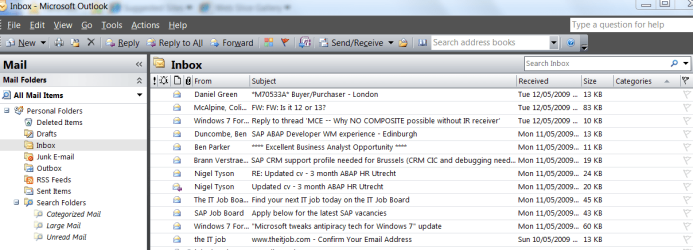
I prefer my email to look like this (attach) where I can double click the message if I want to open it.

3) You have to log in to Windows Live to use it -- not sure I want to do that all the time. This means even to SEND via your own email server you still have to login to windows live -- 2 processes instead of one as the windows live will then xmit the email via your own ISP's emails server (or your own private server).

Not a fan of this -- so I'd either stick to Outlook or use the trick to make Vista mail work on W7 if you want to use a MS email client.

Cheers
jimbo
 

Attachments
  • email1.png
    email1.png
    37.6 KB · Views: 567

My Computer

Computer type
PC/Desktop
Computer Manufacturer/Model Number
Custom built, several laptops HP/ASUS
OS
Linux CENTOS 7 / various Windows OS'es and servers
CPU
Intel i7 Intel i5
Memory
8GB, 16GB
Graphics Card(s)
On Motherboard
Sound Card
Realtek HD audio
Monitor(s) Displays
Apple Cinema display, Samsung LCD
Screen Resolution
1920 X 1080
Hard Drives
4 X 1TB SATA
Mouse
Toshiba wireless laser
Internet Speed
> 20MB up
Breathe. Step away from the keyboard...

Live is another failed MS gimmick. Use Outlook 2010 and be happy. ;)
 

My Computer

Computer type
PC/Desktop
Computer Manufacturer/Model Number
Custom Build/Mod
OS
Windows 7 Home Premium x64
CPU
Intel QX9650 Extreme 4.0 GHz
Motherboard
ASUS Rampage Extreme Rev2
Memory
8GB (4x2) Corsair Dominator DDR3
Graphics Card(s)
2x Radeon R390X [8GB]
Sound Card
SupremeFX X-Fi
Monitor(s) Displays
Dell 2408WFP 26" Panel
Screen Resolution
1920x1200
Hard Drives
4x WD 2TB (8TB+ Total)
2x Crucial SSD 128GB (RAID-0)
1x LG Blu-ray read/write
1x Phillips LightScribe DVD read/write
PSU
Corsair HX1000
Case
CoolerMaster - Cosmos S
Cooling
Custom Liquid - 320mm rad w/ 3x 80mm fans, CPU/NB/SB Blocks
Keyboard
Logitech Illuminater Pro
Mouse
Logitech
Internet Speed
Fractional T1 - 125Mbps
Antivirus
ESET Security Suite / Microsoft Security Essentials
Browser
Cyberfox Intel x64
Other Info
OC'd to 5.0GHz @ 44c under full load
Breathe. Step away from the keyboard...

Live is another failed MS gimmick. Use Outlook 2010 and be happy. ;)


Hi there

It's Monday morning and I'm stuck on a really boring project at the moment with lots of time to play around so I'm just messing around.

Outlook 2007 is just fine for me as I've indicated.

Anyway almost Lunch time and then I'm FREE for the rest of the day.

Cheers
jimbo
 

My Computer

Computer type
PC/Desktop
Computer Manufacturer/Model Number
Custom built, several laptops HP/ASUS
OS
Linux CENTOS 7 / various Windows OS'es and servers
CPU
Intel i7 Intel i5
Memory
8GB, 16GB
Graphics Card(s)
On Motherboard
Sound Card
Realtek HD audio
Monitor(s) Displays
Apple Cinema display, Samsung LCD
Screen Resolution
1920 X 1080
Hard Drives
4 X 1TB SATA
Mouse
Toshiba wireless laser
Internet Speed
> 20MB up
Hi all


1) You have to sign in to Windows live when you want to use it -- that's ANOTHER application / user id / password combination to remember -- hasn't Microsoft ever herad of SSO (Single sign on) or at least automate the login script so when you open windows live mail it logs you straight in just like Outlook / Outlook express / Vista Windows Mail


2) I can't get rid of the reading preview pane.


I prefer my email to look like this (attach) where I can double click the message if I want to open it.

3) You have to log in to Windows Live to use it -- not sure I want to do that all the time. This means even to SEND via your own email server you still have to login to windows live -- 2 processes instead of one as the windows live will then xmit the email via your own ISP's emails server (or your own private server).


Not a fan of this -- so I'd either stick to Outlook or use the trick to make Vista mail work on W7 if you want to use a MS email client.

Cheers
jimbo
1. No you don't. If you go along to the Connection tab in Options, you can deselect it.
2. Yes you can - through the "View - Layout"
3. As you said previously, in No1.
 

My Computer

Computer Manufacturer/Model Number
Three desktops and one laptop with good specs..
OS
Vista and now 7 in 32 and 64 bit.
Where exactly do you have to sign in every time you open WM because I use it all the time and I have never had to sign into it ?
 

My Computer

Computer Manufacturer/Model Number
Self Build 64bit
OS
Vista Ult64, Win7600
CPU
Intel Core 2 Quad Q6600 @ 2400 MHz 64bit OS
Motherboard
Asus P5E3 Deluxe WiFi @p 64 bit OS
Memory
4096 MB DDR3-SDRAM
Graphics Card(s)
ATI Radeon HD 3870 Series x2 Crossfired
Sound Card
Realtek on board
Monitor(s) Displays
Samsung SyncMaster - 23 inches
Screen Resolution
1680x1050 pixels at 60 Hz in True Colors
Hard Drives
Hitachi (250 GB)/Samsung 750 GB. /Barracuda 160 GB.
My Book 1 TB external..
PSU
Cooler Master 1000w
Case
Cooler Master Cosmos 1000.
Cooling
Fans and fresh air,
Keyboard
Wireless
Mouse
Wireless
Internet Speed
Never fast enough
Other Info
I use a Magnum.
Hi guys
I'm referring to WLM (Windows Live Mail) not WM (Windows Mail). Also on 7127 doesn't have the VIEW option anywhere to change anything

I'll post the image later when I can log on to that machine.

could be a fault with build 7127 .

Cheers

jimbo
 

My Computer

Computer type
PC/Desktop
Computer Manufacturer/Model Number
Custom built, several laptops HP/ASUS
OS
Linux CENTOS 7 / various Windows OS'es and servers
CPU
Intel i7 Intel i5
Memory
8GB, 16GB
Graphics Card(s)
On Motherboard
Sound Card
Realtek HD audio
Monitor(s) Displays
Apple Cinema display, Samsung LCD
Screen Resolution
1920 X 1080
Hard Drives
4 X 1TB SATA
Mouse
Toshiba wireless laser
Internet Speed
> 20MB up
Here is what I am using.
Capturew.PNG
 

My Computer

Computer Manufacturer/Model Number
Self Build 64bit
OS
Vista Ult64, Win7600
CPU
Intel Core 2 Quad Q6600 @ 2400 MHz 64bit OS
Motherboard
Asus P5E3 Deluxe WiFi @p 64 bit OS
Memory
4096 MB DDR3-SDRAM
Graphics Card(s)
ATI Radeon HD 3870 Series x2 Crossfired
Sound Card
Realtek on board
Monitor(s) Displays
Samsung SyncMaster - 23 inches
Screen Resolution
1680x1050 pixels at 60 Hz in True Colors
Hard Drives
Hitachi (250 GB)/Samsung 750 GB. /Barracuda 160 GB.
My Book 1 TB external..
PSU
Cooler Master 1000w
Case
Cooler Master Cosmos 1000.
Cooling
Fans and fresh air,
Keyboard
Wireless
Mouse
Wireless
Internet Speed
Never fast enough
Other Info
I use a Magnum.
I was referring to Windows Live Mail also.
My points are appliceable to any version of windows.
 

My Computer

Computer Manufacturer/Model Number
Three desktops and one laptop with good specs..
OS
Vista and now 7 in 32 and 64 bit.
Hm... Im using same signin on windows live mail as for other live services including connect and everything. I even went that far that im forwarding all mails from other 3 mail accounts to live mail and im using only this from now on (like week or two ago) all this for a simple reason, i needed news client couple of weeks ago and they REMOVED it in outlook 2007 (dont think its there also in 2010). And i just hate to have programs that are doing same things on my computer and windows live mail does the job just fine (just crashes from time to time on win7 :( ). Other thing i have issue with is, i cant sync iphone (itunes) with windows live contcts but if this will start to bother me to much ill just replace my iphone with something that is runing windows mobile.

Other thing you have issue with you can remove reading pane in layout options if you like, just untick it :)

Main issue im having atm is no Live-addon for office 2010 (however in all honesty this was another thing that occesionaly crashed on win7 and office 2007).
 

My Computer

Computer Manufacturer/Model Number
Custom
OS
Windows 7 SP1 x64 build 7601.21701
CPU
Intel Q9450 @3608mhz (8x451)
Motherboard
Asus Rampage Formula
Memory
6GB - 2x Corsair CM2X1024-8500C5D and 2x CM2X2048-8500C5D
Graphics Card(s)
Zotac nVidia GTX295
Sound Card
SoundMAX ADI1988B (X-FI MB)
Monitor(s) Displays
LG L227WTP & Samsung LE26R71B LCD TV
Screen Resolution
1680x1050 & 1360x768
Hard Drives
2x Seagate ST3500630NS in RAID0
PSU
Thermaltake Toughpower 750W
Case
Thermaltake
Cooling
Thermalright Ultra-120 Extreme and couple of fans
Keyboard
Logitech G15 v2
Mouse
Razer DeathAdder
Internet Speed
FTTH 50/50 (dualstack IPv4 & native IPv6)
Hi there

the VIEW option is missing in my inbox menu so I don't get the facility to change the views. I downloaded from the MS site so I assume the Windows Live installer is good.

I'm going to see what happens on re-installing the whole lot again on a new VM to see if there are any probs with the initial install --

I've kept the old screenshots and will post BOTH later if there are any changes

On installing Windows Live I only selected Messenger and Mail - I don't need Photo gallery etc etc. - Could that have made a difference.

cheers
jimbo
 

My Computer

Computer type
PC/Desktop
Computer Manufacturer/Model Number
Custom built, several laptops HP/ASUS
OS
Linux CENTOS 7 / various Windows OS'es and servers
CPU
Intel i7 Intel i5
Memory
8GB, 16GB
Graphics Card(s)
On Motherboard
Sound Card
Realtek HD audio
Monitor(s) Displays
Apple Cinema display, Samsung LCD
Screen Resolution
1920 X 1080
Hard Drives
4 X 1TB SATA
Mouse
Toshiba wireless laser
Internet Speed
> 20MB up
no you dont need other crap... ill make screen sec.

46546358.png
 

My Computer

Computer Manufacturer/Model Number
Custom
OS
Windows 7 SP1 x64 build 7601.21701
CPU
Intel Q9450 @3608mhz (8x451)
Motherboard
Asus Rampage Formula
Memory
6GB - 2x Corsair CM2X1024-8500C5D and 2x CM2X2048-8500C5D
Graphics Card(s)
Zotac nVidia GTX295
Sound Card
SoundMAX ADI1988B (X-FI MB)
Monitor(s) Displays
LG L227WTP & Samsung LE26R71B LCD TV
Screen Resolution
1680x1050 & 1360x768
Hard Drives
2x Seagate ST3500630NS in RAID0
PSU
Thermaltake Toughpower 750W
Case
Thermaltake
Cooling
Thermalright Ultra-120 Extreme and couple of fans
Keyboard
Logitech G15 v2
Mouse
Razer DeathAdder
Internet Speed
FTTH 50/50 (dualstack IPv4 & native IPv6)
Click the menus button beside the question mark top right hand of screen and it lets you display the menu bar with the view/tools etc.
 

My Computer

Computer Manufacturer/Model Number
Self Build 64bit
OS
Vista Ult64, Win7600
CPU
Intel Core 2 Quad Q6600 @ 2400 MHz 64bit OS
Motherboard
Asus P5E3 Deluxe WiFi @p 64 bit OS
Memory
4096 MB DDR3-SDRAM
Graphics Card(s)
ATI Radeon HD 3870 Series x2 Crossfired
Sound Card
Realtek on board
Monitor(s) Displays
Samsung SyncMaster - 23 inches
Screen Resolution
1680x1050 pixels at 60 Hz in True Colors
Hard Drives
Hitachi (250 GB)/Samsung 750 GB. /Barracuda 160 GB.
My Book 1 TB external..
PSU
Cooler Master 1000w
Case
Cooler Master Cosmos 1000.
Cooling
Fans and fresh air,
Keyboard
Wireless
Mouse
Wireless
Internet Speed
Never fast enough
Other Info
I use a Magnum.
I've had a single sign on with MS for years, gets me into everything MS including Mail. It's the one and only reason I use WLM. For everything unrelated to MS I use thunderbird
 

My Computer

Computer Manufacturer/Model Number
Generic
OS
Clients: XP/Win7/ubuntu
CPU
E8400
Motherboard
Gigabyte EP35-DS3R
Memory
4Gb HyperX
Graphics Card(s)
ATI 4850
Sound Card
Onboard
Monitor(s) Displays
Samsung P970
Screen Resolution
1280 by 1024
Hard Drives
Samsung SATA-II 500Gb x 3
PSU
Corsair HX520
Case
chieftec
Cooling
Zalman
Keyboard
Logitech
Mouse
Logitech
Internet Speed
512kb
Click the menus button beside the question mark top right hand of screen and it lets you display the menu bar with the view/tools etc.

Hi there
There's definitely something wrong with my installation

1) I tried even ensuring Menus were always displayed on Explorer folder options on Control panel

2) the menu to the LEFT of the Question mark just shows following options in the Layout section

Folder Pane
Message Header (mail)

I don't see any Reading Pane or Message list (your ist 2 options).

Could be my whole 7127 system is "hosed".

Cheers
jimbo
 

My Computer

Computer type
PC/Desktop
Computer Manufacturer/Model Number
Custom built, several laptops HP/ASUS
OS
Linux CENTOS 7 / various Windows OS'es and servers
CPU
Intel i7 Intel i5
Memory
8GB, 16GB
Graphics Card(s)
On Motherboard
Sound Card
Realtek HD audio
Monitor(s) Displays
Apple Cinema display, Samsung LCD
Screen Resolution
1920 X 1080
Hard Drives
4 X 1TB SATA
Mouse
Toshiba wireless laser
Internet Speed
> 20MB up
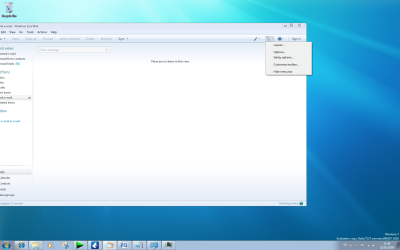
Here is what my one looks like when I click the menu button.

Untitled.png
 

My Computer

Computer Manufacturer/Model Number
Self Build 64bit
OS
Vista Ult64, Win7600
CPU
Intel Core 2 Quad Q6600 @ 2400 MHz 64bit OS
Motherboard
Asus P5E3 Deluxe WiFi @p 64 bit OS
Memory
4096 MB DDR3-SDRAM
Graphics Card(s)
ATI Radeon HD 3870 Series x2 Crossfired
Sound Card
Realtek on board
Monitor(s) Displays
Samsung SyncMaster - 23 inches
Screen Resolution
1680x1050 pixels at 60 Hz in True Colors
Hard Drives
Hitachi (250 GB)/Samsung 750 GB. /Barracuda 160 GB.
My Book 1 TB external..
PSU
Cooler Master 1000w
Case
Cooler Master Cosmos 1000.
Cooling
Fans and fresh air,
Keyboard
Wireless
Mouse
Wireless
Internet Speed
Never fast enough
Other Info
I use a Magnum.
I get the same options as davehc and jfar in wlm and I am really comfortable with it. You only have to sign in the once and that is it. It's also very handy for the other live services that I use, eg messenger and games for windows live, because it retains the password for them also.

Sorry about the problems your having jimbo but they are exactly that, problems.

I don't like using any of the office related stuff because it always wants processes to be running even when you don't. It's also in the nero, itunes, apple, adobe etc etc category ,which I place firmly in the bloatware section.

Hope you sort it soon mate.
 

My Computer

Computer Manufacturer/Model Number
Custom Build.
OS
Windows 7 Ultimate x64.
CPU
i5 760 @ 4.2Ghz. 1.18v
Motherboard
Gigabyte - H55M-USB3
Memory
4g Corsair xms3 ddr3, 1600Mhz.
Graphics Card(s)
Gigabyte GTX-560Ti soc edition
Sound Card
Asus Xonar Dx - Logitech Z5500.
Monitor(s) Displays
Acer 22" LCD Wide screen 1680-1050 -Samsung 42" Plasma....
Screen Resolution
1680/1050 -----1920/1080p.
Hard Drives
2x 2TB Seagate Go Flex,
1x 1TB Seagate,
1x 640WD Black,
x16 Gig sandisc flash drive,
1x8Gig sandisc flash drive.
PSU
XigmaTek 80plus NRP-PC702 - 700w dual 30a.
Case
Venus Gamers Midi Tower Case with LED Display
Cooling
Arctic Freezer 7 Pro Rev 2... x2 Arctic F8 case fans........
Keyboard
Logitech G15-v2 Gaming.
Mouse
Microsoft Sidewinder X8.
Internet Speed
Virgin Media - 50mb down- 8mb up.
Other Info
x2 Xbox 360 wireless controllers...

Dual layer optical disc drive...

Chrome 79million

A.V = MSE
Hi all

Finally got it to work -- needed a complete W7 re-install from a different ISO (build 7127).

I had a bit of a "Dog" getting messages from Outlook ===> Windows Live Mail since there's no direct import.

However I managed to logon to windows XP, import into Outlook express,
change the store to an acessible folder (on a shared drive) and then import the messages from Outlook express to Windows live.

Obviously MS don't want people to go from Outlook ==> Windows live mail directly. :mad:

Might give it another go -- I'm building a "Non Bloat" W7 system for the laptop -- only using bits of Office for example that I use such as EXCEL, Word, and Powerpoint and minimal apps.

cheers
jimbo
 

My Computer

Computer type
PC/Desktop
Computer Manufacturer/Model Number
Custom built, several laptops HP/ASUS
OS
Linux CENTOS 7 / various Windows OS'es and servers
CPU
Intel i7 Intel i5
Memory
8GB, 16GB
Graphics Card(s)
On Motherboard
Sound Card
Realtek HD audio
Monitor(s) Displays
Apple Cinema display, Samsung LCD
Screen Resolution
1920 X 1080
Hard Drives
4 X 1TB SATA
Mouse
Toshiba wireless laser
Internet Speed
> 20MB up
This I am not sure on, Jimbo, but I believe if you open your account in Windows Live Mail, (Tools - Accounts and click your default account) you are given the option to import. That I have. You can then browse to your Outlook folder and import the whole shebang. I cannot test this as I do not have Outlook installed.
I have also read, absurd as it is, that if you have Outlook installed, then the option in File -Import- Messages etc, automatically offers the option to import Outlook messages and accounts. ??
 

My Computer

Computer Manufacturer/Model Number
Three desktops and one laptop with good specs..
OS
Vista and now 7 in 32 and 64 bit.
Hi dave

It worked fine but there's no option to import from Outlook -- it only gives you the options MS OE 6, Windows Live Mail and Windows mail

1) You need Outlook 2007 and XP to be running on the SAME box.

2) before you start backup your Outlook 2007 folder files with the MS backup tool pfbackup.exe

3) Start Outlook express with no messages in the inbox - I just had to create email accounts with same settings as outlook 2007.

4) Import Outlook messages into OE -- no problem at all since it will use the profile you installed outlook 2007 on the XP box.

5) now you can change in (OE) the store location of your folder files

6) Boot into W7 and import OE into Windows live. You'll get a prompt for the OE store (that's why you need to do step 5 to change it to an acessible folder on a shared drive when you boot into W7).

You'll see your emails in the Imported folder under storage folders in Windows Live mail.
You can move and re-arrange.

Job done :D Q.E.D

(Note there's ONE proviso here that I haven't tested -- on the W7 box I've done the IMPORT BEFORE installing Office 2007 so because there's no outlook 2007 on my W7 box then perhaps it won't show in the menu. However it still gave entries for import from Outlook Express etc which doesn't exist in W7. I also didn't have Windows Live installed on XP).

Step 2 isn't really necessary but I always believe in taking enough backups before messing around with stuff like this and losing a load of emails is for me NOT an option.

Cheers
jimbo
 

My Computer

Computer type
PC/Desktop
Computer Manufacturer/Model Number
Custom built, several laptops HP/ASUS
OS
Linux CENTOS 7 / various Windows OS'es and servers
CPU
Intel i7 Intel i5
Memory
8GB, 16GB
Graphics Card(s)
On Motherboard
Sound Card
Realtek HD audio
Monitor(s) Displays
Apple Cinema display, Samsung LCD
Screen Resolution
1920 X 1080
Hard Drives
4 X 1TB SATA
Mouse
Toshiba wireless laser
Internet Speed
> 20MB up
Anyway. Seems like you finally got there! So what is the verdict?
 

My Computer

Computer Manufacturer/Model Number
Three desktops and one laptop with good specs..
OS
Vista and now 7 in 32 and 64 bit.
Back
Top