
automaddux
New member
- Local time
- 11:59 PM
- Messages
- 1
My father-in-law has a server computer at work that I tried to do a clean install a few weeks back. He wanted me to wipe the hard drives and clean it up and that's what I thought I did. but when I looked into the hard drive all the information was still on the drive and so I decided to shut it down and deal with it later.
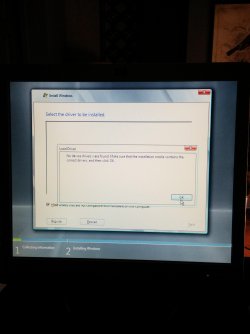
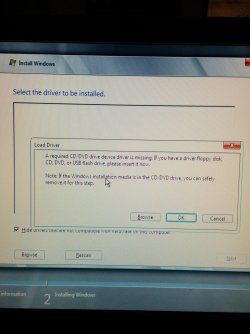
Now I'm looking at it again trying to reinstall Windows on the tower but I can't get into windows due to the Password lock on startup. I don't remember resetting the password and the old password doesn't work. Then with advice from my instructor at school (i'm going for IT, just started) Iwas told to just load the installation and boot from it in BIOS. So it loads the disk, asks for my language and then comes to the screen I attached below. The CD is in the drive but it says it can't find it so I am lost.
Can anyone help?
Now I'm looking at it again trying to reinstall Windows on the tower but I can't get into windows due to the Password lock on startup. I don't remember resetting the password and the old password doesn't work. Then with advice from my instructor at school (i'm going for IT, just started) Iwas told to just load the installation and boot from it in BIOS. So it loads the disk, asks for my language and then comes to the screen I attached below. The CD is in the drive but it says it can't find it so I am lost.
Can anyone help?
Attachments
Last edited:
My Computer
- Computer type
- PC/Desktop
- OS
- windows 8


