
Solved I have a question about a tcp registry key

smirk

New member
Local time
12:57 AM
Messages
20
Location
Washington
I found this registry key Tcp1323Opts and i was just curious if theres a sequence while putting the value as 1(01) or if i could leave it as is?

[HKEY_LOCAL_MACHINE\System\CurrentControlSet\Services\Tcpip\Parameters]
 

My Computer My Computer

At a glance

Windows 10 Home 64bitIntel Pentium N3540 Processor4gbIntel Hd graphics
Computer type
Laptop
Computer Manufacturer/Model Number
HP
OS
Windows 10 Home 64bit
CPU
Intel Pentium N3540 Processor
Memory
4gb
Graphics Card(s)
Intel Hd graphics
Sound Card
Realtek
Monitor(s) Displays
15.6"
Hard Drives
Mechanical Seagate hard drive 500gb
Internet Speed
12 mbps
Antivirus
SecureAPlus
Browser
Firefox
Other Info
Ive been intrested in fixing and optimizing computers for almost 10 years, ive come a long ways and i plan on only improving the knowledge i have to not only make myself happy but others that need it also
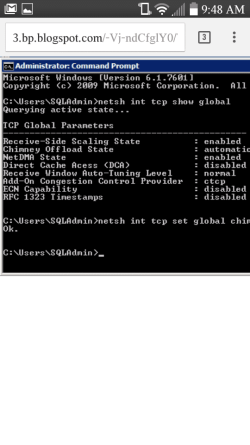
I would leave it the way it is, I think it would make your internet connection either buggy or unusable if you changed it.

Source:
Tcp1323Opts


Description
Determines whether TCP uses the timestamping and window scaling features described in RFC 1323, TCP Extensions for High Performance.

Window scaling permits TCP to negotiate a scaling factor for the TCP receive window size, allowing for a very large TCP receive window of up to 1 GB. The TCP receive window is the amount of data the sending host can send at one time on a connection.

Timestamps help TCP measure round trip time (RTT) accurately in order to adjust retransmission timeouts. The Timestamps option provides two timestamp fields of 4 bytes each in the TCP header, one to record the time the initial transmission is sent and one to record the time on the remote host.

This entry is a 2-bit bitmask. The lower bit determines whether scaling is enabled; the higher bit determines whether timestamps are enabled. To enable a feature, set the bit representing the feature to 1. To disable a feature, set its bit to 0.


Value Meaning
0 (00) Timestamps and window scaling are disabled.
1 (01) Window scaling is enabled.
2 (10) Timestamps are enabled.
3 (11) Timestamps and window scaling are enabled. default
 

My Computer My Computer

At a glance

Microsoft Windows 7 Ultimate 32-bit 7601Intel(R) Pentium(R) Dual CPU E2160 @ 1.80GHz4.00 GB(1) VNC Mirror Driver (2) Intel(R) G33/G31 Ex...
Computer type
PC/Desktop
Computer Manufacturer/Model Number
Compac
OS
Microsoft Windows 7 Ultimate 32-bit 7601
CPU
Intel(R) Pentium(R) Dual CPU E2160 @ 1.80GHz
Motherboard
MSI Boston
Memory
4.00 GB
Graphics Card(s)
(1) VNC Mirror Driver (2) Intel(R) G33/G31 Express Chipset
Sound Card
Disabled
Monitor(s) Displays
Headless
Screen Resolution
1280 x 960 x 32 bits (4294967296 colors) @ 60 Hz
Hard Drives
ST3320820AS ATA Device
Keyboard
Headless
Mouse
Headless
Antivirus
Malwarebytes pro
Other Info
Also
Windows 8.1 Laptop and Desktop both Acer
Should i enable or disable any of the settings since i have tcp1323Opts set to 1?
 

Attachments

  • Screenshot_2016-07-11-09-48-52.png
    Screenshot_2016-07-11-09-48-52.png
    30 KB · Views: 1

My Computer My Computer

At a glance

Windows 10 Home 64bitIntel Pentium N3540 Processor4gbIntel Hd graphics
Computer type
Laptop
Computer Manufacturer/Model Number
HP
OS
Windows 10 Home 64bit
CPU
Intel Pentium N3540 Processor
Memory
4gb
Graphics Card(s)
Intel Hd graphics
Sound Card
Realtek
Monitor(s) Displays
15.6"
Hard Drives
Mechanical Seagate hard drive 500gb
Internet Speed
12 mbps
Antivirus
SecureAPlus
Browser
Firefox
Other Info
Ive been intrested in fixing and optimizing computers for almost 10 years, ive come a long ways and i plan on only improving the knowledge i have to not only make myself happy but others that need it also
Read my post
3 (11) Timestamps and window scaling are enabled. default


If you don't understand what and why you are doing something you really should not be doing it.

If I were you I would steer clear of the registry.

Why not make yourself a Windows 7 virtual machine. After you build it you clone it and before starting it you compress it with 7zip or something similar and play with all registry settings to your hearts content and when something breaks just delete it and unzip the original. Or you could run it in non-persistant mode.
 

My Computer My Computer

At a glance

Microsoft Windows 7 Ultimate 32-bit 7601Intel(R) Pentium(R) Dual CPU E2160 @ 1.80GHz4.00 GB(1) VNC Mirror Driver (2) Intel(R) G33/G31 Ex...
Computer type
PC/Desktop
Computer Manufacturer/Model Number
Compac
OS
Microsoft Windows 7 Ultimate 32-bit 7601
CPU
Intel(R) Pentium(R) Dual CPU E2160 @ 1.80GHz
Motherboard
MSI Boston
Memory
4.00 GB
Graphics Card(s)
(1) VNC Mirror Driver (2) Intel(R) G33/G31 Express Chipset
Sound Card
Disabled
Monitor(s) Displays
Headless
Screen Resolution
1280 x 960 x 32 bits (4294967296 colors) @ 60 Hz
Hard Drives
ST3320820AS ATA Device
Keyboard
Headless
Mouse
Headless
Antivirus
Malwarebytes pro
Other Info
Also
Windows 8.1 Laptop and Desktop both Acer
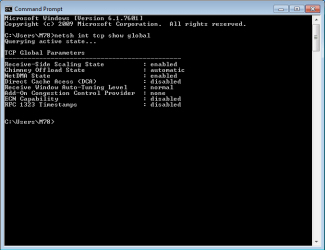
Here is the results of that same command on my machine.

netish int tcp show global.png
 

My Computer My Computer

At a glance

Microsoft Windows 7 Ultimate 32-bit 7601Intel(R) Pentium(R) Dual CPU E2160 @ 1.80GHz4.00 GB(1) VNC Mirror Driver (2) Intel(R) G33/G31 Ex...
Computer type
PC/Desktop
Computer Manufacturer/Model Number
Compac
OS
Microsoft Windows 7 Ultimate 32-bit 7601
CPU
Intel(R) Pentium(R) Dual CPU E2160 @ 1.80GHz
Motherboard
MSI Boston
Memory
4.00 GB
Graphics Card(s)
(1) VNC Mirror Driver (2) Intel(R) G33/G31 Express Chipset
Sound Card
Disabled
Monitor(s) Displays
Headless
Screen Resolution
1280 x 960 x 32 bits (4294967296 colors) @ 60 Hz
Hard Drives
ST3320820AS ATA Device
Keyboard
Headless
Mouse
Headless
Antivirus
Malwarebytes pro
Other Info
Also
Windows 8.1 Laptop and Desktop both Acer
I have a low end computer that i try all my computer stuff out on with backs ups of important files ,registry, full back up of my system, pc parts os disks if i have a problem because of tweaks to the registry, external hard drives etc i appreciate the looking out but i understand what im getting into like for instance years ive learned that killing certain processes you can fry your processor and not have a computer anymore ive learned that with certain registry tweaks you can make it to where a reinstall would be the best option or if you have the right software on a boot disk you can modify inside of the computer to where the system barely knows what to do when the power button is pressed. I have a good understanding of what can happen not just because of trial and error but from talking with certified techs, asking questions and just taking risks
 

My Computer My Computer

At a glance

Windows 10 Home 64bitIntel Pentium N3540 Processor4gbIntel Hd graphics
Computer type
Laptop
Computer Manufacturer/Model Number
HP
OS
Windows 10 Home 64bit
CPU
Intel Pentium N3540 Processor
Memory
4gb
Graphics Card(s)
Intel Hd graphics
Sound Card
Realtek
Monitor(s) Displays
15.6"
Hard Drives
Mechanical Seagate hard drive 500gb
Internet Speed
12 mbps
Antivirus
SecureAPlus
Browser
Firefox
Other Info
Ive been intrested in fixing and optimizing computers for almost 10 years, ive come a long ways and i plan on only improving the knowledge i have to not only make myself happy but others that need it also
Killing certain processes can fry your processor? Which processes?

Hmmm ... suppose in live in Arizona where the summer temps can reach 120 degrees. Suppose I killl the air-conditioner process? The room gets hot. The processor fries.

That must be it, right? :)
 

My Computer My Computer

At a glance

Windows 10 x64i7-7700K16 GB 2400 MHzGTX 1060
Computer type
PC/Desktop
Computer Manufacturer/Model Number
Dell
OS
Windows 10 x64
CPU
i7-7700K
Memory
16 GB 2400 MHz
Graphics Card(s)
GTX 1060
Sound Card
Integrated, plus external Presonus Audiobox USB
Monitor(s) Displays
2x AOC 27"
Screen Resolution
1920x1080
Hard Drives
512 GB M.2 SSD
2 TB 7200 RPM disk
Internet Speed
110 Mbps
Browser
Firefox
By having a low end computer to try, it do not mean anything.

Each computer, including hardware & software & program has its own unique features or setting.
As meaning that you cannot compare using just a low end to play around the setting.

I did this many many years ago, and i found out it is a waste of time, as no 2 computers are the same, although same model.

Just avoid playing the registry, as what sml156 said.

If you want to play around, then focus more on software & program, including update on any changes.
Also use your time here and there (forums) to understand more on whatever interest you.
You may even discovered hidden tips and info, just to add on to your knowledge.
 

My Computer My Computer

At a glance

Windows 7 x64
Computer type
Laptop
Computer Manufacturer/Model Number
Toshiba L630 and L735
OS
Windows 7 x64
Hard Drives
240 GB SSD
Back
Top