Solved I keep failing to Restore. Here is the Message. Any advice?

why should you "repair your computer"? It boots up fine isn't it. There is only one problem:
-cannot restore to older restore points
just 1 restore point is corrupt! don't know why
 

My Computer My Computer

At a glance

Microsoft Windows 7 Home Premium 64-bits 7601...Intel(R) Core(TM) i3 CPU M 370 @ 2.40GHz4,00 GBATI Mobility Radeon HD 5400 Series
Computer type
Laptop
Computer Manufacturer/Model Number
ACER ASPIRE 5742G
OS
Microsoft Windows 7 Home Premium 64-bits 7601 Multiprocessor Free Service Pack 1
CPU
Intel(R) Core(TM) i3 CPU M 370 @ 2.40GHz
Motherboard
Acer Aspire 5742G
Memory
4,00 GB
Graphics Card(s)
ATI Mobility Radeon HD 5400 Series
Sound Card
(1) AMD High Definition Audio Device (2) Realtek High Defi
Screen Resolution
1366 x 768 x 32 bits (4294967296 colors) @ 60 Hz
Hard Drives
WDC WD5000BEVT-22ZAT0
That is why I am asking before I do anything more. However, all the restore points other than the last one are unusable.
If you do not think it is a problem, then I am not going to worry with it.

This all started because I wanted to learn about Networking and I was tinkering with permissions and sharing. I had a home group set up, but there are no other computers in my house, just devices like phones that I wanted to stream to from the computer and between using my home WIFI; so I deleted the home group. If those devices are a part of the
network, they do not show up. Plus I am going to get a HD TV and media center soon and I wanted to learn how to share media from the computer to it.

I know the steps to set up a network but I do not understand what I am doing. That drives me nuts and I have to keep reading and tinkering trying to figure it all out.

Perhaps I could take some snippets and show you the things I do not comprehend and you could enlighten me.
 

My Computer My Computer

At a glance

Microsoft Windows 7 Professional 64-bit 7601 ...Intel(R) Core(TM)2 Quad CPU Q8200 @ 2.33GHz6.00 GB(1) Intel(R) G45/G43 Express Chipset (Microso...
Computer type
PC/Desktop
Computer Manufacturer/Model Number
Dell Studio
OS
Microsoft Windows 7 Professional 64-bit 7601 Multiprocessor Free Service Pack 1
CPU
Intel(R) Core(TM)2 Quad CPU Q8200 @ 2.33GHz
Motherboard
Dell Inc. 0M017G
Memory
6.00 GB
Graphics Card(s)
(1) Intel(R) G45/G43 Express Chipset (Microsoft Corporation
Sound Card
(1) High Definition Audio Device (2) High Definition Audio
Monitor(s) Displays
HP2009m
Screen Resolution
1600 x 900 x 32 bits (4294967296 colors) @ 60 Hz
Hard Drives
(1) SAMSUNG HD642JJ ATA Device (2) Generic- Compact Flash USB Device (3) Generic- MS/MS-Pro USB Device (4) Generic- SD/MMC USB Device (5) Generic- SM/xD Picture USB Device
Sorry we were momentarily distracted from helping you with the problem at hand.

Please open an Elevated Command Prompt and run SFC -SCANNOW Command.

If you need to System Restore to the one working Restore Point, do it now because you need to turn off System Restore long enough to flush the System Volume Information file with a reboot. Then turn it back on and set disk usage as before: System Protection - Change Disk Space Usage

Now run as normal for a few days, setting some Restore points to see how they work. System Restore Point - Create
 
"system restore" restores your system (not documents) to an earlier day. It completes or it fails .... there is not something as a half restored system!! so don't be afraid


How do you restore documents and files?
 

My Computer My Computer

At a glance

Windows 7 home
OS
Windows 7 home
Sorry we were momentarily distracted from helping you with the problem at hand.

Please open an Elevated Command Prompt and run SFC -SCANNOW Command.

If you need to System Restore to the one working Restore Point, do it now because you need to turn off System Restore long enough to flush the System Volume Information file with a reboot. Then turn it back on and set disk usage as before: System Protection - Change Disk Space Usage

Now run as normal for a few days, setting some Restore points to see how they work. System Restore Point - Create

SFC /Scannow found no errors.

I decided to Google the error code 0X8000fff. I am not the only person with this problem. However after reading many posts, I stumbled upon this one that sums up every thing I am experiencing. It turns out I may not have a problem. I do not think I ever tried a restore on this computer until a few days ago, so what this man says may well be the case.

From this link:System Restore Error 0x80070005 - Microsoft Answers

"I manually created a restore point. Performing a system restore to this point works .
I cannot restore to a system created restore point. I can restore to a manually created restore point.
So this problem is due to limited access control list permission.
I cannot be the only one experiencing this!
Is there a tool for changing registry permissions to allow system restore to work to any point?"

I have created 3 manual restore points over the past few days, and can restore to each of them. I can not restore to a System created Restore point.

What do you think about a registry permissions like referenced above?

Thanks for all your help, even without being able to restore I have fixed everything that I wanted and do not need to restore now. Ha!
 

My Computer My Computer

At a glance

Microsoft Windows 7 Professional 64-bit 7601 ...Intel(R) Core(TM)2 Quad CPU Q8200 @ 2.33GHz6.00 GB(1) Intel(R) G45/G43 Express Chipset (Microso...
Computer type
PC/Desktop
Computer Manufacturer/Model Number
Dell Studio
OS
Microsoft Windows 7 Professional 64-bit 7601 Multiprocessor Free Service Pack 1
CPU
Intel(R) Core(TM)2 Quad CPU Q8200 @ 2.33GHz
Motherboard
Dell Inc. 0M017G
Memory
6.00 GB
Graphics Card(s)
(1) Intel(R) G45/G43 Express Chipset (Microsoft Corporation
Sound Card
(1) High Definition Audio Device (2) High Definition Audio
Monitor(s) Displays
HP2009m
Screen Resolution
1600 x 900 x 32 bits (4294967296 colors) @ 60 Hz
Hard Drives
(1) SAMSUNG HD642JJ ATA Device (2) Generic- Compact Flash USB Device (3) Generic- MS/MS-Pro USB Device (4) Generic- SD/MMC USB Device (5) Generic- SM/xD Picture USB Device
System Restore should work correctly. If SFC scan now didn't repair it, then follow the other steps given.
 
I did/am. I turned off protection as you instructed and restarted the computer and then turned it back on. Now I am using it a few days to see what happens.
 

My Computer My Computer

At a glance

Microsoft Windows 7 Professional 64-bit 7601 ...Intel(R) Core(TM)2 Quad CPU Q8200 @ 2.33GHz6.00 GB(1) Intel(R) G45/G43 Express Chipset (Microso...
Computer type
PC/Desktop
Computer Manufacturer/Model Number
Dell Studio
OS
Microsoft Windows 7 Professional 64-bit 7601 Multiprocessor Free Service Pack 1
CPU
Intel(R) Core(TM)2 Quad CPU Q8200 @ 2.33GHz
Motherboard
Dell Inc. 0M017G
Memory
6.00 GB
Graphics Card(s)
(1) Intel(R) G45/G43 Express Chipset (Microsoft Corporation
Sound Card
(1) High Definition Audio Device (2) High Definition Audio
Monitor(s) Displays
HP2009m
Screen Resolution
1600 x 900 x 32 bits (4294967296 colors) @ 60 Hz
Hard Drives
(1) SAMSUNG HD642JJ ATA Device (2) Generic- Compact Flash USB Device (3) Generic- MS/MS-Pro USB Device (4) Generic- SD/MMC USB Device (5) Generic- SM/xD Picture USB Device
OK, it has been two days. After I turned off System Restore off and restarted the computer and then turned Restore back on, I looked and I had only 3 restore points left to use all from the 10/29 time and they were "system". I created a new restore point at that time which made the other three disappear. I now only have one restore point available, the one I created on 11/17 a "manual". Computer is operating normally but it has not created any restore points yet to test.
 

My Computer My Computer

At a glance

Microsoft Windows 7 Professional 64-bit 7601 ...Intel(R) Core(TM)2 Quad CPU Q8200 @ 2.33GHz6.00 GB(1) Intel(R) G45/G43 Express Chipset (Microso...
Computer type
PC/Desktop
Computer Manufacturer/Model Number
Dell Studio
OS
Microsoft Windows 7 Professional 64-bit 7601 Multiprocessor Free Service Pack 1
CPU
Intel(R) Core(TM)2 Quad CPU Q8200 @ 2.33GHz
Motherboard
Dell Inc. 0M017G
Memory
6.00 GB
Graphics Card(s)
(1) Intel(R) G45/G43 Express Chipset (Microsoft Corporation
Sound Card
(1) High Definition Audio Device (2) High Definition Audio
Monitor(s) Displays
HP2009m
Screen Resolution
1600 x 900 x 32 bits (4294967296 colors) @ 60 Hz
Hard Drives
(1) SAMSUNG HD642JJ ATA Device (2) Generic- Compact Flash USB Device (3) Generic- MS/MS-Pro USB Device (4) Generic- SD/MMC USB Device (5) Generic- SM/xD Picture USB Device
After I read the link you provided above, I did not change anything yet. The system says it has done restore points daily and they do not show up, so I took snaps of everything to show you.

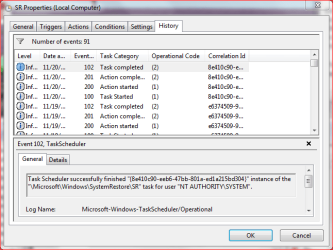
This image shows that SR ran this morning and completed successful.
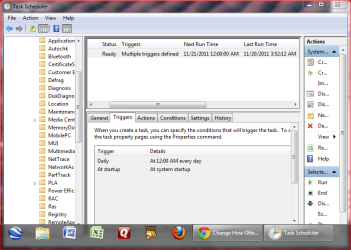
Page1.PNG

This image is of the history tab
Page2.PNG

This image shows all the choices I get when I go to system restore.
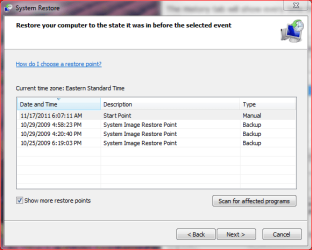
Page3.PNG

All the other tabs in SR Properties are the same as on the Tutorial

Here is the xml readout of the details history tab in case you might need to see it.

Log Name: Microsoft-Windows-TaskScheduler/Operational
Source: Microsoft-Windows-TaskScheduler
Date: 11/20/2011 3:52:12 AM
Event ID: 102
Task Category: Task completed
Level: Information
Keywords: (1)
User: SYSTEM
Computer: Sunshine
Description:
Task Scheduler successfully finished "{8e410c90-eeb6-47bb-801a-ed1a215bd304}" instance of the "\Microsoft\Windows\SystemRestore\SR" task for user "NT AUTHORITY\SYSTEM".
Event Xml:
<Event xmlns="http://schemas.microsoft.com/win/2004/08/events/event">
<System>
<Provider Name="Microsoft-Windows-TaskScheduler" Guid="{DE7B24EA-73C8-4A09-985D-5BDADCFA9017}" />
<EventID>102</EventID>
<Version>0</Version>
<Level>4</Level>
<Task>102</Task>
<Opcode>2</Opcode>
<Keywords>0x8000000000000001</Keywords>
<TimeCreated SystemTime="2011-11-20T08:52:12.437863800Z" />
<EventRecordID>551989</EventRecordID>
<Correlation ActivityID="{8E410C90-EEB6-47BB-801A-ED1A215BD304}" />
<Execution ProcessID="748" ThreadID="6552" />
<Channel>Microsoft-Windows-TaskScheduler/Operational</Channel>
<Computer>Sunshine</Computer>
<Security UserID="S-1-5-18" />
</System>
<EventData Name="TaskSuccessEvent">
<Data Name="TaskName">\Microsoft\Windows\SystemRestore\SR</Data>
<Data Name="UserContext">NT AUTHORITY\SYSTEM</Data>
<Data Name="InstanceId">{8E410C90-EEB6-47BB-801A-ED1A215BD304}</Data>
</EventData>
</Event>

I am in a holding pattern until I hear back from you about what may be causing the restore points from being listed in the third picture above.

 

My Computer My Computer

At a glance

Microsoft Windows 7 Professional 64-bit 7601 ...Intel(R) Core(TM)2 Quad CPU Q8200 @ 2.33GHz6.00 GB(1) Intel(R) G45/G43 Express Chipset (Microso...
Computer type
PC/Desktop
Computer Manufacturer/Model Number
Dell Studio
OS
Microsoft Windows 7 Professional 64-bit 7601 Multiprocessor Free Service Pack 1
CPU
Intel(R) Core(TM)2 Quad CPU Q8200 @ 2.33GHz
Motherboard
Dell Inc. 0M017G
Memory
6.00 GB
Graphics Card(s)
(1) Intel(R) G45/G43 Express Chipset (Microsoft Corporation
Sound Card
(1) High Definition Audio Device (2) High Definition Audio
Monitor(s) Displays
HP2009m
Screen Resolution
1600 x 900 x 32 bits (4294967296 colors) @ 60 Hz
Hard Drives
(1) SAMSUNG HD642JJ ATA Device (2) Generic- Compact Flash USB Device (3) Generic- MS/MS-Pro USB Device (4) Generic- SD/MMC USB Device (5) Generic- SM/xD Picture USB Device
I can't tell from the Scheduler log that you've actually got SysRestore points scheduled. If you do then I'd remove the task and schedule it again to you liking then see how that works out.

How much disk space do you have apportioned to Restore points?

I'm not sure I'd worry too much about this if I test and know for sure a Restore point works.
 
I can't tell from the Scheduler log that you've actually got SysRestore points scheduled. If you do then I'd remove the task and schedule it again to you liking then see how that works out.

How much disk space do you have apportioned to Restore points?

I'm not sure I'd worry too much about this if I test and know for sure a Restore point works.

Ok, I chose to schedule a restore point for when I log off as a user. (just to test this)
The history says it does it but it does not show up as a Restore Point. None of the scheduled Restore points do show up in the box to choose from.

Every manual, when I uninstall a program, when I install a program, all show up to use as restore points.

So the little pea brain programmer inside me is wondering, what is the instruction issued when I click the Command Button "create now" when I am in the System, System Protection tab? That is the instruction ("Action") that I think I should have in the Task Scheduler.

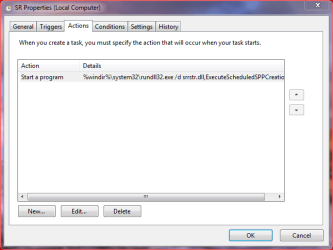
Here is the action that is in the Action Tab of the scheduler. I have no clue what is says or if it is what is used to create a Restore Point.

Action.PNG

And I have 20% selected as the space to reserve for restore points.

Again, thanks for your help.
 

My Computer My Computer

At a glance

Microsoft Windows 7 Professional 64-bit 7601 ...Intel(R) Core(TM)2 Quad CPU Q8200 @ 2.33GHz6.00 GB(1) Intel(R) G45/G43 Express Chipset (Microso...
Computer type
PC/Desktop
Computer Manufacturer/Model Number
Dell Studio
OS
Microsoft Windows 7 Professional 64-bit 7601 Multiprocessor Free Service Pack 1
CPU
Intel(R) Core(TM)2 Quad CPU Q8200 @ 2.33GHz
Motherboard
Dell Inc. 0M017G
Memory
6.00 GB
Graphics Card(s)
(1) Intel(R) G45/G43 Express Chipset (Microsoft Corporation
Sound Card
(1) High Definition Audio Device (2) High Definition Audio
Monitor(s) Displays
HP2009m
Screen Resolution
1600 x 900 x 32 bits (4294967296 colors) @ 60 Hz
Hard Drives
(1) SAMSUNG HD642JJ ATA Device (2) Generic- Compact Flash USB Device (3) Generic- MS/MS-Pro USB Device (4) Generic- SD/MMC USB Device (5) Generic- SM/xD Picture USB Device

Only about a thousand times. There is nothing in there about "Actions", just triggers and conditions and a little history.

I read all the help files about every tab in the properties tabs of the scheduler.

I the meantime I found out how to write a script from one of Google searches about what is the Command issued when we hit the "create now" button.

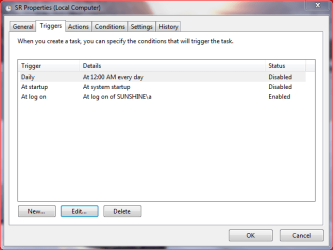
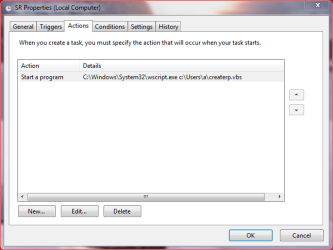
It works from the desktop shortcut I created. I used it as the action command and arguments for the scheduler. I disabled the two triggers that were there and made my own for "At logon of Sunshine\a" which is me. It fails, is says an instance is already running, even though I eliminated all the conditions, so it should run and complete almost instantly just like if I ran the script from the desktop shortcut.

The only things I have not changed are the Settings tab.
 

My Computer My Computer

At a glance

Microsoft Windows 7 Professional 64-bit 7601 ...Intel(R) Core(TM)2 Quad CPU Q8200 @ 2.33GHz6.00 GB(1) Intel(R) G45/G43 Express Chipset (Microso...
Computer type
PC/Desktop
Computer Manufacturer/Model Number
Dell Studio
OS
Microsoft Windows 7 Professional 64-bit 7601 Multiprocessor Free Service Pack 1
CPU
Intel(R) Core(TM)2 Quad CPU Q8200 @ 2.33GHz
Motherboard
Dell Inc. 0M017G
Memory
6.00 GB
Graphics Card(s)
(1) Intel(R) G45/G43 Express Chipset (Microsoft Corporation
Sound Card
(1) High Definition Audio Device (2) High Definition Audio
Monitor(s) Displays
HP2009m
Screen Resolution
1600 x 900 x 32 bits (4294967296 colors) @ 60 Hz
Hard Drives
(1) SAMSUNG HD642JJ ATA Device (2) Generic- Compact Flash USB Device (3) Generic- MS/MS-Pro USB Device (4) Generic- SD/MMC USB Device (5) Generic- SM/xD Picture USB Device
I have it working now. I thought about "another instance running" and decided that maybe I should turn the computer off to clear up stuff. I turned it back on, logged on and when everything was loaded, I opened up the Task Scheduler, and looked at the history tab. It worked. So then I opened up restore and the instance is listed there too.

The link to how to write the script and create the shortcut is here:
How to create a System Restore point in Windows Vista
Used instructions in Alternative method below section.

Here is a snip of my Triggers Tab, and my Actions Tab.
Triggers.PNG Actions.PNG
 

My Computer My Computer

At a glance

Microsoft Windows 7 Professional 64-bit 7601 ...Intel(R) Core(TM)2 Quad CPU Q8200 @ 2.33GHz6.00 GB(1) Intel(R) G45/G43 Express Chipset (Microso...
Computer type
PC/Desktop
Computer Manufacturer/Model Number
Dell Studio
OS
Microsoft Windows 7 Professional 64-bit 7601 Multiprocessor Free Service Pack 1
CPU
Intel(R) Core(TM)2 Quad CPU Q8200 @ 2.33GHz
Motherboard
Dell Inc. 0M017G
Memory
6.00 GB
Graphics Card(s)
(1) Intel(R) G45/G43 Express Chipset (Microsoft Corporation
Sound Card
(1) High Definition Audio Device (2) High Definition Audio
Monitor(s) Displays
HP2009m
Screen Resolution
1600 x 900 x 32 bits (4294967296 colors) @ 60 Hz
Hard Drives
(1) SAMSUNG HD642JJ ATA Device (2) Generic- Compact Flash USB Device (3) Generic- MS/MS-Pro USB Device (4) Generic- SD/MMC USB Device (5) Generic- SM/xD Picture USB Device

My Computer My Computer

At a glance

Microsoft Windows 7 Professional 64-bit 7601 ...Intel(R) Core(TM)2 Quad CPU Q8200 @ 2.33GHz6.00 GB(1) Intel(R) G45/G43 Express Chipset (Microso...
Computer type
PC/Desktop
Computer Manufacturer/Model Number
Dell Studio
OS
Microsoft Windows 7 Professional 64-bit 7601 Multiprocessor Free Service Pack 1
CPU
Intel(R) Core(TM)2 Quad CPU Q8200 @ 2.33GHz
Motherboard
Dell Inc. 0M017G
Memory
6.00 GB
Graphics Card(s)
(1) Intel(R) G45/G43 Express Chipset (Microsoft Corporation
Sound Card
(1) High Definition Audio Device (2) High Definition Audio
Monitor(s) Displays
HP2009m
Screen Resolution
1600 x 900 x 32 bits (4294967296 colors) @ 60 Hz
Hard Drives
(1) SAMSUNG HD642JJ ATA Device (2) Generic- Compact Flash USB Device (3) Generic- MS/MS-Pro USB Device (4) Generic- SD/MMC USB Device (5) Generic- SM/xD Picture USB Device
Back
Top